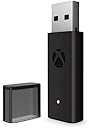


🎮 Level up your PC gaming with flawless Xbox wireless freedom!
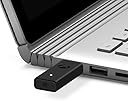
The Xbox Wireless Adapter for Windows 10 lets you connect your Xbox Wireless Controllers to PCs, laptops, and tablets (7"+ with USB 2.0/3.0 Type A). It supports up to 8 controllers and multiple headsets, delivering high-quality stereo audio and in-game chat. Featuring a compact design and plug-and-play ease, it ensures a reliable, lag-free wireless gaming experience that mirrors your Xbox One setup.

| ASIN | B074QMN4YW |
| Best Sellers Rank | 4,480 in PC & Video Games ( See Top 100 in PC & Video Games ) 5 in Xbox One Adapters |
| Customer reviews | 4.3 4.3 out of 5 stars (8,359) |
| Is discontinued by manufacturer | No |
| Item model number | 6HN-00003 |
| Product Dimensions | 14 x 7.39 x 5 cm; 10 g |
| Rated | Not PEGI rated |
N**I
Works flawlessly.
Brilliant and easy to use, wireless adapter for Xbox controllers, on windows 10. Packaged well. Arrived neatly presented in a white cardboard box. This is a brilliant little adapter. This also comes with an extended adapter too. The extended adapter is for just incase the adapter interferes with another adapter close. I would use one of these adapter's, even if you have a Bluetooth receiver, they can be notoriously unreliable for signal and connection issues. You can also get cheaper versions of this adapter but in the long run, for hassle free play, no loss of signal or no loss of connection, stick to this brand, it works flawlessly. Simply plug in the adapter, click the pairing button on the adapter and the pairing button on the control pad. This will connect to your pc in the same fashion as it would your Xbox. That's it, ready to go! Signal is strong, even walking around a large room. The pc automatically switches for games as it knows there is a controller connected. No issues at all. I would recommend this adapter. It's brilliant and easy to use.
L**S
Works Perfectly.
TLDR - Works perfectly out of the box, you can sync up to 8 controllers to it at once. After buying a Bluetooth dongle on amazon (that was highly rated) and testing it on my pc with my xbox one controller (with Bluetooth) and having connection issues where it would fail to connect, I decided to take the plunge and just get the Microsoft official one... and I don't regret it at all. The device is well packaged, and is literally plug and play. There is a sync button on the top of the very small receiver that you press alongside the sync button on your controller and it instantly pairs, and stores the controller in its memory, meaning no more opening the Bluetooth device drivers and pairing every time you want to use a controller. This adapter also allows up to 8 controllers to be synced to it, which is definitely more than I need, but nice to have if you decide to play split screen games.
M**N
My thoughts
Despite what some reviewers mentioned, this came in a retail box with included usb extension cable and paperwork, all sealed and unopened and not by itself in a padded envelope. Unit preforms as expected and I’ve had no issues with it, was easy to install, connection to the controller (elite series 2) does not drop unlike the bluetooth option which I previously used. Worth noting: -first install, it loaded in as XBOX ACC and was not recognised. I remedied by right clicking the Device in device manager and clicking ‘uninstall’, unplug and replug. Then I did the same except this time I went to ‘update drivers’ and it found it via windows update. The device also gets pretty warm, so to preserve life I would say only plug this in when you’re using it and not leaving it in 24/7 with your system. Otherwise all good.
M**W
It's good, does the job.
It took me a while to set it up as the drivers it came with werent updated, I had to look online for ones that were updatd enough so my controller would connect to it. That aside, this is a great product. I had the previous generation, the tall, wide, slim version of this and because of how wide it was I didnt really like using it because it blocked off other usb ports at the back of my PC, but this new one is all-around just small, it's great.
E**A
Recommended even if you're using bluetooth connection
The price may seem quite high and you might be tempted to buy a cheaper bluetooth adapter, but I don't recommend it unless you actually need bluetooth for other things. In fact, even if you already have bluetooth, I'd still recommend buying this if you have some extra cash; especially if you're using more than one controller, otherwise you'll see some serious input delay. This adapter uses its own propriatary 2.4ghz rather than bluetooth technology (which is also 2.4ghz, but can suffer interference with other bluetooth devices) which gives it a much more stable connection; especially if you have more than one controller in use. My pc has quite strong bluetooth 4.0, but still suffered from input delay and occasional disconnects especially when I connected 2 other controllers for my family to play games with me. I decided to purchase this adapter and have no regrets. Aside from the superior connection, using the wireless adapter instead of standard bluetooth does have some (albiet, most likely gimmicky for most users) extra features such as being able to profile your controllers individually such as remapping your controller. Personally, I don't need to remap my controllers, but if that's something you're interested in such as wanting to invert your controls, you can just do it universally through the Xbox Accessories app (need to download it for free from the Windows 10 App Store) rather than change the setting in every game you play. You will need to make sure your drivers are updated and you may need to go into your device manager, but if your windows is up to date, this is unlikely to be an issue. Another feature is that you can use xbox headsets with this adapter, though if you're a pc user, I'm fairly sure you'd have a far superior headset or speakers you can just use, but I suppose it could be useful for splitscreen with friends if you all have your own seperate headsets. If you already connected your controllers through bluetooth and you decide to buy this, you'll need to make your pc forget these connections before connecting your controllers through this device as sometimes Windows will make bluetooth top priority and you'll just go back to the inferior connection. In the end, £40 for a far superior, lag free connection even without all the other benefits such as controller remapping and xbox headset support that I don't use? Its a must buy for me. I don't regret this purchase at all.
M**L
empty box
careful you dont buy empty box as mine was so cant review if i dont have the item, the usb cable is great, works really well cant fault it.
A**O
Buena calidad y te aseguras la mejor conectividad del mando de xbox con el PC. Lo uso con el Xbox elite series 2 y funciona perfectamente y sin cortes. Tiene un botón en la parte superior el cual se usa para emparejarlo con el mando, una vez lo tienes emparejado cada vez que enciendes el mando se conecta de forma automática. En el caso de que seas usuario de un mando xbox elite, para poder configurarlo necesitas conectarlo por cable al pc, con este adaptador no es necesario, puedes configurarlo siempre que quieras sin el cable. Si sientes que por bluetooth no te va demasiado bien, recomiendo la compra.
P**S
The original, great for controllers and XBox Wireless Headset connections for gaming!
L**.
Fonctionne correctement et sans déconnexion
J**N
Fungerade med plug and play Däremot va produkterna som skulle kopplas upp lite svårare och behövde mer konfiguration
G**I
Funziona perfettamente L'installazione è semplicissima: basta collegarlo alla porta USB e il sistema riconosce subito il controller. La connessione è stabile e senza ritardi, permettendo un'esperienza di gioco fluida e reattiva, anche su giochi più esigenti. Molto meglio di cavi usb o bluetooth
Trustpilot
3 weeks ago
1 month ago