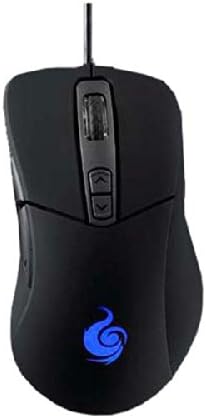
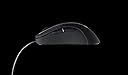
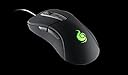
Cm Storm Alcor PC Mouse, PC / Mac, Built-in Storage Capability, 2-ways
Product ID: 11945133
🎮4000 DPI precision
💾Built-in storage
🔄2-way connectivity
🎯 Elevate your game with precision and style!
The Cm Storm Alcor PC Mouse is a high-performance optical gaming mouse featuring 4000 DPI precision, built-in storage for customizable profiles, and dual compatibility for both PC and Mac users. Its ergonomic design ensures comfort during extended use, while its sleek black finish adds a touch of sophistication to your gaming setup.
K**R
Perfect sensor plus a rather narrow waist works well for ...
Been using the same unit for 3 years. Perfect sensor plus a rather narrow waist works well for my claw grip. It also has a fairly tactile "coarse" mouse wheel and does not have the outward turn right below the pinky which I find uncomfortable. A+
A**R
Five Stars
Arrived on time. Quality as advertised.
B**B
Great mouse with superb tracking and shape, but with an unfortunately high lift-off distance.
First, a TL;DR for anyone that doesn't want to read :PPros:Great shapeGreat sensor/trackingLightweightCons:LOD too highCould use a bit of software customizationWhen my Deathadder broke last year, I had originally replaced it with a Logitech G700S, but that mouse was too heavy for me, and the acceleration in the sensor was bothersome as well, so I decided to look for another mouse. I have had a pretty good experience with my CM Storm Spawn mouse, so I thought I would give the CM Storm Alcor mouse a try.Packaging:The packaging for the Alcor was very aesthetically pleasing, with a largely black background and with white and silver text all around. The box is relatively informative, but I tend to not look at the specifications on the box, since I usually look everything up beforehand. There is a velcro latch for the front that opens up a view of the mouse. It works well, but magnetic clasps usually feel much nicer.Exterior/Design:The Alcor is pretty much a basic, no-frills mouse. It has an all-black lightly matted coating that feels nice on the hand, although it can get a bit slippery if you sweat heavily when playing games. There is a lit-up CM Storm logo on the mouse that unfortunately is not really customizable (more on this later). The cable is a soft rubber with no special weave layer, but after a few weeks of use, it has absolutely no signs of wear, so I have confidence it will last for quite some time.I really liked the shape of the Deathadder, but double-click problems forced me to switch. The G700S was a bit too big and forced me to fully palm the mouse due to its shape. I use a tip grip with my mice, so I wasn't used to having constant contact with the mouse on my palm. I find that my grip works just as well with the Alcor as it did the Deathadder, with the biggest difference being the shape of the left and right click buttons. The Deathadder has concave sections on these buttons for the fingers to rest in, but the Alcor has a slightly convex set of buttons, so the fingers don't rest as snugly, although it has never bothered me nor affected my performance in-game.The mouse is also really light, measured at 86 g without the cable, so it's much easier for me to use than the G700S (152 g, I believe). There are no adjustable weights of any kind, but I usually like my mice as light as possible to reduce fatigue from long-term use.Buttons:There are 2 thumb buttons, left and right click, a clickable mouse wheel, and DPI up/down buttons. The buttons have a very distinct, strong click to them and I feel like they actuate when I need them to and when they feel like they will. The thumb buttons are easy to reach, but don't get in the way of gripping the mouse. The DPI adjustment buttons are a bit harder to press, but since I don't change DPI much, that's fine for me.Sensor:The Alcor utilizes an Avago 3090 optical sensor, which is used in a lot of other gaming mice, although it's a slightly older sensor. I am a fan of optical sensors, and 4000 dpi is more than enough for me. I usually use 1600 dpi, so the huge dpi race that goes on with laser mice is irrelevant for me. My experience with the sensor has been mostly good-- it is accurate, has minimal latency, and I can't detect any signs of inherent sensor acceleration/deceleration. It's tracked to exactly where I want to go, exactly when I want it to be there.However, there is a big issue I have with the sensor, and that is its lift-off distance (LOD). It's way too high, at close to 4 or 5 mm even with the latest firmware update, even though the firmware update promises less than 1.7mm LOD. I ended up using the tape-fix to lower the lift-off distance to about 2 mm, which is much more acceptable.Software:None! There is no software interface for the Alcor. I find this to be really nice, since I don't like to set up macros and the like. I usually just bind in-game actions to the mouse buttons, since I usually play FPS games. However, it would be convenient if I could reprogram the DPI up/down keys to something else, since I pretty much never change the DPI of my mouse. Also, it would have been nice to be able to adjust the color of the light in the Alcor manually, since with currently available firmware, the color changes depending on what DPI is selected, which means that your favorite DPI could end up with your least favorite LED color :(Hope this review is helpful, and feel free to comment if you have a question!
P**O
good sensor, lightweight
Simple, functional, good sensor, lightweight.Pros: good shape, good sensor, easy to change DPI settings, no need for additional programs or drivers.Cons: no option for additional programs or drivers (unless you count the firmware updates that don't even recognize the mouse and aren't really advantageous), side buttons are easy to press if you pick the mouse up because no part of it is particularly grippy, middle click is much heavier than on average on other mice, point of attachment for the cable doesn't inspire trust, finish on the plastic is honestly rougher (though it doesn't provide a better grip) and feels so much cheaper than on something like a abyssus.NOT FOR PALM GRIP unless you have very small hands or confuse fingertip grip with palm, as so many reviewes seem to do. My hands are average, not large (yes, I checked) and palming this with the rearmost part of it actually touching my palm (you know, palm-grip - the very comfortable way of making the mouse support your hand and not the other way around, with the round part that fits exactly into the lower region of one's palm being in the lower region of one's palm) means my fingers overshoot the tip by almost an inch on the middle finger, so I am forced to either use a claw grip or a fingertip one.\Also, the finish very clearly marks with grease from the fingers, and doesn't clean particularly well for being sanded plastic.
C**.
No nonsense mouse for those who prefer comfort
This is a plug and play mouse from Coolermaster with an optical sensor capable of 4000 dpi. Dpi settings in the firmware are selected by buttons behind the scrollwheel. I prefer low dpi settings and flashed the firmware to a version which allows me to use my preferred setting 400. Those who prefer higher dpi settings should use the originasl firmware.The colour of the scrollwheel lighting shows which dpi setting is active.This mouse is shaped similar to the Deathadder but slightly smaller - very similar to the Zowie EC2 in fact. The rubber paint finish feels pleasant and provides sufficient grip. The thumb buttons are very well placed and nice and soft to actuate. The biggest compliment I can pay to this mouse is that I can play for hours and not even notice the mouse it is so comfy. It feels very similar to my Zowie EC2 but that mouse is a £50+ investment and the Alcor is half that. The cable is coated in a rubbery plastic and doesn't snag or kink easily. The mouse feet look a little small but glide beautifully. The mouse is nice and light and should suit either the palm or claw grip.I highly recommend this mouse to anyone who doesn't need fancy software for macros. I simply rebind game keys in their respective options menus to my prederred mouse buttons and so far haven't had any problems.
P**L
A lesser Microsoft Intellimouse v3, but at least this one is still being made
It's the closest I've found to the venerable Microsoft Intellimouse v3, enough that I bought a second one when the first started getting quirky from some unfortunate tumbles, but it's not quite there. The sensor is good and tolerant of awkward surfaces like legs and chair arms, but the sensitivity levels are too far apart: the lowest is lower than the IM, the second higher, and the two levels above are mad and will need you to turn mouse sensitivity way down in Windows/the game, but also very twitchy and noisy. The large glowing light is kind of annoying when not obscured by your palm. Ergonomically, it's similar to but again not quite the same as the IM, being slightly smaller.It's standing against a great, and it can't match up, except that this one exists, and the IM is now fading into history as Microsoft refuse to make any more.
L**E
So is this an awful gaming mouse, or an overpriced regular mouse?
I'll start with the two good points -the mouse is fairly comfortable & the price is not extortionate!Now for the bad -It's way too lightweight, and has a cheap feel to itIt advertises 7 buttons but two are for changing your dpi so really it has five.. that's two more buttons than a £5 dell mouse that comes with your computer.You can't pick the colours; they are associated with the preset sensitivity levels, only one of which is in anyway viable for gaming.As I just mentioned, only the lowest DPI setting is feasible for gaming, anything else will have you missing all your shots. But what makes this worse is how easy it is to switch up to sensitivity level by accident mid fight, as the DPI switch is directly underneath your middle finger. I've died to this countless times.Throw in the complete lack of customization options (I can't change any of the DPI settings, lights, or remap the two extra buttons you get near your thumb) and you have a pretty trash gaming mouse.
J**N
-Alcor- A comfortable cheep mouse, but it has a few issues...
-Alcor review-Not a bad cheep mouse. Ergonomics are quite good, with only one button (the forward thumb button) at all difficult to reach and use with an average hand size. It's comfortable to use, but is on the lighter side so if you like your mouse heavy this might not be for you. Of note is the fact that the DPI buttons are also used for switching the LED colour so you can't, for example, have it set to full DPI and also have the colour as red. LED colour should have been a separate button.Build quality is okay, not great but not terrible. The plastic does feel a little bit cheep to me though. Also there is no software included unfortunately. Packaging is nice and simple.On the whole, if you're looking for a cheep gaming mouse there are many more worse options than the Alcor. The LED issue isn't great but it has more pros than cons and I don't tend to change my DPI often when gaming so I can live with it. Over all it's just under a 3.5 star for me.
B**D
lots of bang for your buck
A budget mouse that upped my gaming.I was using a £20 budget mouse for a while and was doing ok in games online, but had had enough of the mouse dragging and catching during use. So I took the leap and spent a few dolla, this little beast is epic for its price.I was able to get more kills and snap to alot quicker in online games like PUBG and BF1. aswell as having a really comfy build and very accessable buttons. I enjoy using this mouse every day.
Trustpilot
4 days ago
3 weeks ago