⚡ Dock smarter, watch better, charge faster!
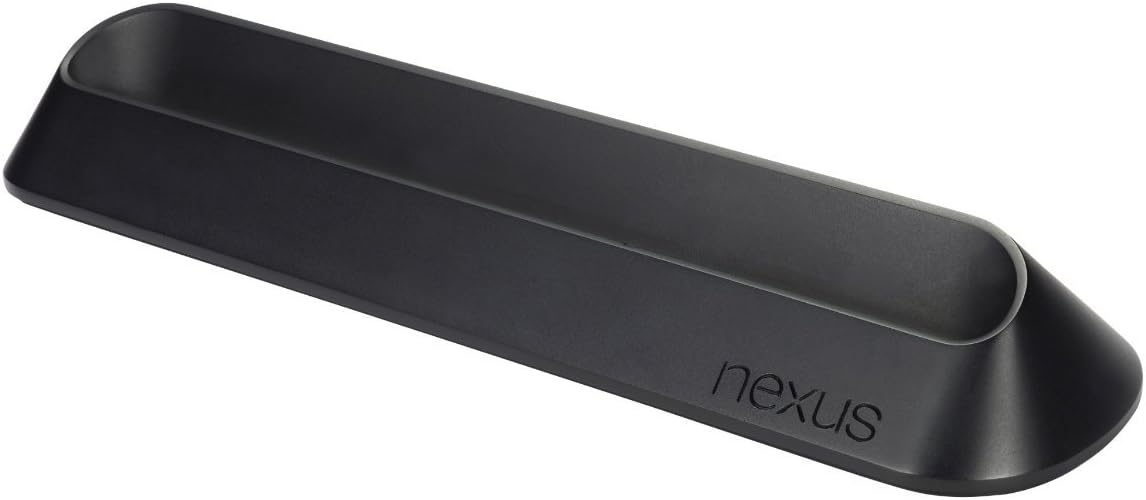
The ASUS Docking Station for Google Nexus 7 (1st Gen) offers a stable, rubberized weighted base with an ergonomic angled design for optimal media viewing. Its innovative pogo-pin connectors enable simultaneous charging and audio output without occupying the USB port, making docking and undocking effortless and efficient.
| ASIN | B009UQZPA0 |
| Brand | ASUS |
| Color | Black |
| Compatible Devices | google nexus 7 |
| Customer Reviews | 4.3 out of 5 stars 775 Reviews |
| Global Trade Identification Number | 00886227273492 |
| Hardware Interface | 3.5mm Audio, USB |
| Item Weight | 0.62 Pounds |
| Manufacturer | ASUS Computers |
| Mfr Part Number | 90-XB3XOKDS00030- |
| Model Number | 90-XB3XOKDS00030- |
| Number of Ports | 2 |
| Total USB Ports | 1 |
| Total Usb Ports | 1 |
| UPC | 886227273485 886227273492 |
| Unit Count | 1.0 Count |
C**Y
I enjoy it. Great digital picture frame maker.
For one, I didn't know Amazon was selling these (the official ones). I've been staring at a "sold out" page on the Google Play store for months just to find out I could have it in 2 days with no tax... Anyways, the unit is pretty nice. It comes in a nice Nexus style box and seems relatively well built. It's got a pretty decent bit of heft to it as well so you don't have to worry about it tipping and what not. Also, just to make a point. This uses the pogo pins on the side of the Nexus 7. Just like the Galaxy Nexus these are meant for one purpose...audio media and charging. There is no HDMI, you will not be able to transfer USB data, etc. This is simply a well built glorified charger that lets you see the screen (and if you want, hook to a home stereo I guess...). Personally, I use it to take advantage of the Daydream feature. It has come to replace my ancient iHome alarm clock but I seem to prefer to use it as a digital picture frame (on steroids). You can pick your Picasa album (or local photos) and just have it cycle through them. So lets break it down. You can get a Nexus 7 for sub-$200 now. The dock will probably bring you up to $200. That's on par with the WiFi digital picture frames you can buy here on Amazon. So for maybe like $20 more you get...better resolution, a full tablet, every storage service you might need, and whatever else you can find an App for. The only real downside is you'll need to keep it plugged in. Pros: - Heavy - Rubber gripped bottom. - Nice construction. Matches the whole Nexus design. Cons: - No HDMI. * The USB port on the N7 supports MHL so Google could have done something with it. Would have probably made it a nice addition to home theaters for some. Other: - I see $30 as perfectly reasonable. Remember, this isn't plastic and doesn't require anything plugged in. It uses the pogo pins. - No charger. Could be a bit of a pain if you're using the provided N7 chord (it's kind of short).
A**E
Debunking Strange Reviews
This little guy does exactly what it promises. I was a bit worried about it because of some of the strange reviews I read, so I'd like to talk about specific issues. [FIRST: I'm not certain this works with the brand new 2013 Nexus 7. So be sure you check into that if you have a new one.] (1) Stiff pogo connectors: Some people claimed they needed two hands to push down the tablet because the pins were "too strong". This is just crazy. Maybe they are putting it in at a weird angle, but the pogo connectors work and work well. (2) Cost complaints: I bought mine for $30. It does feel like it could be $5 cheaper, but it's a solid build quality. The weight and grips on the bottom make it feel like its worth the price. Anyone who argues this is worth $10 has no idea what they're talking about. (3) Doesn't charge: One reviewer said they actually had less charge the next morning than the night before when they plugged it in. Again, this is just silly. It's essentially like the apple mag-safe power adapters. The pogos charge beautifully. (4) Perfectly balance: Another review said that the tablet had to be perfectly balanced in order to charge. Literally, you just drop it in with one hand as you're walking out of the room. It could not be easier. (5) Spontaneously stopped charging: There was a review by someone who had to keep monitoring it in case it spontaneously (for no reason) stopped charging. I have never had this problem. I plug it in, and it's charged when I return. Negatives? (1) I do wish it came with another power cord. If you do need another one, simply throw a standard micro usb charger in your cart for $5 when you checkout. (2) It would be nice if it had some small front speakers.
J**K
Fixed my charging problems
First off, if you are having trouble charging your nexus 7 with the USB port, this dock will fix your problems. My Nexus 7 USB port is completely useless, and this dock charges my tablet in a few hours. It is WAY overpriced at $40-50, but it is cheaper than a new tablet. It is built well, and it complements the tablet's minimal design. As far as I can tell, all the complaints about this dock are completely unfounded. If you cannot charge your nexus 7 through USB, this pogo dock bypasses the defective port and breathes new life into an otherwise doomed device. I have been having problems charging my nexus 7 through the USB port. It would sometimes not charge. Other times, it would charge unbelievably slowly. It might only gain 20% overnight. I did some research and discovered that this is an extremely common problem. The Micro USB plug can bend and mess up the port inside the tablet. After determining that the cord was not the problem, I was forced to find another way to charge this device. This seemed like the best option so that I could still use this tablet. My nexus 7 has been having trouble a lot with slow charging. Recently, my dog knocked my tablet off my nightstand, causing the Micro USB to become loose. The USB can sometimes make contact, but a disapproving glance is enough to disconnect it. I managed to charge it to 20% (over the course of a day) so it wouldn't wreck the battery before this dock arrived. When it did get here, I immediately set the tablet on it, and it began charging! When I turned the tablet on however, it did not say it was charging. I left it on and docked, and I can confirm that the battery percentage does increase. In about half an hour, it went from 19% to 41%. I haven't seen this device charge that quickly in months! I was concerned that it didn't say it was charging though. I found out that the dock requires at least android 4.2 to be officially recognized. This may be the problem people are having thinking that it isn't charging. As for those who say the pins are too stiff, I just can't imagine this being the case. All they have to do is make contact, so even if they were too stiff, they would still make contact. I can only assume that they received a different dock from the one I received. The dock I have doesn't require any effort. You just set the tablet down and it begins charging. It requires no pressure to make contact or anything. It just gently rests on the dock and charges. If your dock requires pressure to get the device to make contact, maybe you should try the following: 1.) Turn off your Nexus 7 2.) Make sure the dock is plugged in. 3.) Set the powered off nexus 7 on the dock. If it comes up with the charging indicator, it is connected. While my tablet is turned on in android 4.1, there is no indication that it is plugged in other than the increasing battery percentage. The 4.2 update is required to enable all the fancy docking features. Overall, this device is worth $40-50 to me because it allows me to use my nexus 7. It is well built and stable. It is impossibly easy to charge your device. You just set it in the dock and it charges. It also might be a wise preventative step to avoid breaking the flimsy USB plug. This is apparently a common problem with this tablet, which leads me to believe that Asus is gouging nexus 7 owners on this dock because it is necessary to use the tablet. Overall, I am just happy I can use my previously doomed tablet once more. If anything goes awry, I will update my review. So far though, it is an expensive but necessary accessory. I don't ever remember the USB port charging my device this quickly. Also note that all you get is the dock. You will have to use the wall adapter and cord that came with your nexus 7, or a compatible one. UPDATE: It's 4/8/2014 and the current price is $70! This is absolutely outrageous, and there is no justification for this price other than scarcity. If Asus would have put a sufficiently strong USB port in the Nexus, there would be no need. At this price, you are getting ripped off beyond belief! It originally sold for about $30-40! I got mine for $50... and that's only because it was the only way to use my tablet. At $70, I am rather offended. I hope nobody pays that price. If they do, I may just put mine on amazon to be sold off... It is currently obscenely overpriced. It probably would cost Asus less than $5 to make this... it's just some wires and a heavy base... nothing fancy at all.
M**.
Works well, but pricey for what it offers
This is a very simple, well designed piece of plastic. The charge is done over 3 little metal contacts on the side of the Nexus so there's no "click" when connecting. You just gently rest the Nexus 7 on the dock and it starts charging. The color matches the Nexus 7's what makes it a nice piece of [electronic] decoration, too. The flipside is the tablet can tumble over easily if tapped on the back, so I recommend placing close to the wall or other things so there's no room for something to touch the tablet on the back. The biggest downside for me is the price. Although I liked it, I think ~20 bucks is quite expensive for what this is. I guess I'm payng a branding premium. If it was a generic one it'd be half of the price...
R**B
OK, so it's sort of a dock....
I bought this after owning my Nexus 7 for close to year and wanting something to perch the Nexus on when I want to quickly charge the tablet and to keep it someplace where I could always find it. For that purpose this dock works fine, and as a place to always sit the tablet when I don't take it with me makes finding it a heck of a lot easier! I just never used to know where I last left my Nexus before getting this dock! The downside to the dock is that there is no interface between it and the USB connection outside of purely as a charging stand...yes, there is an audio breakout of sorts using a 1/8" stereo jack, but for my uses that is superfluous. I use my N7 for all kinds of things, but around the house it is most often used as a remote control for an installation of Media Monkey on a laptop that I use as the core of an HTPC/Media server setup with external hard drives for my FLAC and .wav storage, and a Micromega MyDAC for for it's ability to handle 24/192 audio files. I use Wireworld Starlight USB cables and DH Labs Silver Sonic interconnects between the MyDAC and my Audible Illusions Modulus 3A preamp and I am very pleased with the sound of my system, so adding something that makes utilization of the remote PC functions, even for volume control as the AI does not have any kind of remote, has been a Godsend... When the unit is in this dock album art is displayed as albums or songs change and it has really made me appreciate my N7 even more, and although I use Apple products at my part time job with a high end audio dealer I prefer Win7 and Android for my own use, and now this dock has given me a proper stand to sit my N7 into and let it display the music's information as it is played. I do wish the dock had true USB connectivity, but you can always plug another micro USB cable into the unit while it is in the dock to transfer files, or do it wirelessly. I, for one, am really glad I took the plunge and bought this dock from Amazon. And, isn't that the true measure of an item, whether we are glad we bought it or not?
E**A
Exactly what I wanted
This is exactly what I was waiting for. I was tired of messing with the mini USB cable and worrying if I was inserting it straight and not bending the end or the opening in my Nexus 7. Figuring I did it six or eight times a day it was bound to happen after a year or so. Now I just come in and plop my Nexus 7 into the dock. It charges, plays my playlist through my Bose speakers while I cook dinner. It is the clock for the entertainment room while we watch TV in the evening. At night it is the clock radio that then wakes me up in the morning. It works every time. At $34 each, I bought two and now have one for at my desk at work as well as at home. I don't even have to take my MoKo slim fit cover off. I'm so glad I did not listen to the haters. They wanted to be early adopters then complain about the price. Be patient and get it at what you feel is reasonable. Then don't complain that the mean old company knocked you down, beat you up, took your money and left you with this product you knew absolutely NOTHING about and don't like at all. Cry me a river! By all means READ the description before you by so you know this is ALL that will be in the box. Nothing else, nope, none, nada. And it will not work for anything other than a Nexus 7 so don't expect it to work miracles either. Remember! not to let anyone MAKE you buy this product, do it because you want it or need it.
P**J
I cannot believe this is the official Nexus 7 dock.
The dock design is clean, slim, and sturdy. However, it does not include any cable for charging. Fine, I can live without an additional cable, so it is not a big deal. What is really problematic is that the Nexus 7 needs to be perfectly balanced on the dock in order to charge it. If there is a slight move or touch, you will be more likely to lose the connection to power, hence no charging. Since the power button is on the top-left, whereas the charging connector is on the bottom-right, you should avoid pressing the power button when your Nexus 7 is on the dock. If you press the power button, while having the Nexus on the dock, you will have to re-position or re-balance it, which could be very annoying. In addition, the mini-USB cable needs to be firmly plug into the dock. If not, it will take more than 24 hours to fully charge the Nexus. I am very disappointed that Google once sold such a low-quality product (This dock is no longer available on the Google Play site).
K**.
A necessary evil to charging older Nexus 7 with bad USB port
A necessary evil to the poorly designed 2012 Nexus 7 by Asus. The USB ports to this older version Nexus 7 (pushed by Google, too) were very poor in design and failed very frequently (just search for 'USB port for old Nexus 7' to see how many vendors are offering a replacement). Unfortunately, if you don't want to crack open the tablet and perform a little surgery to fix the bad USB port, Asus offered this Docking station at the same time they sold the older Nexus 7. Ironically, they stopped selling the dock too about the same time (which is too bad because at the time it sold for around $30). Now you have to search regularly for these now desired docks (sometimes as much as $90). The dock itself works great. I believe the side charging posts (on this dock) charge quicker than trouble USB port did (when it worked). Just a word of warning, what you see is what you get. This dock will not come with a wall charger or mini-USB cord (the manufacturer assumed you use the one that came with Nexus 7 - and the cord didn't melt with the faulting USB port). Chargers and cords are inexpensive (and most folks already have this -- or they wouldn't be looking for this dock anyway). Haven't tried the Audio jack option on this dock (but believe it to work as promised). Again, was looking for a quick fix to charge the tablet. Otherwise, this dock requires a bare Nexus 7 tablet. In other words, if you have a protective cover on your tablet, you'll have to remove it prior to docking the unit.
S**Y
Fast charging for one device.
It's a shame this dock is ONLY for the original Nexus 7 which makes it useful just for one device, but it works great, and seems to charge the Nexus very quickly.
A**O
USB charger would no longer fit Nexus 7, preventing ...
USB charger would no longer fit Nexus 7, preventing the tablet from charging. Mostly due to many years of use & some damage from the kids charging it. The dock with pogo pins solved the problem, and easier for the kids to charge too. Should hopefully get many more years out of it from now.
B**P
Per essere il dock ufficiale, potrebbe calzare meglio
Bisogna spingere il Nexus 7 per bene fino in fondo, poi spostandolo a destra e a sinistra finchè non tutti i connettori sono inseriti, o questa base può dare brutte sorprese. Questo è particolarmente importante se si intende far uso della presa audio, che potrebbe non funzionare anche se il tablet è inserito quanto basta per permetterne la carica.
M**I
Four Stars
For anyone confused, this is for the 2012 model.
S**3
純正の安心感と作り込みの良さ
ネクサス7のボタンと反対側にある電極から受電するクレードルです。 実は充電だけじゃなくでスピーカー端子も兼ねていますので このクレードルと他のスピーカー組み合わせると音楽再生もこなせます。 マイクロUSB端子を労わって長く使いたい人に特に勧めです。 当然ですがマイクロUSB端子に接続せずに済むので簡単に受電できます。 ケーブルを刺すのもそれ程面倒ではありませんが 一度これを使いだすとケーブルを使った充電は面倒くさく感じます。 また、充電中は自動で画面に時計を表示させたりもできます。 結構重量がありますがネクサス7をセットしたり外したりする際に 置いた場所からズレない様にする為には、ある程度の重量が必要です。 ガシャっとはめ込む感じではなく置くと充電が始まる感じで、 充電ミスは殆ど(今のところ全く)発生していません。 値段は高いですが個人的には大満足のクレードルです。
Trustpilot
1 week ago
1 month ago