Buy anything from 5,000+ international stores. One checkout price. No surprise fees. Join 2M+ shoppers on Desertcart.
Desertcart purchases this item on your behalf and handles shipping, customs, and support to Finland.
🎯 Elevate your creative game with flawless colour fidelity
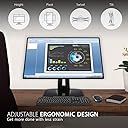
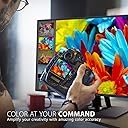
The ViewSonic VP2458 is a 24-inch Full HD IPS monitor designed for professionals in graphic design, photography, and video editing. It delivers 100% sRGB colour coverage with Delta E<2 accuracy, ensuring precise and vivid visuals. Featuring a frameless design for seamless multi-monitor setups, hardware colour calibration with factory pre-calibration and a personalized report, plus ergonomic adjustments and versatile connectivity options including HDMI, DisplayPort, VGA, and USB 3.1, this monitor is built to boost productivity and colour confidence.


| ASIN | B07JR9R5YS |
| Adaptive Sync | FreeSync |
| Aspect Ratio | 16:9 |
| Best Sellers Rank | 79,362 in Computers & Accessories ( See Top 100 in Computers & Accessories ) 1,433 in Monitors |
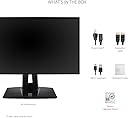
| Box Contents | LCD Display Power Cable(cable length :1.8M) DisplayPort to DisplayPort Cable (cable length :1.8M USB3.1 Up Stream Cable(cable length :1.8M) Quick Start Guide |
| Brand Name | ViewSonic |
| Colour | Black |
| Colour Gamut Value | 1 |
| Compatible Devices | cellphone |
| Contrast Ratio | 1000:1 |
| Customer Reviews | 4.3 4.3 out of 5 stars (622) |
| Display Technology | LED |
| Display Type | LED |
| EU Spare Part Availability Duration | 2 Years |
| Global Trade Identification Number | 00766907992519 |
| Hardware Connectivity | DisplayPort, HDMI, USB 3.0 Type A, USB 3.1 Type B, VGA |
| Has Color Screen | Yes |
| Image Brightness | 250 cd/m2 |
| Is Electric | No |
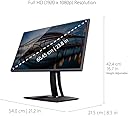
| Item Dimensions D x W x H | 21.6D x 42.4W x 53.8H centimetres |
| Item Type Name | Monitor |
| Item Weight | 5.5 Kilograms |
| Manufacturer | ViewSonic |
| Maximum Display Resolution | 1920 x 1080 Pixels |
| Model Name | VP2458 |
| Model Number | VS17557 |
| Mounting Type | VESA-Compatible Mount |
| Native Resolution | 1920x1080 |
| Network Connectivity Technology | HDMI, USB 3.1, DisplayPort, and VGA inputs provide connection flexibility. VESA Compatible (Wall Mount 100 x 100 mm) AC in DP HDMI VGA USB up stream USB down stream Input: VGA x 1 DisplayPort 1.2a x 1 HDMI 1.4 x 1 Type B x 1 Type A x 2 |
| Picture Quality Enhancement Technology | SuperClear |
| Pixel Pitch | 0.32 |
| Power Consumption Size | 14 Watts |
| Product Features | Built-In Speakers, Cable locking slot, Viewing angle, vertical: 178° |
| Product Warranty | 1 Year |
| Refresh Rate | 60 Hz |
| Resolution | FHD 1080p |
| Response Time | 5 Milliseconds |
| Screen Finish Type | Flat |
| Screen Size | 24 Inches |
| Series Number | 17557 |
| Shape | rectangular prism |
| Specific Uses For Product | Multimedia |
| Total HDMI Port | 1 |
| Total USB 3.0 Ports | 3 |
| Total USB Ports | 3 |
| UPC | 766907992519 |
| Unit Count | 1.0 Count |
| Viewing Angle | 178 Degrees |
| Voltage | 240 Volts |
| Warranty Type | No Manufacturer Warranty |
L**E
Great monitor!
Great monitor, decent price, amazing picture quality. Mainly used it for reading documents but overall very happy with it, will explore the photography side of it soon
R**T
Good second screen for MacBook Pro if you buy adapters
Using as second screen / monitor for a new MacBook Pro 13". Great size, great picture. Only downside is the controls are on the back of the screen and a little menu pops up on screen when you press them. You have to feel for the buttons and it is not obvious how to use them, so that takes some getting used to. I downloaded the manual and found it all a bit frustrating at first. (On my old screen there were brightness and contrast buttons.) Unfortunately the MacBook Pro doesn't come with all the ports I actually need. My work includes graphic design. Here is my setup: I bought a hub (including ports for thunderbolt, new USB-C, old USB, and HDMI) and plugged that into the laptop. And I bought an HDMI cable to run from the hub to the ViewSonic 24" monitor. It wasn't a sharp clear picture with my old HDMI cable so I bought a new good-quality cable for under a tenner (Sweguard 4K high-speed 1.5 metre). Now the monitor is almost as good as the laptop screen. I wish I had realised that the cable dictates the picture quality. All fine now. Overall this is a good screen for the price. <Edit after a few weeks:> The buttons on the back of machine and the on-screen menu continue to be annoying and I've had glitches (eg sleep countdown suddenly starting up when I thought I had turned it off). I have reset the monitor to the original settings and have downloaded a separate app from another developer which forces the MacBook Pro brightness controls to control the second monitor too. Now I don't need to use the buttons. Phew.
B**R
Used like new
Used like new would be a more apt description of my second hand monitor, are you sure you did not send a new one bye mistake. Even had the pleasure of unpacking from original packaging which Viewsonic do really well. It is up and running and meets all my expections, thought I would never be able to afford a really proper display for my Photoshopping. I will comment further when I done some work on it. Thanks! really great value.
M**N
Plug and play without a hitch
I use this monitor for photo editing as a hobbyist. It does the job well. Even without calibration it's pretty close to my laptop screen in terms of tones, contrast etc. I'd recommend it if you want a good value for money solution and don't need absolute perfection with every pixel for which you probably need to invest a four figure sum.
D**N
Great 1080p productivity monitor
Use this as a secondary monitor in portrait mode. Even though it's basically just used to show my discord or Spotify and maybe the odd football stream it's a great monitor. The lack of bazels makes it pretty simple for it to match whatever monitor you may already have. Definitely recommend. May even get another one.
A**Y
Does the job, good graphics, bad product design
The placement of where the cables plug into are too close to the base of the screen and super spread apart Meaning no amount of cable tidying can make this look neat and tidy. Terrible design fault. Apart from that it functions fine, easy enough to assemble Graphics look nice and clean.
K**M
Superb (Same as the VP2468 ?)
I own a VP2468 from a purchase 2-3 years ago and found this has replaced it. Odd numbering that 2458 is newer. No matter; it's excellent - and apparently identical in looks and spec?? I use it for editing high-resolution digital SLR photos that contain huge dynamic range (full frame, 24MP or greater). Just amazing.
R**W
I'll write more later
I returned a Dell monitor in favour of this. but the thing you need to know is Viewsonic, whatever focus group you had to decide to put the buttons on the back of the monitor - fire the staff that were involved in this decision
J**N
Absolut sicher verpackt und nach einem Tag auf dem Tisch! Es braucht wirklich keine extra amazon-Umverpackung. Auspacken, Aufbauen, Anschließen - alles in allem 10 Minuten und der neu Bildschirm läuft. Übrigens auch für Frauen ohne männliche Unterstützung kein Problem. Da sich die Bedientasten hinter an der rechten Seite des Monitors befinden, ist eine Installation der Software vDisplay Manager empfehlenswert. Man benötigt dafür das mitgelieferte USB-Kabel als Datenverbindung. Darüber lässt sich z. B. sehr schnell vom Standard- in den Moviemodus (und alle anderen Modi natürlich auch) umschalten. Höhenverstellbarkeit, Kippen und Drehen, alles funktioniert wie geölt. Pivot-Funktion kann auf Auto gestellt werden und man braucht nur den Bildschirm zu drehen, fertig ist das hochformatige Bild. Macht wirklich Spaß. Im Gegensatz zu meinem alten Philips 244 bemerkte ich eine bessere Helligkeit, der vorkalibrierte Bildschirm ist hell, die Farben leuchtend, aber nicht unnatürlich. Seitenwechsel, Scrollen etc. scheinen wirklich schneller zu gehen. Ich nutze den PC für viele Gestaltungen und Bearbeitungen von Fotos, diese sehen sehr natürlich aus. Mir gefällt es und ich bin zufrieden. Die Homepage von Viewsonic bietet jede Menge Hilfe, einschließlich Mail- und Telefonkontakten. Handbücher, Treiber (so man sie braucht) und Dokumentation sind vorhanden. Preis-Leistungs-Verhältnis ist perfekt.
T**T
The best monitor for the money. I use dual set for Work and Home. Great display for graphics/web work, WebEx on-line meetings, video and business presentations. Love the USB ports for headset and phone charging.
L**A
El monitor es perfecto con el manejo de color, tal como se aprecia en la foto la diferencia de color entre la del portátil y la ViewSonic es del cielo a la tierra, el gran problema es que el primer día de uso diseñando le apareció una raya de pixeles muertos en el centro de la pantalla como se ve en el resto de las fotos, de resto la construcción del monitor como siempre en ViewSonic se ve la calidad, su soporte ajustable 360 es perfecto para trabajar, lamento este desperfecto del monitor pero me tocara devolverlo,
I**H
Lo recomiendo como segundo monitor, no si este seria tu unico monitor profesional. La calidad de imagen y colores estan perfectos pero solo si lo calibras tu, por que el mio me llego creo con error en configuracion, , cuando uso el modo srgb, los colores negros parecen grises y colores opacos, pero moviendole los ajustes, encontre que cambiando el modo rgb full range y ponerlo a limited range, hace que el monitor ya se vea 100srgb, Solo por que tenia mi otro monitor benq pude darme cuenta y compararlos hasta calibrarlo para que se viera igual al benQ, igualmente la saturacion la aumente 5 puntos. Otro malo es que me llego con poco backlight bleeding, no mucho, no lo noto amenos que ponga todo el monitor en negro con la luz apagada. No lo regrese por que pague por la importacion y ese dinero no me lo regresarian, fue cuando compre el benQ despues de esta pequeña decepción, pero una vez lo comprare con el benq y lo calibre, estoy feliz de este monitor y no haberlo regresado, es decir, una vez calibrado bien, como segundo monitor esta genial, incluso me gusta como se ve mas la arquitectura en este. que el benq al jugar videojuegos. Lo recomiendo solo si tienes otro monitor pro o para calibrar.
W**0
Veelzijdig verstelbaar en zeer goede kleuren. Voorgekalibreerd, dus prima voor degenen die grafisch en fotowerk doen.
Trustpilot
3 days ago
3 weeks ago