We remain fully operational. Our teams are working around the clock to ensure your deliveries continue safely.

DOWNLOAD THE APP


Copyright © 2025 Desertcart Holdings Limited
DOWNLOAD THE APP
Buy anything from 5,000+ international stores. One checkout price. No surprise fees. Join 2M+ shoppers on Desertcart.
Desertcart purchases this item on your behalf and handles shipping, customs, and support to Finland.
🌐 Elevate your HVAC game with wireless control that keeps you connected and in command.
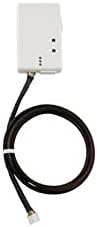
The Mitsubishi Electric PAC-USWHS002-WF-2 Wireless Interface Control 2 is a cutting-edge WiFi adapter designed to provide remote and local control of Mitsubishi mini-split HVAC systems via the Kumo Cloud app and web service. Compatible with select indoor units and capable of simultaneous use with the MHK1 controller, it supports dual-band wireless networks (primarily 2.4 GHz) and integrates with Alexa and Google Assistant for voice control. While installation requires careful network setup and device compatibility checks, it offers a modern solution for smart HVAC management with broad platform support and a one-year manufacturer warranty.
| ASIN | B07VBZRB8T |
| Best Sellers Rank | #110 in USB Computer Network Adapters |
| Brand | MITSUBISHI |
| Color | White |
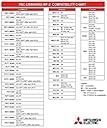
| Compatible Devices | For Mitsubishi Electric, MSY-D-NA-8, MSY-GE-NA-9, MSY-GE24NA, MSY-GL, MSZ-D-NA-8, MSZ-GE-NA-9, MSZ-GE24NA, MSZ-FS12NA, MSZ-FE-09NA-8, MSZ-FE-12NA-8, MSZ-FE-18NA, MFZ-KA09NA, MFZ-KA12NA, MFZ-KA18NA, SEZ-KD-4.1 TH, SEZ-KD-4R.1-TH, MVZ-AA4, MVZ-AA7, SVZ-KP, SLZ-KA, SLZ-KF, ML-KP, PCA-KA4, PCA-KA4.TH, PCA-KA6, PCA-KA7, PEA-AA4, PEA-AA4R1.TH, PEA-AA6, PEAD-AA4, PEAD-AA6, PEAD-AA7, PKA-HA4, PKA-HA6, PKA-HA7, PKA-KA4.TH, PKA-KA6, PKA-KA7, PLA-EA, PVA-AA4, PVA-AA7, PEFY-NMAU-E3, PEFY-NMHSU, PLFY-NEMU, PLFY-NBMU-E2, PLFY-NFMU, PVFY-NAMU, PKFY-NBMU-E2R1, PKFY-NHMU-E2, PKFY-NKMU-E2, PKFY-NKMU-E2.TH, NTXWMT09A112AA, NTXWMT12A112AA, NTXWMT15A112AA, NTXWMT18A112AA, NTXWMT24A112AA, NTYWST12A112AA, PVFY-E00A, PVFY-E00B, PEFY-NMHU-E2, PEFY-NMAU-E2, PEFY-NMSU-ER2, PMFY-NBMU-ER5, PLFY-NBMU-ER2, PLFY-NCMU-ER4, PCFY-NKMU-ER1.TH, PFFY-NEMU-E, PFFY-NRMU-E, PKFY-NBMU-E2 Compatible Devices For Mitsubishi Electric, MSY-D-NA-8, MSY-GE-NA-9, MSY-GE24NA, MSY-GL, MSZ-D-NA-8, MSZ-GE-NA-9, MSZ-GE24NA, MSZ-FS12NA, MSZ-FE-09NA-8, MSZ-FE-12NA-8, MSZ-FE-18NA, MFZ-KA09NA, MFZ-KA12NA, MFZ-KA18NA, SEZ-KD-4.1 TH, SEZ-KD-4R.1-TH, MVZ-AA4, MVZ-AA7, SVZ-KP, SLZ-KA, SLZ-KF, ML-KP, PCA-KA4, PCA-KA4.TH, PCA-KA6, PCA-KA7, PEA-AA4, PEA-AA4R1.TH, PEA-AA6, PEAD-AA4, PEAD-AA6, PEAD-AA7, PKA-HA4, PKA-HA6, PKA-HA7, PKA-KA4.TH, PKA-KA6, PKA-KA7, PLA-EA, PVA-AA4, PVA-AA7, PEFY-NMAU-E3, PEFY-NMHSU, PLFY-NEMU, PLFY-NBMU-E2, PLFY-NFMU, PVFY-NAMU, PKFY-NBMU-E2R1, PKFY-NHMU-E2, PKFY-NKMU-E2, PKFY-NKMU-E2.TH, NTXWMT09A112AA, NTXWMT12A112AA, NTXWMT15A112AA, NTXWMT18A112AA, NTXWMT24A112AA, NTYWST12A112AA, PVFY-E00A, PVFY-E00B, PEFY-NMHU-E2, PEFY-NMAU-E2, PEFY-NMSU-ER2, PMFY-NBMU-ER5, PLFY-NBMU-ER2, PLFY-NCMU-ER4, PCFY-NKMU-ER1.TH, PFFY-NEMU-E, PFFY-NRMU-E, PKFY-NBMU-E2 See more |
| Customer Reviews | 3.9 out of 5 stars 217 Reviews |
| Data Link Protocol | IEEE 802.11n |
| Global Trade Identification Number | 00748528959287 |
| Hardware Interface | 802.11 b/g/n |
| Item Dimensions L x W x H | 2.92"L x 0.69"W x 1.82"H |
| Item Weight | 0.01 Ounces |
| Manufacturer | Mitsubishi Electric |
| Mfr Part Number | PAC-USWHS002-WF-2 |
| Minimum Required Operating System Version | Android 4.1 Jelly Bean |
| Model Number | PAC-USWHS002-WF-2 |
| Product Dimensions | 2.92"L x 0.69"W x 1.82"H |
| UPC | 748528959287 |
| Warranty Description | 1 year manufacturer |
D**F
Not as intuitive of an install as one might expect but DOES work dual band and mesh networks
I sincerely hope this review helps others. I almost gave up on these units and am very glad I didn't. First, customer support from Mitsubishi, while easy to contact, but was highly inaccurate in my experience, until I got the right person, 4 calls, 2 days, several hours, worth it in the end. Here was my problem and my solution. I had a dual band goggle mesh network. My network SSID was named David's Wireless and was a dedicated 2.4 band with 39 devices on it. During install, I kept receiving an SSID error code. I called mitsubishi. My call was answered rapidly, I was connected with a rep who was assertive in her explanation, mesh networks don't work with the unit, she said. Off I went to Best buy to buy a 2.4 only noon-mesh router, $350, easy install, back to unit, same error code, same wireless network name, David's wireless. UGH! Call Mitsubishi again. New rep tells me device has been used prior and needed to be re-set (device reset involves using a paperclip to hold down top bottom on left, a hole, below and to the side of the green light and blinking blue lights.) I was given a case # and asked to wait for level 2 assistance. It never came-hour waiting on phone then dial tone. UGH. Wait a day, too frustrated. Next day new call new rep. They instruct me to make a guest network. They tell me do not use an apostrophe in my network name. It works, but now many of my cameras and other devices are not liking the new router now that it is not broadcasting using a mesh. I think for a moment and decide to try the same solution with my old router. It works! I return $350 router to best buy. I make a new guest network on my google mesh wifi and use it only for the units and the Kumo Cloud. I don't use an apostrphe, it all works. When you are not connected to the wifi band the device is using, as in out of your home, it does take longer for the unit to respond. These are signals bouncing back and forth between servers and is not a very rapid transmission. I am very surprised that I was told mesh networks do not work. They do! I am surprised so many are saying it doesn't work with dual band. It does! It doesn't work with 5g. Dual bands have 2.4 so it may need to be enabled or disable 5g but it does work. The problem was an apostrophe for me in David's wireless. If i didn't have 40 devices connected I could have simply removed the apostrophe and connected device. It also becomes possible that for some routers guest networks will be limited and may not receive data. Solution will be to change setting in guest network or use non-guest network. This device works fine and is great. It is not as easy to install as you'd think but only because of network issues, not hardware or mechanical. {Two blinking blue lights equals no internet signal. Four rapid blue blinking lights means ready for install, and 3 bliking blue means operational and connected to wifi.}
M**S
Mitsubishi has a lot of work to do
I expected these to add Nest/Ecobee like abilities to my new HVAC system. They REALLY suck. The app is SUPER slow all the time, and it won't save programs properly. Also, I had to delete my programs after winter as it would just keep turning them back on. The Alexa/Google Home integration is terrible. You can set the temp, if the units are on. But the only way to turn them on/off it to create a Routine to do so. I have them called "Alexa Heater Off/on", and specific rooms like "Alexa Bedroom Heater Off/on", so i have like 6 of these routines. They almost never work. Alexa dings that it understood, then nothing happens. I contacted Mitsubishi support, and they just want me to call in. Terrible support, won't even email back and forth. I don't have time to call during their support hours. These added $150 bucks to each unit, WAY not worth it compared to a central HVAC control system. Installing them wasn't hard, but was tedious. Have to take the entire front of the unit off, then a screw holding in the plastic protection plate on the electronics, drill a hole in the outer case for the wire, and route it VERY carefully to plug it in. Make sure to turn the system off at the circuit breaker first too. These are slightly better than the super crappy remote that come with the units, but only just. And they don't let you do the more advanced stuff like occupancy detection, just fan speed and vane control.
W**9
Took a couple of hours
So I installed both the PAC-USWHS002-WF-2 and MHK2. On the one model I decided to test this on, FS09, it only took me about 10 minutes to install. Super simple. The rest of the time was spend troubleshooting why it wouldn't connect to my network. When I could get it to connect, it was very unreliable. It was even causing my thermostat to immediately lock up at "wait" when it was paired. After more troubleshooting then you can imaging, I decided to create a rule in my firewall (enterprise grade) to allow all traffic for this device past my other custom rules on the LAN side. This solved my issue, but why? So I dug into the state table and noticed the device was requesting DNS queries from Google's DNS servers. That's not how my network is setup and would have blocked that from the device. All my devices are told to send those request to my firewall, which in turn the firewall will use Cloudflares DNS if needed. So after all that, this thing has been working solid. I don't have any complaints about this product other than it's price. I can understand the price a little if you think of supply and demand, not to mention what's paying for the API to run. I know some users dislike the 2.4 only, but it does make sense. My access points allow the device onto my mixed network without any modification. 2.4 can travel longer distances and through more walls. Assuming this choice was done for reliability as this device really doesn't need bandwidth.
B**.
Great way to add smart home/mobile phone control
I purchased this when the units were being installed and just asked the installer to connect them up as they installed both units and I would do the rest. Once they were connected I downloaded the Kumo cloud app and started the setup, while the devices themselves seem to be good and rock solid, the Kumo cloud app is another story. I found no way to setup the Wi-Fi interface without having an installer pin, luckily I have a friend who is an HVAC contractor and the pin is just 9999, but they try and force you to have the installation company add the devices to Kumo Cloud and then transfer them over to you. Once I got around the pin issue, the setup was easy, you enter in your Wi-Fi SSID and password (you don't have to be connected to the same Wi-Fi), so that is great considering I put them on an IoT network that my phone doesn't normally connect too. Once you've entered in your Wi-Fi info the app connects to the interface over bluetooth and setups up everything; which does take some time, maybe 3 minutes or so. Once it is setup, it does take another couple minutes to come online with the app, I'm assuming firmware was getting updated, etc. When it is online with the app, control was easy and worked well. One of the units is right at the end of my current Wi-Fi coverage and still stays connected well and doesn't seem to disconnect at all. I also have my 2G and 5G network names combined and that doesn't appear to have caused an issue either. Overall I knocked a star off due to the pin issue in the app during setup, but otherwise it is an easy process.
P**I
Good control of the units
Easy to install and connect to WiFi - the app provides enormous flexibility to set limits and parameters for the units. Excellent for way to control renters from running up utility costs!
C**R
The Good And The Bad
I purchased two interface controllers and installed them following an online Youtube video. Relatively easy, though a bit intimidating to get the covers off the Mitsubishi unit due to the force needed on the four clips. Install and setup went without a hitch. All worked fine for 3 weeks and then I started getting an error when accessing the Kumo Cloud offsite through my Android using the phone via WiFi. Remember, all was well for the first 3 weeks accessing remotely. I started getting an error with an "I" inside a circle on only one of my two Mitsubishi units when accessing the Kumo Cloud. Then a week later both units had the "I" inside the circle. I reached out to the vendor and they said the Kumo Server was acting up and this was normal. I called Mitsubishi customer service, they said the same thing. All this time I could access and control the two units from within the router zone of where the units were installed. A week later, when offsite and could not access my units via my Kindle or Android, I called Mitsubishi's customer support again. They were able to log in and control my units (I verified this by watching on a security camera). Mitsubishi customer support said there was nothing they could do to help since they could log on without any problem and control the two units. What they should have said was, "try turning off the WiFi on you Android and then try to login to the two units." But they did not. But, I noticed when I was away from a router and WiFi, I could access the Kumo Cloud and my units. At my regular off site location I tried again to access the Kumo Cloud with my Android via WiFi and I could not. I then turned off the WiFi on my phone and could access my Kumo Cloud. I did this back and forth for awhile on the offsite router, no access; unless I turned WiFi off. Bottom line, the Kumo Cloud and the interface controllers were accessible and controllable via the off site's WiFi for a few weeks and then stopped. I then could not see one of the units. Then a week later I lost contact with both units. Then I turned off the Andoid's WiFi and I could access both. It sure would have been nice to have been told by Mitsubishi Kumo Cloud support to try turning off the WiFi on the Android.
E**R
Nightmare to setup, works inconsistently
Getting these devices to reliably connect to our network is proving next to impossible. I am reasonably knowledgeable about networking and have designed various IoT devices. This one is terrible. Yes, we did all the required stuff, putting it on a 2.4GHz connection with very strong signal and the right authentication. But it still drops randomly. It is definitely not the quality level I expect from a Mitsubishi Electric product. Probably wasted a good 10 hours on this. Unfortunately, it's pretty much the only game in town to fit our needs. We have an accessory dwelling unit with mini splits that are on a shared system with the rest of the house. If we select cooling but the ADU selected heating, we lose. It can't do both at once. Worse, the Auto mode automatically switches between heating and cooling on individual heads, so it's easy to accidentally get locked out. These units let you address that problem. They also let you set various limits on what each unit can be set to. We think this is important for a rental space. Once set, it doesn't need a live connection to maintain that functionality. For our purposes, intermittent connection is probably good enough. But shame on Mitsubishi Electric for creating such a problematic product. Their stuff is usually fantastically engineered, but these adapters are decidedly an exception.
R**N
Very easy install after watching videos on YouTube.
I watched install videos on you tube and it took 15 minutes to install. I had the Comfort App downloaded on my iPhone and install was easy. If it is compatible with your unit I would not hesitate to purchase.
Trustpilot
2 weeks ago
1 week ago