Desertcart purchases this item on your behalf and handles shipping, customs, and support to Finland.
❄️ Power, Protection, and Performance — The Ultimate Raspberry Pi 4 Upgrade!
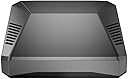
The Argon ONE V2 Aluminum Case for Raspberry Pi 4 combines sleek, durable aluminum construction with advanced cooling via a 30mm fan and integrated heatsink. It features a convenient one-push power button for safe shutdown, dual full-sized HDMI ports for multi-display setups, and a smart cable management system. Designed to extend your Pi’s lifespan and performance, it also supports M.2 SATA/NVMe expansion boards for enhanced storage, making it the must-have case for professionals and makers who demand reliability and style.


| Antenna Location | Computer |
| Asin | B07WP8WC3V |
| Best Sellers Rank | #192 in Computer Cases |
| Brand | Argon Forty |
| Case Type | Raspberry Pi |
| Color | RPi4_Case ONLY |
| Compatible Devices | Raspberry Pi 4 |
| Cooling Method | Air |
| Customer Reviews | 4.7 4.7 out of 5 stars (3,346) 4.7 out of 5 stars |
| Enclosure Material | Aluminum |
| Fan Size | 30 millimeters |
| Hard Disk Form Factor | 3.5 inches |
| Internal Bays Quantity | 1 |
| Item Weight | 0.21 kg |
| Manufacturer | Argon Forty |
| Mfr Part Number | AR1_Rpi4_Case Only |
| Model Name | V2 |
| Model Number | B07WP8WC3V |
| Number Of Fans | 2 |
| Number Of Items | 1 |
| Other Special Features Of The Product | Built-In Fan, Proprietary Power Button Functionality |
| Power Supply Mounting Type | Bottom Mount |
| Supported Motherboard | Mini ITX |
| Total Usb 2 0 Ports | 2 |
| Total Usb Ports | 2 |
| Upc | 045918091818 |
| Warranty Description | 1 month |
User
Summary - I love it! Best case I've ever seen.
Simply put, the best Raspberry Pi case I've ever seen and purchased. One big pet peeve I have always had with the RPI is the fact the connectors are on all sides of the board, most importantly, that the power and ethernet are on two different sides. For many of my applications this makes for awkward cabling and more complicated positioning. The Argon40 brings all the connectors to the back! Yay!! Finally!!Another pet peeve is that I have to pull out my phone to power down the system... the Argon40 adds a power button to gracefully shut down the system! Yay!! Finally!!Many cases with fans are loud... The Argon40 incorporates two very effective cooling methods... one is using the enclosure as a massive heatsink, and the other is a speed controlled fan. This equals SILENT OPERATION. Yay!! Finally!!My only disappointment was that I could not use a POE board as the case connects to all of the 40 GPIO pins. To get around this, I purchased a POE splitter that has ethernet and USB C cables of equal length coming out of it. Given the Argon40 has both of those connectors on the back, this results in a clean installation!The only caution I have for people is to be careful when inserting the connectors of the board that brings the connectors to the back as it takes some force and it would not be too hard to cause irreparable damage. The case is clearly designed to be built up for the long term and left as is. That is what I plan on doing. The particular system I used the Argon40 in is my primary (I have 2) PiHole / Unbound DNS server. It is headless and is powered by a Unifi switch via POE.Summary - I love it! Best case I've ever seen.EDIT: One potential issue those using this for headless 24/7 systems is that you must press the power button to turn it back on after a power outage. This is obviously a big issue in my case as a power outage or even simple switch reboot can leave me without DNS, and VPN (well not 100% true as I have 2 systems for redundancy.... but... you get the point). I'll see if I can hack this awesome product to make it power on by itself upon power restore while retaining the graceful power off by pressing the button.
User
Easily the best case for cable management and heat management rocks!
This is a very well thought-out case that works extremely well. The only thing lacking is easy access to the camera CSI slot and display slot -- more on that at the end. But it's still so much better than every other case I've used (and I've used quite a few) that I couldn't give it less than 5 stars.The case is three main pieces (and some internal pieces):The bottom is plastic (tinted but transparent -- you can view the power & activity lights). It has a opening to provide access to the microSD card slot.The main body is a aluminum alloy casting. It has vent slots in it for airflow, but it also has a couple of blocks that are designed to press to the CPU and memory and includes thermal pads. This allows the Pi to transfer the heat to the entire case to provide passive cooling. The passive cooling works *extremely* well! The case has a variable speed fan and comes with software that changes fan speed based on temperature. The default is to use no fan if the Pi is less than 55°C. At 55°C it goes to 10% fan. At 60°C it goes to 55%. At 65°C it goes to 100%. But you can set these to any temperatures and any speeds you want -- it is completely customizable. While I've tested the fan to make sure it works... the case does such a good job dissipating heat naturally through the thermal pads and blocks that transfer heat to the case body ... that my Pi generally never gets above 40°C (I'm using a Pi 4B/8GB). I ran a stress test to peg all 4 CPUs to 100% and after about 10 minutes it finally managed to reach 51°C.... and still never made it to the 55°C temp that would have triggered the fan. As I write this, my Pi is sitting at 36°C and the case is moderately warm because all the heat is transferred to the entire upper body of the case. So I'd say the heat management on this thing rocks!The third part of the case is a magnetic cover for the GPIO pins. The case plugs into the GPIO on the Pi and re-routes the GPIO to the back/top of the case under the cover. When the access cover is removed, the new GPIO header color codes the pins and also provides labels -- making it very easy to find the pins you want.The case also has an internal custom board that plugs into the side of the Pi to connect to power, both HDMI ports, and audio ... and re-routes these to the rear so that *all* cables connect at the back of the Pi making for a much cleaner look -- especially if use the Pi as a desktop. There is an internal board (pre-installed) that has the fan and also re-routes the GPIO access.Lastly, the case has a power button and software that comes with the case monitors the button. A single tap will power up the Pi. A double-tap will reboot it. Holding it for 3 seconds will do a nice shutdown and then cut power. Holding it for 5 seconds will do a forced shutdown (cutting power without waiting for an orderly shutdown).The *only* thing this case doesn't offer is any type of access to the display or CSI camera slots. There actually *is* a slot visible when you remove the magnetic GPIO cover ... and it looks like you could probably manage to route a ribbon cable through this -- but it would need to be done before you assemble the case. I did not actually try this.If you are not using a Raspberry Pi camera that uses the CSI ribbon cable slot or the display that uses the display ribbon slot, then this is definitely the very best case I've used. If you are using either of those two slots, you might want to try a different case.
User
The only Pi 4 case you should consider
I don't usually write reviews, however I was so impressed with this enclosure that I felt it was appropriate.I purchased one of these enclosures for testing, as I am building a cluster of Pi's for my homelab and wanted something that would look elegant in my server rack. This is the only case I found that I consider nearly perfect. (More on the "nearly" part later).I was immediately surprised at the size and heft of this case. It is quite a bit smaller than I thought, and also much heavier. Upon picking it up, it instills an immediate feeling of quality. The screws go in smooth as can be, and the tolerances are very tight making everything fit exactly as it should. The labeled and color coded extension of the GPIO pins is incredibly useful and easy to access with the magnetic cover which doubles as the intake for the fan. As for the installation, it couldn't have been smoother. It took about 2 minutes and was as straightforward as can be. I spent longer looking for my screwdriver set than I did actually assembling everything. The instruction manual is printed in high quality full color with detailed instructions, and in fluent English. I did have some trouble getting video output at first, but I eventually found this to be the fault of my Micro HDMI adapters not sticking out far enough to make contact with the connector, not a fault of the enclosure. A quick job of cutting the rubber covering on the adapter back about 0.5mm with a razor fixed this problem. Once booted, I installed the power button/fan control software and it worked perfectly right away. The power button functions exactly as stated in the manual, and it is more useful than you might think. One unexpected thing about the enclosure that I liked is that the indicator lights on the Pi are able to shine through the acrylic on the front of the enclosure for a quick status check. My absolute favorite thing about this case is that it routes all of the connections to the back using an extension board. This makes for an extremely clean setup and easy cable management, and makes it look like a real desktop similar to an Intel NUC.Now for that "nearly perfect" part I mentioned earlier. I do wish Argon40 would've taken the opportunity to convert the micro HDMI to full HDMI internally, eliminating the need for adapters. Even if this came at the small expense of size and cost, the convenience would've been well worth it. My other suggestion would've been to eliminate the USB-C power delivery issue that has plagued the Pi4, since it is powering through GPIO instead of the integrated USB-C connector on the Pi. As far as I can tell, the issue still exists and will not power up with "e-marked" USB-C power adapters, or at least not with the power adapter for my Lenovo X1 Carbon. Not a big deal considering the official Raspberry Pi adapters are relatively cheap, but I feel it is a missed opportunity as type C chargers become more ubiquitous. There may be a technical reason for this that I'm not aware of, so I am not knocking any points.My only real complaint? As of this writing on 10/18/19, this case can only be purchased on Amazon as a bundle with a power adapter or with a Pi 4 whereas I bought it on its own without any accessories. I plan to buy a few more of these, but I already have Pi's and power adapters and would rather save a few bucks by buying the case only.TL;DRThis case is amazing and you should definitely buy it. In fact, I'll go as far to say that it is the ONLY Pi 4 case you should consider if you don't need to use hat's. I know I'll be picking up a few more.
User
Overkill? Maybe, but it is still awesome.
I run a PiHole and my old case/fan setup was cheap, but noisy. I figured why not splurge after reading positive reviews on the build of these Argon cases. The fact it includes the daughter board to make the connections fit with the case is very cool. Operating temps are down and I cannot hear much, if anything coming from the Pi any more. A++
User
Good case, but with caveats (Also Fix for black/blank screen on bootup in review)
The Argon One V2 case for the Raspberry Pi 4 model is definitely one of the nicer cases I have used for my Raspberry Pi 4s; the overall design of the case and its build quality seems to be sturdy, as the case is made of full cast aluminum (including the heat sinks which are built into the case itself) and included fan to circulate air through the case.My operating temps were acceptable (generally low to mid 30s c, some high 30s to 40c temps under heavy load) with the included thermal pads and two metal columns that sit on the SoC BCM2711B0 chip and RAM with the fan running quietly the whole time.There are somewhat strong magnets that hold a metal cover on the top of the case that covers the GPIO header from the daughter board (enough to keep it on while lightly shaking the case).I especially like the on-off button feature, which can actually allow you to do a reboot, soft shutdown, or even hard shutdown on the system (depending on the button press combination), all without requiring bash line command inputs. However, if you don't want to use the button, it can be by-passed with jumper settings if needed.With everything said and done however, as the title suggests, there are some things that you have to contend with once everything is put together and I would have recommended it 5 stars if it wasn't for the issues.This case is trickier than most to put together than a typical plastic case (mostly because of the daughter board that plugs into the native mini HDMI and 3.5mm audio ports and move them to the back of the case, along with adding two full size HDMI ports) but even your inexperienced builder can follow the included instructions and get the entire setup put together in under 30 minutes.There is one major issue I've encountered with this case that might cause some issues unless you don't mind doing some tinkering and it involves the daughter board mentioned earlier; for some reason it doesn't seem to play nice with the Raspberry Pi 4 Model B for which it was designed (I've experienced this issue installing it on both the 4 GB and 8 GB models which was fixed the same way both times).For some reason, it seems that the Argon case daughter board is causing some issues with displaying properly via HDMI that needs a hotfix to address (which I found after doing some research; see below).Steps to fix blackout screen when booting up Raspberry Pi 4 (these steps are for a Windows PC):1.) After installing the Raspian OS to your SD card, plug it back into your computer and open up a window in File Explorer for the "boot" partition of the SD card. If not, you can look for it yourself in File Explorer, open the drive named "boot" under "Devices and drives" after clicking on "This PC" in FE.Inside the boot folder, you should find a file named "config.txt" and open it using your text editor of choice (I recommend Notepad). If you need help finding it, search google for config.txt and read the documentation from the Raspberry Pi Foundation.2.) After opening the config file with a text editor, there should be a line inside that looks like this:# hdmi_force_hotplug=1(if you can't find this line, just add the line yourself like below at the bottom of the text file)3.) Remove the # and space in front of hdmi_force_hotplug to enable this command within the config file;hdmi_force_hotplug=14.) Save your changes and plug the card into your Raspberry Pi.If you do this, this should fix the black screen issue that sometimes happens when you first start up this case with the daughter board on your Pi.Please be aware that after you apply the fix above, one of the HDMI ports might have a fixed screen ratio of 1280x720 so it might open a small window in the upper left hand corner of your screen instead of filling up the whole monitor (looks very tiny especially if you have a large monitor); to fix this, plug the cable into the other HDMI port on your case and restart the Pi, afterwards it should hopefully scale up to fit the screen's resolution like normal. Of course this shouldn't be an issue if you SSH into your Raspberry Pi but this is a warning for those that rely on the HDMI output.------------------------------------------------------------------------------------------------------------------------------------After addressing the above issue, I haven't had any other major issues with the case and it's been working well since.Overall, I can recommend this case but please be ready to do some troubleshooting as noted above to get it fully working; hopefully my instructions above can help you save time and trouble like I had when first putting everything together.
User
Wow, the reviews are accurate, this is a well built high quality case!
I gotta be honest, didn't expect a raspberry Pi case to be "premium" but this one surely is.It is heavy, and the case design and supplied A/V and sound board that comes with it to move all the connections to the back is truly a game changer for cases.The case was easy to assemble to the Pi board, save for a slight alignment issue with the two boards mating together, there is a miniscule fraction that the board is crooked on the connection on mine where the power usb-c plug coming out of the case from the Pi board is a tad crooked matching up to the hole in the case for the power port. It says to push the boards together very firmly to allow for firm connection, when I did that, the two boards overlapped one another and one sat on top of the other and the screw holes didn't align up, and it was slightly crooked. I had to pull them apart just slightly to align the screw holes to mount boards to the case. The power plug port on the board is still slightly off when aligning to the power port hole on the case, but it doesn't affect the plug in any way from being able to be plugged into the connection on the board.I haven't turned it on yet, but this is a solid premium case with a great feature that all cases should have anyway, why anyone would want their connections on the front of the case, or the sides is beyond me, it should be like a full size computer cases are with all connections in the back and out of sight, and this case fixes that design error by other manufacturers.I am so impressed with this case, I'll be buying more for my other projects.The only con I would note is the supplied thermal "paste" pads to help with cooling, are pretty much worthless and wouldn't stick to the sections the instructions say to put on the heatsinks on the case, the thin and fragile paste crumbled in my hand when trying to gently apply it to the two sections they advise. It would be fine I think to just leave it off, as the metal case acts as it's own heatsink and allows heat to escape anyway, plus there is a built in fan that comes with the case already, so essentially two ways to cool the board with this case.All in all, this is a fantastic case, I don't imagine there is currently anything on the market that will top it.It does not come with a power supply, so you will have to order one separately, I webt ahead and ordered the matching same brand power supply to be safe.So stop reading these reviews and just buy it already, you will be glad you did.
User
Great case for overclocked retropie build; here are some tips!
I've bought a couple of these for retropie builds for family members. The build quality is very good. I overclock the cpu and gpu quite a bit; the case gets warm but that is good because it means the passive cooling via the aluminum case is working effectively. The fan helps too. Temps are always at safe levels. Power button works good as well. The daughter board is a great feature. All in all I'm pretty happy with these cases.Here are some tips I recommend for anyone picking up this case:* The daughter board can go in hard but the hardware is sturdier than it seems. Get a good grip and press firmly and gently; the daughter board will overlap the pi board ever so slightly. Then I recommend testing the alignment by inserting it into the case and checking before applying the thermal putty.* I recommend pairing this with the m.2 cover so you can use an SSD; this accessory works great and I have a review over there as well.* The fan was detached with one unit but I simply popped it back in and it worked fine.* To install the power button/fan control the instructions say to curl a shell script and pipe it into bash. I always recommend downloading and auditing scripts (even a quick peruse) just to make sure its not malicious. In this case, the last time I checked the script created some python scripts for interacting with the hardware and registered some system daemons which was exactly what it should be doing. Main takeaway is always be careful running scripts as root.Have fun everyone!
User
Argon Raspberry pi4 box
Received In brand new perfect condition. Very well packaged. Everything went to gather very fast and easy software up date. Works perfectly. Note the layout for all connections are located in the back like it should be. Super highly recommend!!!
User
Top notch quality and style!
I was suprised by the quality of the parts.The top of the case is aluminum which serves as a heatsink and comes with silicone thermal pads.There are two daughter boards that serve to reroute the GPIO and hdmi/audio which seem of very good quality. ( nice components, nice welds without burns or traces of flux )Also included are four stick-on rubber feet.I had a very small fitment issue where the boards are off by a tiny bit but this doesn't interfere with the port openings it just meant i had to squeze a bit until i had put the screws in. I belive this is the cause for the second very small problem, that the case doesn't sit flush and has a slight wobble.These small issues aren't enough for me to remove a star from this product.9.9/10 Would definitely reccomend.
User
Exelente
Exelente
User
Impressive and neat little case!
I had in my mind that this case would be somewhat bigger than it actually is. Perfect well made little case and everything fitted together nicely. Just beware of the pins used by the case for the power button and fan control as the power button uses the same GPIO as the default 1-Wire GPIO pin and the fan uses the I2C bus. The 1-Wire pin can be changed in the Pi’s boot configuration and the I2C bus supports multiple devices so it wasn’t a deal breaker. The Pi runs much cooler now due to the heatsink being integrated into the case which makes for a larger cooling area and I find it is running some 8-10 degrees cooler even without the fan running. Beats any of those stick on heat sinks hands down. My setup is running Docker with Portainer that is running multiple containers of Node-Red and Grafana. It’s yet to break a sweat and have the fan kick in which starts at a default setting of 50C.
User
Ucuz değil ama kaliteli
Çok memnunun. Öneririm.
User
Case di qualità!
Ho un piccolo server acceso 24/7 su un raspberry pi 4, da quando l'ho installato in questo case ho risolto tutti i miei problemi di temperatura! Il case in se dissipa tutto il calore passivamente e la ventolina aiuta nei momenti di maggior carico!
Trustpilot
1 day ago
1 month ago