Buy anything from 5,000+ international stores. One checkout price. No surprise fees. Join 2M+ shoppers on Desertcart.
Desertcart purchases this item on your behalf and handles shipping, customs, and support to Finland.
💡 Upgrade your lighting game — smart, simple, and seriously connected!
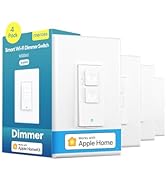
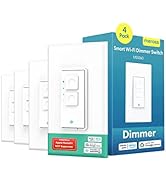
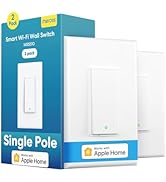
The meross 3-Way Smart Switch is a single-pack, neutral-wire-required smart light switch compatible with Apple HomeKit, Alexa, Google Assistant, and SmartThings. It supports 3-way or single pole wiring, connects via 2.4GHz Wi-Fi without a hub, and enables voice and remote control. Installation is quick and affordable, replacing just one switch in a 3-way setup. Features include energy-saving timers, secure AWS data transmission, and a fire-retardant durable design, making it a reliable upgrade for modern smart homes.


| ASIN | B0894KT8DC |
| Actuator Type | Push Button |
| Best Sellers Rank | #48,055 in Tools & Home Improvement ( See Top 100 in Tools & Home Improvement ) #166 in Electrical Light Switches |
| Brand Name | meross |
| Circuit Type | Support 3-Way or Single Pole |
| Color | White |
| Connectivity Protocol | Wi-Fi |
| Connector Type | Clamp |
| Contact Material | Copper |
| Contact Type | Normally Open |
| Control Method | Voice |
| Controller Type | Amazon Alexa, Google Assistant, homekit |
| Current Rating | 2 Amps |
| Customer Reviews | 4.4 4.4 out of 5 stars (1,096) |
| Included Components | 1 x Quick Installation Guide |
| International Protection Rating | IP00 |
| Item Dimensions | 4.7 x 2.8 x 1.5 inches |
| Item Weight | 3.2 Ounces |
| Manufacturer | meross |
| Material Type | Plastic |
| Model | MSS550 |
| Mounting Type | Wall Mount |
| Number of Items | 1 |
| Number of Positions | 1 |
| Operating Voltage | 120 Volts |
| Operation Mode | ON-OFF |
| Specification Met | Fcc,ic,etl |
| Switch Type | Support 3-way Or Single Pole |
| Terminal | Spdt |
| UPC | 787446925547 |
| Unit Count | 1.0 Count |
| Upper Temperature Rating | 104 Degrees Fahrenheit |
| Warranty Description | 2 Year |
| Wattage | 200 watts |
T**Y
Great switch at the right price
To start with, I am very happy with my purchase thus far. It was priced right, easy to install (took about 5-10 min), and works very consistently. I have started to get more into smart devices recently, and had a problem I needed to solve. I own a 3-story townhome, with a deck on the 2nd/living room floor. There is a bright light over the deck, but there is no light switch near it or on the same floor. For whatever reason, it is controlled by (2) 3-way light switches: one on the top floor in the bedroom, and one on the bottom floor in the utility room. Why would the light be configured that way? I have no clue. To turn it on or off, I have to go either upstairs or downstairs. So here is where the idea of a smart 3-way light switch came up. The idea was to have it controllable while out on the deck, but still controllable from the light switches. Also, as I get more into the smart devices, I was wanting Apple HomeKit support as I am being heavily persuaded by loved ones to jump over to the Apple side of things and away from Android. Although I'm not fully convinced to make the jump, I wanted support for both options just in case. I purchased this 3-way switch from Meross for about $28, which was great compared to others I had seen that supported both Android/Alexa and Apple Homekit. You only need to replace one 3-way switch to make it smart, so I chose the one in the utility area on the bottom floor. At first I was a bit apprehensive due to not having messed with 3-way light switches before, and rarely have had to change a light switch (primarily rent). So a 3-way was a bit confusing to me. However, Meross made it quite simple with their instructions and wiring diagram. I have attached some photos, 2 of which I've added some notations for some guidance that I learned along the way. Also, your first step should be to shutoff the breaker in order to kill power to the light switch. Safety first. I was not familiar with "Traveler" wires that are used with 3-way switches. I found that these red and black "Traveler" wires connected to the original standard 3-way switch using brass-colored screws. This made them easy to identify. You just disconnect the wires from the original light switch and use the provided wire-nuts to connect them to the wires coming out of the new switch. So here is how it goes, referencing the marked-up wiring diagram and light switch photos I've attached: L = Live = Black wire connected to original light switch T1 & T2 = Traveler 1 & 2 = Red and Black wires connected to brass screws on original light switch N = Neutral = White wire. The neutral wires should be bundled/connected with a wire nut and stashed behind your original light switch, but not connected (mine wasn't). Just undo that wire-nut and add the white Neutral wire from the new switch, then screw on the wire nut again to bundle ⏚ = Ground = Green wire connected to original light switch (If you have one. My original light switch didn't have one) Hopefully that gives enough detail for others (like myself) who have never done this before. Simple enough. So, a few notes: the plate that comes with this switch is slightly skinnier than your standard light switch wall plate. It didn't seem to be a big deal for me, but just something to keep in mind. Also, you have to use the cover plate that comes with the new switch. It is designed to snap onto the switch and doesn't screw on (likely because there are more to the internals of a smart switch to house the additional electronics you don't have with a standard switch). Just something else to be aware of. This was fun to do and really helped solve my problem. I brought it into my Alexa app and I can control the light from my phone or Echo now and don't have to stop drinking on the deck! ADDED BONUS: If you use Alexa and configure this as a "light", you can use it with Alexa Guard, which allows an "Away Mode" with automated lighting. The Alexa Guard will use sunrise and sunset times (based on your location) to know when it starts getting nighttime, and will use some logic to turn your lights on and off automatically to make it seem like someone is home. With my outdoor deck light, this is easy for anyone outside to see and will be a great deterrent and protection. I already have my neighbors confused on if I'm home or not. Working as intended!
Y**H
So much better than smart bulbs!
This is a copy of my review of the single pole version of these switches. I have been replacing my light switches with these Meross smart Wi-fi wall switches. I got a few to try them out and see how well they work as a replacement for my smart bulbs. The smart bulbs (3 different brands, including the supposed expensive good brand) would keep loosing connection. They would be unresponsive more often than not. I was getting so tired of Siri "not hearing back from the device" so I decided to make the switch to smart switches, and boy am I ever glad I did. No more problems with loosing connection since I started using these! Also, some really cool features are as follows: If you are replacing a 3-way switch setup, you only need to replace one of the switches if you use these smart switches. You can set up an automation to make it so that the lights switch off automatically after a set amount of time, or you can make it so that whole groups of lights come on if you switch on one etc. You can use this functionality to effectively make unrelated lights work kind of like they are part of a 3-way light switch. Maybe best of all is there is no longer a problem if somebody switches off the light switch (unlike the dumb smart bulbs that get completely screwed up if somebody accidentally forgets and turns off the switch). I also like how I can decide on a per-switch basis, if I want the little indicator light to work as a night light, a power indicator, or to just stay off (this functionality is accomplished via the Meross app, and that's about all I have used their app for so far, it's easy to add your switches to the Meross app if you have finished setting them up in homekit first). So far I have found these switches to be very reliable. Setup can be done completely through homekit and it works pretty seamlessly. Out of 12 switches so far (both 3-way and single pole) I have only had one that had any hiccups while trying to set it up, and after resetting the device, setup went smoothly on the second try. Please note, these switches require the neutral wire, so they won't work if your house doesn't have neutral wires in the switch boxes. On a side note, I noticed that amazon "clip to save" coupons pop up every day or so with these, so don't buy them all at once. Buy them one set per day so you can keep getting that coupon each time!
R**U
Great Power Related Smart Home Product- Will be buying more
Connects easily to Apple Home. Downside is you must have a 3-Way Smart Switch on both ends of the circuit to prevent inadvertent power loss by the “dumb switch” being turned off, so not sure why the would ever be a need for a single pack. Otherwise works great to set up automations within Apple Home and would recommend over using smart bulbs for the same inadvertent power loss caused by “dumb switch”. The only setting I see a smart bulb being a better solution is for an instance where “dumb switch” is never touched. Otherwise Smart Switch is the better choice even when smart bulb might be more economical. I plan to order more of these to expand my Smart Home setup and Meross has become my preferred brand for power related Smart Home options.
A**O
Buen producto, fácil de instalar y configurar, solo asegúrate que tengas un cable Neutro en tu sistema eléctrico. Funciona bien con Home Kit de Apple. Es una opción económica que funciona muy bien. Lo recomiendo.
A**R
This looks, feels and operates well at a great price. Wish I’d been able to set it up years ago. Just one thing! Getting it set up with Apple Homekit took days and several attempts. Finally buried in some extended setup instructions found on the Meross website, I found the instruction to check the Meross app to ensure that switch had access to Local Network. Mine was turned off and once it was turned on, bingo! problem solved. The Meross folks should add this instruction to their quick notes included in the package. Setup was a breeze after that. Great product!
J**K
Love these switches by Meross! Great for your apple home. Would definitely recommend.
D**O
Excelente producto, funciona realmente como lo indican, compatible con HOMEKIT sin necesidad de otra aplicacion. Compatible en mexico, muy facil de instalar y el diagrama muy claro.
E**E
In case you did not know: By agreeing to the Meross Terms of Use, you are relinquishing the following information and rights: 1. Personal Data Collection: Your account information, including email, password, and any connected devices or third-party services. Meross may also collect personal data via cloud services, hardware, and the app. 2. Usage Data: Information on how you interact with their services, including activity logs, user submissions, and user content such as posts, comments, and uploaded media. 3. Cloud-Connected Devices: Any video/audio recording devices connected to Meross services might collect data like video footage or audio recordings, which are subject to their Privacy Policy. 4. Third-Party Sharing: Your data might be shared with third-party services and partners, and Meross is not liable for third-party content, services, or materials used through their platform. 5. Automatic Updates: You agree to automatic updates of the app and services, which can be done without additional consent. 6. User Content: Anything you post (messages, comments, photos, etc.) can be used by Meross under a broad license that includes the right to use, modify, and distribute it globally, without compensation. 7. Legal Obligations: You waive certain rights to take legal action against Meross or third parties for issues related to service use. Disputes are subject to arbitration in Chengdu, China. The key privacy concerns involve broad data collection, potential sharing with third-party services, and the extensive license you grant Meross to use your content.
Trustpilot
1 month ago
2 months ago