Desertcart purchases this item on your behalf and handles shipping, customs, and support to Finland.
🔴 Elevate your left-hand game with precision, comfort, and control!
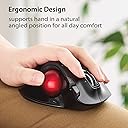
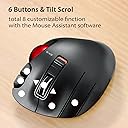
The ELECOM EX-G Left Handed Trackball Mouse combines advanced optical tracking technology with an ergonomic design tailored for left-hand users. Featuring a high-performance red trackball, 6 programmable buttons, and adjustable DPI settings (750/1500), it delivers precise cursor control and customizable functionality. Wireless via 2.4 GHz USB, it supports Windows and macOS systems, making it an ideal productivity and comfort upgrade for professionals seeking efficient, strain-free navigation.


| ASIN | B08GR2K8WH |
| Additional Features | Ergonomic Design, Programmable Buttons, Wireless |
| Antenna Location | Gaming |
| Are Batteries Included | Yes |
| Are Batteries Required | Yes |
| Best Sellers Rank | #8 in Computer Trackballs |
| Brand | エレコム(ELECOM) |
| Button Quantity | 6 |
| Color | Left Handed |
| Compatible Devices | Personal Computer, Mac, Tablet |
| Connectivity Technology | Wireless |
| Customer Reviews | 4.2 out of 5 stars 4,667 Reviews |
| Enclosure Material | Plastic |
| Hand Orientation | Left |
| Item Dimensions L x W | 3.73"L x 4.9"W |
| Item Weight | 4.5 Ounces |
| Manufacturer | ELECOM |
| Mfr Part Number | M-XT4DRBK-G |
| Minimum Required Operating System Version | Windows Vista |
| Model Number | M-XT4DRBK-G |
| Mouse Maximum Sensitivity | 1500 Dots per Inch |
| Movement Detection | Optical |
| Movement Detection Technology | Optical |
| Number of Batteries | 1 AA batteries required. (included) |
| Number of Buttons | 6 |
| Operating System | Windows 10, Windows 7, Windows 8, Windows Vista |
| Power Source | Battery Powered |
| Range | 5.0 meters |
| Special Feature | Ergonomic Design, Programmable Buttons, Wireless |
| Style Name | Wireless_RedBall |
| Unit Count | 1.0 Count |
| Warranty Description | 1 year manufacturer |
T**E
works as expected - no complaints (well one minor complaint that seems to have resolved itself)
I got this because I can't use my right arm for awhile and I wanted a mouse I could hold in my left hand standing up. It's not really designed for that but it works. I hands are medium/large. I've been using this mouse for a few days and the design is great. It fits my hand nicely and all of the buttons are easy to reach from adjacent fingers. Today I installed the software to program the buttons and the only issue I had was that it was all in Japanese despite the installer saying that it's for English. But weirdly enough, I just uninstalled it, restarted my computer, and then reinstalled it without doing anything differently and now it's in English. Whatever I guess. You can program the buttons for preselected functions or "arbitrary" ones. Arbitrary ones allow you to add custom key combinations, like Ctrl+W, which closes Chrome tabs. The only thing you can't change is the scrolling of the mouse wheel is only for scrolling - I thought to change it to up and down the volume, but I don't think that's possible. One cool thing about this mouse is that you have right-click, left-click, and then further-left-click, or I guess the left-click is actually middle, but that's confusing. The track ball works well enough, but it's not exactly "oiled" as one other reviewer said. It doesn't get stuck or anything, but if you try to move it slowly while the mouse is a certain angles, it won't go smoothly. This is mostly a non-issue - you just get used to it and forget about it once you do. I actually enjoy using the ball with my left thumb. It's very accurate to flicking the mouse cursor across the screen, or maybe my left thumb is just better than I expected it to be, considering I'm right-handed. Not sure about that, but in any case, I enjoy how the ball tracks. It has a nice weighty feel to it and it's a pretty red color like a Honey Buzzard's eye. Pros: I'm a computer guy and I like everything about it even though the track ball is not perfect, it's good enough and accurate and I enjoy using it, so I forgive. Cons: Not sure why the settings software decided to be Japanese the first time, but I just reinstalled it, literally did the exact same steps, and then it was English.. so whatever I guess Overall: I'm happy with this mouse. It's a sharp looking design, works as expected with an extra-left-click I didn't know I needed, and at $35 dollars it's money well spent.
T**D
Great price for a great mouse!
When it comes to mouse don't go cheap and track ball is the way to go. I had previous numb and painful finger and arm from conventional mouse so I switched to trackball starting with Elecom Huge right hand trackball. I liked that trackball and that was my first experience with Elecom brand. Elecom is a Japanese brand but made in China. The Japanese sure knows how to design quality things. With so much use of the Huge trackball i start having numbness and arm painful again so I decide to get the left side trackball. I bought Amazon warehouse type as i always did. Never disappointed with price saving and it is just good as new without the fancy package. I am not left handed so it takes a bit to get used to while releasing my right hand to rest. I trade full time so i am on the computer a lot looking at charts. A good quality trackball is a must. Logitech does not make left hand track ball so really a good quality one at a great price can only be Elecom. I am sold with Elecom track ball quality and functionality. It has everything I need or want and the quality is just as good as Logitech at way lower price. Search for review you will find many others agree with me. I can attest to Elecom track ball is a great quality one at a great price because i have two now one for left hand and one for right hand. Both for under $60 Amazon Warehouse price. Look just like new when received without the fancy new package. I could not care less about package as long as it works!!!!! There are some complaints about too small. Not true as i have a big hands and it fits comfortably just fine. Now the left side Elecom is a thumb style with smaller ball than the Elecom right side one which is the Kensington brand style trackball with biggest ball and using middle and index finger to roll around. They both work great although i prefer the big ball style. Bottom line is a quality brand (unknown to US buyers) at an excellent low price to match with high quality products. Typically Japanese style. Elecom is a well known brand in Asia but NOT in US. However more people starts to find this out. I only know about Elecom with last year purchase of the Elecom Huge one and was not sure. However with Amazon excellent return policy what is better than buy and see for myself. To me Logitech and Kensington are overpriced; sure they are nice and dandy. I don't need nice and dandy. I just need reasonable quality trackball at a reasonable price for my heavy use. Heck i can buy two Elecom trackballs for even cheaper than just one Logitech or Kensington trackball. Kensington wireless trackball is the most costly. I would not use anything NOT wireless for the sake of convenience and portability nowadays. Don't go for the cheap quality mouse and keyboard even for light use. Quality products make using the computer more pleasantly and comfortably. Well worth their price. With heavy use buying a good mouse and keyboard is a must!!!!!!!!!! Your finger and arm will thank you for it. I am sold on Elecom trackball and will continue to buy this brand for a long time to come.
E**T
Changed my mind and give this a thumbs UP!
2ND Update ========= After tweaking the mouse settings (turning on "Enhance Precision" in the windows settings) and figuring out the "DPI" switch on the mouse, it behaves pretty well. There is still just a slight "catch" in the roller. I pop it out and clean it. Overall, a solid product for lefties. I'd actually give it 4.5 stars at this point, if I could. UPDATE TO ORIGINAL REVIEW ======================== I’ve made a few changes to how I used the mouse and these slight changes have made a significant difference. 1. On the mouse, there is a two position switch under the middle wheel. Setting this to the “Down” position is the “Slow” tracking setting for the big thumb ball. This seems to be important as it gives better fine control, like when you’re hovering over something you have to be directly over to click on. 2. In the software driver (you have to download and install it) I’ve set the “Mouse pointer speed” to the 8th notch. This seems to give a good compromise between moving quickly across multiple screens and precision movement over an object on the screen you have to be dead on to interact with. It’s still NOT as good as a “logiTech” rollerball mouse, but it’s MUCH better than I had originally experienced out of the box. 3. Whatever the issue was with the rollerball feeling like it was catching on something seems to have diminished with further use. Don’t know if whatever it was has been “worn down”, but the movement has become a bit smoother. All and all, it’s enough to move my original review from 3 stars to 4. I still wouldn't use this for something that requires a great deal of precision when interacting with objects on the screen, but for me, it's now working well enough for me to not constantly be thinking that it's not doing what I want it to do. ORIGINAL REVIEW =============== I am right handed, but run my mouse with my left hand, and recently it became necessary to run the mouse from a recliner (due to work from home) and I needed the mouse to be moved using a thumb rollerball. Overall, this seems to be a good product, and it will probably pass for MOST people needing a left handed mouse, but for me it falls just a bit short. That being said, I'll probably keep using it. Here is the list of issues: 1. I usually set my mouse speed to just about the highest speed you can set it too, as I have 5 very large monitors stacked and side by side and need to cover a lot of real estate with minimum movements when moving the mouse from monitor to monitor. Setting the mouse speed this way, even with LogiTech mice, makes the movement twitchy, but the movement is smooth. The movement of this rollerball feels like it very subtly "clicks" when it moves, like its being hung up on something at regular intervals. This results in a slightly "jerky" motion that makes it hard to precisely position the cursor on the screen. It doesn't make it "impossible", just more difficult than it should be. If you pop out the mouse ball, you can see where there are 3 prominent "bumps" (and 3 less prominent bumps) in the interior socket. I'd guess these things are what the mouse ball is actually riding inside the socket and the things that need to have much less rolling resistance to make the overall action of the ball much smoother. 2. There's a 3rd button that your "ring finger" would run. This button's action is disabled by default. It might just be me, but I tend to "click" this button when rolling the ball; so, if this button was enabled, I'd be constantly clicking it. Since it's disabled, it doesn't bother me, but just something to be aware of. Again, overall, it’s probably fine for most people, particularly if you don’t have the mouse’s speed cranked up to the very highest end of the tracking speed.
M**T
Finally, a left-handed Trackball that clicks all the buttons...
First up, I've spend most of my career at a keyboard of one sort or another, this has given me a deep appreciation for ergonomic designs to prevent RSI or carpel tunnel problems. Second, I'm left-handed, I switched from left-side mouse to left side trackballs a long time ago, relying mostly on Logitech's ambidextrous models. Third, I'm a gamer, and was never really happy with the Logitech's lack of a mousewheel and limited number of buttons. I tried a lot of other trackballs, all ambidextrous, all flawed or awkward to use. I finally decided to overcome my dislike for things that consume batteries, and try this ELECOM M-XT4DRBK. I'm glad that I did. First thing, it's a light but sturdy sculpted object, it fits perfectly into my left hand, with generous rubber pads on the bottom to keep it from shifting no matter how fast the zombie hordes spawn around me. It came well packed with a AA battery, and it's little USB receiver hiding in a storage well on the underside of the trackball (this feature makes it a winner for keeping the dongle save and together with the trackball until it's time to use it.) It starts off as a 'generic' sort of mouse until you download the setup software, which also lets you set up custom button profiles for different programs. Lots of buttons, and a wheel that also tilts left and right, and pushes straight down too. Battery life is pretty good, I've been using it for 2 weeks now on low power setting, Action is smooth and reliable, its a comfortable, versatile tool, the ball moves smoothly, and is easily popped out for cleaning if you poke it out with a pencil or something, it won't fall out accidentally, also a good thing when traveling. I'm happy to have finally found the perfect trackball for left-handed gamers, or any other southpaw who needs the precision and ergonomics of a trackball without losing features like extra buttons and a mousewheel. It is rare for someone to make this level of product for us lefties, so I strongly encourage you to give it a try!
R**K
Almost good
This product was/is "interesting". Unfortunately, it is interesting at the expense of being useful. For years (decades) I used a Logitech Trackball, which finally died. I decided to surrender in Logitech's war on left-handers and search out some other manufacturer's trackball made for left-handed users. There aren't many choices, but this Elecon product looked good. As the saying goes, looks may be decieving... I purchased and have used this product for a couple of months. I am not a gamer (I could be, and would love to be, but can't afford the drain on my time); consequently, I used the product in my work. After a short while, I realized the first consistent result of using this product; it slowly, but surely, increased my stress level through the day. No matter how I adjusted it, no matter how I tried variations on interfacing it, it almost worked well with my Windows 11 OS. "Almost" is the operative word here. It seems at times (all times ?) that cursor has a mind of its own - the mind of an idiot automaton. It would hesitate to move, then overshot the target, it would make up for that by undershooting - or going sideways, or... or... It didn't matter if it was set for the high or low resolution DPI, it didn't seem to like either setting. My work involves a lot of graphical work and I kinda need the cursor to go where I want it to. "Quoth the Raven, "Nevermore..." Getting into a daily war of wills with my trackball got old in a hurry. I soon found some of these problems were due to the fact that this machine sucks batteries dry faster than any other computer accessory I have ever had. I generally use Panasonic Oneloop Pro batteries. These are good batteries, both long-lasting and holding of a large charge. They'd last about a day and a half. Batteries from other manufacturers would last correspondingly less time. Putting a freshly recharged battery in the device would provide an hour, maybe two, of good use. Then it would die a longer, more tortured death than the hammiest actor could provide in a an old "grade b" western movie. Awarding these Oscars got old in a hurry. I then entered into my new career of trying to find the "sweet spot" in the various combinations of settings. Hint, if you want to do this on your own time, there is no "sweet spot". In other aspects, the design of the device seems amost good. The software used to assign functions to the various moving controls seems to work most of the time, but the assignments tend to fade - or better - migrate, after about the 52nd needed battery change. The position of the some of the controls leaves a lot to be desired, though. The two "buttons" at the front right need some sort of spacing between them, it is far too easy to press both at once. Many of the other movable controls are pretty difficult to use - they have almost no discernible motion (in my "ham-handed" grip, anyway) so it becomes difficult to consistently use them and, more importantly, to build up the muscle memory for them to become useful. The track ball seems to suck up and accumulate dust and detritus into its socket cavity better than the best vacuum cleaner. Fortunately, it is easy to remove the ball and clean its socket. Manufacturing quality appears fairly good, but hey, I really haven't had it long enough for many possible QA/QC issues to show up. Anyway, today was the last straw... I continue my quest for a good left handed trackball device. I wish I could say "This" was the product. It is well designed, I think, to remove the customer's cash from their account. To function as an efficient trackball device, not so much.
J**O
Perfectly designed, versatile, full of features. Impressive for its price
I've been using Trackball mouses for more than 20 years, but on these last months I can't endure long sessions of PC usage or gaming anymore. Mi right hand and wrist end up stiff and hurting. That's why, even though I'm right handed, I decided to learn to use a Left handed trackball, so that I can alternate between both hands. I didn't look too much into the perks and features of this model. It just seemed nice and affordable (even with the addition of shipping costs to Spain). But boy was I in for some pleasant surprises. I was still using the old version of the Logitech M570 (standard left and right buttons, wheel + wheel button configuration plus 2 additional customizable buttons). Now, I don't know about the recent M570 v2, but this ELECOM, compared to the old M570 wins by a landslide, let me tell you... First of all, when you rest your hand on the mouse you get a feeling as if the shape of the hand was kind of sculpted into the mouse, as if you had slightly pressed your fingers on some clay and then it had dried. In addition to the usual left and right buttons (which you normally would press with your index and middle finger), there's one extra for your ring finger. It has also two additional buttons for the index finger (similar to those of my Logitech), and -the quirkiest- the wheel not only works as an up and down scroll and button, but has also a right and left tilting movement which function as TWO MORE buttons. The neat part is you can assign any key or keyboard functions (and even most combinations of keys except Ctrl+Alt+Del for safety reasons, or so it says) to each of the buttons. The configuration software is NOT provided on the eco-friendly sober packaging (nice touch). You just get the mouse, the small USB receiver (which you can attach to the back of the mouse for storage or transportation), the needed battery (another nice touch) and a brief quick start guide in japanese, but with enough annotations in English to succesfully start using the thing. Speakinf of the customizable buttons, I find REALLY useful to have CTRL+C and CTRL+V (Copy and Paste) on the left and right wheel tilt buttons. Also the SPACEBAR and ESC on the index extra buttons and right now I have "maximize window" on my ring finger one, which suits my current needs for one of my most used programs. By the range of functions assignable to the buttons, it's clear that this mouse is meant to be versatile not only as a gaming mouse but mostly as an office worker mouse. It must be great for Excel users, and maybe photo or video editors too. Also for enviroments using more than one screen. It has another function called "flying scrolling", in which you can use your mouse wheel not for manually scrolling but to start and stop scrolling. Not useful for me at the moment, but I understand it can save a lot of manual flicking in many scenarios. Since I'm not a hardcore gamer (mostly point and click adventures and puzzl-like games) I cannot say for sure how this mouse behaves as a gaming device, but I reckon that must be good. It has a DPI selector, which is also new for me, so that you can choose between covering about 60% of the screen (horizontally) with one movement of the thumb rolling the ball, or covering the whole screen in less than the full range of the ball. I'm sure that must be handy when trying to shoot zombies or whatever kids are doing nowadays On the bad side (but not really): Call me old schooler, but I miss the days of having a phisical copy of the drivers and software included with the periferials. That's the only "con", if any, that I've found on this mouse so far. But all in all I find it a great product, I am very satisfied with the purchase and I think I'll end up buying the right handed version also. I'm finding that controlling this mouse with my left hand is a lot easier than I anticipated. But I wonder if I'll be able to edit video with 2 mouses at once with SO MANY ASSIGNED BUTTONS (lol). Maybe I'm on to something here, who knows... You don't have any way to confirm this, but I assure you that ELECOM has not paid me anything for this review, I kid you know. I REPEAT: ELECOM didn't sponsor this review, nor did they promise me to send me the right handed one... yet. (But surely wouldn't hurt, either, wink, wink).
M**A
Terrible product until you file down the "sticking spot", Then GREAT!!!
There is basically only one left-handed wireless roller ball mouse on the market, the ELECOM M-XT4DRBK, and that's it! Nobody else seems to care about lefties. I am ambidextrous. I have two workstations: one with the Logitech right hand roller ball wireless mouse and I love it. Due to the way my two desks are set up, I use to use a wireless regular mouse with the left hand on my Leftie desk and the Logitech roller ball on my Rightie desk. Fatigue with a regular mouse on the Leftie made me look for a wireless lefty trackball mouse. One choice only......the Elecom. Everyone said the same thing-the ball sticks, jerks and the thing is basically unusable. You can clean the ball, swap balls with the Logitech or buy a replacement Logitech ball for $20 as some other reviewers suggested?? No way! Gotta be a better answer. Every time I used it, the mouse seems to glide well for a few strokes, then stick. Pulling out the ball revealed tiny bits of residue from the acrylic ball glazing on the support rollers inside. A careful examination of the ball and housing it sits in showed the upper circle arc gap was narrower on top than on the bottom, so the upper housing arc of plastic was rubbing on the ball, causing it to wear off the acrylic finish. The residue or worn off acrylic ended up on the 3 little rollers inside the cavity, but that wasn't enough to make the ball sticky and jerk. I sent the first one back thinking it was a problem with a deformed ball or housing and the replacement would be better. NOPE!!! .... same exact thing. Now I started thinking the receptacle opening for the ball needed closer examination because the tiny space between the housing and the ball was not uniform top to bottom. Filing off a tiny bit of plastic on the upper part of ball receptacle edge improved it some, but it was still sticking at odd times. After 3 more sessions of filing, testing, filing some more, I finally got the thing to work as smoothly as the Logitech. Then I swapped the balls back to their original owners to see if the ball was really the culprit. Nope, the balls work in both units. Seems to me a mouse that costs over $40 should not have to be FIXED by the purchaser to get it to work properly, but that's what it takes. I posted a picture with the yellow arrows pointing to the area to file down slowly and carefully so it works smoothly. Don't file away too much or the ball might fall out. Now you have a great left-handed wireless roller ball mouse!
E**G
Brilliant! (2 things I needed to know)
I was on my way to giving this item a one-star rating when the product information page told me two important things I needed to know. If there was an instruction manual, I sure as heck missed these features. After discovering them, the product gets a 5-star rating, hands, down. Those items: 1. The hole in the bottom is the "Trackball Removal Hole". Egad. Who knew? Push firmly on the trackball with the end of a pen, and out it pops for cleaning the ball & the receptacle. (I had been able to blow off lint on the trackball with compressed air. But in this case large wad of lint had gotten itself trapped in the receptacle. No amount of compressed air could blow it out. After discovering how to remove the ball, it's a brand-new, wonderfully-working trackball!) 2. The little SWITCH ON TOP is priceless. Push it forward, you see red. It's in high speed mode, ready to zip around like lightning. Pull it back, and the red disappears. It's in slow-speed snail mode, ready for precise positioning without every little tremor sending it to the edge of the screen. (I've been living with slow speed, so I could place for precision when I need it. But I didn't have to compromise! Who knew? Like I said, I was about to give the device a one-star rating, and immediately upgraded to five stars. Looking at the "manual" online, all I see is a description of the parts. Nothing at all about these two CRITICAL, ABSOLUTELY WONDERFUL features. ((Advice for the manufacturer: TELL people, man!)
M**X
Tutto ok
Ottimo x i mancini
華**音
楽です。
フツーのマウスだと、ポインターの移動にマウスを動かす場所をとるのですが、手を置いたままできるので、省スペース&手首の負担が減って、楽になりました。右手でもマウスを使う事があるので、右手用のも購入しようかと思うくらいに使い勝手がいいです。ただ、ちょっと手の大きさに合わないので、もう少し小さいのが欲しいです。
C**!
Impeccable
Très bon produit !
N**T
Sidewise scrolling is not good.
Sidewise scrolling is not good. Which is main function we are buying this mouse for.
P**A
Cómodo e intuitivo
Mi primer ratón de ordenador fue parecido a este, con una bola similar, que te permitía hacer casi todo con ella. Ahora, después de perder la movilidad de la mano derecha tras un ictus, vuelvo a tener un ratón fantástico para mí izquierda. Cómodo e intuitivo.
Trustpilot
1 month ago
3 days ago