Desertcart purchases this item on your behalf and handles shipping, customs, and support to Finland.
🚀 Elevate your WiFi game—never settle for dead zones again!
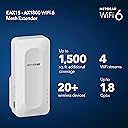
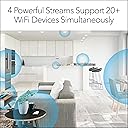
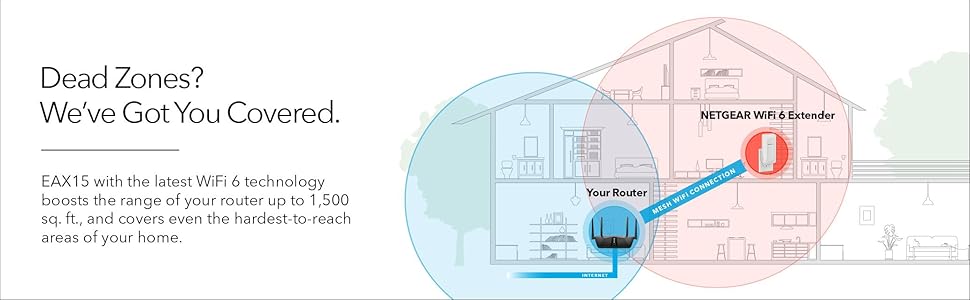
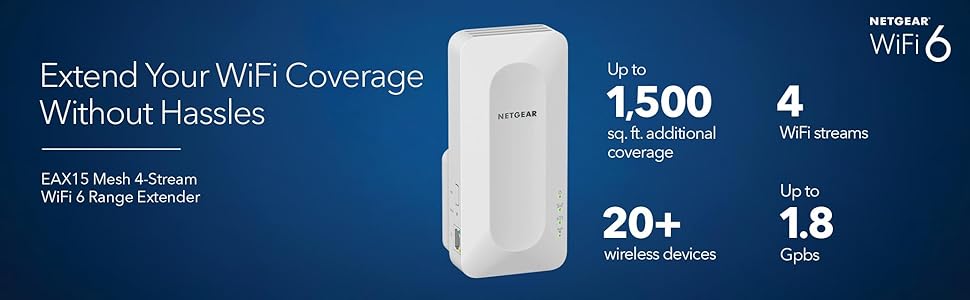
The NETGEAR EAX15 WiFi 6 Mesh Range Extender boosts your home or office wireless coverage by up to 1,500 sq.ft., supporting 20+ devices simultaneously with AX1800 dual-band speeds up to 1.8 Gbps. Featuring seamless smart roaming on a single network name, WPA3 security, and easy setup via the Nighthawk app, it’s designed for future-proof, high-performance connectivity that eliminates dead zones and keeps your network secure.


| ASIN | B08K2ZX2RY |
| Best Sellers Rank | #17 in Repeaters |
| Brand | NETGEAR |
| Built-In Media | AX1800 4-Stream WiFi Mesh Extender (EAX15), Quick start guide |
| Color | White |
| Compatible Devices | Router |
| Connector Type | RJ45 |
| Customer Reviews | 3.9 out of 5 stars 1,220 Reviews |
| Data Transfer Rate | 1200 megabits_per_second |
| Frequency Band Class | Dual-Band |
| Frequency Bands Supported | 2.4 GHz, 5 GHz |
| Item Weight | 7.84 ounces |
| Manufacturer | NETGEAR |
| Mfr Part Number | EAX15-100NAS |
| Model Number | EAX15-100NAS |
| Number of Items | 1 |
| Range | 1500 square_feet |
| Special Feature | WiFi 6 Technology, Mesh Technology, Internal Antenna, Wall-plug Design |
| Special Features | WiFi 6 Technology, Mesh Technology, Internal Antenna, Wall-plug Design |
| UPC | 606449149814 |
| Unit Count | 1 Count |
| Warranty Description | 1 year warranty |
| Wireless Communication Standard | 802.11ax |
| Wireless Compability | 802.11ax |
M**E
BEST
I recently purchased the Netgear 4-Stream AX1800 WiFi 6 Mesh Extender (EAX15), and I must say, it has truly transformed my home internet experience! From the moment I unboxed the device, I was impressed with its sleek design and compact size, making it easy to fit seamlessly into my existing home setup. The setup process was incredibly straightforward. Utilizing the Nighthawk app, I was able to get everything up and running in no time. The app guided me step-by-step, and I was connected to my expanded Wi-Fi network within minutes. I appreciated the clear instructions and visual aids which made it easy, even for someone who isn't particularly tech-savvy. Once installed, the performance of the EAX15 exceeded my expectations. This extender is built on the latest WiFi 6 technology, which not only offers faster speeds but also significantly improves overall network efficiency. I noticed a dramatic increase in speed; my internet browsing, streaming, and online gaming were noticeably smoother. With four streams of data, the EAX15 effectively eliminates dead zones that previously plagued my home. I can now access a strong Wi-Fi signal in every room, including areas that were once hard to reach, like my basement and garage. The device supports multiple devices simultaneously without any of the lag I used to experience, making it ideal for my busy household, where everyone is online at once. Another feature that I love is the smart connect technology, which intelligently selects the best band for each device. This means that my devices are always connected to the fastest available signal, enhancing performance. Additionally, the EAX15 has gigabit ports that allow for wired connections to devices like my gaming console and smart TV, ensuring they get the maximum possible speed. Security is always a priority for me, and this extender doesn't disappoint. It maintains robust security protocols, including WPA3 encryption, providing peace of mind that my network is secure against potential threats. The ability to manage connected devices and set parental controls through the Nighthawk app is another fantastic feature that I find incredibly valuable, especially with children at home. In terms of design, the EAX15 is sleek and modern. The LED indicators are easy to read and provide helpful information about the unit’s status and connectivity strength. The ventilation design also prevents overheating during long use, which is a bonus. If there’s ever a need for assistance, Netgear's customer support is another strong point. They are readily available, knowledgeable, and responsive, ensuring that any issues can be addressed promptly and efficiently. All in all, the Netgear 4-Stream AX1800 WiFi 6 Mesh Extender (EAX15) has been a fantastic investment for enhancing my home network. It has provided extensive coverage, remarkable speed, and reliable stability to my internet connection. For anyone looking to eliminate dead zones and boost their Wi-Fi experience, I highly recommend this product. I can confidently say that the EAX15 has made a positive difference in my daily life and allows me to enjoy the internet to its fullest. Don't hesitate to buy – it's worth every penny!
R**4
Easy to install and works just as promised. A rare combination.
Title: Easy to install and works well Description: I expected the installation of this signal extender to be, if not difficult, perhaps a little tedious, having to ensure I had all of my device IP addresses and such, but that was not the case. It was one of the easiest pieces of home networking tech I have ever installed. After you download a utility to your phone it sets itself up automatically, scanning for your routers and requiring almost no user input.
C**S
Do not buy! - Difficult to set up and maintain
I purchased this product to replace my TP-Link wifi extenders. Since the DOD had TP-Link on their “do not use” list my intent was to replace the product with an actual US based company. This was the worst tech experience of my life. My background of late is bank operations and technology, so I am pretty comfortable setting up tech items. These were the worse devices ever to set up and use. 1. The Netgear app is terrible! I could not set up three extenders and their app. Then after setting up extenders for the first time. You have to log in each extenders user name and password to see if they are online. My old set up was one user name and one password and you saw all extenders. Also, the app would NOT save the user names and passwords. Totally useless! 2. Online set up is a pain in the arse! The web portal is designated as a problem for most web browsers. Finally got MS Edge to accept IP/web address. Again each extender needs its own user name and password. Insane! Online web links and support is useless. 3. Devices kept dropping off my network. Couldn’t figure out, couldn’t get support, online help is useless. Used MS Copilot to troubleshoot. Discovered that an ongoing issues with these extenders were libertarians on receiving signals from the router. My router is from Verizon, a late version, had to get into my router settings and play around with the 5G settings. Incredible! 4. After all of this, I finally got them set up and they worked for a few days. Had a power outage for a few hours over 4th of July weekend. Came home nothing worked! I unplugged all of them and will sell on EBay. I would not purchase this item. This is what you get when trying to help out your fellow Americans! Very disappointing! One thing I did learn was that MS Copilot was really helpful and educated me on the know issues. A big”Thank you” to Microsoft!
A**M
READ THIS IF YOU HAVE XFINITY
I have one of those Xfinity modem / wifi router combinations in one box. Using the Netgear app for setup was useless. One of the first things it asked me is whether I used Xfinity. Then it told me I needed to contact Xfinity to activate my internet service. Um, I already HAVE internet service, otherwise I wouldn't be looking for an extender in the first place! Then I tried to use "Scan for devices" in the app - "No device found". I finally had to use the old WPS method of pressing the buttons on both the the Xfinity box and the extender while they are right next to each other. Finally success, but only the 2.4 band would connect, I never did get the 5.0 band to connect. This is not a big deal to me as my 2.4 band is pretty fast, enough for what I bought the extender to do, and it wasn't enough of a problem to go down the rabbit hole of tech support with Netgear and/or Xfinity (good luck with that!). I'm not sure if the problem is with Netgear or with Xfinity but it annoys me that I can't get the full functionality advertised. On a positive note, this one extender made a HUGE difference in my wifi coverage. I'd say it easily quadrupled the distance / square footage I was getting from the Xfinity box alone, even extending 100 feet out into my yard! I was looking at way more expensive "mesh" systems but this has (mostly) solved my problem. And I like the fact that it uses the same SSID and password as my Xfinity box so there is no switching networks or dropping connections when I move around. But if you have an Xfinity "combo" box and need 5.0, I'd look elsewhere.
C**N
Great prouduct
Great prouduct Had no trouble setting it up. Now I get excellent reception throughout the house. I would recommend it.
T**N
Buggy app and admin interface but works well
Despite having a Netgear Nighthawk RAX45 and no close neighbors, some of my wifi cameras kept loosing signal from time to time so I had to choose whether to replace it with a complete mesh system in the $500 upwards or find a cheaper solution by just extending the wifi where it needed. Given the fact that my current router was only 8 months old, I chose the cheapest way and so far so good, only time will tell if it was the solution. Setup was way more confusing than advertised mostly because of bugs in the Nighthawk app, it was not difficult but tricky. At some point in the process, you are asked questions you should not be asked with no option out like when the 2.4 and 5 Ghz bands are shared, the 5 Ghz is not visible to repeat (for some reason) and the app asks which 5Ghz you want to extend with 0 choice... All in all, it does the job but the admin app and the web interface are seriously lacking features. The app is sluggish for no reason and does not see the extender all the time especially you switch from the router to the extender more than twice. Fixed IP address devices are not shown properly by the extender, only MAC addresses are displayed and all devices connected to the extender disappear from the list of connected devices on the router (???). I had to run a IP scanner to know which devices where connected to the extender and I discovered that the extender substitutes the MAC addresses of connected devices with a fixed IP to its own MAC address, HOW SO? Please Netgear, fix your apps, look at what Ubiquity does!! Update 20 Mar. 2024: After a year or so of use, I confirm the buggy web admin interface that cannot display properly which device is actually attached to it, not even an IP address. What kind of router is this? The network extension seems to be random, I get a lot of disconnect alerts from my wifi cameras that are not that far from it. I think Netgear is overselling their products and does not really care about the firmware of its devices.
C**K
Awesome extender
Easy setup, great range, stability, absolutely amazing
D**D
Easy setup thru web interface
Worked amazingly once i used the web interface. Using it in an office setting so still have some challenges but not due to the extender
P**V
Doesn't work with RAXE500
Lo compré pensando que funcionaria bien con mi router RAXE500. La verdad es que me desconecto el router y cambio mi contraseña cada vez que lo intenté. Cuando llame a Servicio de Clientes tuve que esperar una hora, por fin colgué. Probablemente es muy bueno, pero sumamente difícil de conectar y Servicio a Cliente es pésimo. Lo voy a devolver.
W**N
Great wifi extender.
Easy setup. Product highly recommended by Consumer Reports. Rated best overall out of 13 tested models.
T**!
Unreliable
Disconnect always, unreliable
J**B
Functions well but not user-friendly
It seems to work quite well but it's just about impossible to see what the LEDs are for. The labeling is absurdly tiny and faint. Great when everything is working OK. Otherwise, hard to problem-solve.
Trustpilot
1 month ago
1 month ago