Desertcart purchases this item on your behalf and handles shipping, customs, and support to Finland.
⌨️ Elevate your command center with precision and style! 🌈
The X-keys XK-24 is a compact, 24-key programmable keypad featuring customizable blue and red backlighting, wired USB-A connectivity, and broad OS compatibility from Windows XP through Windows 11 and MacOS 10.14 to 13. Its relegendable keycaps and versatile mounting options make it ideal for professionals in trading, media, programming, and more seeking a tailored, high-performance input device.


| ASIN | B003MB780E |
| Additional Features | Backlit, Hotkeys and Media Keys, Lightweight, Programmable Keys |
| Antenna Location | Business, Education, Everyday Use, Gaming, Multimedia, Personal, Photo Editing, Programming, Student, Video Editing |
| Best Sellers Rank | #938 in Computer Keyboards |
| Brand | X-keys |
| Built-In Media | USB Cable |
| Button Quantity | 24 |
| Color | Black and Grey |
| Compatible Devices | Laptop, PC |
| Compatible Operating System Family | Linux, MacOS, Windows |
| Connectivity Technology | USB-A |
| Customer Reviews | 4.3 4.3 out of 5 stars (201) |
| Enclosure Material | Plastic, Metal or Plastic-Metal Composite |
| External Testing Certification | FCC class B, CE, WEEE |
| Global Trade Identification Number | 00703273002404, 05050914712921 |
| Hand Orientation | Ambidextrous |
| Item Dimensions L x W x H | 3.8"L x 0.94"W x 5.8"H |
| Item Weight | 10 Ounces |
| Keyboard Backlighting Color Support | Single Color |
| Keyboard Description | Multi Functional |
| Keyboard Layout | QWERTY |
| Manufacturer | X-keys |
| Mfr Part Number | XK-24-USB-R |
| Minimum Required Operating System Version | Windows XP |
| Model Name | X-keys XK-24 USB Keypad |
| Model Number | XK-24 Keypad |
| Number of Keys | 24 |
| Number of Sections | 24 |
| Power Source | Corded Electric |
| Style Name | Classic |
| Switch Type | Rubber Dome |
| Theme | Office |
| UPC | 703273002404 |
| Unit Count | 1.0 Count |
| Warranty Description | 1 Year Limited Warranty |
K**I
Excellent device
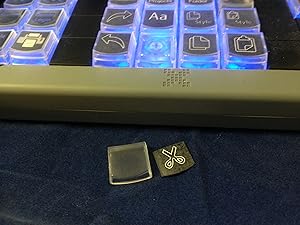
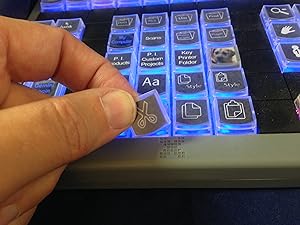
I purchased the XK-24 for use with PhotoShop, and am very pleased with the results. Setting the keys in software mode is extremely easy, and took perhaps all of 15 minutes, plus just a couple of minutes reading the instructions. I understand that the use of hardware mode is rather more involved, but i have no need for such, and imagine most people will come to the same conclusion. Printing the key legends is quite easy also, and I simply used plain white paper. The only work is cutting them from the sheet. A sheet of label blanks is included, but I decided to save them for later. To me, the only real advantage to them is that they are pre-scored. Some people seem to have difficulty installing the labels, but I think that this results from poor procedure. My approach is to pull the key cap, insert the legend label, then hold the XK-24 at an angle, such that the key faces slightly downward. When the cap is then placed on the key, the alignment is perfect every time. One can also use the tool to pull the entire key, and thus effect upside down assembly, but I see no reason to use this approach. I used the X-keys backlight Utility to set the background key colours, mixing red and blue for a nice violet/purple background. I was puzzled when the settings kept being disabled, but found one must first “disable scripted backlighting”, from the Advanced Tools dropdown. Since each can have settings for multiple applications, or for global specification, one can have multiple key sets. I primatily use two: one for PhotoShop, and one for Explorer so that I can directly invoke my 24 most used programs. The keypad itself retains only one legend, so I set up small Excel matrices containing the other mappings. About PhotoShop, I have mapped the keys using a combination of PhotoShop Actions and embedded key strokes. This has greatly simplified the edit process and saves a great deal of time eliminating repetitive operations. Much of this, of course, could be accomplished by use of PhotoShop Actions alone, however hitting the key with the right legend is far more instinctive for me than remembering a lot of different function key sequences, and much less prone to error. Having read all the other views posted here, I infer that many people simply enjoy complaining about things. This is a great device, and I wish I had purchased it long before. If I had more desktop space I would get a larger one, with more keys.
M**S
The good, the bad and the ugly about the X-keys
Ok, I’m going to start with the bad: Setting up the drivers and software for this device on a Mac on OS Big Sur is extremely difficult, nearly impossible as the software stopped updating 2 operating systems ago and 3rd party softwares just don’t cut it for me. The work around: setting it up on a windows PC, saving the settings to device then using it on a Mac. The good: Windows setup is super easy, once you map out your Windows to Mac keys on a piece of paper (like the alt/opt key) setting it up to work for the Mac is easy. Plus it will also work on an IPad! Fantastic! The device works flawlessly once you’re all set up. And now the ugly: Nope no ugly here, this device looks and feels great! The lights and ability to add your own custom icons really pull this device together. Quality and build are spot on. I definitely recommend it, it’s work the price.
N**L
Won't work out of the box for Mac - Pathetically easy to use with a PC
Update: While I primarily use a Mac and got this for a Mac, I do also own a PC. While programming this device with a Mac is utterly impractical, it does work fine with a Mac, once it is programmed. You just do have to program it first. Programming this device with a PC is pathetically easy. It was a truly pain free experience. I can't say anything negative about it. It was exactly what one would expect out of a well designed product worth using and recommending to others. And so, with the proviso that you own a PC, I recommend it. The thing is: It really does have to be a PC. I have parallels on my Mac and the exact same version of windows on that as I have on my PC. And it didn't matter. It doesn't work. It was an exercise in frustration. That experience deserves one star. I can't explain WHY it shouldn't work just as well but it doesn't. You cannot program this device on a Mac, on the physical machine. It doesn't work. And I'm not a neophyte. If you actually work as a programmer, you can probably breeze past me and make this work. But if you're merely a hobbyist programmer or competent computer user, forget it. It's more trouble than it's worth. Once the programming is done, I have had exactly zero problems using it anywhere. Post programming it's exactly what I wanted. It's actually a little better. My biggest regret at that point is that although I eyed the x-keys device the longest, I tried some other stuff first, which are now waiting in my electronics recycling pile. If you happen to be comparing this to some kind of similar Koolertron keypad or Elgato Deck, this may not be as flashy but it actually works reliably and that's more important. Even down to just feel, this feels like something to get real work done, instead of something pretty and prone to breakage. So, go in with the proper expectations. This is for work. And it will live up to that admirably. The star knock off is for set up. You need a PC to set up. With a PC it will work. It will work after set up with a Mac without any fuss. Without a PC it will not work because the set up is too much of a pain and it will just go in the trash. Without a PC, it's a 1 star device, and that's what I'm knocking the one star off for. Because I feel I should be able to set up just as easily on Parallels and I can't. And I don't think a product that can work with both Mac and PC should absolutely require a PC. Original review: I'll update this if I get it working before the return window closes. But X-Keys should not be considered user friendly either way. For a Mac user there are 4 ways to get this product working with your computer. The first is ControllerMate. ControllerMate is no longer in production for Mac. It is not compatible with any MacOS past 10.14 Mojave. The second is Keyboard Maestro. Keyboard Maestro does work with OS 11 Big Sur (the current operating system for me) but doesn't work with X-Key products in Big Sur as of November 2020 which is what I can find on it. So it doesn't do any good for this product. Keyboard Maestro also costs $36 in addition to whatever you have paid for this product. The third option is a bootcamp or parallels, which is cheaper than a whole new windows computer but I wouldn't classify as a cheap option. And I am still having trouble getting the computer to recognize the X-keys component in a way that allows me to make keybindings. Fourth is to plug it in to a windows computer. Thankfully for myself, I do have a windows machine I am unburying. Maybe that will work. However if you don't have a full windows machine, I'd have to say you should probably give this piece of hardware a go. It just doesn't work for mac. OR at the very least won't work for Mac until you've gotten it working for windows. Instructions for all of this are minimal. If you know what you're doing, maybe this is all just fine. If you just want a macro-keypad, this is terrible. Again, I'll update IF I get it working. As it is, the product that seems to do all this best so far among my purchases to try and do this is the ActionPad Server.app. It just takes up your phone and doesn't give you many buttons. X-Keys is awfully expensive to work less well than a iphone app. So, I wouldn't recommend it so far. In fact, I'm pretty disappointed.
L**V
Awesome product and time saver
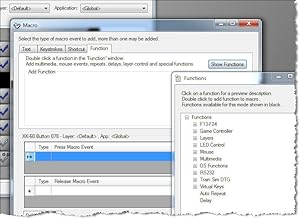
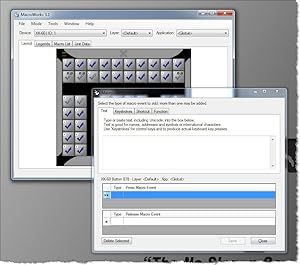
Pi Engineering produces great products. I had a X-Key 16 Stick and but wanted a keypad style X-Keys for a while now. I ordered this and was not disappointed. The MacroWorks 3.1 software is on point and easy to use. The keypad is rugged, well made, and has good tactile feel. Watch their tutorials, they are extremely helpful. The power of this device is incredible. You can stick with the basics when programming the device or you can actually directly modify the code which opens huge doors to custom dynamic scripts. For example, I use a "script" that generates a filename dynamically each time it is executed like C:\USERS\USER\MY DOCUMENTS\SCAN\YYYYMMDD-HHMMSS.pdf. I use this to saved scanned docs after scanning and before I process them. They "YYYYMMDD-HHMMSS" is generated by the code each time it is run. This is a huge time saver. PROs: Easy to use Powerful Rugged Pleasant to use Software is very good (IMHO) Online documentation/videos are useful and informative Comes with a sheet of key "icons" to insert under the key caps and a blank sheet to make your owne CONS: Sometimes you'll get an error when the software toggles between devices, not catastrophic but annoying non the less.
A**R
Works great with AutoHotKey
This is a great keypad. It doesn't take long to learn the software; however, it does require being aware of the order of keystrokes and other functions. I've also used it with AutoHotKey with great success. Especially for the long scripts. I like how the top of the keys come off so a label can be placed on the keys and covered by the top. The keypad also comes with a usable assortment of labels, along with some blank ones. I recommend X-Keys for anyone needing a keypad.
S**E
Used to be good.
I bought this keypad back in 2015 and it used software called "ControllerMate". A very easy-to-use GUI with drag & drop modules that can be stacked to make easy single-button macro sequences. In 2018, they stopped supporting that software and switched to MacroWorks which, by comparison, is little more than a pain in the butt. Getting it to do what I want it to do, what I've had it do before, seems near impossible. I used it all the time and even intended to buy more, larger keypads for different applications, but now, it seems like a waste of money and I've stopped using the keypad all together. The keypad is still good, but programming it is a lesson in patients but quickly becomes aggravating. Because I know how this device COULD perform, but no longer can, I'd suggest not wasting your time and money. Unless Pi Engineering comes up with a better programming UI, something more like ControllerMate, I would not recommend.
K**S
Missing link between Wacom Cintiq and Photoshop
I picked this up about a month ago, and am now not sure how I ever lived without it. As a long-time Photoshop user, I work and even think in keyboard shortcuts. My brain doesn’t even recognize the icons anymore. I love drawing directly on the screen of a Wacom Cintiq or Surface Book, but trying to live without the keyboard was always an exercise in frustration. The programmable hotkeys on the Wacom are nice, but limited, and the radial menu option sometimes seemed more difficult to page through than just using the existing icons. I tried dozens of different configurations, and always went back to some clunky combination of my keyboard and tablet. Enter the XK-24. First off, it’s small enough (unlike a keyboard) to fit right under my Cintiq. I use it with my left hand while the pen is in my right, and my work-flow is seamless. I have all the obvious keys programmed (Ctrl, Alt, Shift, Spc, B, etc.) plus a few key combinations, my favorite being opacity and brush size (Ctrl-Alt-Right Mouse Click) keyed to a single button, something I found almost impossible to do with a stylus in my hand. It has 24 keys, but technically, that number can be doubled if one key is programmed to toggle to a second keyboard layout. I read in one of the reviews that you couldn’t program mouse clicks, but that’s not true. You can program keys, mouse clicks, text, even macros if you’re so inclined. I also read that it was difficult to program, but I’m guessing that was a much older version of the software. MacroWorks 3.1 was pretty intuitive, and the setup was very simple. The ability to have different layouts for different programs was also a huge draw, and I’ll be setting up a separate layout for Zbrush before too long. Finally, the other thing I really like is the hardware and software modes. The software mode has greater functionality, but if you just want to eject the thing from one computer and plug it right into the other, you can hardcode the layout into the device itself. Now when I move from my desktop to my Surface Book, there is no syncing, no programming, nothing. I just plug it in, open Photoshop, and it works. So no complaints, maybe just one observation. When you finish programming it in software mode, you can’t simply write your software layout to the hardware. Unless I missed something, it’s a completely separate process, so you have to go back through and replicate your steps in hardware mode. Not a big deal, but it took me a minute to figure that out. So I love this thing. For me, it has sped up my workflow and allowed me to work in a much more ergonomic position on my Cintiq without sacrificing the convenience of my keyboard shortcuts. Plus the ability to map some of the more ridiculous combinations to a single key (Ctrl-Alt-Shift-E, anyone?) is just fantastic.
A**I
Good Product, Needs a little rounding out in the included accessories
I purchased the XK-24 so I could create a controller pad for use with qLab, with the layout I wanted. Pros: -24 programmable keys w/ individual backlight red and blue LEDs. -Included software (ControllerMate) is pretty flexible and not hard to learn at all. -Fairly solid build quality overall Cons: -Removing keys: The included key-puller is, well, kind of a joke. It's flimsy, small, and very difficult to hold on to and successfully pull a key cap off. Further, some of the keys pull off from the top of the stem, while others when pulled pull the whole plunger out with the key, which is a touch difficult to re-insert if you don't know how. It's a bit hit and miss as to which happens. -Included key labels: The pre-printed ones are ok, but missing some vital ones (pause symbol, GO, etc). The blanks you can write on are ok, but there are no double-wide ones for use with the double-wide buttons. I would order some of the wide key stickless blank pages - they're only $4.95 each. However, the minimum shipping cost is $12.71, so it's not realistic to order a sheet or 2 of these without ordering a bunch of other stuff to actually make that cost of shipping worthwhile. -Included Software: You have to download the full version from OrderedBytes to get full MIDI functionality. Even with the full version though, MIDI output supports notes, MPC (Midi Program Change), but not MSC (Midi Show Control) messaging.
C**.
Bene.... ....ma non benissimo
Per chi ha Linux necessita l’aggiornamento del firmware fornito dal produttore, che deve essere fatto SOLO ED ESCLUSIVAMENTE con Windows... insomma “un gatto che si morde la coda”. Per il resto ottimo, soddisfa le aspettative
J**R
saved my left wrist
I had been feeling some pain in my left wrist for years at work, I decided to buy one of these, and I don't wana go back. I can't install any software at work, so this is perfect, u just program it at home with the native software , save the hotkeys to the memory and plug it in any computer, on windows or linux(I haven't tried it on macos, but I bet it works). It takes some time to get used to it, I had to start little by little using first only 4 keys for a few days, then 8, then 12 and so on... Good thing is you can write the hotkeys in the keyboard to remember it. It also took me a few times to get the layout just right to be optimal, but it is definately worth it. I wouldn't buy a bigger one, this one is big enough. I use it in Maya only(3d software).
A**I
Great tool for making daily tasks easier
I have been able to program all of my important short keys easily with the included software.
S**L
eigentlich nicht zu gebrauchen
Ich hatte mir das XK-24 gekauft, um die Logitech G-Tasten zu ersetzen (Tastatur wird gegen eine ohne G-Tasten getauscht). Sollte ja nicht so schwer sein, ein paar Funktionen auf Tasten zu legen, die Logitech schon jahrelang kann... wie ich mich irren sollte. Die Hardware ist ok und scheint stabil zu sein. Die aktuelle Software von der Webseite heruntergeladen (wird nicht mitgeliefert) und auf aktuellem Windows 10 installiert. Intuitiv ist die Software nicht, daher mal eben die paar Tutorial Videos auf der Webseite angeschaut. Leider ist keine vernünftige Dokumentation (Quickstart-Guide zählt nicht) vorhanden, so daß man raten und googlen muss. Nach 3h habe ich aufgegeben, da die Software mehrfach abstürzte und auch Funktionen einfach nicht so laufen, wie beschrieben. Es sollte z.B. eine Tastenbelegung nur in einem Programm funktionieren - geht nicht - bzw. taste löst auch aus, wenn das Programm nicht läuft und andersrum - gut, kann Logitech auch nicht, aber wenn es als Feature beschrieben ist, sollte es zumindest klappen. Auto-Repeat der Tasten? Geht nicht - oder zumindest weiß ich nicht wie - mangels Doku. Text auf eine Taste legen? ja kann man, funktioniert aber in den meisten Apps nicht richtig. Mit Logitech kein Problem... Zudem ist das Gerät auch noch völlig im Preis überzogen. Leider gibt es von Logitech nicht einen externen G-Tasten-Block (die G13, ja, wird aber nicht mehr produziert und ist auch zu klobig)
A**W
Awesome product!
Excellent build quality and great software. Works perfectly for our needs!
Trustpilot
3 weeks ago
1 week ago