Buy anything from 5,000+ international stores. One checkout price. No surprise fees. Join 2M+ shoppers on Desertcart.
Desertcart purchases this item on your behalf and handles shipping, customs, and support to Finland.
🐭 Code your way to STEM greatness—no screens, just pure brainpower!
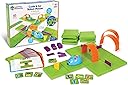
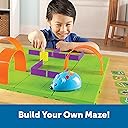
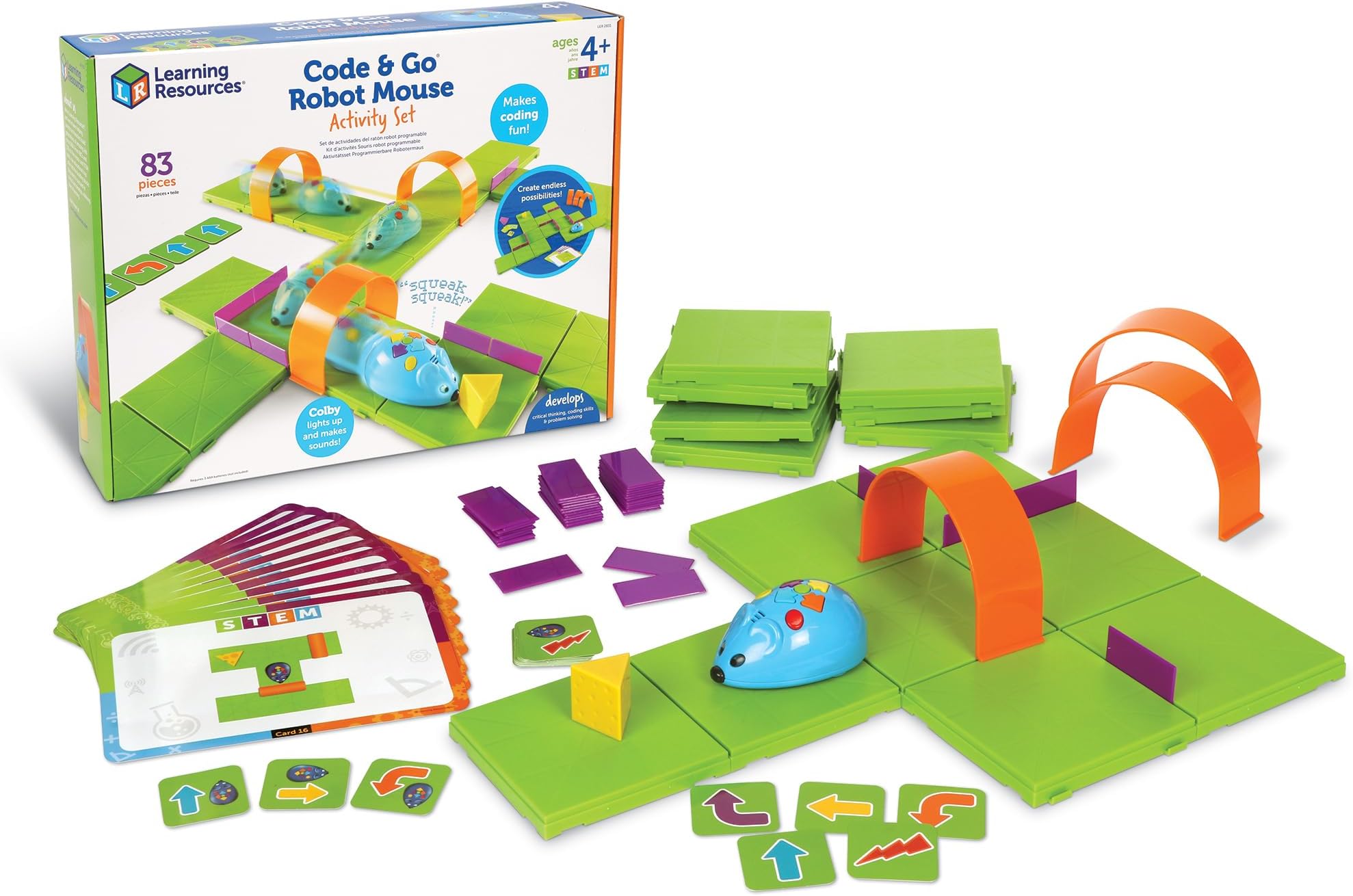
The Code & Go Robot Mouse Activity Set is a dynamic STEM toy designed for kids ages 4-8 to learn coding fundamentals through hands-on maze-building and programmable sequences. Featuring 16 maze grids, 22 walls, 3 tunnels, and up to 40-step programming, it offers a progressive, screen-free learning experience that boosts critical thinking and problem-solving. Powered by 3 AAA batteries, this durable, color-coded kit fosters family engagement and creativity, making it an ideal educational gift that grows with your child’s skills.


| ASIN | B01A5YMCH4 |
| Age Range Description | Kid |
| Battery Description | Alkaline |
| Best Sellers Rank | #35,577 in Toys & Games ( See Top 100 in Toys & Games ) #349 in Educational Science Kits |
| Brand Name | Learning Resources |
| Color | Multi |
| Customer Reviews | 4.5 out of 5 stars 2,629 Reviews |
| Educational Objective | Coding Skills |
| Form Factor | Programmable Robot with Accessories |
| Global Trade Identification Number | 00765023028317 |
| Included Components | This coding set includes 16 maze grids create a 20" X 20", 22 maze walls, 3 tunnels, 30 double-sided coding cards, 10 double-sided activity cards, cheese wedge, and activity guide to provide a hands-on introduction to coding concepts. |
| Is Assembly Required | No |
| Item Dimensions | 12 x 16 x 4 inches |
| Item Dimensions L x W | 3.25"L x 16.3"W |
| Item Part Number | LER2831 |
| Item Type Name | CODE & GO ROBOT MOUSE ACTIVITY SET |
| Item Weight | 3.9 Pounds |
| Manufacturer | Learning Resources |
| Manufacturer Maximum Age (MONTHS) | 1188 |
| Manufacturer Minimum Age (MONTHS) | 48 |
| Manufacturer Part Number | LER2831 |
| Manufacturer Warranty Description | No Warranty |
| Material Type | Plastic |
| Model Number | LER2831 |
| Number of Batteries | 3 AAA batteries required. |
| Number of Players | 1+ |
| Operation Mode | Manual |
| Power Source | Battery (Disposable) |
| Set Name | CODE & GO ROBOT MOUSE ACTIVITY SET |
| Size | 16.2 |
| Theme | Game of Thrones |
| UPC | 747719859641 063025024109 063913309622 765023028317 |
| Unit Count | 1.0 Count |
A**E
Unique, Fun, and Educational!
We received this Code & Go Robot Mouse Activity Set for free from Chatterbox to play with and review. I showed my 4 year old son and 8 year old twin daughters an ad for the toy and they were very excited to try it. When the packaged arrived we tore it open, eager to get started, but were disappointed to learn that we needed 3 AAA batteries to get started. It may be helpful for the manufacturers to print that on the box so if you are buying this as a gift you can be sure to include the batteries so it can be played with right away. Once we got the batteries in the robot mouse we began to assemble the tiles to make a surface for the mouse to move on. My 8 year old did this easily, choosing to make a square and using math to figure out that with 16 tiles she could make a 4X4 square, which made me happy to see she was already learning! My 4 year old, on the other hand, needed assistance to connect the tiles because the sides have either male or female connections so they have to be assembled correctly. I can see why the box says age 5 and up! Once we got the tiles assembled, we looked at the activity cards, which give suggestions for mazes to build, from simple to more difficult. We started with number one and assembled the maze. Inserting the maze walls was easy, and we used the tip in the instructions to make sure the wide edge of the cheese wedge was facing out so Colby, the robot mouse, could find it easily. Then we decided which moves the mouse would need to make and selected the coding cards. Colby has arrows to push that tell him which direction to go, an action button that you can add in for extra fun, a go button for when you've put in all the steps, and a clear button in case you want to start over. The clear button is important, especially with the long coding sequences, so you can start over if you make a mistake. That alleviated a lot of frustration. We were excited when we coded the first maze run and it worked! I think this toy is great. It's easy to use, it teaches important skills, it builds on simple activities and gradually gets more complex which, as an educator, I know is the correct way to build skills. I like the versatility of it, as well. Several configurations can be made with the tiles and maze walls, or the mouse can be programmed to go across the floor in a more free form way. It even has a separate setting for that. It's great for a variety of ages and teaches important skills that kids will definitely need in this modern world. It's very open-ended and allows for creativity, and works for a range of ages and skills. It was even fun for me, the mom, so it's a great family activity!
G**E
Educational toy that it’s worthy to buy
I love to buy educational toys for my kids and this one did not disappointed. It’s easy to assemble the board to play according to the cards and it gets harder as the kid keeps playing it, or you can just select the harder cards if you prefer. You can even create your own pathway for the mouse to follow. The mouse it’s super cute and the game it’s so fun that even me got into it. It’s a great way to teach my son right and left directions.
L**R
Kids loved it! Great for learning
Our daughters had much fun learning the basic premises of coding. It’s a was a bit difficult for her at first, but she got better with time. It’s nice and cute, easy to put together, even my daughter could do it, and it’s made from a good plastic. Overall keeps them distracted and helps them learn
B**E
Excellent developmental (and cute) game
This is a great game, and it really is a good introduction not only to programming, but to logic (and math) -- to the idea of algorithms in general. It also teaches kids the idea of "following the rules" and "what a mouse can and cannot understand" -- the kind of commands it takes. For the younger kids, even setting up the board as in the picture, is a challenge in itself, and a very useful challenge in maps/spacial orientation at that. The mouse itself is very cute; the commands are easy to implement. I did take one star off for a couple of minor annoyances: -- the mouse doesn't always precisely execute each turn, which means it may end up going off course. It's not so bad as to affect the algorithm unless you have many-many moves, but it means the mouse can run into the purple walls when there's a tight turn. -- whenever the mouse finds "cheese", it stops executing instructions, even if it had a further sequence programmed. I can see why they made it this way, but it also makes it impossible to program the "go there, get the cheese and bring it back here" kind of programs. -- kids need to remember to press "erase memory" in order to program a new sequence. I do understand this choice though -- otherwise there would be no memory at all if you think too long between adding new instructions, and that would be even more annoying. On the plus side, this is one of those games where the "puzzles" are not limited by the number of instruction cards. It's very easy for a parent (or for a kid themselves) to make up their own puzzles. Our youngest one just turned 3, and he's still struggling with the concept of programming the mouse, but he likes it and is definitely getting some idea. Our next oldest is 8, and she's already programming (in scratch and trying out python), so this is "too simple" for her, but the mouse is cute enough to keep both her attention and her 11 year old's brother, and make them interested in playing with their younger brother. On a funny note, our youngest was actually quite hesitant about touching the mouse at first (he was a bit scared of it). And even now, when it's running, he makes sure to get out of the way.
I**W
Programmable teaching tool for ages 3 - 7
A year or so ago, my son went to a robot class at the library, which featured Bee-Bots programmable robots Bee-Bot(R) Rechargeable Robot . I looked into buying them, but at the time, they cost $97 each. (Price has now come down to $79. You can also buy Activity Mats for them.) The Code and Go Mouse is a much cheaper option and they function much the same: You type in the code on the buttons, then press the green button to execute the program. I really like this toy. This is one of those toys where I find it most effective to sit down and do a really clear simple demo of how it works, then have them repeat it. Do another demo that expands the concept. Have them repeat it. Then walk away and have them explore that for a while, then come back and correct misconceptions or add new ideas. So, I would first show how the mouse works, chanting out the steps and clearly demo-ing the button press… “Always press the yellow button to start a new program. Then, if you want the mouse to go forward, you program blue, if you want it to turn, you press orange or purple to tell it which way to turn, then green to tell it to go. So, ready: yellow-to-start, forward [press blue], forward [press blue], left [purple], forward [blue]. Now press green.” As it goes forth, I chant out forward-forward-left-forward. Then they do it. Then I teach them how to look at the maze, decide where the mouse needs to go to reach the cheese, and program that in. [There are puzzle cards you can follow that walk you through 20 different maze configurations that get progressively more difficult, building skills in sequence. When I check in, I see how they’re progressing through the cards. Most of the three to four year olds in the class were able to get the process of how to program it, and could get it through a few basic mazes with assistance. The five and ups were able to work through several puzzles independently. There’s a conceptual error they have to get past… If when they start on the maze, the mouse is pointing away from them toward the “top” of the maze, they think of the top as “forward” even after the mouse turns left or right. They have to learn how to re-orient their mind spatially to think “OK, after he turns left, then forward is on the left side of the board, so now if I want him to go up, he first has to turn right, then go forward.”
R**N
Great Product!
We received this product free as part of a Chat Pack from houseparty.com. My daughter loves this toy more than I was expecting. She was very excited to open it when it arrived. And she has been excited to use it each day since then. It is a high quality product. All of the pieces are thick and sturdy plastic. My five year old has accidentally stepped on a couple of pieces while playing with the toy on the floor and they show no signs of damage. The mouse has functioned as expected without any issues. Setting up the mazes and programming the mouse is quite simple. My five year old can put together the mazes on her own, but prefers some help as the large green squares can be a little tricky to put together. It isn't too hard that she would choose not to play with the toy. It is just hard enough that it is a good skill for her to learn. She had to do the entire activity from start to finish by herself for the first time yesterday because my baby woke up from him nap just as we got the toy out. She did it from start to finish on her own. She said it took her three attempts to get everything together and the mouse programmed correctly. She was very proud of herself for completing the task on her own. I was happy to see that she was not frustrated and she was able to use her problem solving skills. I am thrilled that we had the opportunity to try this product. It will be one of our toys that is played with frequently. The child does not realize the skills they are using and learning while using this activity. I would recommend this product to other parents. Please feel free to let me know below if this review was helpful to you.
O**O
Great for learning. It came sealed and it worked good
It has everything it said. My kid used one at school but just one day, that was in July, it became a Christmas gift. It follow orders as it says. The box has examples of mazes / labyrinths so my kid likes to replicate them and then he makes his own mazes and sometimes he just make random moves for fun. My 2 years old also wants to use it but she is learning how it works but she enjoys it. but be careful, they are not so kind with toys at that age and may damage it. In my opinion this is a 4+ years old toy. Because they enjoy understand how it works and how it follow orders. But 3 years old and below just enjoy the mouse is moving, they don't care much about solving mazes. For a 3 years old and below I would get a remote controlled mouse.
W**G
Fun and Gets You Thinking
I gave this to my daughter for Christmas and she absolutely loves it. She loves creating the mazes, and I love watching the "wheels turn" in her head as she figures out how to program the mouse to successfully navigate the maze. The mouse does fall off the maze sometimes (usually when it wasn't pointed perfectly straight before starting it moving), but placing the "walls" of the maze in the right places to prevent this is part of the challenge. If I had a complaint it would be that it's a bit expensive for what is essentially a plastic toy with some rudimentary electronics. Despite the cost, I'm very happy with the purchase and satisfied with the amount of use my daughter is getting out of it.
P**N
Süper
Çocuklar için çok eğitici, firma da her konuda destek oluyor.
K**N
Teaches Logic and Analytical Puzzle Solving in a Fun Way
My 8 year-old daughter isn't into coding but she loves puzzles. This STEM Robot Mouse Code and Go puzzle game was a great way to get her to learn some basic, structured programming without even knowing she's doing it. This has become one of her favourite puzzle games. She has progressed from the initial mazes provided on the cards to her own devious creations, and that's where the real fun comes from - when she unlocks her imagination and challenges herself. She has added her own home-made set of obstacles and goals to work around. This STEM kit is of high quality production and comes with 16 green surface tiles, 3 tunnels, and a bunch of purple half-length walls that act as dividers (the box says 22, but we received more than that - I'm thinking it was a packaging error? I'm not complaining). There is a robot mouse which requires 3 AAA batteries (not included). The cheese wedge has a magnet in it that allows the mouse to "pick it up" and to annouce when it has achieved its goal. There are 10 large "maze" cards - each card contains two puzzles on it. Solutions are not provided but you don't need them - each puzzle is a series of logical steps. This is how difficulty scales: mazes require more steps (coding actions) as they progress. You are provided with a stack of "action" cards which you can use to "write" your program - your child lays out each step (move, turn, etc...) in a row. When they have completed the logic, they then program it into the mouse, and press go. The mouse then executes the logic and hopefully gets the cheese. There is usually more than one solution per maze, and that's part of the analysis process. All in all it's a good product that my daughter will have fun with for some time. She uses it about once a week; its not a daily toy and I think it would quickly lose its appeal if it was. The mouse can have problems running off the edge of the map or not doing a complete 90 degree turn, and small initial errors compound over larger maps and can be a bit frustrating. Also if you make one mistake while entering the actions into the mouse, you have no choice but to clear it and start all over again. These are minor issues though.
L**.
Diversión y aprendizaje
El juguete de robótica nos ha encantado en casa. Es un juego maravilloso para niños pequeños que combina diversión y aprendizaje de una manera muy intuitiva. Mi hijo tiene cuatro años y es totalmente adecuado para su edad. Desde el primer momento entendió la dinámica del juego y se sintió motivado a participar. El ratón robot permite trabajar habilidades espaciales, ya que los niños deben anticipar recorridos y orientarse en el tablero, además de potenciar la memoria de serie y la planificación cuando programan los movimientos paso a paso. Sin darse cuenta, están desarrollando pensamiento lógico y capacidad de resolución de problemas. Me gusta especialmente que tenga diferentes niveles de dificultad, lo que permite adaptarlo al ritmo del niño y que siga siendo interesante a medida que progresa. Podemos empezar con recorridos sencillos y poco a poco aumentar la complejidad, lo que mantiene su motivación intacta. Otro punto muy positivo es que funciona correctamente, responde bien a las órdenes y es resistente al uso diario. Además, es muy divertido compartir el juego con tu hijo: planificamos juntos los recorridos, pensamos estrategias y celebramos cuando consigue llegar a su objetivo. Se convierte en un momento de conexión y aprendizaje compartido. Sin duda, es un juguete educativo muy recomendable para niños a partir de 4 años y más que quieran iniciarse en la robótica y el pensamiento lógico de forma lúdica.
J**S
Spännande STEM utforskande
Vi leker flitigt här hemma med våra bottar (alla från samma företag). De står alla i barnets rum sedan han var 3 år och fungerar fortfarande 2 år senare felfritt fast än de använts flitigt.
N**O
the children like this
The condition of the product, bought second-hand, is acceptable.
Trustpilot
2 weeks ago
2 weeks ago