


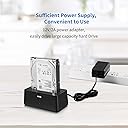
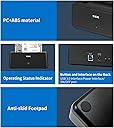
SATA SSD/HDD Dock
Product ID: 273533353
Details
- BrandSSK
- ColorBlack
- Hardware InterfaceUSB 3.0
- Hardware PlatformPC
- Product Dimensions5.08"L x x
⚡5Gbps USB 3.0 SuperSpeed
💾Supports 2.5" & 3.5" SATA HDD/SSD
❄️Efficient heat sink & auto-sleep
Desertcart purchases this item on your behalf and handles shipping, customs, and support to Finland.
🚀 Unlock your storage potential with speed and style!
The SSK USB 3.0 to SATA Hard Drive Docking Station is a sleek, tool-free solution for accessing 2.5" and 3.5" SATA HDDs and SSDs. Supporting up to 5Gbps transfer speeds with UASP, it ensures rapid data handling while its smart auto-sleep and heat dissipation features protect your drives. Compatible across Windows, Mac, and Linux, this docking station is perfect for professionals needing quick, reliable, and versatile external storage access.


| ASIN | B08P1539VD |
| Best Sellers Rank | #31 in Hard Drive Docking Stations |
| Brand | SSK |
| Color | Black |
| Compatible Devices | Desktop, Gaming Console, Laptop, Smartphone, Television |
| Connectivity Technology | USB |
| Customer Reviews | 4.5 out of 5 stars 680 Reviews |
| Data Transfer Rate | 5 gigabits_per_second |
| Enclosure Material | Aluminum |
| Hard Disk Form Factor | 2.5 inches |
| Hardware Interface | USB 3.0 |
| Hardware Platform | PC |
| Item Dimensions L x W x H | 5.08"L x 3.78"W x 2.83"H |
| Item Highlight | SATA Hard Drive Dock Enclosure 5Gbps SuperSpeed, UASP Supported, Tool-Free, Plug & Play, Up to 24TB, No Driver Needed |
| Item Weight | 0.4 kg |
| Manufacturer | SSK Corporation |
| Material | Aluminum |
| Memory Storage Capacity | 20 TB |
| Mfr Part Number | SSK DK102 |
| Model Number | SSK-DK102 |
| Number of Items | 1 |
| Product Dimensions | 5.08"L x 3.78"W x 2.83"H |
| Supported Devices Quantity | 1 |
| Unit Count | 1 Count |
G**J
Good product
Used it to clone my hard drive onto a solid state replacement drive. Worked great. Only caveat is I only needed it once so cant comment on reliability. Worth the price just for that.
T**K
Works great, loves that it turns disk off when not active!
I reconfigured, gutted, and/or tossed a bunch of my old computers some time ago. Leaving me with all of these internal hard drives big enough to be of value to use, but with no new machine to put them in. I figured a docking station (I now own 2 of these) was the way to go. I've had a couple others like this one, plus those wires you use to USB and power an external hard drive to your computer. The problem? They spin the drive 24/7 or whenever you have them turned on. Making them less ideal for a drive you may use many times per day (IE, you want it on), but putting that excess wear time on the hard drive for no reason. I searched and searched and this was the ONLY docking station that I could find which turned the drive off after 10 minutes of inactivity! Love it. I use two external drives as regular hard drives on my computer (which only came with 512GB hard drive, like many machines today). IMPORTANT NOTE: It is my experience that my boot time is a whole lot longer if these are running when I turn on my computer. Hence, I have them turned on (on the docking station), but both plugged into a power strip. I turn on the computer, THEN turn on the power strip (and hence the drives). I shut down the computer, and then once it is completely off, I turn off the power strip. No big deal.
G**E
Great Space Saving HDD Docking Station
Worked right out of the box with a 4TB 3.5" HDD and is JUST what I needed. I have other horizontal docking stations, but needed one that took up less desk space. This SSK docking station filled the bill perfectly. With the fast USB 3.0 it transfers large files between drives very quickly and even using my computer's slower USB 2.0 USB outputs it still transferred large files faster than 32 MBPS which I thought was still pretty good. If you like BRIGHT Blue lights, you'll LOVE the power indicator on the front of this docking station, I'm going to be covering up most of mine leaving a scant wee little opening so I can see that it's turned on. Other than that, I love this unit plus the Amazon price tag was better than most similiar stations ~ And there aren't many of the vertical ones out there ~ YIKES! Nice job SSK but it's okay with me if you DIM THE LIGHT down to about 5% of what it is ~ Cheers :-)
R**N
Plug and Play
Working great so far on 1TB 3.5 drive.
S**G
Strange problem with 6TB drive but seems to work
UPDATED REVIEW: SSK reached out to me and helped me solve the issue with my 6TB drive. I used my old Windows 7 laptop to reinitialize the disk and it seems to be running fine now on my main computer (Windows 10). Disconcerting I had to resort to using an old machine but hopefully it's just a one-off thing. ----- OLD REVIEW: I have a bunch of old WD Red 6TB drives I need to pull data from as a side project. This docking station doesn't seem to recognize them properly. They do not appear in Windows Explorer (I'm on Windows 10), but they do appear in Disk Management. However, I can't really interact with the drives. All of the options are grayed out except to view Properties. I insert an old Toshiba 3TB drive to test it further, and was able to format it and write data to it without a problem, so clearly it has some issue with my 6TBs. What's weird is the 6TBs get read as 2048.00GB Healthy and 3541.03GB Unallocated (5589.03GB Total). They were never partitioned so I gather that this dock is just reading the drive wrong. I returned the first dock and got a replacement, and I'm still having the same results. Either it's a high lemon rate or the 16TB support is false advertising.
D**I
A good, solid USB HDD dock. Works great, even on an older PC.
I plugged this drive dock into a USB hub on my (Old!) Microsoft Surface Pro 4 running Windows 10, and used it to clean out 3 different hard drives (2 one-TB drives, 3.5" and 1 500GB drive, 2.5"), then am using it to write to one of the 1TB drives. It works exactly as expected, and so far there have been no problems at all.
T**N
Hard Drive Reader with little documentation that didn't work for me
After going through electronics of mine, I came across two hard drives from old computers I wanted to extract the data from. Both were SATA hard drives, so I ordered this, as it came at an affordable price, as I didn't want to make a crazy investment for something I would have a very limited use case. After unpacking it and setting it up like drive docking stations I've used before (I work in IT, both hardware and software), I attempted both hard drives in all USB ports on two separate computers (Windows 10 and Windows 11). One hard drive had whining and the LED light did not come on at all for that drive, and I don't think it's a fault of the drive docking station. This hard drive might not be functional. However, the second drive made the noises I would expect from a working SATA HDD, the LED light on the front of the dock blinked blue before moving to a solid blue, and I believed that my computer should have been able to read it. Nothing came up in file explorer or disk management, and the LED light that should have been an indicator of status had no documentation for what it was attempting to indicate. All other devices (including other external hard drives) work in the USB ports attempted. Therefore, I'm left to assume that despite getting the power it needs, it's not transmitting anything to the computer.
N**O
Low cost, but works perfectly
I bought to replace an older dock that didn't recognize my 4TB or 6TB drives. This sounded like it supported larger drives, and was super reasonable cost. Yes, it worked great, found the drives, worked with reasonable speed. I highly recommend this if you need to read bare drives on a Windows machine. My only complaint would be the power switch on the back of the dock is pretty small and rough to operate. I plug in the drive, then turn it on. If it fails, I'll just plug in the power instead of using the switch. Yes, I would buy this one again.
Trustpilot
1 month ago
3 weeks ago