


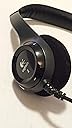


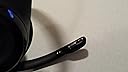
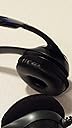

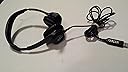
Logitech ClearChat Pro USB Headset
Product ID: 3083705
Details
- BrandLogitech
- ColorBlack
- Ear PlacementOver Ear
- Form FactorOver Ear
- Headphones JackUSB
🎤Noise-cancelling mic with flexible boom
🎧20 Hz–20 kHz frequency range
🔌USB 1.1 & 2.0 plug-and-play
🎧 Elevate your calls and jams with pro-grade clarity — don’t miss the sound revolution!
The Logitech ClearChat Pro USB Headset combines advanced laser-tuned audio drivers with a noise-cancelling microphone and intuitive SoundSwitch™ equalizer presets. Designed for professionals juggling calls, music, and gaming, it offers plug-and-play USB compatibility, flexible mic positioning, and quick-access volume/mute controls. With an 8-foot retractable cable and broad frequency response, it delivers premium sound clarity and comfort for extended use.
| ASIN | B000TG4AGU |
| Age Range (Description) | Adult |
| Audio Driver Type | Dynamic Driver |
| Best Sellers Rank | #6,841 in Computer Audio & Video Accessories |
| Cable Feature | Retractable |
| Compatible Devices | USB devices |
| Connectivity Technology | Wired |
| Control Method | Push Button |
| Control Type | Volume Control |
| Customer Reviews | 4.2 4.2 out of 5 stars (211) |
| Date First Available | July 10, 2007 |
| Earpiece Shape | Rounded |
| Global Trade Identification Number | 00097855046857 |
| Hardware Interface | USB 2.0 |
| Included Components | Cable |
| Input Device Interface | USB |
| Is Discontinued By Manufacturer | No |
| Item Weight | 11.2 ounces |
| Item model number | 981-000010 |
| Language | English |
| Manufacturer | Logitech |
| Material | Plastic |
| Model Name | 981-000010 |
| Noise Control Features | Noise Cancellation |
| Number of Items | 1 |
| Product Dimensions | 3.23 x 8.35 x 10.24 inches |
| Recommended Uses For Product | Audio Monitoring, Calling, Gaming |
| Special Feature | Microphone Included, Noise Cancellation |
| Specific Uses For Product | personal |
| Style | modern |
| Supports Bluetooth Technology | No |
| UPC | 097855046857 |
| Units | 1.0 Count |
B**R
Good Product
I purchased these for online classes so I wear them for approx. 8 hours at a time. I read ALOT of reviews before settling on these. The ear pieces are very comfortable but the head band can be irritating. It's not very rounded at the peak so I find myself sliding the headphones around looking for a more comfortable spot. Voices come through loud and clear - no static. I've also used the headphones to listen to music and they sound fine to me. I'm not really picky about speakers so you might not want to take my opinion on that :) The noise cancelling microphone is great. I have noisy pumps from a fish tank right beside my desk but my classmates never heard them when I spoke. The mic also conveniently slides up out of the way when you don't need it. Everything seems solidly made except for the expansion slots on either side. They don't move when you have them on your head but when you take the headphones off they slide out to their max. size. I worry that one day they won't go back to size while I'm wearing them. Other than a couple minor irritations, I would definitely recommend these headphones.
B**E
Excellent Headset and Bargain
Short and sweet... This is a great headset that provides outstanding audio quality for Skype calls (the primary reason I purchased them). Best of all, it worked right out of the box with my Mac (OS X 10.5.7) and required absolutely no tweaking of any kind. I plugged it in, selected "Logitech USB Headset" from my Skype audio input/output menu, and I was smiling and dialing! While it's slightly bulky, it is lightweight and very comfortable on the head and ears. I will be using this headset for long conference calls with my customers, and judging from my first day using it, the Logitech/Skype combo easily provides the best audio quality for bridged conference calls than any other method I have used. I can't speak to its effectiveness with music (that's not what I bought it for), but I suspect it will have good to excellent quality there, too. And, you can't beat the price for this headset -- significantly less than similar sets from Sennheiser and others (good stuff, but insanely priced). Three thumbs up, especially if you are a Mac user!
L**.
Great Sound - Very Comfortable
I'm using this headset along with Audacity to record audio files and the sound is very clear. It doesn't pick up on background noise, which is great, because my street constantly has cars zooming down it. The cord is quite long, so I can move around freely without worrying about it coming unplugged. The main thing I was worried about was comfort -- a lot of headphones really hurt my ears. These are extremely comfortable! I've worn them for an entire day without having any discomfort. The only thing I'd say these aren't great for is listening to music. It sounds a bit muffled. You get used to it after a few minutes, but it definitely doesn't sound great. However, if your main motivation for buying these is to record audio files, I definitely recommend them. The quality is great and you can wear them for extended periods of time comfortably. Oh, I also use these to talk on Skype, and my friends say that I sound really clear.
A**0
Acceptable for My Purposes
If you understand from the start that you'll not get Bose quality sound or performance from this little product, that it is designed to accommodate Windows as well as Apple operating systems--which is no easy feat, and that it primarily designed for "... audio for Internet communications, music, or PC gaming..." then you can appreciate the Logitech ClearChat Pro USB Headset as an affordable, workable solution between cheap, frustrating options and the ultra-superior professional level products. It isn't perfect. It has some odd characteristics for certain machines. It may not be for everyone. (Read all info before you choose the product!) For my low end, rather casual needs, it has proven to be acceptable, and it is much better than an ancient headset / mic combination that I had. I like this product! :) I have used the Logitech ClearChat Pro on a Macbook (Apple laptop) with Skype, and I had a most satisfying experience. The conversation lasted for nearly one hour and fifteen minutes. I made only one adjustment to the device during the call, which was to enlarge the headset to better reach my ears because I had initially placed it on a bit smaller / tighter than needed. I had no trouble hearing my companion, and she had no trouble hearing me even with a bit of music playing. The sound was strong and consistent with no warbles, drops, or dips at all. Neither one of us had to repeat anything during our talk; in fact, the experience was better than calls I've made with my mobile phone. What I liked about the product during my long call was the length of the cord which gave me the ability to move around a bit without worry about unseating or unplugging the headset during the call. I was quite comfortable to move around in my chair and even stand if need be. I have used the device on an older eMac with no worries listening to some songs I have on iTunes. Again, not Bose quality, however, the sound was decent enough to use while I was working on the old computer quietly as not to disturb others. I like them better than iPod ear buds or those in-ear things I can tell you! LOL Your ears can get a bit warm though if you camp out too long in front of the computer! Other reviewers are correct when they say that the product has a large USB plug. It is quite long when compared to other USB devices, so for some people and some laptops, this could present special challenges or usage problems. I did not experience any difficulty; however, I do not have very many other plugin devices. So, there's no competition for my existing ports. The product works well on my MacBook laptop with expected results. Older Mac Users Note: You might find that you must adjust / control your volume and sound through the Sound control panel in System Preferences rather than from the Logitech device itself. Some design weirdness either through hardware or software issue could affect your ability to use the volume controls on the actual headset (older eMac computer / maybe other old one's too).. Or maybe it's just me / my machine? :) I thought I'd mention that though just so people who have a head up about that possible situation! (This is why I gave the product four stars.) In my experience, I need to let the older Mac know that I've plugged in the headset as it doesn't appear to automatically switch over sound control to it. It isn't hard. The sound panel in System Preferences allows you to achieve what you need. Once you've communicated your wishes the the sound control panel, you can use the Logitech ClearChat for Skype and even to listen to your songs in iTunes. I'm not much of a gammer, but I assume that if you've communicated with the sound panel, the Logitech will handle game music, vox, etc. Others who know about gaming can speak more efficiently on that. For me, this is a useful product, and I use it primarily with my Macbook. It's all I need for my casual uses. People who use high-end type Skype activities, high-performance gaming, and professional quality music frequently and who expect high quality sound outputs for these endeavors may prefer other devices. However, higher quality equates to higher price. Each person must decide what best serves personal needs. For me, not being a high-end user and not into professional sound activities, I'd rather pay $38 dollars than $200 dollars. :)
D**N
Great freakin headset
I just recently got this headset I hooked in my computer and it worked instantly. It works great with Windows 7 which is what I have, it is very comfortable with an easily movable mic. The mic quality is really great, it cancels out background noise and gives a nice clear recording. It's a big step up from my webcam mic I used to use. The speakers are great for listening to music or chating on the web. I recommend this headset for anyone recording voice overs or talking on Skype. Buy this headset! It is a steal at its price.
Trustpilot
1 week ago
2 weeks ago