

Buy anything from 5,000+ international stores. One checkout price. No surprise fees. Join 2M+ shoppers on Desertcart.
Desertcart purchases this item on your behalf and handles shipping, customs, and support to Finland.
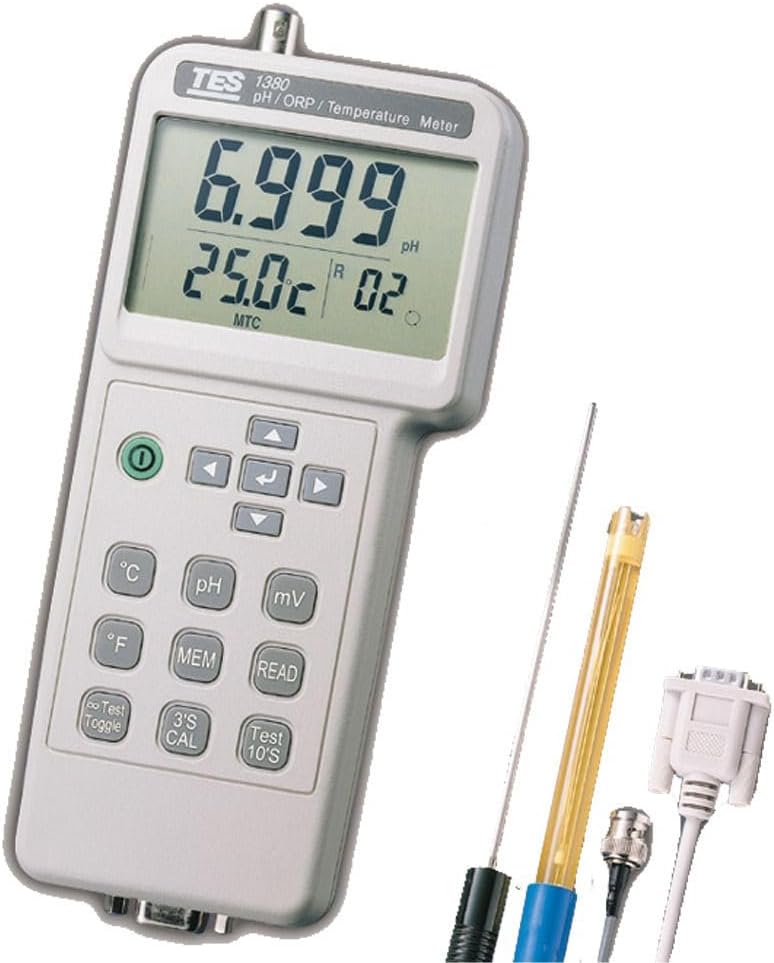
Product description TES 1380K enable to read solutions at various temperatures, the meter will make the correct electrode’s temperature dependency to measure the pH value. The compensation may be manual with a button adjustment on the meter, or it may be automatic with an optional temperature sensing probe immersed in the test solution. TES-1380K PH / ORP / Temperature Meter Specifications 0.001 pH resolution. Auto / Manual pH & Temperature Calibration. Auto / Manual Temperature Compensation. Auto-recognition of buffer solutions. A for one time test and continuous test. Display pH or mV with temperature Simultaneously. Fast & Easy pH measurement. Dual way RS-232 interface with software. Single recording: 99 records. Continuous recording: Have 99 sets of records, MAX. 3000 points. Indication of pH Electrode status. Description of LCD display Measured values, unit, symbols, and decimal points are displayed. Description of Parts & Control keys 1) Press this key to turn on or off the meter. 2) Press the key for increasing or decreasing the values of parameters. 3) Press the key for moving to the desired parameters. 4) Press this key to enter or leave the mode of parameter settings. 5) Press the key for moving to the desired parameters. ⑥ Press this key to select temperature unit ℃. ⑦ Press this key to measure pH. ⑧ Press this key to measure mV. ⑨ Press this key to select temperature unit ℉. ⑩ a) Single record : Press this key to get and memorise the reading. b) Memory Clearing : Press and hold the key, and to re-power on the meter, LCD will appear "Clr" indicator, it means that the memories have been cleared. ⑪ Press this key to read the memorized value for pH、mV、temperature (R1~R99 sets). ⑫ In continuous measurement mode, pH meter will not stop measuring even the reading is same as previous reading. Press this key again to hold the reading. ⑬ Press and hold the key for 3 secs to enter into the adjustment mode, select the reference calibrated value of pH or temperature by pressing increase or decrease key, then press "↵" key to complete the adjustment. ⑭ Press this key, the "A" indicator will flash and halt in LCD, the reading is also held, the meter stops measuring at this moment. ⑮ RS-232 Cable input . ⑯ Input socket : BNC connector for pH and mV. ⑰ Input socket : Earphone jack for temperature probe. Review: Doesnt work for ORP we purchased two neither one worked - Do not purchase if measuring ionization of water. We purchased two neither machine worked for Ionization.


K**E
Doesnt work for ORP we purchased two neither one worked
Do not purchase if measuring ionization of water. We purchased two neither machine worked for Ionization.
Trustpilot
1 month ago
3 days ago