Desertcart purchases this item on your behalf and handles shipping, customs, and support to Finland.
โก Stay effortlessly activeโclick, jiggle, repeat, and never miss a beat!
The Physical Click Auto Keyboard Clicker Mouse Jiggler is a versatile USB-powered tool designed for professionals seeking automated keyboard and mouse activity. Featuring adjustable click speed and angle, it supports both continuous and random clicking modes while operating quietly without heat buildup. Compatible with Windows, macOS, and Linux, this durable device ensures seamless productivity by preventing idle time with easy installation and customizable settings.
| ASIN | B09M8C5XZB |
| Are Batteries Required | No |
| Best Sellers Rank | #700 in Computer Keyboard & Mouse Combos |
| Brand | Ne fashion |
| Color | Black |
| Compatible Devices | Personal Computer |
| Compatible Operating System Family | Linux, Windows |
| Connectivity Technology | Usb |
| Customer Reviews | 3.6 out of 5 stars 107 Reviews |
| Hand Orientation | Ambidextrous |
| Item Weight | 280 Grams |
| Keyboard Description | Indoor |
| Keyboard Layout | QWERTY |
| Manufacturer | Ne fashion |
| Minimum Required Operating System Version | Mac OS 10.12 Sierra, Ubuntu 16.04 Xenial Xerus, Windows 10 |
| Movement Detection | Optical |
| Number of Keys | 1 |
| Operating System | Windows, macOS, Linux |
| Other Special Features of the Product | Adjustable Click Speed and Angle, Random and Continuous Clicking, Low Noise, No Heat Generation |
| Power Source | USB |
| Special Feature | Adjustable Click Speed and Angle, Random and Continuous Clicking, Low Noise, No Heat Generation |
| UPC | 723258220791 |
| Unit Count | 1.0 Count |
J**E
Works as Intended!
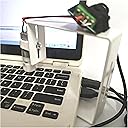
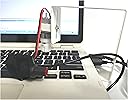
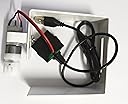
Does everything it advertises and has all the settings one would need for a "keyboard clicker." The package comes with one allen wrench but you'll need a smaller one for the brass piece near the base of the unit. Once that is assembled you won't have to adjust that ever again and can use the provided one for fine tuning the position of the black piece that touches a key. Make sure to use the image with instructions for setting up the various modes. It's the one shown in the thumbnail previews (green paper). I just took a picture of it for future reference. Please be aware there are no instructions for putting the tool together. I just used the second thumbnail image as my visual guide. Note: I saw a review of someone mentioning you could only set a random timer of a value of 009. It can go higher than this. You have to use the [Shift] key (far right button) to change the decimal location. Each unit can go to 9, i.e. 999.
J**H
Useless. Threw it away.
Useless. Don't bother.
E**T
What a great product if you work from home
The first unit I received was defective. Vender sent me out a new unit right away - no questions asked. it may take some use to setting thing up but once you do - this little tool is awesome. This is so much better then a mouse mover/jigglier. It also has a random option which I highly recommend that you use. The instructions are just a simple sheet of paper and it could be done better but no real big deal. When you get your unit, take a few minutes to figure out its functions and im sure you will just love this product also.
K**Y
Amazing Product
The product does exactly what it says and has some really neat settings. You can't help but smile once you see it working. Only reason I didn't give it 5 stars is there's some improvements I'd like to see on it: 1. The random time when a click happens should be randomized to a degree of milliseconds, not seconds. (A human doesn't click at exact second intervals.) 2. There should be a setting to randomize the speed of the actual click. The click speed can be set from a level of 1 to 5 (slowest to fastest), but that speed is always the same. Humans don't click a button at the exact same speed every time. Would be nice if I could set it to click at a random speed between 1 and 2, for example a speed of 1.7, 1.2, 1.5, etc, but not always a speed of 1, 1, 1. 3. It would be nice if the buttons could be labeled in English, but the bottom of the instruction manual does include this. Will definitely buy another once it's improved.
I**N
works well
Using the supplied attachment, I am able to get this device to click two keyboard buttons in succession at random intervals (in my case, the 1 then Enter key). It's quite confusing to figure out, but I didn't spend much time with it before I stumbled onto the way I needed it to operate for my purposes. I'm sure if I spent more time toying with it I would fully understand all its functions, but I don't need to. It has been working perfectly for me for months now. I can leave it for hours at a time and it will function flawlessly without intervention. If you need repetitive and random key strokes to keep your keyboard active, this will do the trick.
B**T
Total Price Gouge
WAY too expensive for what it is and what it offers. It does what it was advertised for but they should normally be a third of what the cost is, this is a total price gouge.
A**R
Nice keyboard assistant
Works like video!!! Instructions not so good, but eventually I figured it out
M**D
Works but not as described
First off, it works. But, here are my gripes: I mainly bought this because the description and instructions said it could be set at maximum of 999 seconds, which is exactly what I needed. At time of use, it only goes up to a value of 009, and the "random" setting clicks within a maximum of 16 seconds. False description, very disappointed. Side note, I had to lay a heavy book over the top of it because it rises up whenever it "clicks" the keyboard. This is pretty disappointing too. Now I gotta buy one of those hardware vice grips to keep it steady cuz using a book is ridiculous.
Trustpilot
2 days ago
3 weeks ago