Desertcart purchases this item on your behalf and handles shipping, customs, and support to Finland.
🖱️ Elevate your workspace, empower your wrist.
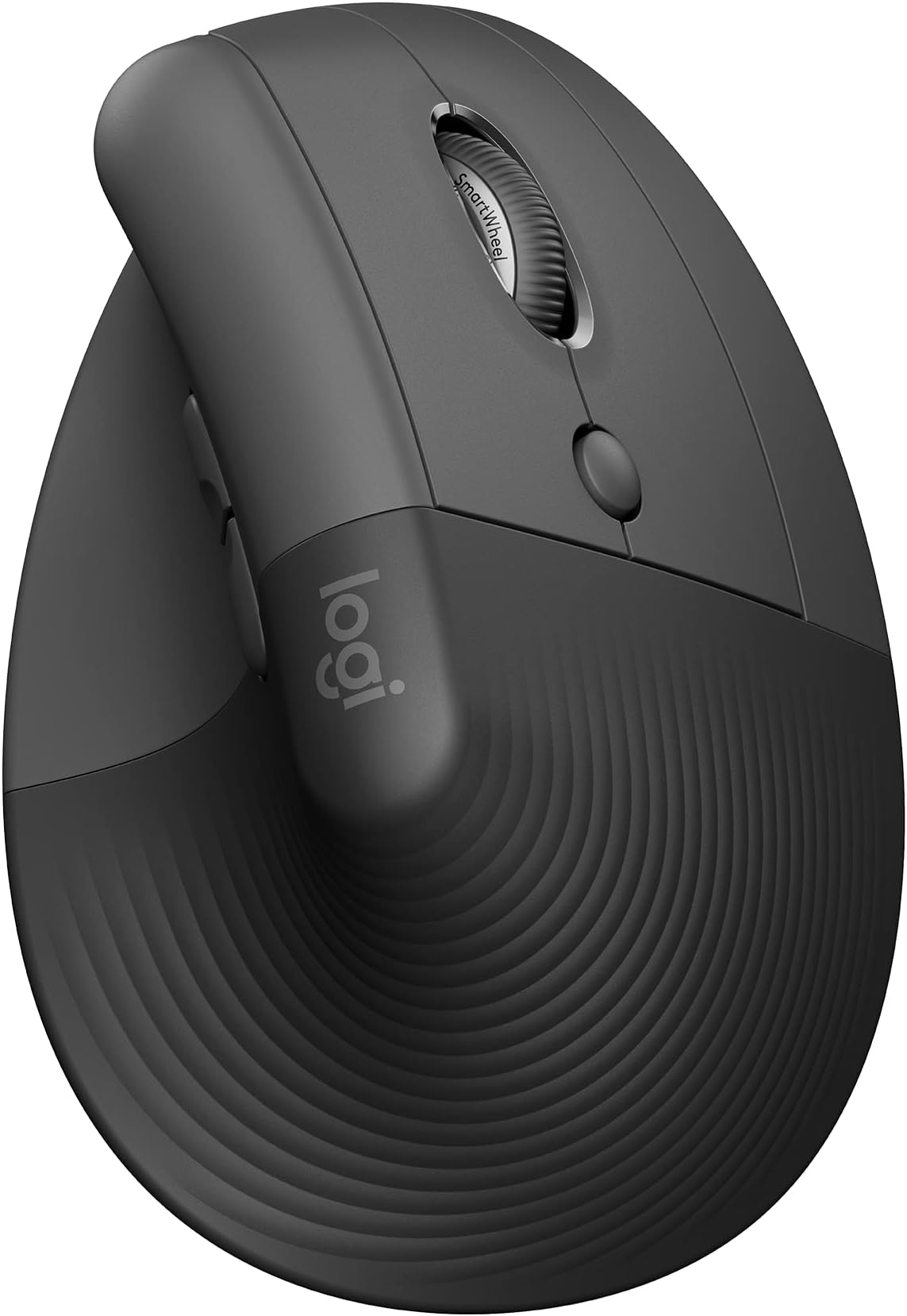
The Logitech Lift Vertical Ergonomic Wireless Mouse combines a 57-degree ergonomic design with whisper-quiet clicks and customizable buttons, engineered for small to medium right hands. Compatible across Windows, macOS, iPadOS, Chrome OS, and Linux, it offers seamless multi-device connectivity via Bluetooth or Logi Bolt USB receiver. With up to 24 months of battery life and eco-conscious recycled plastic components, this mouse is a smart, sustainable upgrade for professionals seeking comfort and efficiency.


| Additional Features | Ergonomic Design, Touch Scroll, Wireless |
| Antenna Location | Laptop, Office |
| Asin | B09J1TB35S |
| Battery Average Life | 24 months |
| Best Sellers Rank | #13 in Computer Mice |
| Brand | Logitech |
| Button Quantity | 6 |
| Color | Graphite |
| Compatible Devices | Laptop, Personal Computer, Tablet |
| Connectivity Technology | Bluetooth |
| Customer Reviews | 4.4 4.4 out of 5 stars (13,746) 4.4 out of 5 stars |
| Embellishment Feature | LED |
| Enclosure Material | Graphite,Plastic |
| Global Trade Identification Number | 00097855170927 |
| Hand Orientation | Right |
| Hardware Platform | Mac, PC |
| Included Components | 1 x AA Battery, Lift Vertical Ergonomic Mouse, Logi Bolt USB Receiver, Quick Start Guide |
| Item Dimensions L X W | 4.3"L x 2.7"W |
| Item Type Name | Mouse |
| Item Weight | 125 g |
| Manufacturer | Logitech |
| Mfr Part Number | 910-006466 |
| Minimum Required Operating System Version | Windows 10 |
| Model Name | Lift Ergo |
| Model Number | 910-006466 |
| Mouse Maximum Sensitivity | 4000 dots_per_inch |
| Movement Detection | Optical |
| Number Of Batteries | 1 Lithium Polymer batteries required. (included) |
| Operating System | Chrome OS, Windows 10, Windows 11, iPadOS 14, macOS 10.15 |
| Pattern | Mouse |
| Power Source | Battery Powered |
| Range | 10.0 meters |
| Style Name | Right-Handed |
| Unit Count | 1 Count |
| Upc | 097855170927 |
| Warranty Description | 1 year Manufacturer |
User
Great for ergonomics, super comfortable
I have this in white and black. Game changing mouse for me. I have both carpal tunnel and DeQuervain’s Tenosynovitis and thus mouse helps keep flare-ups to a minimum. I have almost no pain. Typically if I do have pain it’s due to a flare from something unrelated. It didn’t take much getting used to for me, but colleagues tend to not know what to do with it if they need to “drive” on my computer lol. It’s responsive without being spastic. Connects supper easily and up to 3 devices. The battery lasts forever. I wish they’d make this one rechargeable but they only make the bigger one that way. It has a scroll wheel that functions as it should, not too sensitive but in no way sluggish. I haven’t had an issue with my older white one (I bought that when they first came out) or this one so I’d say it has great staying power. Overall, I would highly recommend.
User
Absolutely worth every penny!
Absolutely Worth Every Penny!I can’t recommend this mouse enough! The Logitech Lift Vertical Ergonomic Mouse has completely transformed my workflow. The customizable buttons and settings make everyday tasks so much faster and more efficient. Being able to personalize it to fit the way I work has significantly improved my productivity. The ergonomic vertical design is what really sets this mouse apart. I spend hours at my computer every day, and since switching to this mouse, I no longer experience the wrist pain and discomfort I used to have with a traditional mouse. It feels natural to hold, and I can work comfortably for much longer periods. The wireless connection is reliable, the battery life is excellent, and the overall build quality is exactly what I’d expect from Logitech. If you’re on the fence about buying this mouse, especially if you spend a lot of time on the computer or deal with wrist discomfort, do yourself a favor and get it. They even have a Left handed mouse!
User
Good scroll wheel, coming from g305, 18cm hand
For reference my hand 18 cm measured from the first crease after your palm to the end of my middle finger. I flexed my wrist and the first crease I used as my end point for my palm. My arms are at a 90 degree angle, and my wrist is neutral (not flexed up or down) due to my wrist rest keeping my wrist straight. Most of my arm weight is on my memory foam wrist rest. My review is based on my personal hand size1 month update: I have not noticed any staining on my white lift. But I am also a pretty hygienic person and I never touch my mouse if I touched food.1 year update: Still have not noticed any staining. I do wipe it with a baby wipe maybe once every 1-2 weeks though. One thing to note is that in order to use shortcuts you need to have the Logitech Options+ software installed. The shortcuts/settings you program to you buttons aren't saved on the mouse. Also annoying since the software takes a substantial amount of CPU usage (why????).Wrist pain:This might be because I don't have arm rests so the weight of my arm is resting on the wrist wrest, but I had some minor wrist pains within an hour or so. It didn't really feel like a muscle or bone kind of pain, but a nerve/soft tissue pain. When I didn't use a wrist rest, the weight was mostly the side of my hand, in particular the bony part near the wrist. That part rubbed when moving the mouse around if you don't lift your arm.Edit: After some adjustment I no longer get any wrist pain, even when gaming.Palm grip:I think palm grip would be unusable for this mouse. My fingers extend 0.5-1 cm after the end of the mouse (where the left and right buttons start curving). When clicking the mouse it almost feels like im clicking with my finger joint instead of my fingertip. With a relaxed thumb (thumb slightly curved and only fingertip touching mouse) it is pretty easy to click the side buttons. Side of thumb can press upper button, thumb joint can press lower button. With the entire thumb fully in contact with the mouse, the upper button is a bit awkward to press but possible, and the lower button is the same as relaxed thumb position. Awkward to use the scroll wheel since you have to curve your fingers quite a bit to get your finger tip on the scroll wheel but still usable. Also because of the hand angle, I found it much more comfortable using my middle finger to use the scroll wheel instead of my pointer finger that I use normally.Fingertip grip:Personally I found it feeling different, but perfect. My finger length is perfect so my fingers land around or slightly below where the left and right mouse button start to curve. When I click, the direction of the force from my finger is more diagonally down and to the left. If my fingers were a bit shorter, it the force would be to the left. I found this diagonally force feels more natural, kind of like squeezing a trigger (kinda) instead of just squeezing a mouse. It is hard to describe. In this grip, the only part of my fingers (including my thumb) that are touching the mouse are my fingertips. My palm is resting on the mouse. Thumb characteristics is same as palm grip. Scroll wheel characteristics same as palm grim.Claw grip:Works fine, only problem is pushing lower thumb button is a bit awkward since you kind have to shift your entire thumb back but it is still possible. Easy to use scroll wheel since your fingertips end right next to itCompared to g305:The Lift is much more comfortable and natural. I got used to the Lift very quickly. In comparison, the g305 felt like a petite mouse. The g305 felt hollow, like there was nothing supporting my palm. I didn't have any issues with the mouse shifting when clicking it on my mouse pad. Even on a smooth surface with no mouse pad it would happen rarely.Scroll wheel:Excellent combination of a normal scroll wheel and a free one. I can scroll down all the way to the end of reddit threads and spotify playlists in one scroll. Going back up takes a few scrolls however since I apply less force. Smooth scroll supplied by Logitech Options+ is also nice. Makes it feel like scrolling has inertia. There a lot of very nice features in Logitech Options+ like Logitech Flow
User
Decent, but could easily be the industry leader by giving it all the MX Master 2S features
I'm rewriting my review because I "like" this product, I need it from a health standpoint and I would like to see it get better.The one major flaw: I'm coming from the MX Master 2S, probably the best mouse I ever had. If you applied the buttons and scroll wheels from the 2S to this mouse, it would be so perfect the universe might collapse in on itself.The big one for me as a designer is the lack of the left thumb horizontal scroll wheel, this is crucial especially in 3D programs. I also miss the ability to switch between a ratcheting feel or a smooth feel on the main wheel, not to mention the speed when I need to scroll to the top of something in an instant.No Bluetooth: I actually originally intended to return this mouse simply based on the fact that there is no Bluetooth, it's an old USB which is SUPER annoying because Mac M2 Laptops don't even have those ports anymore, I have to connect with an adapter!Button Layout: Not bad, but very minimal effort, like they went the cheap route because they don't believe in the product. Logitech really needs to put some real thought into these because there are some real opportunities for innovation. The button layout works, it's just not very noteworthy. Yes you might occasionally get some accidental clicks, but it's not as bad as some people say.Size: Nearly perfect. I have average size male hands probably. I could see some work on more natural contouring to fit the hand, but this is probably the best middle ground.Grip: Comfortable, I can rest my hand on the desk or just on the mouse with much effort. I got more or less used to the vertical feel within a week, and it's definitely helping with the wrist problems I was developing.Build Quality: This doesn't exactly come off as cheap, but it definitely feels like it's intentionally sparse, as if Logitech is still figuring out what to do with vertical mice.Overall this is a good mouse that will get me by for now, but it easily be the industry leader with some real investment in the tech. I really hope Logitech embraces this tech in the future, because as it stands it feels like a prototype of an afterthought.
User
Great mouse.
Best ergonomic mouse in the planet. Quiet, comfortable, and works very well.
User
I love this mouse! No pain in my hand after a full day at the desk!
I really have enjoyed this mouse. First of all it’s pink so it’s cute and that is important for my office design.More importantly it’s comfortable. Before this one I only had the traditional mouse design so this one being the sideways hold I wasn’t so sure I’d like it but I LOVE it. No cramping or carpal tunnel pain after using it all day.For a corporate working mom, this has been perfect for my home office. Looks good, feels good. And the battery life is great. I’ve also never had issues with it disconnecting or anything.
User
Easy peasy connection
First time using an ergonomic mouse of this kind and it'll take a little bit of getting used to. Color matches the theme of my home office and it has a pleasant feel to it. No lights or RGB on this one. Very easy to move maneuver around with. The mouse is very accurate when you move it around your computer screen. I even connected it to my tablet and the accuracy and speed is great. Fast but not excessively fast.I do feel like that there is less strain on my wrist while using this mouse. It makes resting my hand in the wrist pad easier and more comfortable. The size is okay but I have big hands for a female so there will always be a size factor for me when it comes to various mice. The quality and build of this mouse is very good. I've had quite a few products in the past and now from Logitech so it's a brand that I trust. I'm not even opposed to buying another one of these for the office. Initially I thought I would have a problem adjusting to the scroll wheel and clicker being on the side of the mouse, but it's actually more comfortable and convenient than my current Windows mouse. Scrolling is much easier but still adjusting to clicking on things. I'm sure it'll become second nature soon.Instructions on the cardboard are super easy to follow to set up which devices you want to connect the mouse to.It took less than a minute to connect each of my devices. Being able to scroll back and forth on a website or folder without having to use the browser/folder's back and forth buttons is wonderful. I just have to not hit the left click button when I touch them. I decided to install the Logi Option+ software to see what all I could do with this mouse. I was a bit annoyed the software took longer to install than download. The actual mouse is lightening fast compared to the software. Since I'm just getting the product today and starting to use it today, I'm not able to speak on the battery life just yet. Comes work a typical AA alkaline battery which I'm grateful for, but at some point I'll change it to a lithium battery since those last a bit longer. Yet before I do that I'll check to set if the batteries last at least a year.So back to the software, once it finally installed, it took forever to load so guess that portion will be an update. Any hoo, great mouse with a movie of comfort, convenience, speed, and accuracy. 10/10 recommend!
User
A must have if you WFH!
I work from home but I also play video games ahah. So it is safe to say I use a mouse for a GOOD amount of my day, I feel like it definitely started to take a toll on my wrist. I was getting sharp pains and was just overall feeling uncomfortable. I am still young to get carpal tunnel, so I needed to make a change fast.I have always heard of these mice but never thought I would really need it. I decided to give it a shot, and ugh I love her! I connected her via USB and she works great. No lag, the input is immediate, the scroll wheel is fantastic. Absolutely no complaints here! Fits my hand perfectly, and feels 10x more comfortable than normal mice. You need to have ENORMOUS hands for it to not feel comfortable.I bought her with my first paycheck at my new job LOL. I definitely think an ergonomic mouse is worth your money, compared to having to live with carpal tunnel syndrome the rest of your life!
User
Sleek and Wrist-Friendly. Still Clean After One Year:)
I’ve been using this mouse for over a year now. Before this, I used a similar one from Sanwa, which I liked, and I also tried a few other options but I think this one is the most comfortable.I was hesitant to get the white version, thinking it might get dirty easily. But after a year of daily use, it still has a clean, sleek look.Pros- Wrist-friendly: The ergonomic design really saves my wrist. I use it for 8 hours every day and my wrist never gets tired. I also like the rubbery texture. it feels nice to hold.- Long battery life: I use this daily for work, and in a year, I’ve only had to change the battery three or four times. I also appreciate that it only requires a single battery.- Quiet: The scrolling and clicks are very quiet.- Multiple device connectivity: While I don’t use this feature, it’s cool that you can connect to several devices.- Sleek design: A friend of mine bought one after seeing me using it because it looks good.Cons- Bulky: Since it’s vertical for ergonomic reasons, it’s a bit bulky. It doesn’t fit well in my laptop bag and my bag always has a weird shape as I have to shove it in.- Potential to get dirty: I chose the white version, and while I worry it might yellow or stain over time, it’s held up well so far (see photo).Overall, it’s a great mouse. Highly recommend!
User
TOP
Comfortable mouse, very customizable, I have tested it on different surfaces, and still works very well & smoothly on all surfaces including "plastic & glossy surfaces" :D.
User
Yes but depends
I really love it! Works great but for me it hurts my hand more than the horizontal one.
User
Extremamente confortável! Vale muito a pena.
Tive muitos problemas com as articulações do meu pulso ano passado, por causa do uso excessivo e inclinação do mouse. Fiquei meses com uma dor muito incômoda. Demorei para comprar este mouse vertical, porque estava achando muito caro e desconfiava que não iria me adaptar bem... Como me enganei! O mouse é excelente, silencioso e muito confortável, coube perfeitamente na minha mão (16 cm entre dedo médio e pulso). Demorei um pouco para me acostumar a pegar sem teimar em virar um pouco a mão (o que dava um desconforto muscular no abdutor do dedo mínimo). Estou utilizando há um mês e ainda não tive dores persistentes.
User
Very small and not usable for me.
I am not recommending this mouse for anyone as its so small and very light.
Trustpilot
1 month ago
2 months ago