Buy anything from 5,000+ international stores. One checkout price. No surprise fees. Join 2M+ shoppers on Desertcart.
Desertcart purchases this item on your behalf and handles shipping, customs, and support to Finland.
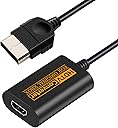
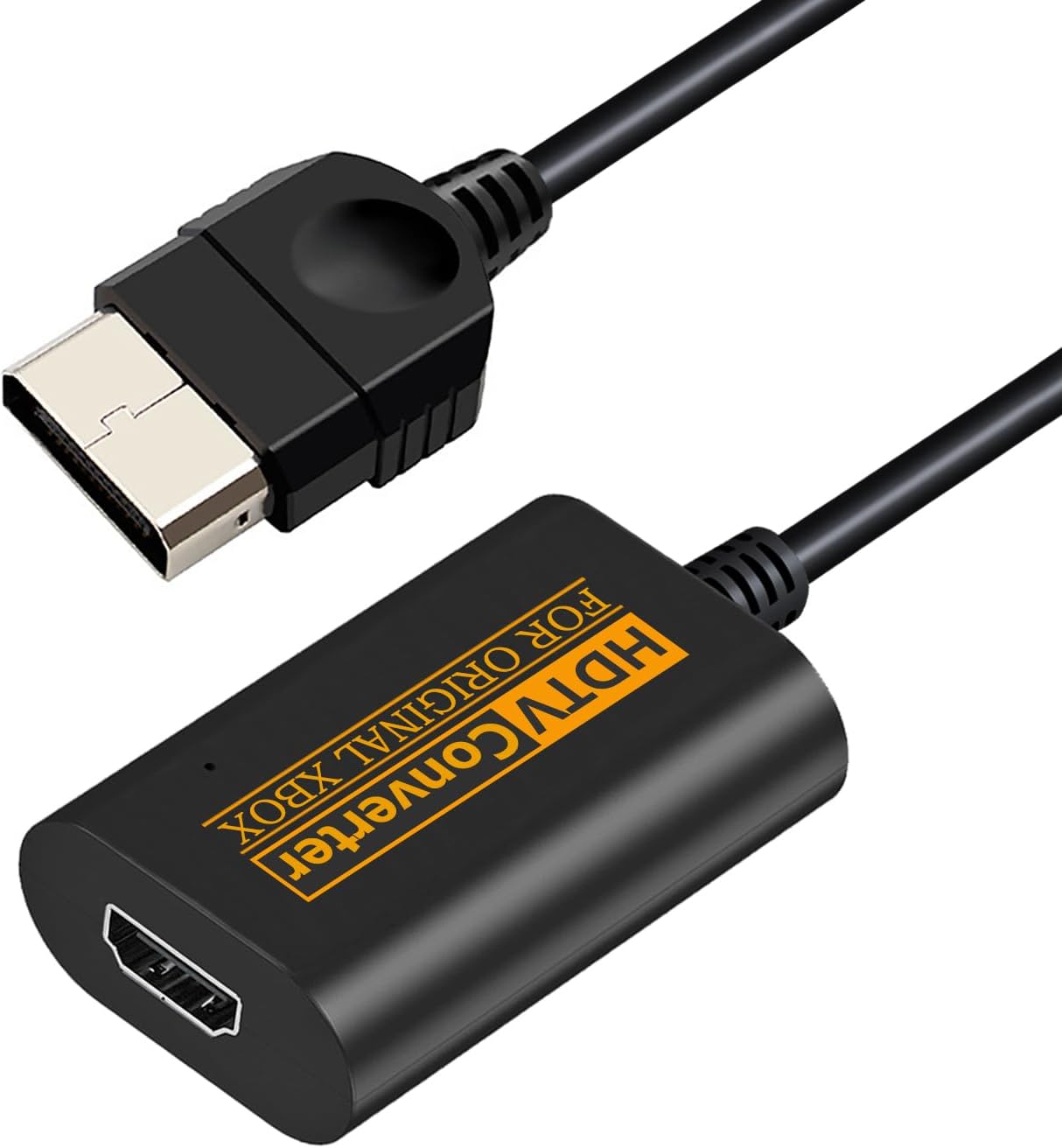
🎮 Upgrade your retro game with modern clarity—because your Xbox deserves the spotlight!
This HDMI Adapter Converter transforms the Original Xbox's YPbPr component output into HDMI signals, enabling seamless connection to modern HDTVs and monitors. It delivers true-to-source color fidelity without delay, supports native HD resolutions up to 1080i, and requires no external power—just plug and play. Perfect for retro gaming enthusiasts seeking to revive their classic console with crisp visuals on contemporary screens.


| ASIN | B0BG1WPCWL |
| Best Sellers Rank | #2,112 in Video Games ( See Top 100 in Video Games ) #5 in Xbox 360 Cables |
| Customer Reviews | 4.5 4.5 out of 5 stars (158) |
| Date First Available | September 21, 2022 |
| Item Weight | 2.64 ounces |
| Item model number | RM |
| Manufacturer | Jadebones |
| Package Dimensions | 5.55 x 3.9 x 0.94 inches |
Y**.
Worked like a charm, no issues at all
I've had my Xbox for many years since I bought it more than 2 decades ago. Still works but the lack of connecting to modern TVs that only accept HDMI has kept it aside. While I used from Composite to HDMI adapters (they require USB for power), they only kept the resolution to sub-SD which doesn't even give me a good 720p output. After searching on Amazon, stumbled upon this model that apparently taps into the console's component video output channeled through the HDMI connector. After connecting it, the Xbox Dashboard easily showed me the toggle options to output 480p/720p/1080i. No issues on sound output as well. For its selling price, provide to be great.
M**S
Works
It works no issues
A**R
Looks great!
It's surprisingly good! Maybe as good or slightly better than the more expensive one that I have. Colors are great and no noticeable lag or audio issues. I would recommend for those who are looking for a cheap alternative. I also like the fact that you don't need to power it with another USB cord.
Z**Y
Best bang for you're buck!
I got to say I was kind of skeptical at first due to the low price, but I got to say I am really impressed with this adapter, for 20 bucks you get an easy Plug and Play HD solution to your original Xbox that doesn't require external power, and it's also compatible with dvd movies. bottom line if you're looking for a cheap and easy HD solution and you don't want to mod your Xbox this is a must buy!
E**A
Hooked up to 60" Plasma and was blown away
I wasn't expecting much from this but I needed a quick option for my visiting nephew and my old Monster component cable I use to use was on the fritz - so after doing a little research it was between this and the much recommended "ElectronXout" adapter that is twice the cost of this little guy. I decided to be cheap because I had intended on fixing the Monster cable. Well, I'm not so sure I need to do that anymore. I plugged this little thing in and without upscaling - I was very surprised by the image I was getting on my tried and true (and old but still alive), 60" inch Plasma TV. I imagine it would look even better on a smaller screen. Again, I don't have the "ElectronXout" for comparison but I can't it imagine it being much better (if at all) than this. I'll leave that verdict up to the pro's. Remember, most OGXbox games are in the old square 4.3 format - but not all. It's on a game by game basis so pay attention to that when setting things up and playing. I have the Xbox set to "Widescreen" in its user interface. Do that. When it comes to playing the games you may have to switch between the 4.3 and 16.9 aspect ratio on your television again, depending on the title. While 4.3 games don't by any means look horrible when stretched to 16.9 the purist in me likes to use to correct ratio but by all means you do what you want. I am just providing the info that the setting needs to be done at the TV and not the Xbox. Again, leave that in widescreen. Obviously I cannot comment on the longevity of this item at this time but I will say after some pretty hardcore gaming sessions with the nephew and now by myself - it hasn't had one hiccup. Have Fun : )
R**K
This is actually pretty clever, but it has limitations depending on the game
The Original Xbox was the first real HD console. The number of games that supported 720p or 1080i are exceedingly rare, but some were made and the Original Xbox had Component Cables available for purchase. ^ This device just takes that existing HD Component output and wraps it in an HDMI signal for modern TVs. To make it work correctly, you need to go into the Xbox Dashboard and enable the HD video modes. You must also be aware on a title-by-title basis of what video modes are supported. Broadly speaking, most games at least support 480p, but if they don't, and if your TV doesn't de-interlace 480i, you won't get any signal. At the end of the day this things lets you play Tony Hawk's Underground at 720p at 60fps -- you just need to keep in mind this thing functions exactly like the Original Component cables did, and your experience will be highly dependent on the software.
T**N
Original Xbox converter
Arrived timely and works perfectly!
J**T
It works on my 4k TV but...
In order for this to work on my 4k tv I have to go into my xbox settings and turn off 480p/720p/1080p. When those options are turned on and I start a game there's no picture. Picture only shows when those setting are off. But hey I finally found an adapter that works on my 4k tv.
C**.
Funciona bien y me llego super rapido.
Z**O
Does the job well
W**D
The blacks are a pinch too black to where you struggle to see extreme darkness but it’s a solid device otherwise
T**O
Funcionó con xbox por hdmi en pantalla
M**A
Cumple con su función.
Trustpilot
5 days ago
2 weeks ago