


Desertcart purchases this item on your behalf and handles shipping, customs, and support to Finland.
🖱️ Keep your workflow alive—because your productivity deserves a little wiggle!
The AUEDROT Mouse Jiggler is a compact, aluminum alloy USB device designed to prevent your computer from locking by simulating mouse movement. Featuring two selectable jiggle modes—subtle and random—it requires no software installation and is recognized as a trusted device by your system. Compatible with Windows, macOS, and Android, it’s a plug-and-play solution ideal for professionals needing to keep their screens active during calls, remote sessions, or multitasking, all while maintaining seamless mouse functionality.



| ASIN | B0B9JQ3Z4T |
| Antenna Location | Gaming |
| Are Batteries Included? | No |
| Are Batteries Required | No |
| Best Sellers Rank | 1,723 in Computers & Accessories ( See Top 100 in Computers & Accessories ) 83 in Mice |
| Brand | AUEDROT |
| Brand Name | AUEDROT |
| Button Quantity | 2 |
| Colour | Purple |
| Compatible Devices | Desktop, Laptop, Tablet, Smartphone |
| Connectivity technology | USB |
| Country of Origin | China |
| Customer Reviews | 4.7 out of 5 stars 1,280 Reviews |
| Enclosure Material | Aluminum,Metal,Plastic |
| Hand Orientation | Ambidextrous |
| Hardware Platform | Laptop, PC |
| Included Components | 2 x metal jiggler mouse |
| Item Dimensions L x W | 22L x 16W millimetres |
| Manufacturer | Shenzhen Paisheng Technology Co., Ltd. |
| Manufacturer Part Number | HU-XI-201 |
| Movement Detection | Optical |
| Movement detection technology | Optical |
| Network Connectivity Technology | USB |
| Number of buttons | 2 |
| Operating System | Android, Windows, macOS |
| Power Source | USB powered |
| Product Features | Automatic Mouse Movement, 2 Jiggle Modes, Trusted Device Recognition |
| Product Warranty | 6 Months |
| Range | 3 meters |
| Special feature | Automatic Mouse Movement, 2 Jiggle Modes, Trusted Device Recognition |
| Style Name | 1 PCS |
| Unit Count | 1.0 count |
M**N
Cool little screen-lock defeat dongle
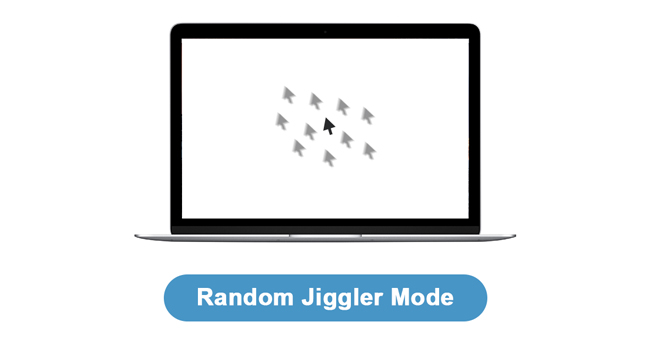
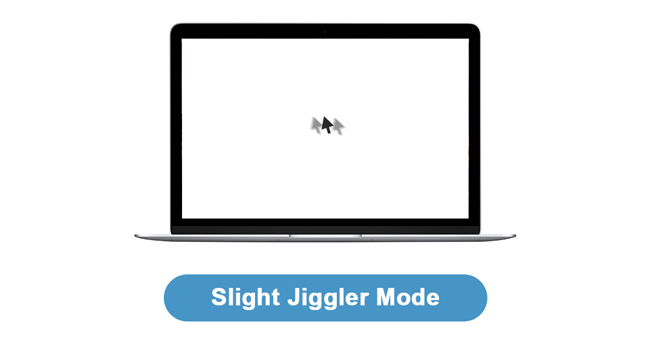
As an IT-professional I was intrigued by such a device. I wondered how it behaved when working alongside an actual mouse. I want to prevent screen-lock when its inconvenient but I don’t want this to interfere with my day-to-day work. I have to report that it works just fine! It has a tiny switch so you can adopt “Mode 1” or “Mode 2”. Mode 1 moves the cursor by a tiny amount. You can actually see it moving but it is by such a small amount it barely has any detectable effect upon positioning the cursor when using the real mouse by hand. So, you can just leave this little baby plugged in and working all the time. You can switch to Mode 2 if you wish in which case the cursor goes crazy all over the screen. It is fun to watch but it then means you cannot practically use your mouse! The USB dongle is plug-n-play fire-and-forget. I just plugged in and it started working immediately on my work Windows 10 (Enterprise) Dell. There were no pop-ups or anything to do. It just works. Your computer thinks it is a completely benign mouse. However, it all just begs the question: who legitimaly needs this and why? (Anyone using this device to “look busy” whilst “working from home” is asking for trouble and nobody should endorse this or find it funny.) If using your own person PC/Laptop then you can simply disable the screen lock. Most technologies (such as Teams or Click-Share presentation middleware) will automatically disable screen lock whilst using them or in a call. So, we guess this is for corporate users. Screen-lock on time-out is a security feature deployed by commercial IT organisations to help secure their network from outside intrusion. However, unless you fantasise that you are living your life in a “Mission Impossible” movie, these sort of security measures are more-often-then-not pointlessly draconian. You are far more likely to have your device physically stolen than you are to have a stranger sit at it to steal commercially sensitive data. Getting hacked by somebody on the other side of the planet is far more of a big deal. Personally, I find this device useful to keep my second device active whilst working on another. This is so I can monitor emails, messages and take Teams calls whilst working on another machine physically next to it. This is in a safe and secure environment of my own home. Nobody here is going to access corporate data whilst I am sitting here! However, my circumstances might be unique. You certainly do not want to use this device in a public space and using at in the office might lead to a disciplinary if you get caught. Seriously, such precautions are there for a reason. Unless you have a secure lockable workplace then make sure your screen locks if you are going to walk away for any period. ...and switch it off at night too!
S**D
Great, easy to use
Great, easy to use and works well.
L**S
Quality and Discreet.
Working really well for the purpose I need. A little more expensive than some models, but worth it for the quality materials and discreet design. The LED is tiny, dim and badly positioned, but better that than something distracting. I just leave it plugged in all the time and it does the job when needed.
S**M
Great Product
Arrived on time and works as expected!
A**T
Does what it says on the tin
LED is tiny and hard to see unless looking directly on, but works like a charm
R**U
Good
good
K**E
No more locked screens
Great product, you can type and leave running without constant lockouts while on the phone!
T**L
Yeap!
Does what it says on the tin.
M**H
Wszystko gra
działa bez zarzutu, spełnia swoją funkcję
J**S
Perfecta
Ha cumplido holgadamente las expectativas que tenía en el producto. Funciona muy bien desde el primer momento, es supersencillo... plug an play, se acabo tener que estar pendiente de si la pantalla se apaga, además, como anuncia el vendedor es indetectable, nadie del servicio de informática me ha comentado que hayan detectado nada extraño en mi ordenador en remoto. El ratón funciona perfectamente a la vez que el dispositivo, por lo menos con la primera configuración que es la que se activa a conectarlo, con la otra no he probado. Mi observación final es que recomiendo totalmente la compra.
F**L
Parfait pour simuler un mouvement de souris
Si vous avez besoin de simuler un mouvement de souris pour empêcher une mise en veille (mon cas lors de certains calculs qui ne bloquent pas nativement ce processus), alors c'est parfait !
N**M
RECOMENDABLE
Llevo ya más de un año usándolo y cumple con su función. Es súper cómodo y fiable
A**T
Lipa
Nie kupować, przycisk nie działa, nie odskakuje co uniemożliwia korzystanie z urządzenia.
Trustpilot
5 days ago
1 month ago