


🖤 Elevate your build with the Thermaltake Core P3 Pro — where power meets panoramic perfection.
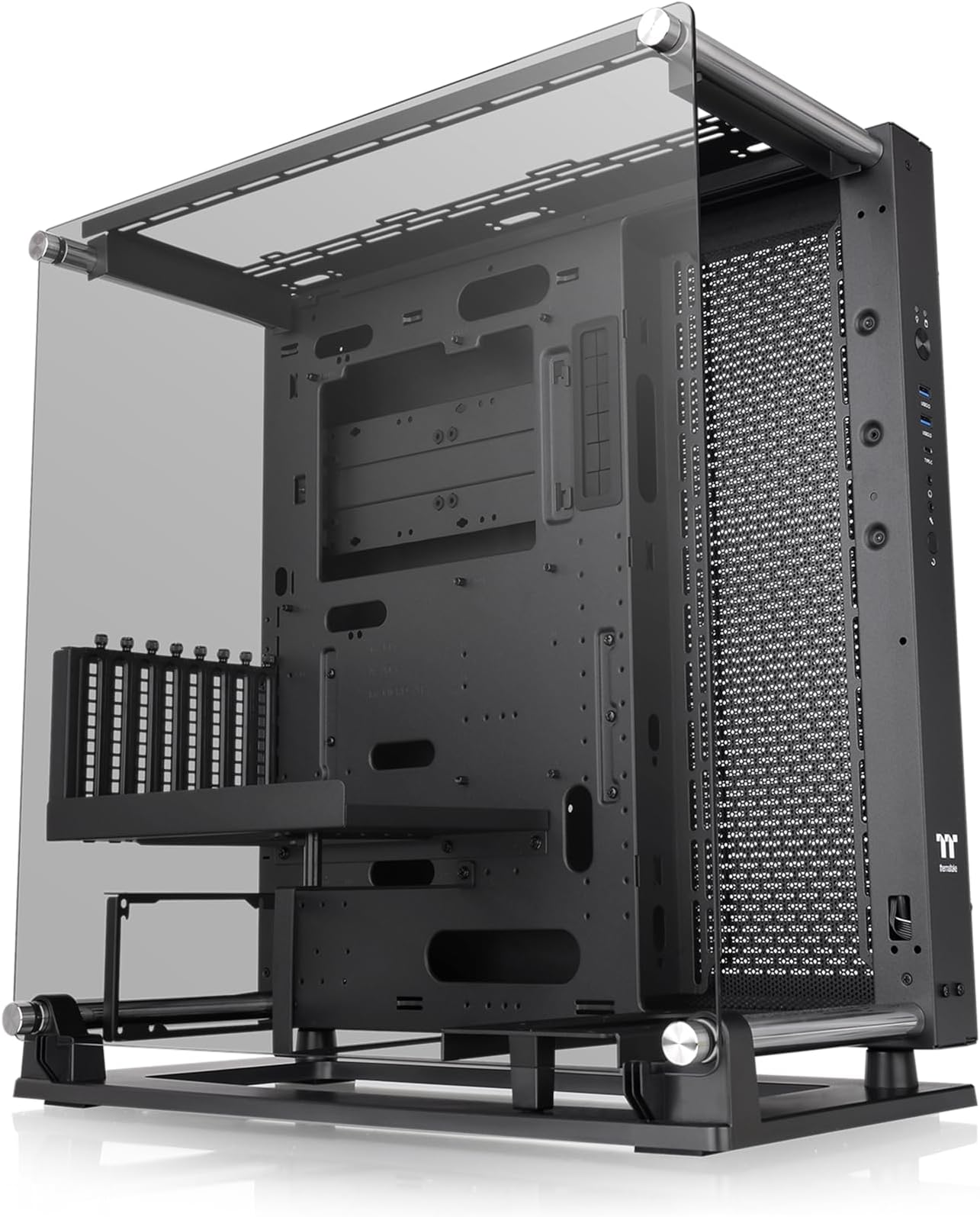
The Thermaltake Core P3 Pro is a premium mid-tower open-frame gaming chassis designed for E-ATX motherboards, featuring a 4mm tempered glass side panel, rotatable PCI-E slots for vertical or horizontal GPU mounting, and extensive cooling support including up to 420mm radiators. Its versatile 3-way placement options and robust Core P6-style feet provide stability and style, making it ideal for enthusiasts seeking a visually striking, high-performance PC case.




| ASIN | B0BDQP3PMB |
| Antenna Location | Gaming |
| Best Sellers Rank | #719 in Computer Cases |
| Brand | Thermaltake |
| Case Type | Mid Tower |
| Color | Black |
| Compatible Devices | Many different devices |
| Cooling Method | Air |
| Customer Reviews | 4.6 out of 5 stars 186 Reviews |
| Enclosure Material | Tempered Glass |
| Fan Size | 120 Millimeters |
| Hard Disk Form Factor | 3.5 Inches |
| Internal Bays Quantity | 6 |
| Item Dimensions D x W x H | 19.69"D x 10.55"W x 21.06"H |
| Item Type Name | Computer Case |
| Item Weight | 31.5 Pounds |
| Light Color | RGB |
| Manufacturer | Thermaltake |
| Material | Tempered Glass |
| Model Name | Core P3 TG Pro |
| Motherboard Compatability | ATX |
| Number of Fans | 3 |
| Other Special Features of the Product | Tempered Glass Side Panel |
| Power Supply Maximum Output | 700 Watts |
| Power Supply Mounting Type | Bottom Mount |
| Recommended Uses For Product | Gaming |
| Supported Motherboard | ATX |
| Total Expansion Slots Quantity | 8 |
| Total USB 2.0 Ports | 2 |
| Total USB 3.0 Ports | 2 |
| Total Usb Ports | 3 |
| UPC | 841163084915 |
| Unit Count | 1.0 Count |
| Warranty Description | 3 Year Manufacturer |
J**A
Fun design. Hard to set up. Tons of compatibility
Took me a while to set up, but you only have to do it once. Youtube build videos really helped here since the instructions are sparse. It is very heavy and offers lots of options. I put a 420 radiator on top along with a 7900xtx. PSU on/off switch and cord may be blocked by bottom rear steel rod so make sure to check orientations of your PSU or you might have to install PSU fan up. I used a Montech Titan 1200W and it is fine in regular postion. Noisy since the base and both sides are open in my setup, but you may purchase another mounting bracket for another radiator or case fans. Only comes with the one bracket. HD mounting a bit weird too so research that. Great case once it is set up, more visual than performance. Basically know what you are getting into if you get this open case of solid construction since it arrives fully dissasembled with a couple bags of screws. Lotta fun
D**.
Huge. Elegant. Versatile. Exhibitionist.
Best PC case for E-ATX motherboards that has ever been brought into existence. Beautiful tempered glass panel held by large shiny thumb screws. Vertical or horizontal GPU options. Optional mount for Thermaltake Pump. Plenty room for fans. Can be used vertically, horizontally, or walla mounted. Great test-bench. Back panel can be removed to access cables in back after removing 6 small thumbscrews. Very sturdy cintruction. Reminder this case is very large. Highly recommend.
H**.
Great case
Not to hard to build, was looking for a case to keep high end components cool, massive airflows, can adjust fat gpus away from glass, radiator is recessed so you can easily get a push/pull going. Very heavy, may wall mount at some point, has vesa mounts, very heavy and sturdy frame, solid temp glass, great case
C**R
Good test bench, but...
Thermaltake Core P3 Pro was purchased for use as a test bench, replacing an ALAMENGDA AL02 bench that my system has outgrown. As a test bench, the Core P3 Pro provides adequate space and mounting points for all system components and the capability to route/hide system cables within the chassis base. With the included rubber feet attached to the chassis base/side, the Core P3 Pro can be placed flat on the work table for easy component access (see attached picture) or sit upright to save workspace. The included adjustable GPU support bracket is hefty and the best that I've encountered. Build quality is excellent and assembly is straight forward, although the included fasteners are all packaged together, making it tedious to identify which are needed for each application. The pictorial based assembly instructions were complete and easy to follow. An irritating problem with the Core P3 Pro is the poor quality chassis USB Type C port/cable. The pre-installed cable is a thin ribbon type and although advertised as USB 3.2 Gen2 capable, it cannot support USB3.2 Gen2 speed/power requirements With the cable connected to my Strix Z790-E motherboard USB-C front panel header, the OS warns of USB failure and then freezes whenever attempting to transfer large files with an external USB-C type NVMe enclosure. The Thermaltake cable is definitely the problem source, since with a Graugear USB 3.2 Type-C header cable connected to the motherboard header, large files transfer at USB3 Gen2.2 rated speed without causing system/OS failure. The Core P3 Pro is not recommended if front panel USB-C capability is important.
A**X
Amazing case with horrible instructions
I want to start off by saying that if you are thinking about buying this case, JUST DO IT! It looks amazing and the thermals are fantastic. As far as noise, it is quieter than the Lancool 3 that I replaced by quite a large margin. Now to the not so great part: the instructions. I have never in my life seen instructions this horrible. There is no order to go in and just random areas that say hey bud, here is how you put together this part. I knew I was in trouble when on the first page it shows a completed build and tells me how to install the base. I highly recommend watching some YouTube build videos to get a better idea of how to do this but don't let this stop you from buying the case. Once you figure out the install, it really is incredible.
J**D
Fantastic case!
This case did everything I wanted it to. I was ready to modify it if necessary, since it's basically sheet metal, but the only thing I had to do was make a hole in the back panel for the rgb cord. Everything else is designed to hide your cables and mount your junk efficiently! Also I didn't know for sure before I got it, but if you use a mATX motherboard you can mount the PSU sideways like the Core P5. It comes with 2 sets of brackets for this. The only downside of doing that is there's nowhere to attach the GPU horizontal mount. I'm using a TV mount that puts the back 1.1 inches away from the wall and the AIO fans don't seem to have any trouble even with the LEDs in the gap. There seem to be plenty of extra tapped holes to mount things, and I used a couple to attach a PCI slot cover as a GPU anti-sag bracket (see above the rear of the 4090 in the picture). Later I'll design something better but this picked up the weight for now. Don't plan on using the one that comes with your card because there's nothing for it to push against. Highly recommend this case if you're wall mounting!
B**N
Great open air case
Still my favorite case to date and nothing has came out that I like more. Perfect open air case so plenty of airflow and easy to install and maintain parts. You can stand it up like a normal pc or lay it down flat you can even hang it on the wall ! Everything has room for installation and it’s a good value.
F**D
This is my Favorite Case Ever!
The Thermaltake Core P3 Pro E-ATX is a fully modular, open frame chassis that showcases all my Dual CPU server components. It has extra front fan bracket and vertical GPU holder. TT ads emphasize that it has many possibilities, but truthfully, I purchased it because this was the only case that I could find to house my X99 E-ATX motherboard AND a big 40 series graphics card upgrade (otw). Convenience, form, function -- makes your build into a working conversation piece that you'll be proud to display.
Trustpilot
1 day ago
5 days ago