


Desertcart purchases this item on your behalf and handles shipping, customs, and support to Finland.
🚀 Elevate your MacBook game with power, speed, and style—never settle for less!
The Anker USB-C Hub for MacBook is a sleek, ultra-compact 7-in-2 dock designed specifically for the latest MacBook Air and Pro models. It expands two USB-C ports into multiple versatile connections including USB-A, SD/microSD slots, and HDMI supporting 4K@60Hz output. With 100W pass-through charging and blazing 40Gbps data transfer speeds, it enables seamless multitasking and dual-monitor setups (except on M1/M2 Macs). Engineered to keep the MagSafe port unobstructed, this hub combines minimalist design with maximum functionality, perfect for professionals seeking efficient workspace expansion.
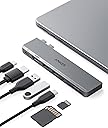


| ASIN | B0BNZ5V1TF |
| Best Sellers Rank | 1,988 in Computers & Accessories ( See Top 100 in Computers & Accessories ) 36 in USB Hubs |
| Brand | Anker |
| Brand Name | Anker |
| Colour | Gray |
| Compatible Devices | Laptops |
| Compatible devices | Laptops |
| Country of Origin | China |
| Customer Reviews | 4.4 out of 5 stars 3,556 Reviews |
| Data Transfer Rate | 40 Gigabits Per Second |
| Enclosure Material | Plastic |
| Hardware Interface | HDMI, MicroSD, USB, USB Type C |
| Hardware interface | HDMI , MicroSD, USB, USB Type C |
| Item Highlight | Thunderbolt 4 Compatible, USB-C and 2 USB-A 5Gbps Data Ports, for MacBook Pro, MacBook Air M4/M5 and More (Not Work with Neo) |
| Item Weight | 54 g |
| Manufacturer | Anker |
| Manufacturer Part Number | A83540A1 |
| Minimum Required Operating System Version | Mac OS 13 Ventura |
| Model Number | A8354 |
| Number of Items | 1 |
| Number of Packs | 1 |
| Number of Ports | 7 |
| Operating System | macOS |
| Product Features | Designed for MacBook MagSafe port compatibility |
| Special feature | Designed for MacBook MagSafe port compatibility |
| Total USB Ports | 7 |
| Total USB ports | 7 |
| UPC | 194644118723 194644119010 |
| Unit Count | 1.0 count |
W**M
Great product, highly recommended.
I recently purchased the Anker USB-C Hub for MacBook (7-in-2 with 4K HDMI), and it’s easily one of the best accessories I’ve added to my setup. The build quality is excellent—it feels solid, premium, and very durable. It fits perfectly onto the MacBook without feeling loose, and the compact design makes it great for both home use and travel. Setup is instant—just plug it in and it works straight away, no hassle at all. It gives you all the extra ports you need, which is a huge upgrade for MacBooks with limited connectivity. The 4K HDMI output works perfectly for connecting to an external monitor, and everything runs smoothly. Performance-wise, it’s been flawless. Data transfer is fast, and the pass-through charging is really convenient so you can power your laptop while using the hub. It genuinely makes everyday use much easier. Overall, this is a fantastic product—reliable, well-built, and great value for money. If you need extra ports for your MacBook, I would definitely recommend this.
T**Y
Fits securely for all my accoutrements
Been using the Anker hub for about a week with no issue - fits solidly / flush against my MacBook Air and allows space for the charger to easily plug into the laptop. In the hub goes my hdmi cable for my larger monitor, usbc for my mouse, usb for my ring light, and usbc for my keyboard charger - it all feels secure and it’s easy to remove when I need to take my laptop out of my office. It’s great! Recommend.
C**S
good built, no headphone jack
Fabulous usb hub for my macbook. it works really well, build quality is metal and fits in with my macbook pro 2021. Would absolutely recommend this to anyone. It's nice a compact so it can fit into my backpack, it charges my macbook at the required watts and has enough ports selection for my need. One downside however is that it covers the headphone port on my macbook so ain't the best for macbooks over 2021.
M**K
Good hub
Good hub for Mac. Take care when inserting and removing.
T**5
Enables 2x external monitors on a MacBook Air M4 (2025) model using the USB C and HDMI ports.
What can I say other than Anker have performed, as expected, again! I own their cables, power banks, charging adapters, magsafe phone stands and speakers so I have been a fan of Anker for many years so they are my go to when I require a new tech-based device. You pay more for Anker versions of most things, but theres a reason for it, they are the best at what they do and this MacBook hub is another one of those times! I purchased this a while back to use with my MacBook Pro (M1 Pro) as a port extender because my external webcam and my Logi keyboard/mouse require a USB A port for each, this hub provides 2x so its perfect for my needs. The HDMI port is a nice addition, so I was able to connect two external monitors using HDMI on each side of my laptop. Fast forward to this week and I have somewhat upgraded to the MacBook Air M4, which is natively compatible with 2x external monitors unlike previous models. I didn't think this hub would provide me with the ports needed for my monitors, but tested it regardless... IT WORKS! I have the first USB C port being used to one monitor (HDMI to USB C cable) and my second monitor is connected to the HDMI port (HDMI to HDMI cable). The reason this is very important to me is for work, but also the MacBook Air has less ports than my MacBook Pro so this hub completely alleviates my concerns. This is an expensive hub, but it's worth it. I would say my only negative is it only comes in one colour; Space Grey. It would be great if Anker matched the Mac lineup so you can purchase the colour that matches your MacBook.
F**E
Astonishing Product.
This Hub is fantastic! Anker really perfected the design on this one. A number of their other USB Hubs have: covered up the charging port, not supported HDMI, or been too bulky etc. But they have absolutely outdone themselves with this one. I bought this for my 'Macbook Air M1 2020' to connect to a monitor and use the SD slots. It exceeded my expectations right from the unboxing; it is incredibly light and small so it rarely poses as a space-saving problem. It is also a perfect match with the Macbook itself and is the right depth to match with the underside of the Macbook - keeping it flush. A very important detail that cannot be overlooked is the fact that this Hub does not drain your laptop the same way that a single USB-C connection would. Due to connecting to both USB-C slots, your laptop is transferring energy at an efficient rate whereas the same energy transference over one USB would drain the laptop quicker and damage it over time. Overall, I believe that this USB-C Hub is the best one out there right now. That is in terms of value for money, performance, portability and every other aspect.
L**E
So Strong holds in place and great powering combo with Macs
This is a great quality USB hub by Anker as usual the weight of the item is fairly heavy and solid and clicks in position and stays secure in place with no movement when other connections are added in place! Highly recommend this brand as really supports Apple Mac computers, I use the plug to charge my Mac as this is the only brand that can power a Mac to the full capacity even with failing battery
A**I
Not sturdy enough.. I expect this product to be better
Hi Team, I bought this product and then forgot then I started using this from May 2026. It worked fine for a while but now it is not working seamlessly, I have to plug it multiple times and then it work. Can you help me check if this is still in warranty
L**A
Excellent product. Fast delivery. Would buy again.
Great product. Excellent value, does what it says. It makes everything stable as it plugs straight into my Mac. I wish I had bought one earlier. Very good, fast delivery too - it came earlier than expected
V**R
Nice hub! Make sure your Mac is not blocking its USB ports
Hub feels sturdy and works as expected. Its design matches beautifully my Macbook Air M2. Make sure you have the proper settings on your Macbook, or the USB ports will not work. System Settings → Privacy & Security → Accessories
J**N
Accessorio indispensabile per il M!
Con il Macbook M1, purtroppo abbiamo solo una uscita USB-C, con questo accessorio ho risolto il problema, del Mouse, secondo display hdmi, caricare il Mac, e tant'altro.
M**T
Ein praktisches Gadget für MacBook-Besitzer - Der Anker USB C Hub
Als stolzer Besitzer eines MacBooks war ich auf der Suche nach einer Lösung, um die begrenzten Anschlussmöglichkeiten meines Laptops zu erweitern. Ich stieß auf den Anker USB C Hub und muss sagen, dass ich von diesem kleinen Gerät wirklich beeindruckt bin. Zunächst einmal ist der Anker USB C Hub äußerst kompakt und passt problemlos in meine Tasche. Das macht ihn zu einem idealen Begleiter für unterwegs oder für den Einsatz im Büro. Aber lass dich nicht von seiner Größe täuschen - dieser kleine Hub hat es wirklich in sich! Mit dem Anker USB C Hub konnte ich endlich meine externen Geräte ohne Probleme an mein MacBook anschließen. Egal ob es um das Übertragen von Daten auf meine externe Festplatte geht, das Anschließen meines Smartphones oder das Aufladen meiner Geräte - dieser Hub bietet eine Vielzahl von Anschlüssen, die all meine Bedürfnisse abdecken. Ein weiterer Pluspunkt des Anker USB C Hubs ist die problemlose Einrichtung. Einfach den Hub in den USB-C-Port meines MacBooks stecken und schon erkennt das System alle angeschlossenen Geräte automatisch. Kein lästiges Herumfummeln mit Treibern oder komplizierten Installationen. Es funktioniert einfach! Die Datenübertragungsgeschwindigkeit des Anker USB C Hubs ist beeindruckend. Egal ob ich große Dateien übertrage oder mehrere Geräte gleichzeitig anschließe, der Hub bietet eine stabile Verbindung und schnelle Übertragungsraten. Das spart mir eine Menge Zeit und Nerven. Darüber hinaus ist die Konstruktion des Anker USB C Hubs solide und haltbar. Ich habe ihn seit einigen Monaten im Einsatz und er hat mich nie im Stich gelassen. Das hochwertige Material sorgt dafür, dass er den täglichen Belastungen standhält und auch nach längerem Gebrauch noch wie neu aussieht. Alles in allem bin ich mit dem Anker USB C Hub für MacBook mehr als zufrieden. Er erfüllt meine Erwartungen in jeder Hinsicht und hat sich als äußerst nützliches Gadget erwiesen. Wenn du nach einer einfachen und zuverlässigen Möglichkeit suchst, die Anschlussmöglichkeiten deines MacBooks zu erweitern, kann ich dir diesen Hub wärmstens empfehlen. Danke für's lesen :-)
T**O
Anker Saves the Day (and My MacBook Ports!)
Okay, let's be real. If you're a MacBook user, especially with one of the newer models, you know the struggle is real when it comes to ports. Seriously, it feels like Apple decided we don't need to plug anything in anymore. That's where this Anker USB C Hub swoops in like a superhero. I've been using this 7-in-1 adapter for a bit now, and it's pretty much become an essential part of my setup. First off, it's Anker, so you expect a certain level of quality, and it delivers. It feels solid, not flimsy like some cheaper hubs I've tried. The main reason I grabbed this was for the 4K HDMI, and it works flawlessly. Plugging it into my MacBook Air and then out to my external monitor (a 1440p, so not quite 4K but super crisp), the picture quality is perfect. No flickering, no lag, just a clear, extended desktop. Beyond the HDMI, having extra USB-A ports is a lifesaver. I can finally plug in my wireless mouse dongle, an external hard drive, and still have room for a flash drive or my keyboard without having to play musical chairs with my dongles. The USB-C passthrough charging is also super handy so I don't lose a port just to power my laptop. It's super easy to use – literally plug and play. No drivers, no software, just connect it and everything works. It's compact enough to throw in my bag without taking up much space, which is great for when I'm working from different spots. If you're constantly juggling adapters or wishing your MacBook had just *one* more port, this Anker hub is a no-brainer. It brings back all the essential connectivity you need in one well-made, reliable little package. Highly recommend!
Trustpilot
2 weeks ago
2 weeks ago