Desertcart purchases this item on your behalf and handles shipping, customs, and support to Finland.
🎥 Elevate your live stream game — be the director everyone envies!
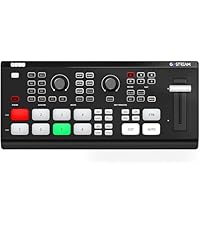
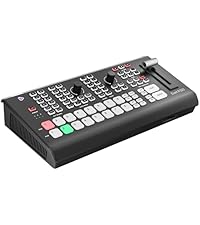
The Osee GoStream Deck HDMI Pro is a compact, professional-grade live streaming video mixer featuring 4 HDMI inputs, 2 outputs, advanced audio controls, and simultaneous 3-platform streaming. Designed for seamless multi-camera switching, it supports landscape and portrait modes, graphics overlays, and NDI updates, making it ideal for creators, educators, and event pros seeking broadcast-quality production with intuitive hardware control.


| ASIN | B0CBPBJK1V |
| Best Sellers Rank | #68 in Audio & Video Selector Boxes |
| Brand | osee |
| Color | Go Stream Deck |
| Compatible Devices | Camera, Monitor, Laptop, Personal Computer |
| Connector Type | 3.5mm Jack, Ethernet, HDMI, USB Type-C |
| Customer Reviews | 4.5 out of 5 stars 384 Reviews |
| Item Dimensions | 11.81 x 5.51 x 3.9 inches |
| Item Weight | 1.1 pounds |
| Item dimensions L x W x H | 11.81 x 5.51 x 3.9 inches |
| Manufacturer | osee |
| Mfr Part Number | Go Stream Deck -CA |
| Model Number | GoStream Deck |
| Number of Items | 6 |
| Number of Ports | 8 |
| Package Quantity | 1 |
| Power Plug Type | Type B - 3 pin (North American) |
| UPC | 769293552114 |
| Unit Count | 1 Count |
| Warranty Description | 1 year manufacturer |
B**N
Impressive video switcher at a great price!
I purchased the Osee GoStream Deck as a video switcher to help bolster the marketing within my retail business. This thing is awesome for efficiently creating recorded and live video. The GoStream is in my opinion the only real competition to the Blackmagic ATEM mini/mini pro & mini extreme. I have a background in broadcast and this little device reminds me of a small version of the bigger production switcher I used to use. It's well built and the button placements have been well thought out compared to the ATEM mini Extreme that has tons of buttons that are hardly used. The preview bus is a MUST in my opinion and I'm so glad that Osee decided to stick with the traditional layout and include those buttons. Incredibly impressive to have a built-in SD card slot that can both be used for recording and playback live. Additionally love that this switcher includes both a SuperSource and 2 keyers, 1 Upstream, and 1 Downstream. Also at this price point it's notable that there are 2 still stores. You have to spend almost $1,000 with BlackMagic to get that feature. Osee has been continually updating the firmware on the device and it just keeps getting better. According to the manufacturer they are coming up with an update soon that will enable API access to the device along with a software companion product for computer control. I would like to see the DVE capabilities extend to doing transitions and also add support for alpha channels within video playback so that animated titles could be added from the SD card. But overall a very impressive device with a promising future. Competition is never a bad thing.
J**.
Works with Zoom! Better than the ATEM Mini
I've been using an ATEM Mini Pro for the last couple of years for my home office. I work in events and during COVID we were all producing livestreams from our home so that was the original need. I'm doing less of those now, but I've gotten used to the workflow of having a switcher at my desk. The one big drawback to the ATEM Mini was that the USB output was mjpeg which Zoom did not handle very well. The blacks were crushed, the highlights were blown out. The image just looked oversaturated / over contrast. In OBS you could solve for this by switching betwee full / partial color profile. But Zoom has no such toggles. I use Zoom for all my meetings at work, so I got tired of this look for my camera and eventually started using an Elgato Camlink instead. Fast forward to receiving the OSEE switcher a couple months ago. I bought it on a whim to see if it would solve this one big problem I have and it did! The output looks fantastic in Zoom without any adjustments needed. The image does look slightly more grainy than the CamLink but its leaps and bounds better than the ATEM. This switcher also improves over the ATEM by having two HDMI outputs so you can have a multiview + something else. And that something else is configurable via macros, so I have it setup to switch between a multiview and preview and program fullscreen. I hook up two cameras and two computers into the OSEE switcher, so with the macros I can toggle between a multiview which I use most of the time and full screen computer output on my secondary monitor when I want that instead. It also supports onboard recording via SD card. It has a secondary USB function which I have a webcam plugged in, just in case my main video call camera overheats during a meeting. It's definitely cheaply built plastic so it's likely not going to be as durable at the ATEM Minis but for desk use it's perfectly fine. One note is that it does run VERY hot. I thought the ATEM Mini ran hot, but this thing literally hurts to touch the bottom of it. So far it hasn't had any impact on my real wood desk, but buyer beware if you have this on a mat or a cheap surface, it could eventually lead to issues. In a Version 2 I would love for a fan to be added. The last thing I'll say is that the on screen menu is OK and works fine (it's got a bit of input lag when scrolling through things). On the one hand, I appreciate the on screen menu since you don't have to have a computer hooked up to change settings like on the ATEM. On the other hand, it's less intuitive and tedious than using Blackmagic's fantastic software. And it makes things like adding in rtmp stream keys very clunky (have to add it in a text file on the SD card). There are pros and cons to both approaches. The ideal would be to have both, so maybe we'll see OSEE release control software sometime in the future. I know they are working on NDI which would be a real game changer in a device this price.
D**S
Value for Money
The Osee GoStream is hands-down one of the best investments I’ve made for live streaming! It’s incredibly easy to set up and works flawlessly with multiple platforms. The video quality is crystal clear, and the device is built to handle long streaming sessions without any hiccups. I was impressed by its compact design and user-friendly interface, which makes it perfect for both beginners and professionals. I use it for our church to live stream Sunday services. This is an excellent product. If you’re looking for a reliable, high-quality streaming device, the Osee GoStream is a no-brainer. Highly recommended!
D**V
Great switcher and a great replacement for an ATEM.
This is a power packed video switcher. Great input options. The ability to stream to 3 different services is great. Also doubles as a video capture device. I would definitely recommend and will buy other products from them as the need arises. No connectivity issues to date. I use this weekly for different projects.
P**.
Great Product - Atem Mini Extreme features at a non-extreme price
I've been using the GoStream Deck for a little while now and I'm really liking it. I am an Atem Mini Pro user and this product competes directly with it at the same price point. I do love my Atem Mini Pro but I wish it had a few more features that require me to move up to the Extreme. The GoStream has some of those features I'm looking for, especially as it relates to super source and media playback. It is super easy to use out of the box, but the main thing missing is a companion desktop software. Osee says they are working on it. Once they do, I will update this review accordingly. What I like: - Easy to use out of the box - Supersource - Ability to record and playback media from a SD Card - Flexible ports - two HDMI ports and two USB-C Ports - Ability to stream to 3 different sources simultaneously - Bring in a webcam as one of your inputs. What I don't like: - No desktop software (as of 10/18/2023) - Some default settings - button brightness is set to high and multi-view layout (these can be changed in the settings) - No video scalers - This will not accept 4k (or higher) inputs. You need to make sure your inputs are set to 1080p (or 720p). - No audio processing for audio. Make sure to update to the latest firmware. One of the issues I had with the original firmware is that by default it output to 1080p 30. The external monitor I used didn't support 30 fps. I had to change the output to 60fps. The new firmware addresses this issue along with a number of other things. See release note below. V1.0.3 Release Note: 1. Fixed the issue of occasional out of synchronization problems between video and audio in long-duration recorded video material to the SD card. 2. Fixed the issue of occasional abnormal audio in recorded video materials. 3. Enhanced the video recording capability that allows the frame rate of recorded videos to match the output frame-rate set by the GoStream Deck. 4. Fixed the issue of out-of-sync streaming.
E**S
PACKS A WALLOP! Embarrasses the competition!
Right out of the box and with hardly a glance at the instructions, this tiny but powerful switcher just works! And, boy, does it work! With tons of features that blow the competition (you know who) right out of the water at a price that's incredible, the Osee StreamDeck has raised the bar for multi-camera switchers. Imagine, built-in SD card slot for recording on-board, and playing back pre-recorded material... AT THE SAME TIME!?!?!?! That alone will blow anyone's mind! Two rows of buttons for previewing before going on air, T-bar, both on-board menus and ethernet streaming capability with no need for a computer... wha??? Yeah! Did I mention two HDMI outputs, one for multi view, the other for program? Webcam output via USB-C and... wait for it... NDI in capability!!! Oh, did I mention, superview? Having three sources live on screen at the same time? The competition does this - for 3X the price!!! Upstream and downstream keyers, including green screen, PIP, you name it! I haven't dumped the competition's switcher yet because, you know what, I can connect that switcher's USB-C webcam out to the StreamDecks's webcam IN USB-C thus extending my capabilities by adding 4 more HDMI switchable sources... (I'm breathless). There's too much to tell, with tons of customization, audio mixing with levels visible in multi-view, and so on... and, oh, an on and off switch to boot! LOL THE BAD (just so nobody accuses me of being a fan-boy)... It will only accept 1080p sources so you have to downscale your 4K cameras before the switcher can see them. The competition's switchers downscale anything you throw at them no matter what... And, it gets really hot... so maybe get a laptop desk fan. Some operations are more intuitive than others. Besides those small details, I have no problem saying this thing is a powerhouse for anything short of broadcast work and if your local TV channel doesn't broadcast in 2K or 4K, you can get away with that as well! Stop reading this and get one... or two!
J**S
The best!
The best purchase for live streaming. We run a church team and we use 3 cameras for live streaming, is a lot easier to control using the interface. The app that you can we can download is great for stills and to control the systems. The video quality is great, sound input and output is awesome. Super portable and there is no lag when connecting the cameras. Make sure to have a USBC to USBC cable to connect the interface to your computer and an external monitor so you can watch the feed directly from the interface.
D**.
Great A/V Unit
Great video and audio mixer but IMO there’s a learning curve. 👍🏻
G**L
A good value product with lots of capabilities
I use it to help with running the local astronomy club meetings. I was particularly impressed when they bent over backwoods to help me sort out some warranty concerns. They shipped the product back for free, listened to the issue I was having and went out of their way to help. I was initially concerned with buying from overseas but as it turned out, it all went fine.
D**)
My New Video Switcher - Outperforms my ATEM Mini Pro
I have been using ATEM Mini video switchers for several years. They have been reliable and affordable. On a whim, I purchased the OSEE GoStream switcher and have been amazed by what it can do, especially in comparison with my ATEM Mini Pro. It is like OSEE heard all of my suggestions and complaints that I have posted and fixed them in the GoStream. Here is a list of those things I wished that my ATEM Mini Pro had that the OSEE GoStream includes. 1. Two rows for input selection, one a separate Preview row. 2. A SuperSource capability that is only available on the Mini Extreme 3. Completely self-contained with the on-board settings. No need to connect up a computer to change settings. 4. On-board recording and playback capability included with the SD card input. 5. A fifth camera input using a "webcam"-type device. 6. A headphone jack, my favourite add-on. 7. Two USBC inputs/outputs, only available on the Mini Extreme. 8. The ability to stream to three different streaming services simultaneously. 9. Two Video Out ports, only available on the ATEM Mini Extreme. 10. And, if you are into using your computer to set up your video device, it now comes with an app to control the GoStream on yourcomputer.
T**S
Smooth and controlled
With hdmi inputs and outputs, this unit is the CB perfect streamer control.
A**R
Fiable et facile d'utilisation
Osee est une marque que beaucoup de gens mériteraient à connaître! Excellent rapport qualité prix et offre plus de fonctionnalités que la concurrence. L'appareil a très bien fonctionné lors de divers événements avec enregistrement et webdiffusion. L'appareil m'apparaît fiable et n'a pas fait défaut pendant ces événements. Il existe des groupe en ligne de soutien entre utilisateurs et la meilleure recommandation est de déposer le GoStream sur un plateau ventilé ou refroidissant. Le principal point avantageux comparé au Atem est d'avoir 2 sorties HDMI : un pour le multiview et l'autre pour le programme.
J**)
I like it but it really heats up. A fan helps.
After I figured out it's tricks it has become a very useful tool. I now have 2. It heats up quite a bit but other than that it's pretty cool. Images are loaded via SD card and must be as a png. . Great value for the money.
Trustpilot
1 day ago
2 weeks ago