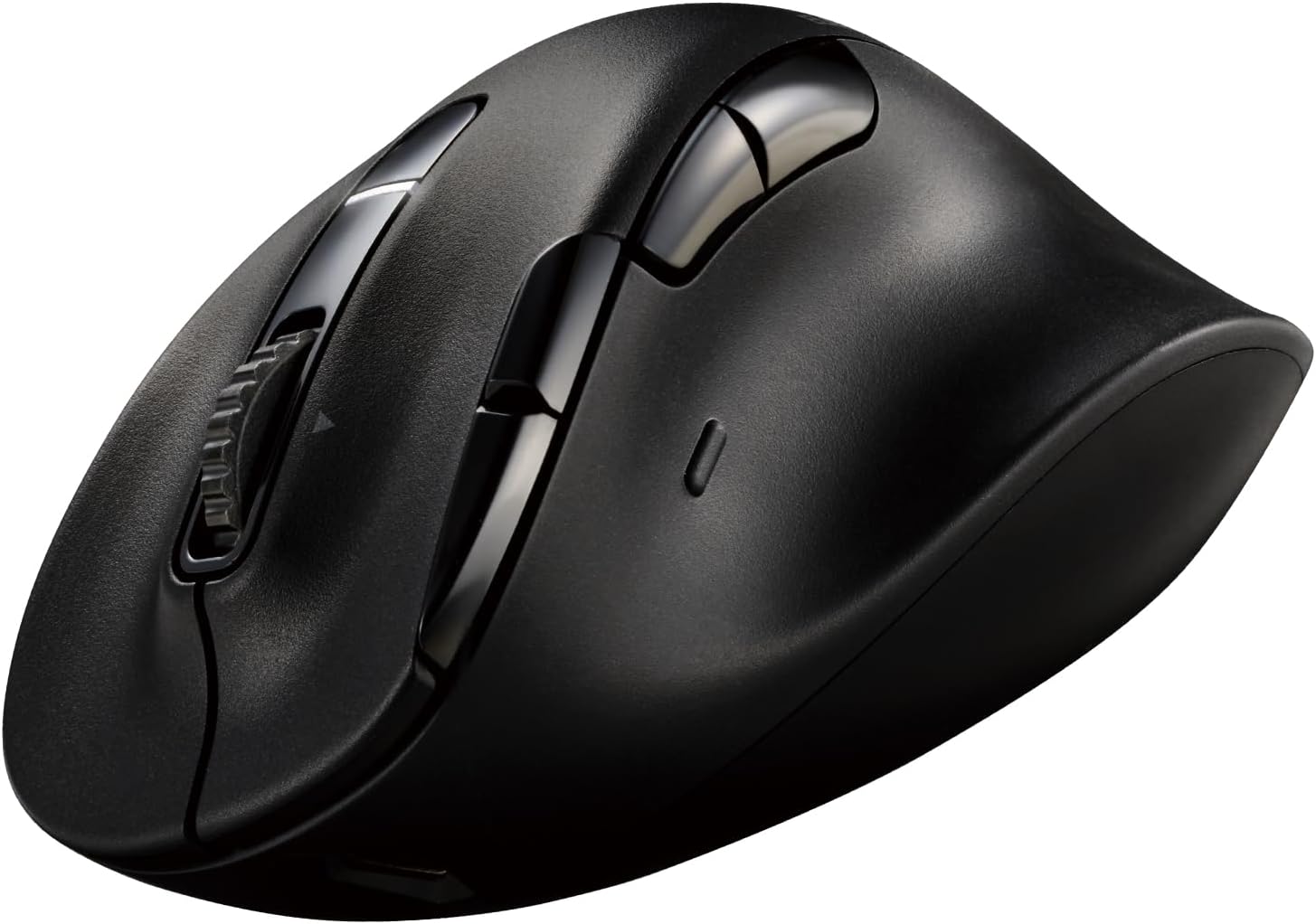


EX-G PRO Right hand
Product ID: 579863869
Details
- BrandELECOM
- ColorBlack
- Connectivity TechnologyBluetooth
- Special FeatureErgonomic
- Movement Detection TechnologyOptical
📶Multi-Device
🔋Rechargeable
🖱️8 Buttons
Buy anything from 5,000+ international stores. One checkout price. No surprise fees. Join 2M+ shoppers on Desertcart.
Desertcart purchases this item on your behalf and handles shipping, customs, and support to Finland.
🖥️ Elevate Your Workspace with Comfort and Style!
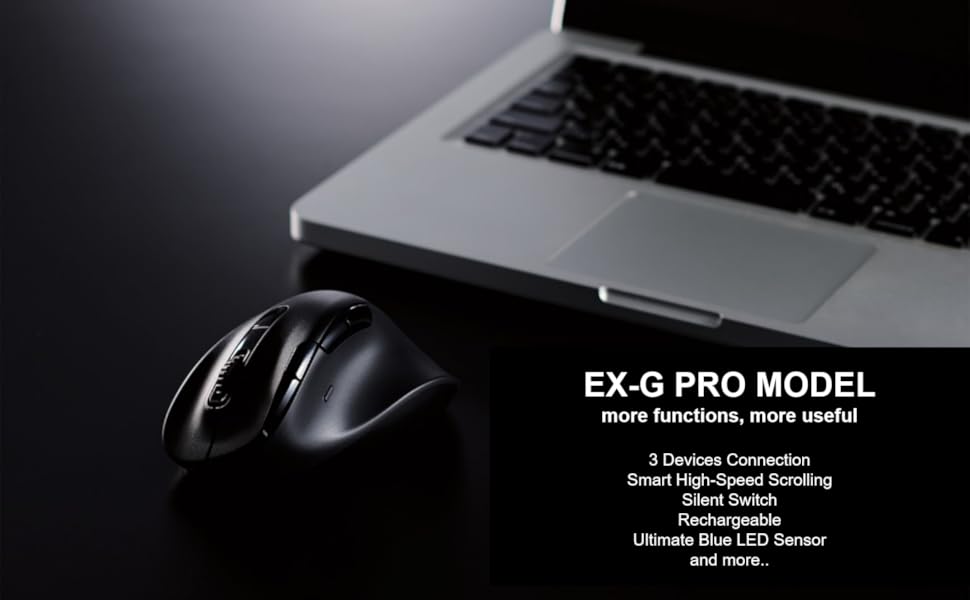
The ELECOMEX-G PRO Ergonomic Mouse is a cutting-edge device designed in collaboration with leading physicians to provide unparalleled comfort and functionality. With the ability to connect to multiple devices, silent operation, and customizable features, this mouse is perfect for professionals seeking efficiency and ergonomics in their daily tasks.








| ASIN | B0CGWN5V9N |
| Additional Features | Ergonomic Design |
| Antenna Location | Indoor |
| Are Batteries Included | Yes |
| Are Batteries Required | Yes |
| Best Sellers Rank | #2,152 in Computer Mice |
| Brand | ELECOM |
| Built-In Media | mouse, receiver, USB-A-USB Type-C(TM) cable |
| Button Quantity | 8 |
| Color | Black |
| Compatible Devices | PC, Laptop, Tablet, Smartphone |
| Connectivity Technology | Bluetooth |
| Customer Reviews | 3.9 out of 5 stars 424 Reviews |
| Enclosure Material | Plastic |
| Hand Orientation | Right |
| Hardware Platform | PC |
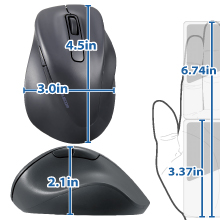
| Item Dimensions L x W | 4.7"L x 3.1"W |
| Item Weight | 110 Grams |
| Manufacturer | ELECOM |
| Mfr Part Number | M-XGL50MBSKBK |
| Model Name | EX-G PRO |
| Model Number | M-XGL50MBSKBK |
| Mouse Maximum Sensitivity | 2000 Dots per Inch |
| Movement Detection | Optical |
| Movement Detection Technology | Optical |
| Number of Batteries | 1 Lithium Ion batteries required. (included) |
| Number of Buttons | 8 |
| Operating System | Windows 11 |
| Power Source | Battery Powered |
| Range | 10.0 meters |
| Special Feature | Ergonomic Design |
| Style Name | Modern |
| Unit Count | 1.0 Count |
M**Y
So comfortable
Nice materials. It tracks cleanly and works great right out of the box. What sets this mouse apart from other ethos is the buttons and body cradle you hand in comfort. This mouse is an absolute joy to use and makes my desk look nice. Buy it if you’re looking for ergo and functionality. Oh yea the materials they use don’t pick up finger oils. Game changer! 5 stars thanks Elecom
E**M
Large Mouse, Slow buttons
Great mouse, especially for large hands. I purchased the XL size, great fit. But the buttons/clicks are not as crisp as the Logitech MX Master 3. Good mouse over all, just be patient when you click on something.
I**.
Very good for large hands. Wheel is a bit cheap and mouse accuracy isn't the best. Battery is good.
Overall I am happy with this mouse. It's not too large or weirdly oriented like full sized ergonomic mice, but it's large enough where my hand doesn't cramp after hours of use. The battery charge holds well enough. My mouse stays on 24-7. I use my mouse on and off, for about 12-16 hours a day. The battery lasts about a week between charges, which takes about 1 hour. The mouse wheel does feel like it was an afterthought, but it's good if you need an accurate line-by-line scroll. The mouse DPI is really low, so it takes time getting used to if you're used to high DPI mice.
Z**.
Would be perfect with some improvements
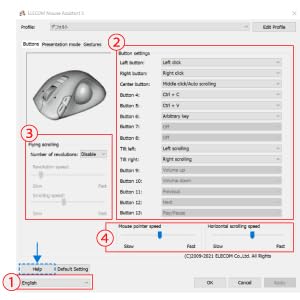
I have very small hands for an adult woman, and the size small in this mouse is both comfortable, AND actually allows me to reach all the buttons - something that could not be said for my Logi Lift mouse, which is also supposedly made for smaller hands. I've been through carpal and cubital tunnel release surgeries, but still need to be careful with regard to ergonomics. This is the only vertical mouse (albeit it's a semi-vertical mouse) with tilt scroll wheel functionality, something I very much missed when using my Logitech Lift mouse. The other thing I love about this mouse, is that it has the most buttons of any mouse I've been able to find in a small size. The typical mouse "suitable for small hands" has a normal scroll wheel, and at most two thumb buttons, often and infuriatingly placed in a spot that can't be reached with small hands. This issue is especially true for small gaming mice. This Elecom mouse has the two extra functions provided by the tilt scroll wheel, three thumb buttons, and two extra buttons to the left of the main left mouse button. Unfortunately, the DPI button beneath the scroll wheel is NOT programmable. The Mouse Assistant software installs in Japanese and needs to be swapped to English. The default profile name was still in Japanese, but it was easy enough to choose "Edit Profile" and "rename" to change it to English. You ARE able to create profiles to pair with executables, which I appreciate as a gamer. I saw a review that claimed you couldn't program the mouse to use keyboard characters. This was a bug at one point, but currently isn't true. Thanks to some awkward translations, you need to choose "arbitrary key" and that allows you to pick whichever one, two or three keyboard characters you want. I just needed to be able to pick a single character for each button, so this is plenty for me. As for things I do NOT like about this mouse, there isn't any on-board profile memory. Close the Mouse Assistant software, and you're back to default mouse settings. If you swap to another PC, and install the Elecom software, it reads nothing from the mouse, and you have to reprogram everything from scratch. Make changes, and you need to make them across every PC or Mac. There is also no exporting a profile to import elsewhere. This is a hugely disappointing decision made by Elecom. Another disappointing choice was for the USB cable. It is a proprietary USB-C to USB-A cable as per Elecom, yet it's completely unlabeled and generic looking, making it MUCH too easy to lose. Worse, it's also only about a foot long, and it's effectively made even shorter thanks to all the kinks introduced into it at the factory when they folded and bound it. Presumably the length was selected with some combination of cheapness and laptop users in mind - except it's on the short side even for laptop users that use the built-in keyboard. Meanwhile, both laptop users with external keyboards and desktop computer users, *absolutely* can't type and charge with just that cable. You can technically use an extension cable with it, however, the Elecom manual warns against potential fire hazards if using anything other than THEIR cable, thanks to the relative volatility of lithium-ion batteries. Another flaw is that you can only see battery status in Bluetooth mode. I'm using this mouse with the USB dongle, since that's better for gaming, but had to waste one of only two available Bluetooth modes on this same PC, JUST so I can check to see where my battery levels are at. They could have had a battery level indication in the Mouse Assistant software for wireless dongle mode, or had it display in Windows settings, Bluetooth & Devices, which it does for the mouse in Bluetooth mode, but it was completely forgotten. Since it still shows the Bluetooth status/battery levels even in 2.4 GHz mode, I'm likely eating more battery life using this workaround. Battery levels matter beyond not wanting to be stuck with a dead mouse at an inconvenient time. The non-removable lithium-ion battery will potentially render this mouse a paperweight in a couple of years, and that's assuming the lithium-ion battery doesn't turn all "spicy pillow" and become a literal fire hazard. Best practices (not letting the battery completely run out, and not re-charging to max levels) are impossible to manage if you don't know what the battery level IS. Elecom would have stood out if they'd chosen to go with replaceable batteries, instead. My old Logitech G700 mice were rechargeable (albeit I couldn't reach all the buttons), and used AA Eneloop rechargeable batteries that could be charged in place, or physically swapped out. Batteries lose capacity? Buy some new Eneloops, and recycle the old. THAT is the way to do it. Unfortunately, even Logitech went for built-in batteries in future wireless models, since it sells more mice in the long run, at the expense of needless environmental waste, and consumer dollars. I would actually have preferred a wired version of this mouse to one with a non-replaceable lithium-ion battery, but the wired Elecom mice are unfortunately all bare bone models lacking the necessary functionality of this model. This could have been a five-star mouse, but poor decisions, such as its dependence on software instead of onboard memory, the inability to export/import profiles, its proprietary/too-short/too generic-looking-not-to-lose charging cable, and its non-replaceable battery, compounded by its lack of battery status display, are the reason this mouse is overall a 3 instead of the 5 I wanted to give it. I'll be keeping this mouse, because there's literally nothing else in this category that fits my hands so well. Thankfully, most of the cons are only of intermittent or eventual concern or annoyance, but I hope Elecom is more thoughtful in a future iteration of this mouse, or at least they decide to offer a USB wired version. Edit: I’ve been disappointed to experience issues with the tilt scroll wheel. It doesn’t always react, which is particularly frustating given (1) it’s one of the reasons I chose this mouse and (2) I keybind it for healing potions or spells in various video games. Left scroll wheel clicks that don’t actually DO anything get my characters killed. Immensely frustrating.
D**N
Great mouse ruined by bad decisions
Mouse itself is 9/10. Easily the best ergonomic mouse I've ever used, fits my hand well. The buttons are gratifyingly tactile and the scroll wheel has just the right amount of heft. The sensor is also incredibly accurate and honestly pretty decent for gaming. HOWEVER, it is utterly unforgivable to use proprietary charging cables in 2024. The entire point of USB is to be a Universal standard. It's literally in the name. The fact this mouse can only charge with the included 6-inch cable, combined with its mediocre-at-best battery life, is an unfortunate achilles' heel on an otherwise solid product.
G**R
Gestures are a huge help with my workflow
I got this mouse for its shape and the buttons. Didn't even realize it has a thumb button just for gestures. Once I figure this out, it has helped greatly with my workflow since I like to keep my hands on the mice most of the time. There is another mouse company that I prefer for shape, however it doesn't have the gestures capability and the cursor isn't as smooth, accurate or precise like this one. A++
G**N
Great Mouse
My carpal tunnel pain does not show up after 10 to 12 hours of using this thing. I like this one so much I bought a backup one.
M**G
A LOT of mouse for the money, but some complaints about charging
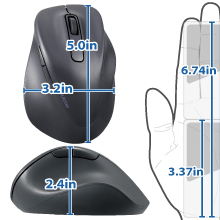
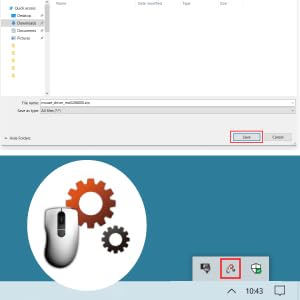
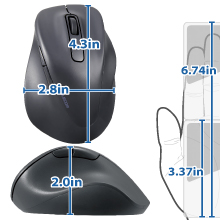
I got this mouse to use with my 2021 MacBook Pro (MBP) running macOS Sonoma14.1, choosing the Large size based on their chart for my 7.5-inch right hand. I have to admit I didn't pay close attention to all of the features before I ordered, and I have to say the features list is extensive; there are a lot of haven't gotten around to trying and may never use, but it's nice knowing they're there. The size is a great fit for my hand, which is right in the middle of the listed range. It's very comfortable to use, very nicely weighted, and glides smoothly on my table without a mouse pad. It was very easy to pair it with my MBP using Bluetooth (BT). Although I only intend to use it with this computer, because it also comes with a USB dongle you can use instead of BT and because it can be paired simultaneously with a total of three devices (two via BT, one via USB) and can switch between them at the press of a button on the bottom, I also tried it with my iPad and another MacBook. All paired just as easily, and switching between devices works as advertised. As soon as I paired it with my BMP, I was able to adjust its basic settings using Mouse in the macOS System Settings. To use the advanced features, which I haven't really looked at that much yet, I downloaded and installed ELECOM Mouse Assistant from the QR code link on the packaging. As is the case with ANY third party mouse or keyboard driver, this required going into the Privacy & Security section of System Settings and enabling it. Their website gives instructions for this, but some users may find this to be somewhat intimidating. This is an Apple limitation, not an ELECOM issue, but it's something to be aware of if you intend to use anything but the two main buttons and scroll wheel. See the photo I've uploaded of the user interface to see just how extensively you can customize this mouse. I've only so far used the Tilt left and right functions of the scroll wheel to scroll from side to side on pages, and it's a really nice feature to have. My two complaints about this mouse are: 1. As the manufacturer states, you have to use the provided USB-C to USB-3 cable charge it. I've verified that other USB-C cables don't work. This is an inconvenience because the provided cable is just a bit over 12 inches long, and to use the mouse while it's charging requires also using a USB extension cable. Fortunately, THAT works, but if you don't already have one this means you need to get one, and this is something you have to remember when you're traveling. 2. It's not mentioned on the product page here, but the packaging says it goes a month on a single charge. Well, I've been using it for just under a week since I first fully charged it, and it's down to 63% charged, which projects out to lasting less than 3 weeks.
あ**あ
ミドルクリックが若干気持ち悪い操作感だが、他は問題なし
M-BL21DB XGM20DLS MNK01DBS の3シリーズのエレコム静音マウスを使ってきて、傾斜がついているものしか多ボタンのマウスが売られていないことから仕方なく購入 バッテリーになったことから軽いとかの違和感はすぐ慣れるので問題ないとして、ミドルクリックの操作感が慣れづらい 人差し指の腹の中心より指先で押すと、右チルトを誤爆してしまう 指の腹で捉える分には問題ないが、ホイールの回転数を稼ぐために指先をデフォでホイール操作に多用する人がミドルクリックを指先で押そうとするとストレスになる 角度がついていると理解して押すにしても慣れが必要 おまけのファンクションボタンみたいなのは、爆音というほどではないが親指で押す一個のボタン以外は申し訳程度の静音だったりする あと記憶違いやYouTube側の問題だったら済まないが、なぜか知らないけどエレコムマウスアシスタント5時代ではできたチルトでのYouTubeの秒数送りができなくなっている ソフトウェア的な問題くさいので、アップデートで再実装されるかもしれない
ヤ**ゲ
戻るボタンがこんなに便利とは・・・
当方macで使用。横スクロールがぎこちないので星4ですが、それ以外概ね良好です。 大きいのがしっくりくるのでXLにしましたが、個人差があるので量販店とかで握り具合を調べてからがいいと思います。
V**E
手が大きくなくても、XLの世界を味わって貰いたいです。
比較的手が小さいと言われる私ですが。これは1番大きいサイズのこちらがしっくり来ました。 一日中使っても、そこまで疲れないかなとは思います。ただ、やっぱり手が小さいのに、1番大きいサイズなので、若干指の動きが大変になる時もありますが、そんな時は正直多くないので、OKでした。 ボタンカスタマイズもあって、1発でコピペができたり、チャッピー呼び出せたり、とても便利です。ピアノやってた人ならもっと指が器用に使えるのかもしれませんね♪
す**が
マウスカーソルの微妙な操作が出来ない。
机とマウスの摩擦が強すぎて、微妙な操作がしずらくそこがストレスを感じる。 ボタンを押す、リンクを押すときにマウスを微妙に動かすだけが出来ない。 細かい作業をマウスで行う人にはおすすめ出来ない。 また、バッテリーの持ちが悪い。
い**ち
結局こういう「握りやすさ」に特化した形が一番疲れない。
仕事で一日中マウスを握っているので、手首の疲れが限界でこちらに買い替えました。 最初は少し変わった形だなと思いましたが、実際に手を乗せてみると、指の置き場所が自然に決まる感じで収まりがいいです。Lサイズを選びましたが、成人男性の手ならちょうどいいサイズ感だと思います。 ボタンの押し心地もしっかりしていますが、カチカチ音がしない静音タイプなので、静かなオフィスでも気兼ねなく使えるのがいいですね。個人的には、高速スクロールが便利で助かっています。長いExcelのデータやWebページを見る時のストレスがかなり減りました。 接続についても、Bluetoothとレシーバーの両方が選べるので、メインのPCとサブのタブレットで使い分けられるのが便利です。一度設定してしまえば切り替えもスムーズでした。 充電式なのも、電池の買い置きを気にしなくて済むので楽です。これまでは電池式のものを使っていましたが、重さのバランスもこっちの方が安定している気がします。 多機能すぎて使いこなせるか不安でしたが、専用ソフトでボタンに機能を割り当てられるので、自分なりに使いやすいように設定して愛用しています。
Trustpilot
1 month ago
1 month ago