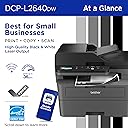
🖨️ Compact power, wireless freedom — print like a boss!
The Brother DCP-L2640DW is a compact, monochrome 3-in-1 laser printer designed for small businesses and home offices. It delivers professional-quality black & white prints at speeds up to 36 ppm, features a 50-page auto document feeder, and supports automatic duplex printing. With versatile connectivity options including dual-band wireless, Ethernet, and USB, plus a dedicated mobile app for remote management, it streamlines high-volume printing, scanning, and copying. Eco-friendly and cost-effective, it includes a toner subscription trial to keep you running without interruptions.


| ASIN | B0CPLFTPCV |
| Additional Printer Functions | Copy, Scan |
| B&W Pages per Minute | 36 ppm |
| Best Sellers Rank | #302 in Office Products ( See Top 100 in Office Products ) #1 in Laser Computer Printers |
| Brand | Brother |
| Built-In Media | AC Power Cord, Drum Unit, Toner Cartridges |
| Color | Black |
| Color Depth | 1 bpp |
| Compatible Cartridge | TN830, TN830XL |
| Compatible Devices | Laptops, PC, Smartphones, Tablets, iPhone |
| Connectivity Technology | Ethernet, USB, Wi-Fi |
| Control Method | App |
| Controller Type | Android |
| Customer Reviews | 4.3 out of 5 stars 2,953 Reviews |
| Display Type | LCD |
| Dual-sided printing | Yes |
| Duplex | Automatic |
| Hardware Interface | Ethernet, USB |
| Initial Page Print Time | 8.5 Seconds |
| Ink Color | Black |
| Item Dimensions D x W x H | 15.7"D x 16.1"W x 12.5"H |
| Item Type Name | Multifunction Printer |
| Item Weight | 25 Pounds |
| Manufacturer | Brother |
| Maximum Copies Per Run | 50 |
| Maximum Copy Resolution Black and White | 1200 x 1200 dots_per_inch |
| Maximum Copy Speed Black and White | 36 ppm |
| Maximum Media Size | 8.5 x 14 inch |
| Maximum Print Resolution Black and White | 1200 x 1200 Dots Per Inch |
| Maximum Sheet Capacity | 250 |
| Model Name | DCPL2640DW |
| Model Number | DCPL2640DW |
| Model Series | DCP-L2640 |
| Number of Ethernet Ports | 1 |
| Number of Trays | 1 |
| Other Special Features of the Product | Auto Document Feeder, Auto-Duplex, Energy Star, Envelope Printing, Epeat Qualified, Network-Ready, Scan To E-Mail |
| Output sheet capacity | 120.0 |
| Paper Size | Up to 8.5 x 14 |
| Power Consumption | 470 Watts |
| Print media | Envelopes, Labels, Paper (plain) |
| Printer Connectivity Type | Ethernet, USB, Wi-Fi |
| Printer Output Type | Monochrome |
| Printer Type | Laser |
| Printing Technology | Laser |
| Processor Count | 1 |
| Resolution | 300 x 300 |
| Scanner Type | Flatbed, Sheetfed |
| Series Number | 2640 |
| Special Feature | Auto Document Feeder, Auto-Duplex, Energy Star, Envelope Printing, Epeat Qualified, Network-Ready, Scan To E-Mail Special Feature Auto Document Feeder, Auto-Duplex, Energy Star, Envelope Printing, Epeat Qualified, Network-Ready, Scan To E-Mail See more |
| Specific Uses For Product | Home, Office |
| Total USB 2.0 Ports | 1 |
| Total Usb Ports | 1 |
| UPC | 012502672685 |
| Unit Count | 1.0 Count |
| Warranty Description | 1 Year Limited |
| Warranty Type | Limited |
| Wattage | 10.5 watts |
P**P
Works Great So Far! Reasonably Fast & Clear Printing - Convenient Wireless Connectivity
I have used Brother laser printers for years. I decided on this particular model, mostly because it offered just exactly what my small business and home office needs were. I have no use for a fax machine any more, so this printer and scanner was really all I wanted, and it seemed like a pretty reasonable value. I have tested it several times with various paper media. I print normal text documents, some with graphics, envelopes, and voucher checks regularly. This printer has handled everything really well so far. There was a bit of a learning curve with some odd sized envelopes, but I'm pretty sure my struggle was with the software I was using, not the printer. I did experience a couple of situations where the machine said there was a paper jam when using the front tray to print an envelope, but it was easily resolved. The quality and clarity of the print seems great to me. You can adjust the print density, toner ecology, etc. pretty easily. The machine itself has a heavy duty and durable feel to it, and I'm happy with how it has been working so far for me. WIRELESS CONNECTIVITY: I was reading other people's comments about having issues with this. I am going to share what I found worked best for me, and maybe that will be helpful for others. Since I have owned and used several Brother printers in the past, I've learned that getting the machine on my wireless network is easiest by simply using the machine's console push buttons. I know in the literature it says it should be discoverable by going through the steps outlined in the instructions after downloading their software. However, I've never had consistent luck with that process. I still download the software to make sure I have the right drivers and features loaded, but when it comes to getting the printer on my network, I just use the machine's console to find my router and then type in the password. It's a tiny bit tedious typing the password using the console buttons, but I've never had it not work for me. Honestly, seconds after doing that, the wireless printer was discoverable and available to all of my devices. I was able to print from my CPU, laptop, phone, tablet, etc. without any issues. I know that's not the only way of setting up the wireless functionality on these printers, but it's what I've learned causes the least amount of stress and frustration. I hope that's helpful. They provide details on how to accomplish this method in the accompanying literature that comes with the printer. At this point, I have no reason not to give this five stars. If something shoud change down the road, I'll be sure to update this review.
J**S
I didn't think I'd find a laser printer this high quality for such a low price
It's a bit large, but not too much so. Good value for the money. Nice design. Good print speed for $209 + tax. It's black and white, so color isn't a thing. I don't do much printing. I mainly use a printer to scan to save me trips to places that let me upload important documents such as my tax accountant. Toner cartridges don't dry up like the ink cartridges do for non-laser printers, so that makes the printing cost-effective. Things I liked: (1) It looks sharp. Looks are not relevant to the functionality, but it's nice to have a good-looking printer (see attached picture). (2) It scans quickly for the price. 3 pages in just seconds is not bad. (3) You can scan single pages by placing them printed side down on the glass under the lid and then use a Scan app from your PC to kick off the scan and save the document. (4) You can scan multiple pages at a time via the document feed. DO THIS FROM THE MOBILE APP. Trust me on that one. It works flawlessly. It shows the pages scanned right on your phone screen, and from there, you can decide what you want to do with them (email them, save to a file on the phone, etc.). Be sure the print is facing up when you place them (I apologize if I got this wrong - it's a 50/50 shot. You'll get it right quickly enough). (5) Toner cartridges are cost effective compared to color inks. If you need color ink, then this is not really helpful, but if your needs are simple, and black and white printing is good enough for you, this is an effective solution. The toner cartridges are significantly cheaper than the color ink. I did a quick check. One offer was 4 cartridges for about $70 USD. Not bad at all. Roughly 17.50 dollars for a toner cartridge in this day and age of runaway inflation isn't bad considering how long a cartridge can last if you don't print a lot. Negatives. (1) The most frustrating part was trying to get hooked up to WIFI. I followed the instructions, but it kept failing. In this case, persistence paid off. You just keep trying to get it to connect, and eventually it will. I have a 1 gigabyte fiber connection with a WIFI signal booster right beside my computer, and it still struggled. Once connected, though, it was fine. (2) I tried using the scan button on the printer. It said no PC found. I'm sure this is user error on my part, because my PC connected quickly and easily. Still frustrating. (3) RESOLVED (SCROLL to bottom of review and look for "MISSING PASSWORD RESOLVED" tag: I use the mobile app from the Apple store. It's VERY nice. One thing I didn't like was that it tried to do a firmware update. It asked for a password. I tried the one I used to set up my account. Failed. I then read the directions (duh). It said the password would be by the letters "Pwd:" on a label on the back of the printer. It was blank. No password. So now, I have no clue how to get the firmware update done. I'll have to do some googling, but this is a pretty egregious oversight. (4) While the scanning is nice, it's sooooo simple from the mobile app and a royal pain in the tush from the menu of the printer itself. Probably a user error on my part, but definitely a turn off. (5) Unless I missed it in the instructions, it doesn't tell you how to scroll up and down in the menu options on the printer. There is an "OK" button. There is a button above it with "+" and one below it with "-". Those scroll up and down. Not overly obvious, but I figured it out pretty quickly. (6) The power cord is very short. Be aware of this when deciding to place it. I do not recommend using an extension for 3-prong power cords. It's best to plug the printer cord directly into a wall socket. Conclusion: While I have not had the printer long, I am pleased so far. If that changes, I'll post an update. MISSING PASSWORD RESOLVED: If you go into the menu on the printer, then scroll down to "5. Print Report", Press the OK button, then scroll down to "3. Network Config", you can print the report and it will show the password at the bottom.
P**R
Fantastic no-nonsense printer.
Functional and simple to use. Easy to connect via wifi to my computer. Prints fast. Exactly what I needed. 10/10
C**Y
I'm Satisfied.
Good printer. Setup wasn't too difficult. Installing the toner cartridge and drum assembly into the printer was easy. Wi-Fi setup was ok. I choose to set up my connection up without using a cable. I used the control panel on the printer itself. On the quick set up guide, step 8 gives good instruction on how to set the Wi-Fi up using the LCD screen, but one key step they left out is that after you enter you password (Network ID), you have to press AND hold the "OK" button to get it to accept. THEN, you'll see the accept message pop up. This maybe be a "duh" moment for some, but it took a few minutes for me to figure that out. After I did, the Wi-Fi connected instantly. Another issue I ran into was entering the password to download software on my computer. The password is located on the back of the printer. So, I would recommend maybe writing the password down or snapping a picture of it w/ your smart phone prior placing your printer to where it's going to go. Otherwise, once you get the printer situated, you may have to do some moving around and adjusting the printer (like I did) to get the password from behind the printer. After writing the password down, I entered it and the dialog box stated the password was incorrect. I found that the letter "O" I entered was actually the number "0". So, if you run into an issue where the password is incorrect, you may have input the wrong character. Also noteworthy, when entering the password, there is no feature to you reveal what you're inputting. When entering the password, it just shows black dots for privacy. This may be cumbersome for some I can imagine. Other than that, the printer works great. It is kind of loud, but I can deal with that. It prints fast. The scan feature works well. The instruction manual does not come with the printer, it can be found online. The manual is massive (like 600+ pages). But on the Brother website they have it in sections to where you can locate whatever it is you're trying to do. This is my first day using it, but as of now I am satisfied and I anticipate getting many years of use out of this printer. From reviewing the manual, it appears to do more than I thought. I think it's worth the purchase.
A**K
Toyota camry of B&W printers - just buy it
I've had this for about a year, I'm on the end of my third semester of college and I've now ran through the entirety of the provided toner. To date I have had 0 jams, a small handful of the scanner not feeding straight (probably my fault in bad loading), and zero problems with ink. The prints have been consistently high quality text and have had basically no fall off, even the very last two pages the printer produced on the original toner are perfectly legible. Are they perfect? No, but it's been yelling at me to replace the toner for the last ~50 pages. I plan to shove a new 20-30$ toner in this thing and keep running it until I can't live without color printing. And then I'm sure I'll still find a home or use for it. As far as I can tell, this thing is the toyota prius/camry of printers. Does exactly what it needs to do with no fuss and no scary bill waiting to jump scare you. The app and set-up is easy if you're tech inclined. I love that I can tell it to print something from anywhere, if I need to. I have used this from across town when I needed a mound of papers printed on short notice for my girlfriend. And I had no worries that I'd come home to a jammed printer, just a stack of papers as ordered. The one thing this doesn't have that would be neat, is the ability to scan both sides of a double sided printed paper. I use PDFgear to rearrange files when I need to sort out a double scanned stack. Would I pay an extra 100$+ for that feature? I suppose if I was doing a lot more scanning, but since I do it roughly 15 times a year. Nah Notes: I use nicer 24lb paper designed for inkjet in this (166140R), this could be part of why I am having a lovely time with the printer. I've also used the printer to print onto card stock, which it handles without fuss. The ink doesn't perfectly fix to card stock, but it'll do the job if you just need some lines to trace for a craft project.
V**S
Worst Amazon Purchase ever..............beware.
No Stars...............I found this Brother Printer impossible to install on my computer. It was insanity trying to get the downloaded driver to link up to get the printer to print from my computer. I checked on the computer control panel and the driver, which was loaded from on line, did not show up where it was supposed to be. Did not load properly and would not load as I tried over and over...... I was able to see my old printer driver though. I WANTED TO THROW THIS PRINTER AT THE WALL; it was so frustrating and time consuming resulting in futility and a dead end getting nowhere over and over....... But, I remained calm and packed it up well and got a return label. I noticed many other people had similar issues with Brother Printers......I would not recommend this printer to anybody. Look elsewhere for one that works...UPDATE: I did a chat with Brother & explained the problem (if it was Brother) ??? I was referred to their tech service for help. (If it was their tech) ??? Read on......I got to speak to a guy who was speaking with a foreign accent who said that he would install my Brother printer. Then, he told me that the install of the driver had failed. He would investigate.....Next he asked me to authorize full control of my computer to him. He had an app that needed my permission to run...what the hell.....OK let's try this. He asked me not to touch my mouse and he was all over the computer checking things and installing things. He then told me Brother (if it was Brother) would get the driver for this printer installed, but my computer was full of viruses and MALWARE,,,which he showed me on my screen. The cost to remove the malware would be $ 250.00 + tax. I gave him the OK and he told me a tech in the company would have to work approx 1 hour clearing all of the malware which was preventing the install of the driver for this printer. The app was a Microsoft app going to work going through the whole computer. Loads of stuff being scanned. He called me back a few times to give me a progress report. I was then told that the computer was cleared of all Malware, attack viruses, blockers, spyware Trojan Viruses & so on. Then he installed the drivers for the printer and we tested it for printing from the computer and for scanning. Works...WOW !!!!! The printer now works beautiful. I could have never have done this by myself. Whomever these people were, they knew their stuff. I paid them by VENMO and he gave me his name and tel # in case I needed more help or problems arose....the payment went to a company which was NOT Brother......but, I have to say the services that he performed for me were very good. I took a chance doing this and the services I got were worth the money. BUT, Grrrrrrrrrrr,,,,SHAME ON BROTHER FOR SELLING A DEVICE THAT WAS HELL ON EARTH TO GET WORKING AND REQUIRED LOADS OF OUTSIDE HELP FROM WHOMEVER HELPED ME OUT !!!!!!!!!!!!!!!!!!! I still stick to my one star for this printer. It was inexpensive to buy, but required high tech experts to get it working (whomever they were) ????. After I finished up with these people, I went on my recycle bin to discard a few things and I found 13,875 items that this company removed from my files. All sorts of crap...Now my computer is lightening fast, the new printer works very well, the old printer still works and I can choose either the new one or the old one. Long review, but if anybody is shocked reading all of this, I am just as shocked that I had to do all of this to install this new Brother Laser Printer on my computer. Thanks for reading this review....
B**D
Excellent printer, excellent value.
This is a fantastic printer for the money. I'm saying that as someone who has been 35 years in IT and 15 in consumer electronics. Everything but the connection to the LAN was intuitive and straightforward (but though there is no keypad, i figured it out with no problem). The quick setup documentation is sufficient to get you going and printing (there is no comprehensive documentation included). I never downloaded the smartphone app. This printer is VERY fast, has a small footprint, the LCD display is up front and highly visible. Absolutely recommend!
A**A
Kinda happy my old printer died :-)
Highly recommend the Brother line (no I don't own stock in the company :-) ) Received the printer from Amazon in good shape. Unboxed the very well packed unit. Read the quick start directions, then set the unit up with paper after removing the protective tapes and wraps. This unit is hardwired to my network, had to go into the setup and turn on the ethernet port. Downloaded the setup app onto a PC and hit search for the printer, it came up, clicked on the printer in the app and firmware and drivers downloaded and installed effortlessly. Ran some documents through it and man that printer is FAST. Great quality print, copier works well. Haven't tried the WiFi but I'm sure it would work well. Highly recommended since Brother doesn't hold you hostage for supplies under DMCA like other mfgs do. +++
Trustpilot
4 days ago
2 months ago