Desertcart purchases this item on your behalf and handles shipping, customs, and support to Finland.
๐ก๏ธ Elevate your Surface Laptopโs defense with clarity and confidence!
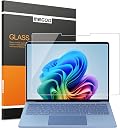
The Megoo ArmorShield Screen Protector is a precision-cut, 9H tempered glass film designed exclusively for Microsoft Surface Laptop 8 and 7 (13.8 inch). It delivers ultra-clear HD visuals while providing robust scratch and fingerprint resistance. Engineered for smooth touch sensitivity, itโs perfect for professionals and students on the go. The package includes a cleaning kit and access to dedicated customer support, ensuring a flawless, bubble-free installation every time.


| ASIN | B0D8L65MNY |
| Best Sellers Rank | #4,406 in Computers & Accessories ( See Top 100 in Computers & Accessories ) #87 in Laptop Screen Protectors |
| Brand | Megoo |
| Brand Name | Megoo |
| Clarity | 10 |
| Color | HDX Clear |
| Compatible Devices | Laptop |
| Compatible Phone Models | Surface Laptop 8 13.8"/Surface Laptop 7 13.8" |
| Customer Reviews | 4.4 out of 5 stars 134 Reviews |
| Finish Type | Glossy |
| Item Dimensions L x W | 11.69"L x 8.27"W |
| Item Hardness | 9H |
| Material | Tempered Glass |
| Model Name | ArmorShield Screen Protector for Surface Laptop 8/7 13.8" |
| Model Number | AS-MS-Laptop-13.8-8/7 |
| Number of Items | 1 |
| Part Number | 01 |
| Product Dimensions | 11.69"L x 8.27"W |
| Screen Size | 13.8 inches |
| Screen Surface Description | Glossy |
| Special Features | 9 H Surface Hardness, Anti-Bubble, Scratch Resistant |
K**P
Perfect Protector and Installation Tools and Instructions
Worked perfectly. This fits the 13.8'' model of the Surface Laptop 7. Follow the directions very carefully. Look up the instructional video for this exact screen protector on the Megoo YouTube channel. When you finally lay down the screen, if it doesn't stick and start spreading by itself, press gently on one corner to get the seal going. Do not press anywhere in the middle of the screen or you will create an air bubble. If you do have an air bubble after the screen seals, gently (but with necessary firmness), wipe the bubble slowly to the nearest edge. It may take quite a few wipes, but eventually, you should be able to wipe the bubble all the way out. Look at the screen from multiple angles and adjust a lamp if you have one to very carefully check for remaining airbubbles, however tiny, and press them out.
F**M
Edited to reflect outstanding customer support experience.
Donโt buy. Any tiny dust particle will produce a huge bubble. Impossible to lift to clear this unlike stated in instructions. Once protector is lifted off (sticker detaches and cannot lift off partially applied screen protector), corner will bend and protector cannot be reapplied. Edit: Customer service reached out to me and gave me a full refund. In addition they offered to send a new item free of charge and walk me through the installation. By that time I had already installed a different screen protector so I asked that they don't send me a new one. They made it clear that they did not expect me to change my review but I feel that editing it is the right thing to do. I am changing my rating for this product, and no longer recommend "do not buy" since it seems that if you do have a negative experience, they will go above and beyond to help fix any issues.
J**E
A must need for any screen.
Screen protector helped me prevent scratches and scuffs on the display. Installation, just like any other screen protector, takes a bit of time and patience. Make sure you prep the surface and keep it lint-free before installation. (Keeping fans off and minimizing movement will help.) Make sure you let the screen protector adhere to the screen from the middle out to avoid trapping air bubbles. Once installed, I had no issues with the closing function of the laptop or touch sensibility. Great addition to prolong the life of your laptop.
S**Z
Good protector
I love the idea of protecting your screen! This is a good quality one, but when you buy it (and I rec you do) DONT follow instructions or YouTube instructionsโฆ Iโve put on 100โs of screen protector of all sizes. I know tricks to Get bubbles out and the directions confused me. I actually took off the wrong side (step1) and had to eye ball the rest. Because I took off the most important part Way TOO early, installed had a TON of lint.. It was a mess, but thankfully I was able to systematically take the link remover sticker and bend up one portion at a time retrieve the lint and continue onโฆ it took about an hour and even with my great patient, i was ready to stop. Afterwards, it looks like absolute perfection, even though I lifted it probably 116 (5 stars for being able to be manhandled like that!) Iโd buy again!
S**Q
Very good
Easy to install :)
A**T
Very lightweight and holds a charge.
love my new laptop!
P**N
Nice screen protector
The sellers sent links to videos with installation instructions that made things very easy. I can hardly tell it's there.
R**A
That the screen protector is replaced
The screen protector was cracked when I opened the package I would like it replaced please I read other reviews and there was several that said they received the screen protector cracked in the same way
Z**N
top
Die Folie sitzt auf dem Laptop sehr gut. Hat keine Katze und keine Folien und Der Touch funktioniert einwandfrei.
K**M
Fits well and does the work of saving the screen
Fits well , saves the screen from oils specially when you have habit of scrolling the touch screen. Easy to install.
F**T
Fantastic quality and clarity
Fantastic product. Must have for your Surface Laptop.
D**I
My laptop
Excellent and i really love it. Very quality.
G**N
Super fit. Easy to install.
Does what it needs to do. Installed now and I can't even notice it unless I really look for it at the edges of the screen. When installing just be prepared to gently lift one of the corners if there are any big bubbles under the screen that can't be pushed out, once they're all gone it looks great.
Trustpilot
1 month ago
3 weeks ago