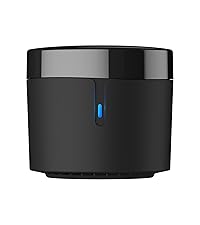
🎯 Own your smart space — one remote to rule them all!
The BroadLink RM4 Pro is a cutting-edge universal remote that combines infrared and 433 MHz RF control to unify your smart home devices under one app. Compatible with Alexa and Google Home, it offers voice control and scene automation via 2.4 GHz WiFi. Expandable with environmental sensors, it’s designed for seamless integration and effortless smart living.


| ASIN | B07CNP9MGS |
| Battery Types | Alkaline or Lithium |
| Best Sellers Rank | 3,167 in Remote Controls (Electronics & Photo) |
| Brand | Broadlink |
| Brand Name | Broadlink |
| Button Quantity | 2 |
| Colour | Black |
| Compatible Devices | Air Conditioner, Cell Phone, DTH |
| Compatible devices | Air Conditioner, Cell Phone, DTH |
| Connectivity technology | Infrared , Radio Frequency |
| Controller Type | Voice Control |
| Customer Reviews | 4.0 out of 5 stars 3,006 Reviews |
| EU Spare Part Availability Duration | 1 Years |
| Manufacturer | Broadlink |
| Manufacturer Part Number | RM-04 |
| Max number of supported devices | 1 |
| Maximum Number of Supported Devices | 1 |
| Maximum Range | 8 Metres |
| Model Name | RM4 Pro |
| Model Number | RM4 Pro |
| Network Connectivity Technology | Infrared, Radio Frequency |
| Product Features | Universal |
| Product Warranty | 12 Monate |
| Special feature | Universal |
| UPC | 727523692948 716253823647 |
D**J
Brilliant Bit Of Kit
This is, without doubt, the best IoT device - in fact, probably one of the best tech devices - I've ever purchased. I have spent many, many, many hours of my life attempting to set up and configure various 'Smart' devices over the years. This is often an infuriating process that makes me question whether it's really worth all the effort. My experience with the Broadlink RM4 Pro was the exact opposite. I've kitted my home out with electric roller blinds in four different rooms. These can be linked to a (really terrible) app, or you can buy remote controls for the blinds. The blinds are great, the remotes work well, but the app really lets the whole system down. It's terrible. After doing some research on the internet, I found out that the remotes that I use with the blinds are RF remotes that transmit on a 433.92 mhz frequency. I decided to give the Broadlink RM4 Pro a try, and I was blown away by how easy it was to set up. In less than an hour, I have all four blinds working seamlessly via the Broadlink app, scenes created to control all four blinds at once, automations set up so that I can set the blinds to open at sunrise and close at sunset when I'm away from home, and full Siri Voice Control. I really can't fault this device. I'm incredibly impressed that it all works so seamlessly. Highly recommended!
H**S
Worked for RF blinds, even with Alexa!
So I bought a cheaper product first - Sonoff RF bridge. I should have read other people's reviews more closely. The Sonoff is only really suitable for their own devices, it is not trying to be a universal remote. I have 2 sets of battery powered Hillary's blinds, and I really wanted to automate them and have them work on timers for when we are away (although not much of an issue during a pandemic...) - so I thought I would have a last go with the Broadlink RM Pro+. It was a bit fiddly to setup, but it is now working perfectly to control my Radio Frequency blinds, and I eventually got it working with Alexa as well. I haven't used it for IR so can't comment on that. I can now issue commands to Alexa to open and shut the blinds, use the app to do it and have them on timers. It is a bit of a hassle to setup, the timers don't link to sunrise or sunset (like Phillips Hue will) so I guess I'll have to keep adjusting them, but other than that, it does exactly what I wanted. Oh, I suppose the range for RF isn't that great, it works fine in the same room, but only about 50:50 when I put it in the hallway to work blinds in 2 separate rooms. Some tips for people in the UK who want to use to automate RF as of Mar2020: As of Mar2020 use the Intelligent Home Centre for EU (not the Intelligent Home Centre, it does work, but not with Alexa as I found out). Don't link to Alexa yet! Link the app to the Broadlink RM Pro+, then add a remote under that device. Select the closest type of remote (e.g. I had to choose curtain as there was no remote for blinds) then self learn the buttons by following the instructions. That is a bit hit and miss, but don't give up, it did eventually work to learn everything I wanted! At this point you can control your blinds from the app and setup timers (just find the timer setting in the app). If you don't want to use with Alexa, you are done! If you want to use with Alexa then a bit more to do... First I setup 'scenes' in the app for everything I would want to do with Alexa, basically for me opening and shutting each blind. The scenes are easy to setup in the app. Only once you have everything done in the IHC for EU app should you link to Alexa. When you are done with everything in the IHC for EU app, link in the IHC for EU skill in the Alexa app (you'll need your IHC for EU app username and password). Then (it is a bit buggy as this point) it says it can't find any devices and do you want to discover devices. You say yes and the Alexa app pulls in all the remotes you setup, plus routines from the IHC for EU app (it won't pull them from the IHC app...). It is a special one time discover. If you add something to the IHC for EU app later a normal Alexa 'discover devices' won't find anything new. At that point you have to disable the skill in Alexa and then enable it again. Aaaarrrggghhhh... Not really a big hassle, but gets a bit annoying. Almost there... Now in the Alexa app you can setup routines like 'Alexa, open sesame' (sorry, but the kids love it...) and link to the IHC for EU scene you setup earlier! Done!!!! So, at this point it is working perfectly. As I said before, apart from the fiddly setup (see above...) the only real downside it that it seems you really can only reliably use it on devices in the same room. At £40 for the Pro+ that is going to start adding up if you have lots of rooms. Anyway, to be fair, it does now do exactly what I was hoping for AND works with Alexa, and given how well it worked for this one type of device I assume it would work well for other RF devices (check the frequency is compatible first) and I guess IR devices to. So, if you are a bit of a nerd and don't mind the fiddly setup (and are pretty patient) I definitely recommend it. 'Alexa, open sesame' (look at those Hillary's blinds go!)
A**N
OK for IR remotes, no Alexa for RF remotes
Ok, but only partially compatible with Alexa write up does say “TV only” but this is not quite true as BroadLink Switches and certain manufacturers of Air Con Units, Lamps, Set top boxes can all be controlled by Alexa... if they are IR remotes RF remotes cannot currently be controlled by Alexa as they can only be configure as Universal Remotes which are not discovered by Alexa through the “BroadLink Smart Home for EU” Skill. Seems odd to exclude this capability, maybe it is on the roadmap for the future. The “Sonoff RF Bridge” may be a better choice for RF remotes if you require Alexa and it is half the price.
L**S
Works with IR/RF, can do complex routines (scenes) with Alexa etc. but the app isn’t so great.
Having recently added a 120” motorised projector screen that’s RF controlled, I wanted to simplify the process of getting it down consistently, and without the need to use four different remotes just to get to the point of being able to choose a film to watch. It apparently has a set screw for stops at either end, but setting it would be a pita now it’s mounted, and I would still need to trigger it with one remote, then power on the projector with another, and the AV receiver and set the input with the third, then I can pick up the actual media remote and choose what to watch. I’ll be honest, that’s not my idea of fun, and it’s also the opposite of family friendly for movie nights. I briefly considered Home Assistant and a Shelly Plus 2PM, but the current price on Amazon is horrific, and that simply swaps a remote for a voice command and still leaves me with some weird remote control juggling dance. Next idea was a universal remote, but it would still need the RF remote for the screen and IR macros for everything else, I wanted something that would be as close to a single click/command as possible, not having to put the family in training for a remote control button dance. So that lead me to the BroadLink RM4 Pro, and I’ll be honest, I came in with low expectations as Home Assistant is the clear winner here, but at half the price of the Shelly, it claims to be RF/IR compliant, is visually non offensive, has enough reasonable reviews, and did I mention £37 delivered? In theory, this replaces 3 out of four remotes, including the RF one and while the app gets some deserved flak, it actually works, with the odd quirk. Install was painless, literally grab the app, it found the RM4P, create an account or sign in using one of the usual suspects, a quick firmware update, and away you go. It did ask about thermal and humidity monitoring, but I skipped that section. Adding devices was pretty painless, OK the UI isn’t great, but it usually works, the database was OK, the odd button needed a manual learn, and it’s Chinese roots are pretty obvious once you delve into the custom user database, but AV receiver, TV and projector were all sorted with minimal effort. The RF screen controller took a little more effort, single button pushes registered, but multiple repeated presses were required to actually get it to work when testing, but it did work. The result is exactly what I wanted, I can now use a single Alexa voice command and trigger the projector and AV receiver to come on, and screen to drop for 43.5 seconds (which consistently puts it in the right place) and means I only need one remote to choose what to watch, best of all it means anyone in the family can do the same without having to learn a complex button dance. Is it perfect? No. The app has some significant and obvious issues, some things simply don’t work, eg the documentation/help simply doesn’t even load. The terminology is either from a non native English speaker or translated poorly, it throws the odd error about not finishing a scene (routine) command even when it has, and frankly it really could do with someone doing some basic acceptance testing before pushing it out, that said updates seem frequent, but the issues mentioned seem to be long standing from other reviews. Is it a worthy replacement to the Logitech Harmony Hub or similar? Functionally, kind of, but it’s not really a fair comparison, that was a large company with a - at one time - reasonable dev team behind it before they abandoned the customer base. BroadLink appears to be much, much smaller and despite the English packaging and app, it’s clearly had a decent repackaging job, shame the same people didn’t do the app, that’s going to need some work, but 3 years in and it’s still getting updates regularly, so perhaps it’ll be fixed. That said, it’s hard to knock a device costing this little that works and replaces 3 remotes with a single voice command and saved me from having to pick a fight with a fully extended 3m wide screen.
D**B
Did not work for my setup
I bought this hoping it would replace a few remotes and integrate easily, but unfortunately it did not work for what I needed it for. The device itself seems well made and setup is straightforward, but compatibility was the main issue. Despite trying different options and settings, I could not get it to control the devices I wanted reliably. If your setup is simple and already known to be supported, you may have better luck. This is not a bad product, it just did not suit my use case. If you are considering it, I would strongly recommend checking compatibility with your specific devices before buying. In my case, it ended up being unusable, which is disappointing given the expectations.
C**S
GREAT Value for Money
I bought this to control my IR controlled kitchen TV and 3 RF controlled electric blinds. The blinds manufacturer has a smart hub at £130! I rated 5* for Alexa integration but I have actually integrated with Google Home Assistant . My objective was to achieve meaningful voice control of these devices. You do have to be a bit creative and any issues are perhaps more on the Google side than with Broadlink?. With the blinds, I could program on the IHC app no real problem. Tip - hold the remote VERY close to the hum (I mean mm) in learning mode. It then works first time every time. The blinds allowed three controls to be learned: lower, raise and stop (at any point). However, when this 'speaks' with the Google skill, everything becomes a switch. A switch has two, not three states. On or Off. It transpired if I asked 'hey Google, turn blinds on' it actually raised them / turn off lowered them. Stop didn't work. So delete all and back to square one. I programmed the lower function for raise and vice versa. I then programmed a 'switch' with just the on control learned as the stop button for the blinds. Now, if I ask 'command - turn blinds on' they lower and 'command - turn off' raises. This is logical for me. To stop at any point I just have to say 'command - turn stop on'. Hey presto! The TV works very well. I use a sky Q box and whilst I could programme a set top box with basic commands, voice control wasn't supported. I found saying 'command - turn up the telly' incremented the volume 1 point (e.g. on the telly from 35 to 36 which is nothing meaningful. BUT I found if I say 'command - turn up/down the telly 5 points' it works! Not perfect and I may have more to learn and refine this, but it basically does everything I want at a great price. I'll add my RF controlled garden lights in spring when its warm enough to tinker outside! Delighted with this purchase.
C**E
It broke in a month
Item arrived without a UK plug and instead had a European plug then after about a month of use it went offline. It's also not that intuitive for controlling a TV as it means saying exactly what you labelled your scene as. If you say BBC One Alexa gets confused and thinks you want the BBC News skill so you have to label the scene channel 1. But even thats not as useful as using the remote and actually seeing whats in the TV schedules so it's kind of pointless anyway. The only thing it was use full for on a BT TV was accessing Netflix and Sky Movies as these take many button presses to get to but you still had to wait for the thing to press all the buttons to get there it wasn't instant. As for lamp control I was using a smart things hub too. Smart Things doesn't recognise the Broad link device so along with the routines I had to turn the lamps on at Sunset I had to make virtual switches which switch on as well. I found it an incredibly long winded process just to have lamps only turn on when home and only turn off when not asked to stay on, because Broadlink doesn't work with Smartthings. Therefore I think smart sockets recognised by Smartthings are better for this purpose. Why accept anything less intuitive than manually switching lamps on the old fashioned way
J**N
Great with home assistant a well thought of device
Awesome product Using both RF and IR to control multiple devices in one room. Using to control my blinds to go blind via RF, you will need an rf remote, pair that first then capture the codes via the app/home assistant. Tip - you don't need to setup your devices to be controlled via the broadlink app if you are using home assistant, you will need to unlock your device from the app to use it in home assistant. App onboarding is easy, home assistant setup is also easy - as I said don't forget to unlock. Comes with a little wall mount, I haven't needed to use this, but I think it will be needed where your devices are in a cabinet for optimal line of sight. Highly recommened
Trustpilot
3 weeks ago
1 month ago