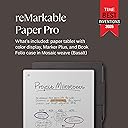
✍️ Elevate your note-taking game — because your ideas deserve the best canvas.
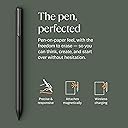
The reMarkable Paper Pro Bundle features an ultra-slim 11.8” full-color paper-like display tablet, Marker Plus pen with built-in eraser, and a premium Mosaic Weave Book Folio cover. Designed for professionals craving distraction-free digital note-taking, it offers 2 weeks of battery life, adjustable reading light, low-glare screen, and powerful organization tools including handwriting-to-text conversion and PDF annotation.


| ASIN | B0DGBDR2PM |
| Average Battery Life (in hours) | 2 weeks |
| Batteries | 1 Lithium Ion batteries required. (included) |
| Battery Type | Lithium-Ion or Lithium-Ion Polymer |
| Best Sellers Rank | #939 in Electronics ( See Top 100 in Electronics ) #23 in Computer Tablets |
| Brand | reMarkable |
| Card Description | Integrated |
| Color | Burgundy |
| Customer Reviews | 4.1 4.1 out of 5 stars (1,571) |
| Date First Available | September 6, 2024 |
| Flash Memory Size | 16 GB |
| Item Dimensions LxWxH | 14.17 x 8.93 x 1.42 inches |
| Item Weight | 1.16 pounds |
| Item model number | RM83C-1001NW |
| Max Screen Resolution | 1872x1404 |
| Operating System | Linux |
| Product Dimensions | 14.17 x 8.93 x 1.42 inches |
| Screen Resolution | 1872x1404 |
| Series | RM83C-1001NW |
| Standing screen display size | 11.8 Inches |
| Wireless Type | 802.11a, 802.11b |
L**N
Movin' on up!
To the East side, we finally got a piece of the pie! reMarkable user/subscriber. Saw the Pro release, drooled a bit. Many, many moultons later, after they've destroyed the cities and the buildings are ashes on the blood stained streets, I finally got the wherewithall to upgrade to the Pro. It's beautiful. A work of art. Amazing. Really slick looking and get this, functional! Multi-functional, even! If you like things, get this.
T**X
Its the Legal Pad You Wish You Had Back In the Day
Just like the title says, this is not a tablet. Its a modern legal notepad that you write on. Its not for movies. It really doesnt do email. There are no apps. No reminders. No distractions. What it does is simulate a legal size notepad with the benefits of copy, cut, paste, erase, endless markers and pens of all colors. If you could do it on a legal pad, you can do it on this, with one exception: Undo. Undo is POWERFUL. Mine remembered and UNDID 45 characters and then restored an ENTIRE page that I thought I had duplicated but had mistakenly erased. No legal pad can do that. Its also very good at managing and creating pdf file pages. I dont use the desktop or mobile app. I direct connect mine via USB and drag & drop. Its a rock solid e-notepad that gets the job done old school style.
J**F
I Wish I Bought It Sooner!
I am someone who takes a lot of notes and makes a lot of lists. I have pads of paper and scraps of paper everywhere, both at home and in my office. I liked the idea of this electric notepad to always have a place to take as many notes as I want and to have plenty of room to make the list as long as it needs to be. I also like having them all in the same place as I won't lose them. I love being able to have a hand written list converted to text, though I believe you have to have a subscription to the reMarkable app for this to work. You get a short free trial, though I went ahead and committed to a year long subscription at a reduced cost (versus monthly) as I like the idea of being able to transfer my notes between my reMarkable and both my personal laptop and my business laptop (you are required to download the desk top app to do this).. Yes, this electronic notebook is expensive, especially for my primary use. But I have found it to be very worthwhile in the two weeks that I have had it. I am less concerned with the feel of the pen on the screen. That isn't a sensation that I necessarily needed to have. It feels fine but isn't why I purchased this. To me, there is no real noticeable lag in writing and the text appearing on the screen. If you erase something, yes, the screen refreshes but I don't find that to be a hindrance and it really only takes a moment for the page to refresh. Some of the features I absolutely love are illustrated in the short video I am posting with this review. The eraser is great to have for small changes. Being able to select a section and erase that larger area is fantastic. Then, being able to select a section and move it around the page is great, too. I have downloaded a couple of the templates, specifically the calendar templates but I have not yet explored other templates that may be helpful. I also have not yet imported a PDF to edit and look forward to trying that out. I haven't even read the getting started guide yet. As soon as I received it, I started playing around with it and I find it to be pretty intuitive to use. I will eventually read it. I chose to go with the color version because I wanted to have the option to use additional colors or highlighting. However, this is probably the one negative I will note with this in that the colors are not vibrant at all. This is a function of the type of screen that it has. You can barely tell the difference between black and blue or between red and magenta font colors. The highlighting feature does work when putting a brighter color over a dark font (magenta highlighting black, for example). So it is functional but have low expectations here. While it is more expensive than only the B&W reMarkable, I am glad I have the color options. It came with extra pen tips though I have not had to change one out yet so can't comment on how long they last. The battery life is OK. I use it a lot so I suppose I should not be surprised that I may have to charge it more often than others do. I also tend to keep it on, or forget to turn it off. Or, really, put it into "sleep" mode rather than turning it off altogether. But it isn't that hard to charge as it uses a USB-C charger, and I have plenty of those around. In short, yes, this is an extraordinarily expensive electronic notebook but I do find good value in having it. After reading the reviews and considering the potential of having problems, I chose to purchase Amazon's extended warranty. And while this is not an element of the reMarkable product, I have a Prime credit card and appreciated the option of amortizing the cost of this item over a longer period of time to help defray the cost somewhat. I do recommend purchasing a protective case for it. I thought the ones sold in bundles with the reMarkable were way too expensive (I don't need a leather case and their non-leather case was still a bit pricey) and purchased a CoBak case for it, especially to be able to protect the screen when the notebook is in my briefcase or backpack. I had good experiences with CoBak cases with my Kindles previously. I heartily recommend this product!
D**A
Save yourself the trouble
UPDATE: I have returned the item 8 DAYS ago, the item was received at return center the very next day. However, my refund has yet to be issued, just still stuck under “item received” status. The refund issue date that was originally for tomorrow was changed to end of NEXT WEEK, which would put me ant almost THREE WEEKS since I physically returned the item. Not to mention the time it’ll take to actually credit back to my card. Absolutely absurd. Seriously, avoid at all costs. Original: I wanted to love this. I was so excited for it. I’m a student and after a lot of research I felt this would be the best tablet to keep me organized but needed it quickly. I received the item in a timely manner, but it has been a disaster. Immediately upon opening the product, it looked and felt amazing, high quality, well built. However, when I turned it on, it took FOREVER to load/turn on. Then, when it finally turned on, it wasn’t recognizing the marker that came with it for set up. Weird, but will skip that part for now. Then it got to the part of connecting to wifi but it didn’t recognize a single network. Again, weird, but I’ll move on and come back to it. I created a passcode. Then it displayed a “corrupted disk” display and that is all it has done since. I have tried clicking the repair button that is provided on the same screen, multiple times, no luck. I tried manually turning it on and off. I tried letting it charge fully, and I even went to the website and followed the steps of a software restore, still didn’t work even though it got to the last step. Finally, I contacted the manufacturer and they took almost an entire day to respond to each email, which is also a different person each time. They explained they would send a “replacement” in exchange but advised me to strictly avoid sending in anything aside from the tablet (no folio, marker, tips etc) because they will only send a replacement for the affected part (the tablet). Which would be fine, except this likely means I’d be receiving a refurbished tablet, not new and I did not pay almost $700 for refurbished. I even tried to work with Amazon instead for replacement but they said it would have to be through manufacturer. I’m sure the product in theory would’ve been great, but it has failed to meet my expectations despite my best efforts in trying to get it to work and even trying to get a replacement despite the poor first impression. Ill be returning and looking into something different, because spending HUNDREDS of dollars and having to experience a defective product on top of disorganized customer service is crazy.
D**Q
Excellent note taking tool, but have small quality issue
The device is excellent. I love the build and design, looks great, and truly amazing for professional sketching and note taking. But unfortunately, found a dead pixel that's really bothering me from the time of I unboxed it. The really a bummer, it's ruining my experience. I hope they can rectify this issue.
M**G
The reMarkable Paper Pro delivers an exceptional writing and reading experience that truly lives up to its reputation as a “paper tablet.” The large 11.8-inch colour display feels natural on the eyes, and the integrated reading light makes it comfortable to use in any environment, day or night. Writing with the included Marker Plus pen is smooth and highly responsive, closely mimicking the feel of pen on paper, which makes note-taking, sketching, and annotating documents genuinely enjoyable. What sets the reMarkable Paper Pro apart is its focus and simplicity. Free from distractions, it’s ideal for professionals, students, and creatives who want to think, read, and write more clearly. The colour display adds real value for highlighting, diagrams, and PDFs, while the premium build quality makes it feel like a serious productivity tool rather than just another tablet. If you’re looking for a refined, purpose-built device that replaces notebooks and paper clutter, this is a standout choice.
A**I
What a device. Loving every bit of it. On surface, hardly has anything functionally but delivers exactly as promised- no nonsense writing on paper experience. I am going to to do bit of sketching too. This device even enabled me with daily diary writing habit as so convenient to do it. I also use it for office todos, meeting notes, rough work, and what not. If you love writing in notebook for any area then it can become your e notebook without losing physical paper writing experience. Go for it!
D**9
I bought the reMarkable Paper Pro a few months ago, and it has quickly become part of my daily routine. I use it every single day for work and personal notes, and it has completely replaced all of my other notebooks. I used to carry around a stack of different pads and jotters, but now everything is in one place and perfectly organised. The build quality is excellent. It feels solid and well made, with a really premium finish that makes it a pleasure to use. The writing experience is brilliant. The texture of the screen feels very close to real paper, and the pen responds instantly without any delay. It makes handwriting feel natural again, which is something I had really missed since switching to digital devices. What I particularly like is how clean and simple the interface is. There are no distractions, no unnecessary apps or pop-ups, just a calm space to think and write. The connection between the device and the computer app works perfectly too. My notes sync automatically, so I can start writing on the Paper Pro and continue later on my laptop without any fuss. The new features are a nice bonus. The colour and frontlight additions make it more versatile, and the speed improvements are noticeable. I have had no problems with battery life, and the pen still feels great to use every time. I have read a lot of mixed reviews about digital notebooks over the years, but this one has genuinely impressed me. It is not trying to be a tablet or a laptop. It is designed to help you focus, think, and write, and it does that better than anything else I have tried. If you enjoy writing by hand but want the convenience of keeping everything stored and backed up digitally, the reMarkable Paper Pro is worth every penny. It feels professional, reliable, and thoughtfully designed. I would honestly struggle to go back to paper now.
V**V
Best for reading and making notes
C**U
Belle fabrication, jolie et solide. Très réactive à l'écriture et vraie sensation d'écrire sur du papier. Le bloc note parfait
Trustpilot
3 days ago
2 weeks ago