Desertcart purchases this item on your behalf and handles shipping, customs, and support to Finland.
๐๏ธ Elevate your workflow, ditch wrist pain, and click smarter with Om!
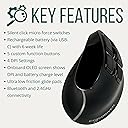
The Ergodriven Om Vertical Ergonomic Mouse is a wireless, rechargeable vertical mouse designed to improve posture and reduce wrist fatigue. Featuring dual Bluetooth and 2.4GHz connectivity, a high-capacity battery lasting up to 5 weeks, an OLED screen for DPI and battery status, and 5 customizable buttons, it offers professional-grade comfort and productivity for PC, Mac, and Linux users alike.


| ASIN | B0DN7W49PL |
| Additional Features | Ergonomic Design, OLED Screen, Rechargeable, Silent Click Vertical Mouse, Wireless |
| Antenna Location | Gaming, Office |
| Battery Average Life | 5 weeks |
| Best Sellers Rank | #622 in Computer Mice |
| Brand | Ergodriven |
| Button Quantity | 9 |
| Color | Black |
| Compatible Devices | Personal Computer, Smartphone, Tablet |
| Connectivity Technology | Bluetooth, USB |
| Customer Reviews | 4.4 out of 5 stars 349 Reviews |
| EU Spare Part Availability Duration | 2 years |
| Enclosure Material | Plastic |
| Hand Orientation | Right |
| Included Components | 1 x Rechargeable Battery |
| Item Dimensions L x W | 4.25"L x 3"W |
| Manufacturer | Ergodriven |
| Minimum Required Operating System Version | Mac OS 13 Ventura, Ubuntu 22.04 Jammy Jellyfish, Windows 11 |
| Model Name | Om Handshake Vertical Mouse |
| Model Number | 14001 |
| Mouse Maximum Sensitivity | 2400 dots_per_inch |
| Movement Detection | Optical |
| Movement Detection Technology | Optical |
| Number of Buttons | 9 |
| Operating System | Windows, macOS, Linux |
| Power Source | Battery Powered |
| Range | 10 meters |
| Special Feature | Ergonomic Design, OLED Screen, Rechargeable, Silent Click Vertical Mouse, Wireless |
| Style Name | Handshake |
| Theme | Gaming |
| UPC | 732388137053 |
| Unit Count | 1 Count |
| Warranty Description | 2 Year Manufacturer |
W**2
Game-Changer for Wrist Pain โ More convenience for Windows/Mac shortcuts too!
I was skeptical about vertical mice, but this Ergodriven Om Handshake Vertical Mouse has completely changed my daily computer user experience. Durable Cable: The cable is incredibly sturdy, feeling like a thick jumprope. This gives me confidence that it won't bend or break easily. The length is perfect to use while charging. (unlike the Apple Mouse where you have to stop use during charging) Perfect Fit: This mouse is the perfect size for my hand, offering much better comfort than the other two vertical mice I've tried. (I have smaller size hands) Easy Customization: There are 4 customizable buttons, and the included card in the box provides a QR code for a quick how-to video. This made setting it up for my Mac a breeze. It has the standard left/right clicks plus scroll wheel, then a button you can press with your thumb (I kept it as mute). Then, two buttons on top you can press with your thumb (Ive kept those as undo and Mission Control (This is usually only possible on Apple mice folks, this is amazing!). Then, there are two more buttons below the left/right/scroll wheel (Ive kept these as copy and paste). Seriously the best kept secret in vertical mice! Smooth Movement & Pain Relief: The movement is incredibly smooth especially as I have to travel my mouse across multiple screens and I've already noticed a significant reduction in wrist strain and pain. (I've had this for a week now.) Digital Display Screen: Yes! Not only does it tell you what DPI you've selected, but this screen tells you how much battery your mouse has, THANK YOU for this. Game Changer. (I get so heartbroken when suddenly my apple mouse tells me I am 2% in the middle of the day!) This is also the screen you use to set all your button customizations. I'm genuinely impressed. A standing foot mat company made this? - You guys should shout this from the rooftops! You could be saving people from years of wrist discomfort. Highly recommend!
J**F
PC Gamer Viewpoint
As a PC Gamer, I bought this mouse for PC Gaming. I know it's not billed as such, and it certainly doesn't look "Gamer". It doesn't have RGB, or overinflated specs, and it's not overpriced, but it works very well for gaming! I have grown to love vertical mouses for gaming because of the hand and wrist comfort. But I have also grown accustomed to at least 3 or 4 programmable mouse buttons... Specifically the thumb buttons. The inherent problem of a vertical mouse for gaming is torque drift. It's when the pressing of the L/R buttons can cause micro horizontal drift while aiming and shooting. This Egodriven OM addressed those issues with ergonomics and button design. And it delivers! Torque drift is reduced or even removed with the design of this mouse. I feel very accurate, maybe even more accurate than traditional mouse designs. I have "Gamer" mouses that cost alot more, with "better specs" of polling rates and DPI, etc. but this mouse works as good or even better than all of them. The comfort and quality of this mouse is excellent! The buttons are reliable and crisp, and the tracking is smooth and accurate. The soft fingertip actuation of the L/R buttons reduces torque drift while aiming and shooting in FPS, and the assignable buttons can be set for jump/dodge/roll/ping/chat/etc. just how I like it. The built in screen is great and shows my current battery percentage and DPI setting. I no longer have to memorize color coded DPI settings through RGB like other gamer mouses. I can just glance at the screen and press the DPI button for on-the-fly changes. I also don't have to wait for flashing RGBs to signal a drained battery. My one nitpick is the button assignment function. They can only be assigned to a limited preset selection of commands inside the mouse's firmware. They cannot be assigned to any button on the keyboard. This can cause limited options for some games and commands. However, this mouse is not sold as a "gamer" mouse, and the low price is amazing for what you get. So far, I have been able to work around this limitation, and still get the assignments I want. But it may cause me some future problems with games I haven't yet played with this mouse. Overall, it's pretty unbelievable that a mouse this good is so cheap. It certainly punches above its price point, and it's far more practical than what you may think. I highly recommend it!
X**N
Does what is advertised and with some tinkering, its also great for gaming.
Best Vertical mouse with 5 extra buttons perfect for gaming. Ergonomics was the selling point and they sold me on that too. I am giving it a 4 star because I needed a little more customization. There is no software which would make the basic user happy but I do like options and having them widely available to tinker with. The preset bindings for the customizable keys were serviceable but I went ahead and used Microsoft powertoys for more defined options for keys. Also the LOD(lift off distance) was way too high on this mouse which is only a big problem if you game or use a low sensitivity. to fix this, I used a piece of electrical tape to half the mouse rays field of view which made it near perfect LOD for me. The buttons are great, the positioning of them are intuitive and I can use this mouse for hours with very little pain build up in my wrist. it took me about a week of using it to become familiar with its vertical feel and because it reduces my wrist pain, Ive grown to love it.
A**J
Finally, a mouse that doesnโt hate my wrist
I work at a computer 8โ10 hours a day, and after years of dealing with wrist soreness and the early signs of RSI, I was desperate for something that actually helped. Iโd tried wrist rests, stretches, taking breaks โ nothing made a real dent. Then I switched to this mouse, and within about a week, the difference was noticeable. The vertical grip angle feels awkward for the first day or two, but once your hand adjusts, it genuinely feels more natural than a traditional flat mouse. My forearm is no longer twisted throughout the day, and the tension I used to feel by mid-afternoon has basically disappeared. Build quality is solid. The buttons have a satisfying, responsive click without being stiff, and the scroll wheel is smooth with just enough resistance. It connected instantly to my laptop and has held a reliable charge โ I charge it about once every two weeks with moderate use. Bottom line: If youโre dealing with wrist fatigue or discomfort, stop putting it off and make the switch. This is one of those purchases I genuinely wish Iโd made sooner.
A**R
It's ok.
I use a Utechsmart Venus for my daily driver, and I consistently use all 12 thumb buttons - it's a great mouse, but the ergonomics of it hurt. After an injury induced lingering tendinitis, my orthopedic surgeon told me to get a vertical mouse. I decided to try this one. For gaming, my modified claw grip does not translate well, and up/down motions are awkward at best, and the tracking is not great. -2.4G signal hiccups sometimes, causing microstutters and pauses. -It does not connect via cable, only charges. This would resolve the wireless issues. -LCD information changes drastically. Turning it off and on again will result in a battery level discrepancy. -Size seems a touch too short for a 3 3/4 inch palm width. My pinky constantly drags the mouse pad. My temp fix for this is to work the mouse wheel with my middle finger and right click with my ring finger, which is weird and wrong. -It does actually help my hand feel better doing use, despite being more awkward. -It does NOT come with a USB C charging cable. Having a cable connection would make it better, but there's still a few slight issues that keep this from being perfect.
S**R
Great First Ergonomic Mouse
After destroying my former mouse, I thought I would venture into the realm of ergonomics this time 'round. The additional buttons compared to the typical mouse was the main draw. Customizing the button bindings is very simple and done *through* the mouse itself rather than some required piece of software. This was quite convenient and done via the small display on the top of the mouse, holding the DPI button, pressing the button you wish to configure, and using the mousewheel to select what you want the button to do. The list of shortcuts seems very robust and I was easily able to rebind the buttons below the left/right click to volume up and down. As this was my first ergonomic mouse, it took a few hours to get used to but after playing a point-and-click video game, I already find myself comfortable with the new posture. The mouse feels great, accurate, responsive, and fits perfectly in my large hand. As for the buttons themselves, the left & right click buttons have a very soft sound and feel to the clicks while the rest of the buttons are a bit more noticeable but not enough to be distracting nor disturbing. The mouse wheel has a satisfying ratcheting bumpy feel to the scroll to let you know when the scroll actuates. The mouse had a bit of mass to it compared to other mice that I have used, but I don't see myself becoming fatigued after prolonged use. Switching between two devices is quick and easy with the switch on the bottom of the mouse. Having the USB dongle plugged into my computer while having he mouse paired with my phone's bluetooth was the other main draw for me to buy this mouse. This multiple device support feels spot-on and was what convinced me to go wireless. The solid black design fits well with just about any setup and the combination of matte and gloss parts is quite nice to look at. Finally, the small LCD screen is easy to glance at and displays the current connection mode, DPI level, battery charge, and configuration menu while rebinding buttons. Despite only using the mouse for a small amount of time so far, I can say that I expect to enjoy this mouse for quite some time in the future.
J**N
I am impressed.
Shockingly good ergonomic, vertical mouse, wireless (2.4 or BT) at this price point. My hand is about 7.25" from index finger to wrist / the end of my 'thumb pad', and this is easily the most comfortable mouse grip I've ever had. Compared to every other such mouse at a similar price range, you're getting two additional main left/right buttons, which contrary to what you may think, at least what I thought, you do not end up accidentally clicking. The way the grip works just makes that not happen. Oh, and those two extra buttons are macro customizable. I've set up one of mine to bind to a screen zoom function on my OS, just as an example. You've also got 3 thumb buttons, not the more standard 2... those can all be macro reassigned as well, and doing the reassignment doesn't require any software on your PC, its entirely contained within the mouse itself. Criticisms? Add a simple image or two that explains how to adjust the custom button macros/bindings to either your webpage or the store listing here on Amazon, or the little instruction placard that comes in the box. Mildly annoying to have to watch an unlisted youtube video for that information. But that's not really a problem with the mouse itself. Overall? Affordable, practical, best feature set out of comparable mice in this price tier. I'm honestly kind of shocked this thing is not super popular, you don't need to have carpal tunnel to appreciate this thing, its a little weird at first, but it makes so much more sense than a traditional mouse after maybe a day or less of use. I actually hope that one day there will be a 'premium' version of this mouse with a higher polling rate... of course that would make such a mouse cost more, and its current polling rate is more than fine for general productivity/office use, but I'd encourage Ergodriven to make basically a 'gamer' or 'premium' version of this same mouse, pop a fancier PixArt chip in there, and ya'll could maybe grab a share of the aging Millenial/Gen X PC Gamer cohort, hah! If you really wanna go into actual design refinements/changes maybe look into different kinds of modular, attachable/detachable grip pads for where your thumb and pointer finger grip, maybe also the pinky finger area? But the actual shape of the thing as it is... is just stellar, at least for myself, so don't change it too much!
S**A
In a world of Logitechs, be an Ergodriven
Corny title but this is not a paid review: it's just a really wonderful mouse. Everything about it from the feel of the buttons, to the customization, to the ergonomics... all feels like it was made by people who cared. I take it everywhere and it's held up to more drops than reasonable but still works perfectly. If it were $100 this would still be a wonderful mouse, but these legends sell it at a price point where I'm able to enthusiastically recommend it to people and not seem like a weirdo telling them to buy a $100 mouse. There's even a two-pack if you look around! If I was *forced* to find a drawback, I'd say I do wish the DPI change was hidden behind a long press like the customization: I think I see the vision in that, this mouse is at its best when used at higher DPI levels, so they're making it easier to build up to that over time... but once you're used to it, it'd be nice if that could be used as a normal button! All in all this mouse is holding my faith that there are still brands and people out there who care about the stuff they design, really wonderful :)
P**A
Excelente Producto
Excelente calidad y manejo
P**R
Only mouse you'll need. BEST Ergo mouse
Best mouse I've ever had! I use it for work and gaming, it's also the first wireless mouse I've owned. Mapping the extra buttons are so easy and so helpful. I will probably buy a spare to take to work
M**S
5 star item
Great. Does what it says on the tin.
R**S
Wonderful design
Itโs fantastic piece of work. Silent click is a bonus. Does its job.
A**E
It's almost the perfect vertical ergonomic mouse
I first started with the Logitech lift and according to their literature the measurement of my hand should have fit it perfectly but it was too small and it lacked enough buttons. So, I continued my quest for a decent ergonomic mouse and came across this one. This is a very good mouse so don't get me wrong when I level some criticisms at it because it is, so far, the best economic mouse that I've used so far. The good is that it has a screen that shows you all the information you need, the battery lasts absolutely forever, it has extra mouse buttons which for me is a must, it fits my hand perfectly, and all the customization of the extra buttons can be done on the mouse without any software which is a pro and a con. My criticisms are that it uses a 500 Hz sensor but they've limited it to 125 Hz and do not give you the option to change it to 250 Hz or 500 Hz if you prefer a smoother mouse pointer with worse battery. I find this choice very strange because when I say worse battery I'm talking like 6 months instead of 8 months on one charge so this decision is quite perplexing to me. The other decision that is a reasonable detractor for me is that since they've made this mouse usable without any software you're stuck with the keys and functions that they allow you to bind to the extra buttons which do not include a few of the keys and commands that I'm interested in binding so they've artificially limited two things about the mouse which don't need to be limited at all. It really is a bit strange because everything else about the mouse is fantastic yet they've made two critically wrong decisions about this mouse that make it go from the perfect ergonomic mouse to just a very good ergonomic mouse. I've been in contact with their support and I must say that they have been fantastic. I told them my criticisms about not being able to toggle the Hz of the mouse and have either more options on the mouse to bind keys and commands to the buttons or have an optional lightweight piece of software that allows you to burn further options onto the onboard memory if you so choose to use it just like how Logitech has the onboard memory manager which is a portable program that you can just open and burn on the options that you want to the mouse, close the program, and never have to open the program again if you don't want to change anymore options. They said that they would consider updating the firmware of the mouse to add further customization options which is encouraging. Although, I don't think they commented on creating a small portable piece of software to customize the mouse which is disappointing. All that being said, this is the best vertical ergonomic mouse I have used so far and it's the one that I am currently using on the desktop (not for gaming but they said that they are looking to release a gaming version of the mouse near the end of 2026) and despite the fairly glaring flaws that shouldn't have gotten past the engineering phase this is still the best ergonomic mouse on the market that I've been able to find. So, if you're looking for a vertical ergonomic mouse at the time of this review this is the best one that you can get - so get it. TL;DR despite it lacking some functionality which would make it five stars for me it is still the best vertical ergonomic mouse on the market that I have been able to find. So, if you're in the market for a vertical mouse I recommend that you buy this one over any other at the time of writing this review. Plus, they have a very good customer service representative who is always eager to quickly discuss and try and solve any of your problems. It seems like a great company and a fantastic mouse with just a few shortcomings but still the best one on the market.
Trustpilot
3 days ago
1 month ago