

Buy anything from 5,000+ international stores. One checkout price. No surprise fees. Join 2M+ shoppers on Desertcart.
Desertcart purchases this item on your behalf and handles shipping, customs, and support to Finland.
๐ง Empower your workspace with wireless printer freedomโbecause proximity is so last decade!
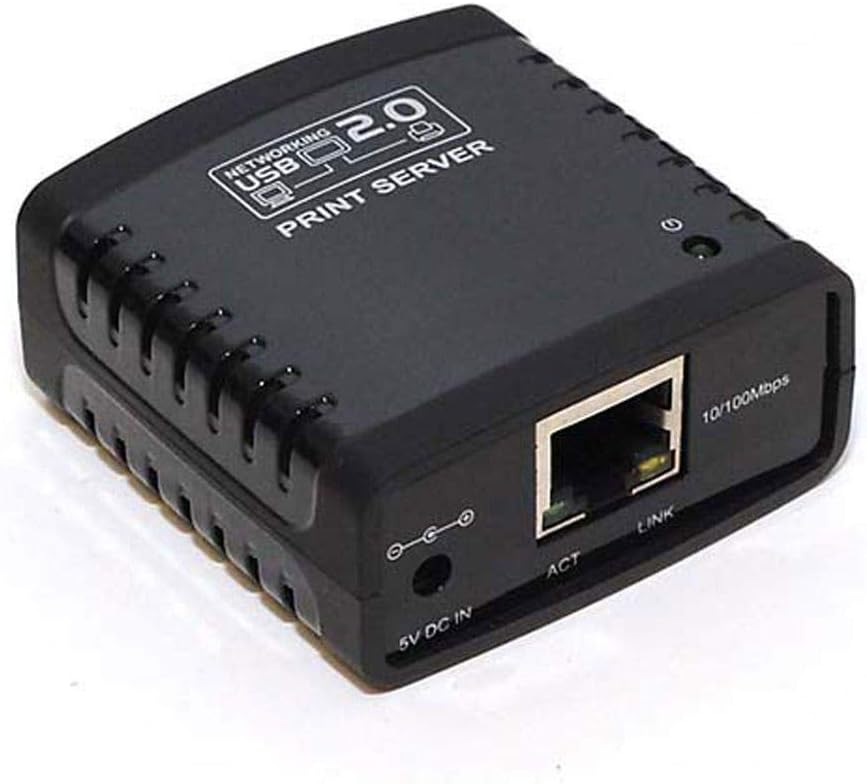
The Monoprice Networking USB 2.0 Print Server (model 5342) is a compact device that enables any USB printer to be shared across a network via an auto-sensing 10/100Base-T Ethernet port. Supporting multiple Windows operating systems and featuring web-based management, it eliminates the need for direct printer-to-computer connections, boosting office productivity and flexibility.
| Best Sellers Rank | #11 in Computer Networking Print Servers |
| Customer Reviews | 3.3 out of 5 stars 197 Reviews |
J**R
Works great for my Brother printer
I was a little skeptical about trying this since the reviews were pretty mixed. I have a Brother HL-L3290CDW which is a great printer, but within the past year or so has been having issues staying connected to WiFi. Since it does not have an Ethernet port built-in, my only option was to awkwardly connect my laptop to USB when I needed to print something. But otherwise, the printer itself still worked fine, so I didn't want to replace it. This little USB print server saved my printer! Setup was easy, just connect the USB side to the printer, plug the Ethernet side into your router or switch. It comes with a CD with some setup software - I'm sure if you don't have a CD drive on your device, you can find this software online as well (my laptop does not have a CD drive, but my desktop PC does - so I copied the files off of the CD and put them on a USB drive so I could install on my laptop). The software itself is basic with only a few options, the first option runs through a wizard which finds the USB print server device on your network, shows the printer model that the USB print server detected, and allows you to install the printer on your PC. You may have to go to your printer manufacturer's website to download print drivers if your PC doesn't have them automatically. After the initial setup, the printer appeared in my list of printers, and print jobs were now making it through every time, instead of about 25% of the time using the printer's WiFi connection. I'm very happy I tried this device and would recommend it if you have a printer without WiFi / Ethernet, or a printer with a problematic WiFi connection like mine. EDIT: Both my laptop and desktop are Windows 11. The product details don't list support for Windows 11, but I haven't had any issues.
C**S
Didn't work for me (a software engineer)
I bought to try and connect my HP LaserJet 1320 to my Windows 10 PC. It didn't work. Setting it up was a breeze -- simply plug it in, and it powers up and uses DHCP to assign an IP address to itself. The web UI is minimal. The included software appears to work for setting up a printer just fine, and is much easier to use than setting up LPR printers manually under Windows 10. But whenever I went to print something, nothing came out of the printer. No lights flashed on the printer, so it wasn't even receiving any data. The web UI is so simple it provided... zero debug information so I could tell what might have failed, or if it even received the document. Guess it doesn't work. Note that the description above fails to mention two things: (a) the box and manual says it is only tested to work with versions of Windows up to Windows 7; and (b) there is a relatively short list of printers it is "compatible" with -- and my LaserJet 1320 is not on the list. Oh well.
W**N
Works well even with an unsupported printer.
This thing works great... so long as you are comfortable getting things configured manually. It appears things CAN be configured automatically IF your printer is one of the select few supported by the software. In my case, my printer was not supported. However, my printer can communicate via LPR protocol therefore it DOES work with this product. FWIW, My printer was manufactured in the mid 2000's and I'm printing to it via numerous computers running Windows 10 Pro. In my case (because my printer was not supported), I had to: 1. Statically assign an IP address to the print server 2. Manually configure the printer on each client computer to use a TCP/IP port (pointed at the statically assigned IP address of the print server), and then 3. Specify that the manually configured TCP/IP printer port use the LPR protocol. Voila, printing! One small point of issue I had with the product was the packaging. It says "Wired or Wireless Printing" in big letters on the box. Printing is only wireless IF the print server is connected (by wire) to a router hosting a wireless access point. This product is a wired print server. Period.
F**D
Works as advertised
Works as advertised. It could be a little difficult to get working, if you were not tech savvy...
R**K
not reliable
Installation off of the network switch was simple and straightforward. Installation of the supporting drivers went fine but seemed out of date. Printed reliably for a while but eventually it would not work and needed to be powered off and on (which is very inconvenient given it resides in a networking closet). The lack of reliability got to the point where we disconnected it and attached the printer (an HP deskjet) to a PC which we left on and shared the printer (Windows 11).
G**B
Good print server for the price
This product does work across multiple networks but if you have different networks where Multicast cannot be forwarded then you will have to rely on static IP of this device so you can configure all your clients. You just have to add the LPR feature from your win7 OS and configure LPR Byet count. Do not use PCL6 drivers with this product as it will slow print jobs down considerably. All in all, the setup was quite easy and its small enough to be tucked away behind a desk or table and takes up little power. I gave it 3 stars because of the print slowness with PCL6 drivers and having to figure out on my own how to set it up on multiple wireless networks. The company that sells it is not at fault, its the vendor who makes it. They never returned my calls.
A**R
Simple and effective
This USB print server is compact, inexpensive and does exactly what it was designed to do. It comes with a CD that has a utility to access and configure the device but I didn't bother with that. The MAC address is printed on the bottom of the device, so after I plugged it in I went into my router's config and looked at the list of DHCP clients to verify that it was connecting to my LAN properly. That gave me the IP address assigned to the device. I was then able to enter that IP address in my browser's URL field and access the admin page for the print server. Later, I configured the router to assign a static IP for the device to make it easier to configure my printer. Once that was done, I just added a standard TCP/IP port in Windows' printer config window with the assigned IP address, selected LPR as the protocol, accepted the other default settings, and the printer works perfectly. I'm using Windows 8.1 on my machine, but this device should work just fine with any version of Windows from XP to 10, as well as Linux, I would assume. The manual claims that this device will support other types of USB peripherals such as scanners, multi-function printers and storage devices, but I didn't test that functionality, so I can't comment on how it handles those other peripherals. If you need to network a USB-only printer though, it would be hard to go wrong with this little server.
N**S
Loses network connection frequently
Works OK when it works, but randomly disconnects from the network after a few days. There is no visible indication of this - all the lights are still lit up, but you can't print, ping the server or access it from a browser. If you cycle power, it works again for a few more days. Clearly this product was not well tested. It seems to be just another piece of cheap, Chinese junk.
A**I
Nice little server, like it
Easy set up. Working as intended!
S**A
This product not suitable in my system
J**.
Doesn't work
Both the online literature and enclosed literature in the Box were in contradiction regarding wether my HP LaserJet p1005 printer would work I ended up calling Monoprice and they said it would definitely work both myself and my neighbor who's a computer programmer tried it endlessly with mono prices suggestions and it still didn't work piece of junk
A**G
mostly don't work
I have ordered one it didn't work at all in windows 7 (print crashes every time), windows server 2016 and 2019 printers won't get added, these are mostly buggy software and not updated, better go with Netgear router with USB (readyshare print) cheaper and works flawlessly
N**A
not worked. dead product received.
Trustpilot
1 week ago
2 weeks ago