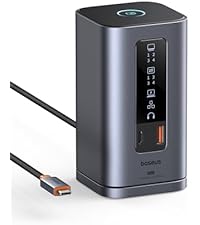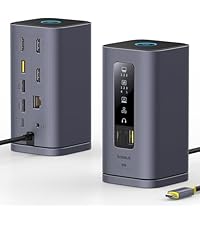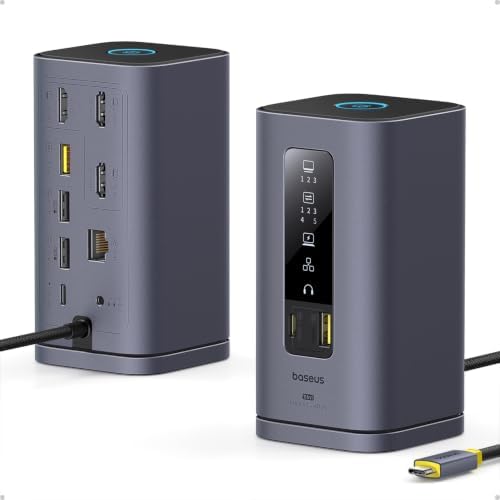
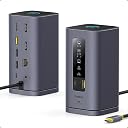


🚀 Elevate your workspace—dock, display, dominate!
The Baseus Spacemate Displaylink Docking Station is an 11-in-1 USB-C hub designed for professionals seeking a sleek, powerful solution. It supports up to three 4K monitors, delivers ultra-fast 10Gbps data transfer, and provides 100W power delivery to keep your devices charged. Compatible with the latest M1/M2/M3 Macs and Windows PCs, it offers versatile connectivity including Ethernet, audio, and multiple USB ports, making it the ultimate productivity booster for modern workspaces.


| ASIN | B0D3QFWPDW |
| Brand | Baseus |
| Brand Name | Baseus |
| Colour | grey |
| Compatible Devices | M1/M2/M3, Win, MacOS |
| Customer Reviews | 4.4 out of 5 stars 114 Reviews |
| Hardware Interface | 3.5mm Audio, Ethernet, HDMI , USB 2.0 Type A, USB 3.1 Type A, USB 3.1 Type C |
| Item Weight Unit of Measure | 0.68 Kilograms |
| Manufacturer | Baseus |
| Manufacturer Part Number | 11 in 1 |
| Model Number | 11 in 1 |
| Number of Ports | 11 |
| Smart Home Compatibility | Not Smart Home Compatible |
| Total HDMI Port | 3 |
| Total USB Ports | 5 |
| UPC | 850064146417 |
| Unit Count | 1 Count |
| Wattage | 100 |
A**R
[UPDATE: it works now!]. worked like a dream ... for a week.
read the UPDATE at the bottom for the happy ending... ************* INITAL REVIEW: BaseUS for Mac, running on a 2024 M4 Pro Max. Initially, it worked beautifully ... for a week. I have an M4 mac and after installing the driver, it displayed to the laptop display and 2 separate monitors via HDMI. Also plugged in where a webcam to the USB-A, an ethernet cable, and power to the incoming USB-C port. I used the macbook's power supply to power the hub. I was happy. For a week. I then left on a trip and returned a week later. Pluged my macbook back in and ... nothing on either external monitor. I tried: restarting the macbook restarting the monitors restarting the BaseUS (well, unplugging it, unplugging everything from it, waiting a minute, and plugging it back in) using only one monitor (each external in turn) I can validate the cables are working by plugging them directly into the macbook. I can also validate the monitors are working by plugging them directly into the macbook via hdmi. When both monitors are connected to the hub, the front panel lights show the external monitors are connected. The indicator lights also show when the webcam is connected, as well as power. and ethernet. The webcam is recognized and usable by the macbook. Only the displays are buggered. I tried doing the "press option while in the display control panel" trick to force the macbook to recognize the monitors. It did not work. As a final step, I tried with the 3rd HDMI port. (previously I'd only used 1 and 2) Connecting the HDMI to the third port, video appeared on an external monitor. (this, of course, does not work for me since I need two external monitors) I honestly don't remember if I'd only ever used ports 1 and 2, but it seems perhaps both of those ports are bad. Poor soldering and the physical ports are buggered? The only pressure on them is from HDMI cables coming out the back and draping down to where they enter cable management ... so really, no pressure at all. While I've seen multiple reviews regarding the company being very responsive, this is for work and I need a replacement soonest. I'll be ordering another and returning this one to Amazon. Hopefully it was a one-off and the next will work. I'll update this review once the next one arrives and I can determine if it works past a week. I'm leaving two stars instead of one because hey...at least the other features still work. ¯\_(ツ)_/¯ *********************************** UPDATE: (spoiler: it was not a hardware problem. And they have *AMAZING* customer service!!) I received my second unit only to find ... it was doing exactly the same thing as the one I already had! So something was up. I'd gotten rid of the previous one's packaging because, hey, it was working great and if something did go wrong, I was sure the manual was available in a pdf somewhere. (sneak peek .. it was/is. I just somehow missed it) When it stopped working I searched high and low to find a manual. The BASEUS site had a page for the model, but somehow I completely missed the manual. <facepalm> Find it here: https://support.baseus.com/product/452/Spacemate-Series-11-in-1-(MAC)-Docking-Station?n=mxobwklbv9 I opened up the manual (printed with probably 6 point type ferchrissakes .. my eyes are OLD, people!) with the new unit I received and - there it was - the note that the unit needed a driver and the magic link to find it. (here it is for some poor soul coming after me: https://www.synaptics.com/products/displaylink-graphics/downloads ). I downloaded the installer and re-ran it only to be kindly informed "You've already got the newest version." Oh. Right. Ok, I knew that. So what's the problem?! I can't believe I got *another* unit that happened to be borked in exactly the same way that my current one is. (when the current one initially worked great) Now here's the rub. These aren't exactly "drivers" ... it's a driver set/program pack. When you install the driver it launches the controller program and everything works splendidly. However, if you subsequently reboot, the multi monitor feature of the hub stops working UNTIL you relaunch the program - DisplayLink Manager. DisplayLink Manager DOES have an option to relaunch at system restart. But was that enabled by default on install? (you can guess). So from where I sat, the unit just ... stopped working. And nowhere - I mean *NOWHERE* online did I find someone saying "oh, yeah. You not only need those third party drivers - the controller needs to be running or things won't work". I was expecting a driver to be, well, a driver. Something that, once installed, I didn't have to think about again. But even THAT could be forgiven if there had been documentation somewhere that detailed what needed to be done. Even the manual simply had a reference to the driver and nothing more. An additional line saying "make sure you set DisplayLink Manager to launch automatically after login" would have saved no end of trouble. Or even better - a big 'ol notification at the end of the install. In the end, the hardware is fine. I was going to update the review, but only bump it to four stars. But I'm putting it at 5. Why? Because, for everything else that went wrong and frustrating and caused me to burn time ... the company saw this review, contacted me, and offered to refund the purchase price. No hassle, no argument, no nothing. Just "we're sorry it caused you inconvenience". I can forgive an *awful* lot for proactive, respectful customer service like that. So five stars it is.
C**S
Excellent dock for MacBook Pro M1 Max — compact, stable, and perfect for dual monitors
Estoy en Colombia y llevo varios días usando esta estación de acoplamiento con mi MacBook Pro M1 Max. Honestamente, me sorprendió lo fácil que fue conectarla y comenzar a usarla. Todo funciona rápido y sin problemas. Algo importante: Baseus explica muy bien en todas partes que en Mac es necesario instalar un driver para que funcione correctamente. En mi caso lo hice antes de conectarlo y todo quedó funcionando perfecto desde el primer momento. La he usado con dos pantallas externas y funciona a las mil maravillas. No he tenido cortes, fallos ni desconexiones raras. Además, me gustó mucho que no necesita alimentación externa ni cargadores adicionales; simplemente conectas el USB-C al MacBook y listo. El tamaño también me parece excelente: es pequeño, ocupa poco espacio, pero al mismo tiempo se siente estable y bien construido. Sí se calienta un poco durante el uso, pero realmente es muy leve. Vivo en una ciudad relativamente fría en Colombia y aun así se siente apenas tibio. Supongo que es normal por el procesador interno que utiliza. Hasta ahora ha sido una muy buena compra y definitivamente lo recomendaría para usuarios de Mac que necesiten más puertos y soporte para múltiples pantallas.
S**S
It works, but there is more you need to know.
So, this technically works, but there are a few caveats. I have an M1 MacBook Pro, which officially supports one additional monitor. I already had the display link driver along with a USB C to HDMI dongle from Pluggable, and I had another dongle that had power delivery and another HDMI. This was working and very smoothly. This Baseus Spacemate seems to put two of the HDMI ports through display link and one through ALT DisplayPort. My MacBook only has two USB C ports. I have an LG 4K monitor and a Dell 2k. At first, my LG would only show in 2K. The mac's displays menu showed all of the resolutions up to 4k, but it just wouldn't go 4k. I then moved it to the alt DP port and it worked in 4k. But, whenever I restart the computer, it restarts in 2K, and then once it's completely running, it will switch back to 4K. But, my entire computer became sluggish and my processor was working. My fans NEVER turn on but they were spinning about 1200 and the computer temps went up to 141F. The stock power delivery plug from apple is only 61W. This would not allow the power delivery port on the baseus to power my Mac. I use it in clamshell mode and it must have power to allow the external monitors to be on. So, I had to either plug my original apple power into the laptop directly, or buy a 100W power brick in addition to this. (verified with a friend's power brick). But, it was still sluggish. So, I plugged the 100 w brick into the baseus so it would deliver power and then unplugged the HDMI for my LG and plugged it back into a dongle and then into the now empty USB C port. Sluggishness is gone. But, I'm kind of back where I was. I just have replaced the pluggable dongle with the Baseus as a dongle. So, it's kind of useless to me. It is a beautiful product and iwll work for some people.
N**.
Producto defectuoso y costoso - Actualización
Doking Station defectuosa. Se calienta demasiado y me bloquea mi laptop( macbook pro m4 pro). Los puertos hdmi son inestables a pesar de haber instalado y configurado el driver. Relentiza mi trabajo y me obliga a desconectar y conectar en repetidas ocasiones los dos monitores externos. Probé todas las configuraciones posibles de conexión y siempre obtenía resultados iguales o peores. No recomiendo este producto. Dedicará mucho tiempo tratando de solucionar problemas que realmente son defectos de fabrica. Es un producto costoso que debería tener un mejor proceso de control de calidad. Actualización: Debo reconocer que el vendedor, es muy honesto porque luego del anterior mensaje, se comunicó y me ofreció el reembolso. Agradezco su esmero por solucionar el problema y brindar un trato educado al comprador. Por lo anterior, valoro su actitud y considero que debe tener una mejor calificación. Sin embargo, compré una alternativa diferente al producto inicialmente adquirido.
C**N
Great Dock, Just Runs a Little Warm
This docking station has been a fantastic addition to my workspace, finally letting me drive three external monitors from my MacBook without any flickering or lag. The port selection is excellent, with fast 10Gbps USB speeds for my external SSD and reliable Gigabit Ethernet. It delivers plenty of power to keep my laptop charged, effectively turning my setup into a one-cable solution. The only reason I'm not giving it a full five stars is that the unit can get quite warm to the touch when it's under a heavy load with all ports in use. It hasn't caused any performance issues, but it's definitely noticeable. Otherwise, it’s a powerful and reliable hub that does exactly what it promises.
Trustpilot
5 days ago
2 weeks ago