


🚀 Elevate your workspace: One switch, endless power moves!
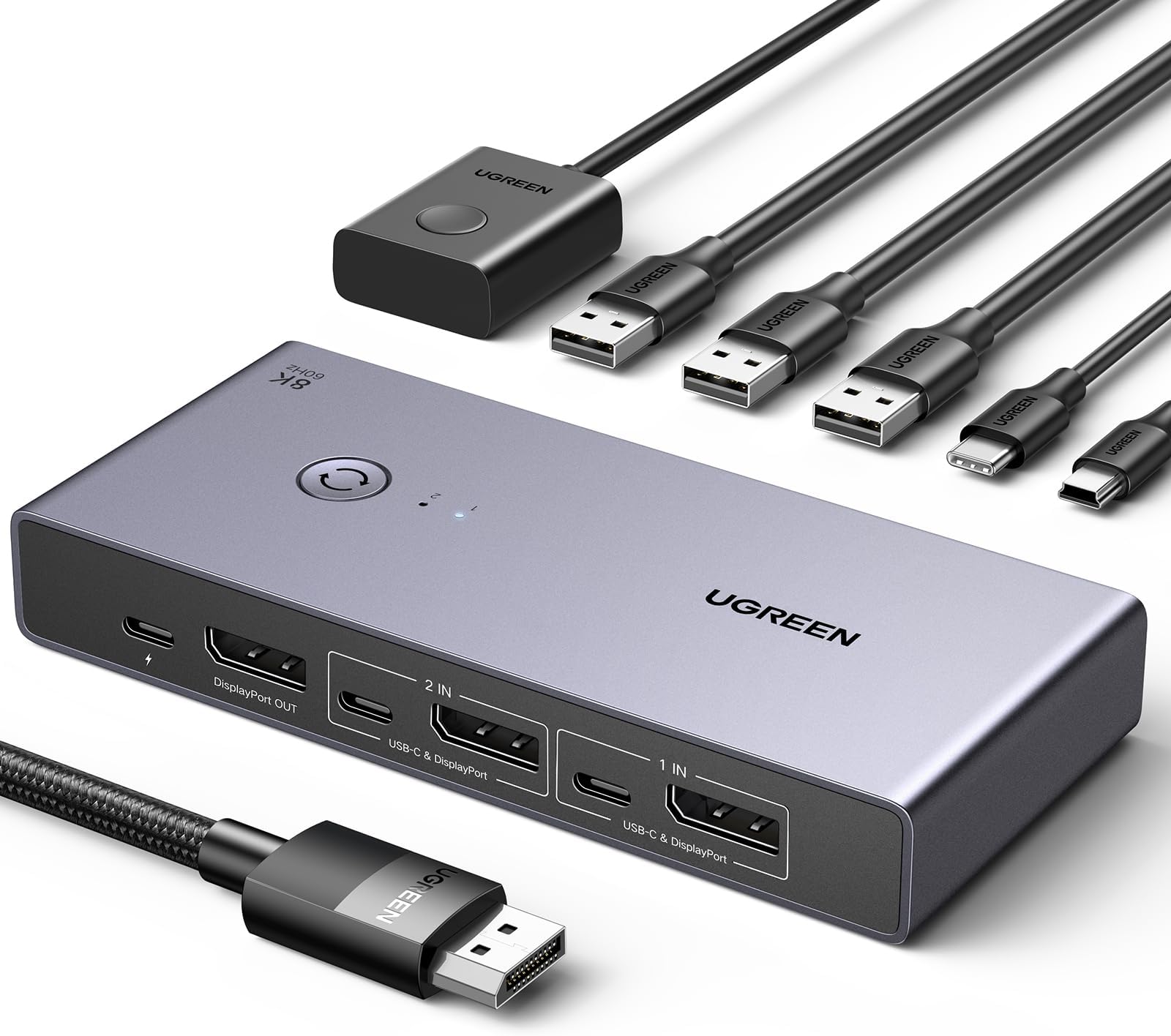
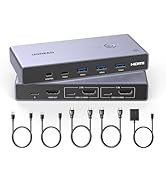
The UGREEN 8K@60Hz DisplayPort KVM Switch lets professionals share a single 8K or 4K ultra-high-definition monitor, keyboard, mouse, and USB devices between two PCs seamlessly. Featuring DP1.4 support, four high-speed USB 3.0 ports, and easy plug-and-play operation without drivers, it’s engineered for millennial managers craving sleek, efficient multitasking setups that save space and boost productivity.





| ASIN | B0CFFFHFJT |
| Amazon Bestseller | #13,095 in Computers ( See Top 100 in Computers ) #64 in KVM Switches |
| Brand Name | UGREEN |
| Connector Type | Plug In |
| Contact Material | / |
| Contact Type | Normally Open |
| Current Rating | 200 Milliamps |
| Customer Reviews | 4.2 4.2 out of 5 stars (774) |
| International Protection Rating | IP00 |
| Item Dimensions | 23 x 15.4 x 5 cm |
| Manufacturer | Ugreen Group Limited |
| Material Type | Acrylonitrile Butadiene Styrene, Aluminum |
| Model | 25962 |
| Number of Items | 1 |
| Operating Voltage | 5 Volts |
| Operation Mode | ON-ON |
| Switch Type | Push Button |
| Terminal | / |
| Unit Count | 1.00 Count |
| Wattage | 4500 W |
K**I
画面を切り替えたいというよりはUSB機器の切り替え機能をメインに購入しました。 画面は液晶側でも変更できますが、ボタン一つで画面やワイヤレス接続のキーボードなどすべて切り替わるので非常に便利です。 遅延や機器の誤作動などもなく、私の環境では完璧に動作しました。 TypeCケーブルやDPケーブルなどもすべて入っていましたので、環境が合う方はおススメです。
Z**N
星5つに修正。 本製品によるものではなく、USB3.0の特性のようでした。 と言うわけで、本製品起因ではないということで星5つとしました。 ---以下が最初のレビュー記載--- 4Kモニターを2台のPCで共有しています。 モニターの切換器としては動作に問題ありません。 USBハブについて、以下のように接続して、1口開けていました。 ・無線キーボード、マウスのドングル ・USBハブ-USBヘッドセット -USB-A - USB-C ケーブル (スマホを接続してデータ転送できるように) ・空き:USBメモリやUSB-HDDを取り換えて使うため ※DC入力は、念のため10W(5V-2A)出力のUSB-ACアダプタを接続しています。 手の届きやすい場所に本KVMを置いて、USBメモリ、USB-HDDなどをつなぎ変えて使いたいと思っていたのですが、PCの電源ON状態でUSBメモリ、USB-HDD等をつなぐとキーボード、マウスが反応しなくなります。 この状態でキーボード、マウスのドングルを抜いて、差しなおすとキーボード、マウスが使えるようになります、たまにフリーズするように引っかかるような動作をします。 最初、USB-HDDをつないで同現象が発生したため、電力不足かと思ったのですが、USBメモリでも同じ現象が発生しました。 と言うわけで、PCの電源ON後、本KVMのUSBハブの抜き差しができません。 なので、私は最後の1口に128GBのUSBメモリをつないで使うことにしました。 ---以下がネット情報収集し検証後の追記--- 詳細は不明ですが、USB3.0の仕様上、USB3.0対応ハブに、2.4GHzの無線製品を接続し、USB3.0接続の製品と同時に使用すると、USB3.0機器の高周波ノイズの影響で2.4GHzの接続が不安定になるようです。 具体的には、2.4GHzの接続は、無線キーボード/マウスやBT等で使用されています。 私はBTは未確認ですが、無線キーボード/マウスが2.4GHz接続でした。 この状態で、開いているUSBポート(A、Cどちらでも)に、USBメモリ、USB-HDD等のUSB3.0接続をすると、キーボード、マウスが動かなくなったり、プチフリ状態になったりしていました。 ちなみに、この状態で同時に接続している、有線のUSBヘッドセットの音も切れていました。 本製品のレビューに、「ハブを経由したら安定した」と言うレビューも発見したため、試しに、本製品にUSB2.0ハブを接続し、USB2.0ハブに無線キーボード/マウスと、USBヘッドセットを接続したところ、本製品のUSBポートにUSBメモリ、USB-HDD等を接続しても、マウス、キーボード、ヘッドセット共に問題なく使用できるようになりました。 これまでこの現象に遭遇せず知りませんでしたが、USB仕様というか特性起因らしいことがわかりました。 USB接続機器が安定しない方は、2.4GHz無線製品を同時に使用されていないかご確認されると良いと思います。
夏**夏
一つのモニターを、二つのPCで共有するために購入。 でも、考えてみれば、片方をHDMI、片方をDPで、それぞれ接続して、モニターの横のボタンで入力を切り替えればいいだけでした。 モニターと共にUSB機器を共有したいという人向けですね。 動作は問題ないです。いつか有効に活用できる日が来るかもしれない。
白**だ
8K対応で質感も良く、製品自体のクオリティは非常に高いです。この価格帯では間違いなくおすすめできます。 ただEDID非対応な点には注意が必要です。AppleCinemaDisplayで利用していますが、 WindowsからMacに切り替えた際、OS側で「モニター切断」と認識されるため、 Macに戻すと画面が真っ暗なままディスプレイを認識しなくなることがあります。
T**K
BUYER BEWARE DOES NOT WORK
Terrible. I bought expensive 8k usb-c to usb-c wires to pair with this. I spend a ton of money on this set up for it not to work in the end. Watch the video. It’s all connected probably and I even added a 5V 3A connection and still not working.
A**O
PC本体複数、接続機器は共有したい場合にとても便利です モニタの出力の切り替えだけでなく、USB機器の切り替えもできるので 私の場合は会社PCを持ち帰ってきた場合にも、 簡単にモニタとその他キーボード・マウスの切り替えができて便利です。
R**N
ディスプレイと無線マウス、キーボードとUSBメモリの切替に使ってます 今のところ何の問題もなく満足して使っております 特に、切替に時間がかからない、すぐに切り替わります これの前に使ってた切替器(それはHDMI)は切替スイッチを押してから実際に切り替わるまでに結構なタイムラグがあったのですがこれはすぐに切り替わります ストレスなしです
ラ**ト
二台のタワー型PCで一台のモニターを共有したくて本器を購入しました。結果から言うと安定動作していますが、安定して使えるまでに試行錯誤した。原因はPD電源(Type-C 6個、Type-A 2個口)から電源を取ると、他の機器を接続したときにネゴシエーションによる瞬断が発生するようで、その電源の瞬断が本器に悪さをするらしく、マウスやキーボードの接続が切れて操作不能になることが何度も起きた。そのため、本器の電源は別に専用に用意する必要があるようです。ニ個口のPD電源でも必ず本器専用に用意してください。
V**I
Brilliant product. works as expected with almost instant switch for the Monitor, keyboard and trackpad . using to switch 34 inch ultra wide 165HZ oled between macbook and macstudio. There is almost nothing in this price range which can do all this. impressive.
N**P
Compact and stylish design and a great ease of use. Would recommend!
G**A
La calidad de construcción del KVM es muy buena, con buenos terminados. Es muy fácil de instalar, y el producto incluye todos los cables necesarios para realizar la conexión de dos computadoras a un mismo monitor con DisplayPort. Todos los cables son de buena calidad, aunque los DisplayPort pueden ser algo cortos (alrededor de 1m) si tus computadoras están lejos de tu monitor (algún standing desk con computadora de escritorio en el piso, por ejemplo). El cambio entre dispositivos funciona muy bien y es rápido. Muy contento con la compra, Ugreen no decepciona.
N**T
This Display KVM Switch was purchased to share a monitor, keyboard and mouse between my gaming PC and my Mac mini M2 Pro and it is working flawlessly. My monitor is a 3440x1440p 165hz and I am getting the full resolution and refresh rate on both computers. G-Sync and VRR is also working on both Mac and PC. I am using a Logitech wireless keyboard and Corsair wireless mouse and I have both dongles attached to the KVM and they are also switching across both computers along with the DisplayPort signal. I really can't fault this unit at all, it is working perfectly.
W**L
I use an Apple MacBook Pro M! for music production and as my daily driver. I also have a Windows Rig I built myself for gaming. Running a 4080 super and AMD 7800X3d. My Monitor is an LG UltraGear 38 Ultrawide, running at 3840x1600. It has a refresh rate of 165Hz with overdrive. But I run it at 120Hz as it gives me 10 bit colour. It is GYSNC compatible and so provides variable refresh rates across the full spectrum. It is also HDR 600 Compliant. I am connecting wired Razer BlackWidow Pro V2, and a Razer Mouse. (Don't judge, I love the RGB!). I was looking for a device that could swap between both devices, making my life considerably easier then it was faffing around changing the input on the monitor, swapping over the keyboard, etc. I was dubious about this device, because I was asking for a lot. However, I can safely say, it all works. Working on the PC Side : * GYSNC passthrough works perfectly, I get variable refresh across the range * HDR passthrough works perfectly. I still get HDR compliancy via the switch * 165Hz at 8 bit colour, 120Hz at 10 bit colour, at 3480 x 1600 (native), works flawlessly. * Both Razer Keyboard and Mouse are detected and work flawlessly as though they are connected natively. * Previous Logitech Dongle (MX Keys and Mouse Master 2s) also works perfectly. Working on the Mac Side : * HDR passthrough works perfectly. I still get HDR compliancy via the switch * 75Hz VRR works perfectly. This is the maximum my dock provides via Displayport * Both Razer Keyboard and Mouse are detected and is recognised via openRGB (great software BTW), and colours can be changed. Additional Notes : I did think I would need to supply the device with additional 5v power due to the RGB keyboard and mouse being connected. To my surprise, this was not the case. This may be different if you're using Corsair Devices, or Logitech, or SteelSeries RGB devices. If so, I can't see why they wouldn't work if you provide them enough power given my Razer Devices work without it. You will need you're OWN power cable though if you do require additional power; Contents : 2 x USB A to USB C cables. 2 x Display Port 1.4 to Display Port 1.4 Cables (Backwards compatible) - And yes, they are DP 1.4 compliant! 1 x USB remote control cable The DP cables are very short at about 3 feet. Bizarrely the USB cables are another foot longer. Still, they are excellent quality cables. The unit itself has some weight to it. Is certainly DP 1.4 compliant and is very well made. The remote control is quite long, but isn't up to the standard of the rest of the device. Merely functional and acceptable. There is room for improvement. I may decide to make my own as a fun project. Additional Notes for Mac Users : I see there are quite a few negative complaints from Mac Users saying this device does not work with their device. That might be down to what dock you're using. Or you are using the wrong type of cable. Or you're confusing Display port with Thunderbolt as they are NOT the same. This is a basic DISPLAY PORT switch. A Thunderbolt switch WILL allow Video Passthrough via your USB-C connector. However, you can basically double the price of that device, if not more. You might be better off using the HDMI version of this dock if you're having problems. But if you're expecting to get video passthrough on a basic Display Port switch that isn't Thunderbolt, then you're not going to have much luck I'm afraid. Just an FYI. Blame the USB/Thunderbolt corporate overlords standards committee for not making this clearer. Conclusion : If you have TWO DP compliant devices, want HDR, VRR, Gysnc, and High Refresh rates at high resolutions, then this is a GREAT device for the price. I was very surprised it provided all of the above. I was expecting to pay a LOT more for a more compliant device. (You're looking in the hundreds of pounds to be honest!). I was very surprised at how good the build quality of the unit is, how good quality the cables were, and how competitive the price is. Very pleasantly surprised in every aspect. I recommend.
Trustpilot
3 weeks ago
1 month ago