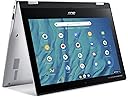
💼 Work, create, and connect—anywhere, anytime with Acer Spin 311!
The Acer Spin 311-2H is a versatile 11.6" 2-in-1 Chromebook featuring a 360° hinge, Intel 4-Core Celeron N4000 processor, 4GB RAM, and 64GB eMMC storage. Its HD IPS touchscreen supports stylus input, perfect for productivity and creativity. With up to 10 hours of battery life, dual USB-C ports, and Chrome OS’s fast, secure environment, it’s designed for professionals and students who demand flexibility and all-day performance.
| ASIN | B09NYCP2YG |
| Audio Output Type | Headphones, Speakers |
| Audio Recording | Yes |
| Automatic Backup Software Included | Gmail, Google Drive |
| Available M2 Slot Count | 1 |
| Battery Life | 13 Hours |
| Bluetooth support? | Yes |
| Box Contents | Adapter, IST COMPUTERS stylus pen, Laptop, Manual |
| Brand | Acer |
| Brand Name | Acer |
| CPU Model | MediaTek MT8183 |
| CPU Model Number | N4000 |
| Camera Description | Front |
| Colour | Pure Silver |
| Compatible Devices | External displays, mice, keyboards, storage devices, wireless keyboards, wireless mice, wireless headphones |
| Computer Wireless Type | 801.11ac, Bluetooth |
| Control Method | Touch |
| Customer Reviews | 4.2 out of 5 stars 573 Reviews |
| Display Technology | LED |
| Display Type | LCD |
| Form Factor | Convertible |
| Graphics Co Processor | ARM Mali-G72 MP3 Graphics |
| Graphics Description | Integrated |
| Graphics RAM Size | 4 GB |
| Graphics Ram Type | DDR4 SDRAM |
| Hard Disk Description | Emmc |
| Hard Disk Size | 64 GB |
| Hard Drive Interface | Solid State |
| Hard Drive Size | 64 GB |
| HardDisk Rotational Speed | 7200 |
| Hardware Interface | USB 2.0, USB Type C |
| Has Color Screen | Yes |
| Human Interface Types | Keyboard, Touchscreen with Stylus Support |
| Item Dimensions L x W x Thickness | 29L x 20.6W x 1.9Th Centimeters |
| Item Weight | 2 Pounds |
| Keyboard Description | Chiclet |
| Keyboard Layout | QWERTY |
| LAN Port Bandwidth | 10/100 Megabits Per Second |
| Manufacturer | Acer |
| Maximum Display Resolution | 1366 x 768 Pixels |
| Memory Clock Speed | 2400 MHz |
| Model Name | Spin 311 2H |
| Model Number | CP311-2H-C7QD |
| Model Year | 2021 |
| Native Resolution | 1366 x 768 pixels |
| Network Connectivity Technology | Bluetooth, Wi-Fi |
| Number Of Cells | 2 |
| Number Of Ports | 2 |
| Operating System | Chrome OS |
| Optical Device Type | No Optical Drive |
| Other Special Features of the Product | Support Stylus |
| Processor Brand | Intel |
| Processor Count | 8 |
| Processor Speed | 2 GHz |
| Processor Type | MediaTek MT8183 |
| RAM Memory Installed | 4 GB |
| RAM Memory Technology | Lpddr 5 |
| Ram Memory Maximum Size | 4 GB |
| Scanner Resolution | 1366 x 768 |
| Screen Size | 11.6 Inches |
| Specific Uses For Product | Education, Multimedia, Student |
| System RAM Type | DDR4 SDRAM |
| Total USB Ports | 2 |
| Touch Screen Type | Capacitive |
| UPC | 755379237556 |
| Video Output | DisplayPort |
| Video Processor | ARM |
| Voltage | 3.7 Volts |
| Webcam Capability | Yes |
| Wireless Technology | Bluetooth |
C**E
Better than my previous Asus Chromebook
Though it looks exactly like my previous Asus Chromebook (model C101P) which reached its AUE, there's one major difference with this Acer model. And that's the battery's life which is pretty amazing. After being fully charged, this item keeps working for days which I consider a real plus. Other than that, I haven't encountered any problems with it yet. The touchscreen feature also works well. Highly recommended. UPDATE: I've had the Chromebook for almost three weeks now and today the screen suddenly froze leaving all keys and the pointer inoperable. Turning the power on and off had no effect. I'm sure others know the fix for this dilemma but I learned that simply pushing the ESC key (top row, fourth in from the left) and the power key simultaneously instantly solves the problem. Hopefully, it won't happen again but at least I know how to deal with it.
ع**غ
الرياض
لايوجد قلم للابتوب اين القلم
J**L
Pésimo teclado, sin funciones, es mejor una laptop de segunda mano
El teclado no sirve, si tecleas una letra la escribe casi 10 veces, no puedes usar word, excel, powerpoint o cualquier otra aplicación, es mejor comprar una laptop de segunda mano
N**N
Beautiful colors, clear, sharp letters, and movies
Size perfect. Beautiful color. Easy to use. Stable screen, clear, bright.
F**S
Writing after 3 months of purchase.
This chromebook is trash. The wifi connection is terrible. I can confirm that it's the chromebook itself because other wireless items in the same room have perfect connectivity. Most of the apps don't work or run, and half of the streaming I do has to be in the browser because the apps regularly crash even when they're the only thing running on the darn thing. Streaming is the only use for this hunk of junk now, I had to purchase a different tablet for my intended use of drawing with the touch screen. The bluetooth also doesn't work at all. My headphones work with my phone and other tablet fine but this chromebook won't connect with any of my bluetooth cabale headphones no matter the manufacturer. (Sony, Jlab, offbrand, airpods). I don't know if I just got a dud, but it was a total waste of money.
Trustpilot
2 weeks ago
2 days ago