🖌️ Elevate your digital art game—because your ideas deserve the best canvas.
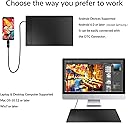
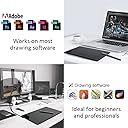
The VEIKK A30 is a sleek, professional-grade graphic drawing tablet featuring 8192 levels of pressure sensitivity, a large 10x6 inch active area, and 4 customizable touch keys plus a gesture panel. It includes a battery-free tilt pen and supports Windows, Mac, and Linux systems via a reversible Type-C USB port. Designed for artists, designers, and educators, it offers plug-and-play ease, versatile compatibility, and a complete accessory kit to jumpstart your creative projects.


| ASIN | B07DQP93BD |
| Active Surface Area | 10 inches x 6 inches |
| Best Sellers Rank | 8,183 in Computers & Accessories ( See Top 100 in Computers & Accessories ) 22 in Graphic Tablets |
| Box Contents | Battery-free Pen, Glove, Replacement Nib, USB Cable |
| Brand | VEIKK |
| Brand Name | VEIKK |
| Colour | A30 |
| Compatible Devices | Desktop, Laptop, Smartphone, Tablet |
| Connectivity technology | USB |
| Country of Origin | China |
| Customer Reviews | 4.3 out of 5 stars 4,421 Reviews |
| Display Type | LCD |
| Item Dimensions L x W | 21.2L x 33.2W centimetres |
| Item Weight | 570 Grams |
| Manufacturer | VEIKK |
| Model Name | VEIKK A30 |
| Model Number | VEIKK-A30 |
| Model name | VEIKK A30 |
| Native Resolution | 1920x1080 |
| Network Connectivity Technology | USB |
| Operating System | Linux, Mac OS, Windows |
| Operating system | Linux, Mac OS, Windows |
| Pressure Sensitivity | 8192 Levels |
| Pressure sensitivity | 8192 Levels |
| Product Features | Programmable Press Key, Stylus Dock |
| Screen Size | 11.66 Inches |
| Special feature | Programmable Press Key , Stylus Dock |
| Specific Uses For Product | Designing, Drawing, Online Education |
| Target Audience | Designer, Sign for approval, Student, Teacher |
| UPC | 601707033812 |
S**Y
VEIKK A30 Pen Tablet - Easy to use with great specs at an amazing price!
I received my Veikk A30 tablet this week, delivery was extremely fast (and free for Amazon Prime members!). The box design had me excited from the get go, tells you what you need to know in terms of report rate speed (250 RPS), Lines per inch (5080 LPI), levels of pressure sensitivity (8192) and size 10”x6” all of which are particularly impressive given the low price of the tablet. On opening the box, all components were well packaged with the tablet itself on immediate view with the accessories tidily stored underneath. You get; • A30 tablet • Battery free stylus pen with two hot key buttons • Type C USB adaptor cable • Nib replacement tool with spare nibs • Quick start guide Handling the tablet it feels light, looks extremely sleek and barely thicker than my smart phone. I was thrilled to find that it fit comfortably inside one of my padded laptop bag compartments although I can see the benefit of buying a tablet pouch to protect it rather than leave it on my desk inbetween uses. Setup was surprisingly straightforward and devoid of some of the language issues I’ve encountered when installing other Chinese gadgets. The tablet is powered via the USB cable so no need to charge it for first time use and plugging it into my Windows 10 laptop launched the setup utility. After a reboot, the utility launched on startup to enable me to set the hot key settings. Even though by default the stylus is set to work as a pen rather than a mouse, hovering the stylus over the tablet, without making contact gained immediate control of the mouse cursor. By default the primary stylus hot key was set to right mouse click but this was quickly changed to left mouse click whilst I configured the tablet and got used to using the stylus. The position of the stylus hotkeys and moving the cursor when hovering above the tablet takes a bit of getting used to but very quickly I stopped looking at the tablet and was navigating the software just from looking at my screen. In addition to the two hot keys on the stylus, there are an additional 4 hot keys on the tablet that you can tailor to input your most frequently used settings in your sketching software. Within 10 minutes of opening the box, I was already using the stylus to sketch directly into photoshop. If I had one criticism, the stylus feels a little light and could do with being heavier but that’s probably a personal preference. I would also love to see a stylus holder mounted on the tablet itself, I can see myself spending time hunting for this in future! I want to spend a few weeks using the tool in earnest and complete a full drawing project before I can really comment on how the tablet has helped my creative process but on first impressions the VEIKK A30 appears to be a well designed quality product, simple to use with very good performance specs for an amazing price. Highly recommended.
M**R
An Impressive Model for Beginning Artists
As someone who does digital art quite a lot, I have particular tastes when it comes to graphics tablets, and know what sort of thing to look for. The Veikk A15 surpassed my expectations. The design is sleek and straight forward, with the command buttons being laid out perfectly to my non-sketching hand, and being able to program them for keyboard shortcuts is a massive help, particularly saving on having to press "Ctrl-Z" or "Ctrl-Shift-N", which means having to put down the tablet and disrupting the flow. The driver is easy to acquire, install, and I was ready to draw within minutes with a very simple and intuitive software, which allows me to map the commands I need very easily, especially being able to switch between pencil and eraser functions at the touch of a button, which is so much better than many other tablets that either lack this function, or rely on a rear pressure sensor on the pen which is prone to jamming or not functioning as intended. But what really sells me on the tablet is the compatibility with portable devices. I have been looking for sometime for a drawing tablet that works with my tablet PC, so I can sketch whilst away from my desk, and some have unfortunate issues with interface, size, or having an arbitrary restriction on work space when connected to handheld devices. The Veikk A15 works reliably with my work tablet, and I am looking forward to when convention season rolls up, and this will give me the freedom to work away from my desk. If you're someone who is looking not just for a reliable tablet, but a good one on a budget, look no further.
J**L
Good little tablet for the price
When I opened my VEIKK A15 I was very impressed with how the product looked - very smooth and professional looking, and matches the aesthetic of my desk well. This tablet offers a lot of features for the price. I very much enjoy the large drawing surface, as it allows a lot of fluid hand movements for expressive lines. The hot keys are very easy to assign to do whatever I want, and works well in any drawing program - I've been using it mostly with clip studio paint. My favourite part about it is just how many levels of pressure sensitivity there are - all of my drawing lines come out incredibly smooth and this allows me a lot of freedom with line weights in my drawings and digital sculptures. I did have issues getting pressure sensitivity to work with Photoshop, but I usually draw in other programs and found it to work perfectly in these, such as CSP, SAI and Medibang. For the price, however, the tablet has great potential and I really enjoy drawing with it.
K**S
Affordable and perfect for a new or old artist
I’m so excited to bring you guys a review of the new Veikk A15 drawing tablet. They recently reached out to me and asked I look at their product and I have to say I am pretty pleased with it. It arrived super quickly via Amazon, the box was a touch damaged but this is down to Amazon and not Veikk. Box was clean with all information that you needed, the clean graphics of the box gave me this kind of ports car vibe. I dunno why. I got the version that came with a glove, which is a lil snug on my hand so if you’ve got larger hand it might not fit comfortably, it was just right for me and I’ll be using it over my wacom glove. As well as the glove, inside the box you’ll find replacement nibs, there are only one type of nibs from what I can see on their website which is the former plastic ones. The pen, the usb power cable and of course the tablet. First things first, the pen. It was a really nice size, it’s also a non rechargeable pen so no worries about it not working suddenly because it needs a charge up. However I found it a bit light, this is probably just because the pen to my other tablet is heavy and I’ve grown used to that. This is something that can be eased with a pen sleeve so is only one small issue. The power cable is honestly pretty cool, there is so wrong way to plug it in, so regardless of if you’re right or left handed it’ll be out of your way. The tablet itself was bigger than I pictured inside my head, with a 10x6 in work are. There are 12 configurable buttons, I admit I was a bit stupid and honestly thought the red circle was a dial of some kind. Should have seen me spend 30 minutes trying to work out why I couldn’t program zoom to it. I should have read everything first, speaking of the dial comes in four colours I believe? Black, gold, blue and red. The work area has a papery texture, but not overly textured giving a natural drawing feel. Now onto the main part. Installing was a lil bit of a pain for me, the drivers were easy to find on the website. However the first time I installed they didn’t take. It wasn’t til I realised I needed to uninstall my pre-existing tablet drivers that they finally worked. I use mainly Paint tool sai 2 and Clip Studio Pro. Despite my earlier worries of the pen being too light and causing me issues, it didn’t, in fact I was able to draw for a good few hours before wrist pain kicked in and I needed a break, the wrist pain isn’t something I can blame on the tablet either, if you’ve got healthy joints and stretch before drawing I don’t see it being an issue. I LOVE, LOVE the sensitivity on this tablet, like I can not express how happy I was while drawing. The sensitivity and pressure was fluid, there were no big jumps in brush size. I’m very heavy handed with my pens and I rarely get those subtle movements. I hate to say it though, but the pressure on this might be better than my $600+ tablet that I use daily. I really enjoyed drawing with this, it took a lil time to get used to drawing on it as my currently tablet has been a digital screen tablet, it’s been three or four years since I last used my bamboo. I also want to add their tech support was spot on. I had issues getting the tablet to work with Clip Studio pro, my main art program, if I had dual monitors. We sat down over teamviewer and troubleshooted. It was an easy fix but they were great and kept in contact with me the whole time. (If you get this problem just switch which monitor is 1 and 2) The TLDR; Basically if you’re starting out or professional I’d recommend this tablet, it’s affordable, well made and great to work with. Pros Affordable. At £45.99 currently I can’t fault the price. Professional Quality Looks great Amazing to draw with Cons Pencil is a little light weight for me.
L**R
Easy to use, very helpful for Digital Artists.
Upon arrival the tablet was boxed extremely well, the packaging was perfect and it came with a lot of helpful additional pieces like extra nibs, even protection for the tablet pen itself which is rarely considered by most tablet brands which I personally adored to see and a drawing glove to use with the tablet itself. I have a ganglion on my drawing wrist so having a drawing glove accompanied with a tablet is always helpful in ensuring protection of my wrist and hand while doing my job. I also really enjoyed the fact this tablet came with a USB-C cable input since this is more efficient and I do hope to see other tablets follow in its footsteps. There are a lot of helpful shortcut keys already embedded into the tablet itself which I really adore because the choices for the shortcuts are ones often used by artists like myself (e.g. CTRL-Z, etc.). So you can tell the creator of this tablet understood the target audience this was going for. The tablet’s shape, I believe is underrated. I’ve seen a lot of tablets go for the size of height being a priority taking up most of my space, but this tablet actually focuses more on width which makes it easier to use with a multi-purpose computer and even more relaxing to see on the desk in contrast to a tablet which I feel could be ‘over-sized’. This tablet is definitely at a perfect size and very comfortable to move around and use. I’ve been very comfortable using this tablet to do my freelancing work. It has been comfortable, convenient and very capable with the tasks I have to perform while doing my job. This tablet is extremely well for the price-range it has. I’d definitely recommend Veikk in the future to other artistic-loving friends as well as even family. I’ve already discussed it with some family members who are passionate about art and they’ve even seemed interested despite being the hard-to-convince type! I’d likely buy from this brand in the future myself. We as artists sometimes do struggle in finding a tablet but I even believe if beginner artists use this tablet, they’ll become very easily adapted to shortcuts which can be beneficial to know as an artist – So learning this earlier on will be a miracle-sent for some! Perfect condition, delivered rather quickly and with ease. Definitely worth more than what’s priced for it.
A**F
High Quality, Feature Rich, Large Tablet - Ideal for Whiteboarding
In the world of lockdowns and remote working I wanted a digital way to be able to 'whiteboard' and brainstorm ideas. I am a big OneNote user and I have a projector connected to my laptop - so wanted to try and use a tablet with that set up. Based on other reviews I decided to go with the VEIKK A30 and I'm so happy I did. Size I needed a nice large size, and this is basically A4 size. It is ideal for the kind of whiteboarding usage I was looking for. Quality The whole product feels sleek and high quality. The ultra thin design, the buttons and touchpad, the pen - all feel of premium quality Setup Do not be put off by reviews talking about drivers and setup. They are old reviews. If buying post 2020 this is 100% plug-and-play with Windows. Windows detects it and switches to Windows Ink Workspace by default. Installing the Veikk software allows you additional control over the buttons. I needed the tablet to sometimes work with a monitor (in a multi-screen setup) and sometimes with a projector. The software made this a total breeze. Additional Buttons In a few clicks I had set up the buttons to be mapped to key shortcuts I wanted : undo, redo, go back, go forward. This is ideal for OneNote as you can quickly navigate between pages. I set the touchpad to allow me to easily zoom in/out/click right/click left. This is a powerful feature. Overall I am extremely happy with this. Great price, great feel, excellent functionality and well packaged. Do not hesitate to buy this.
K**N
Really good for beginners and pros!
After browsing Amazon for a while, trying to find a tablet in my price range of £40-60, I found the A15 Tablet by VEIKK. I had never heard of this brand label before so I wanted to try it out to see if the price was worth what I'm getting. After receiving the tablet I found that its actually a really nice and lightweight tablet and could most definitely fit into my laptop bag for easy transportation. The driver was really simple to install (as long as you have a Wifi connection) and easy to find after going to the website. I hadn't used a tablet that wasn't shown on screen for a long time but it took less time to get used to using it that I thought! It has 12 customisable keys so it was easy to bind all the brushes I use plus the undo/redo buttons to for ease of access instead of having to use my keyboard. I was pretty happy that I didn't have to constantly charge the pen either since its completely wireless and battery free. I tried the A15 on both Paint Tool Sai and Krita and it didn't have any problems working on either of these programs at all! This tablet would be great for anyone wanting to start venturing into doing more digital art as it's really easy to use on the get go! Overall I really liked using this tablet especially with it being pretty affordable. I will definitely be using it when I'm travelling between conventions and on the train too!
K**A
Solid tablet, few bells and whistles
Easy to setup, just plug in, download the driver and away you go. Didn't override any of my existing drivers/settings for my current tablet which was handy, gave me a chance to test it out without committing to it. Nice sizeable working area and robust pen stylus, plus a bunch of spare nibs. The red 'wheel' doesn't do anything and is just for decoration, but the buttons down the side can be mapped to hotkeys, which can be very useful. All in all, does exactly what you need a pen tablet to do, with no overly lavish features (and that's not a bad thing).
Trustpilot
3 weeks ago
2 weeks ago