Desertcart purchases this item on your behalf and handles shipping, customs, and support to Finland.
🎯 Master your digital domain with a tap — productivity just got personal!
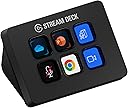
The Elgato Stream Deck Mini is a compact USB-C peripheral featuring 6 customizable LCD keys designed to simplify and accelerate workflows. Compatible with Windows and macOS, it integrates seamlessly with popular apps like Zoom, Microsoft Teams, Adobe Creative Suite, and Spotify. Its intuitive drag-and-drop software enables multi-action sequences, allowing users to execute complex commands with a single tap. Ideal for professionals seeking to boost efficiency in presentations, content creation, and daily multitasking, this device transforms tedious shortcuts into effortless control.


| ASIN | B07DYRS1WH |
| Best Sellers Rank | 5,736 in Computers & Accessories ( See Top 100 in Computers & Accessories ) 87 in Keyboards (Computers & Accessories) |
| Box Contents | Quick Start Guide |
| Brand | Elgato |
| Brand Name | Elgato |
| Colour | Black |
| Compatible Devices | Personal Computer, Smartphone, Tablet, Laptop |
| Connectivity technology | USB-C |
| Connector Type | Micro USB |
| Connector type | Micro USB |
| Controller Type | Voice Control |
| Country of Origin | Taiwan |
| Customer Reviews | 4.7 out of 5 stars 7,826 Reviews |
| External Testing Certification | Não Aplicável |
| Form Factor | pc peripheral |
| Global Trade Identification Number | 00813180020658 |
| Item Dimensions L x W x H | 6.1L x 5.8W x 8.4H centimetres |
| Item Highlight | Compatible with Zoom, Teams, Office, Adobe apps and more, Drag-and-drop setup, Multi-action sequencing, Works Mac and PC |
| Item Type Name | Elgato Stream Deck Mini: Live Content Creation Controller with 6 customizable LCD keys, for Windows 10 and macOS 10.11 or later |
| Item Weight | 6.17 Ounces |
| Manufacturer | Corsair |
| Manufacturer Part Number | 10GAI9901 |
| Memory Storage Capacity | 12 GB |
| Model Name | Stream Deck Mini |
| Model Number | 10GAI9901 |
| Network Connectivity Technology | USB-C |
| Number of Items | 1 |
| Number of Packs | 1 |
| Other Special Features of the Product | Customizable LCD Keys |
| Product Warranty | 12 months |
| RAM Memory Installed | 8 GB |
| Resolution | 8K , UHD, 1080p |
| Special feature | Customizable LCD Keys |
| Supported Internet Services | Twitch, YouTube, Mixer |
| Supported Internet services | Twitch, YouTube, Mixer |
| UPC | 813180020658 |
| Video Codec | H.264, H.265/HEVC, VP9 |
| Video Output Resolution | 1920 Pixels |
A**B
Great even for non-streamers
I don't stream but I got this product due to the convince it brings. I use it for daily tasks and it is really useful for particular people and specific use cases. I will outline some of my use cases in detail for people who might want it for the same application. Some of these features have to be enables by enabling the plugins that are extra and not enabled by default. Headphones and Mics: I use it to switch between headphones and microphones. The stream deck is great as it allows you to switch between microphones and playback devices. For example if I want to use one pair of headphones and want to switch my playback to that then i can by setting a key to do that functionality. However if i want to switch back or switch to another pair i can then click a button. But you have switch the mic and the playback separately. So for example say your headphones have a mic in them and you want to use a separate mic you can do that by selecting the mic you want through the stream deck instead of going through all the settings and then changing that one to default. For example you can have Headphone1 Mic and Headphones2 Mic and Webcam Mic as buttons and switch between them. Same situation with headphones. So that makes it really convenient as it changes the default one and then that means software's will automatically change to. Voicemod: This is a cool little extra feature that was added my Elgato to the stream deck and it is for a little fun. As mentioned before you can set a button to change to the voice mod output however it wont change the mic selected on the software you have to change that manually. You can do funny things like change your voice and censor words with a beep button and you can pick random voices but you if you want a particular one you have to buy the pro version. You can also hear yourself and can turn on and off through the elgato stream deck which is really convenient. Zoom: The elgato stream deck can be used in zoom calls and be used for a full list of things that i will list: Mute toggle, Video Toggle, Share Toggle, Focus, Leave Meeting, Cloud Record Toggle, Local record Toggle, Ask all to Unmute, Mute all Participants, Custom Shortcut. This is good for zoom calls an there is not much to add as it works seamlessly. YouTube: You can use it to control YouTube. I don't use it for this however it does allow you to chat a message through a click of a button and you also have another option of viewers. That is all you can do with YouTube as of default. Mute and Unmute: When in any call or meeting you can use the elgato stream deck to mute and unmute and it will work with any program and call because it mutes the mics internally and not through that software so if you are in 2 calls and want to mute on one then you cant through this unless that other one is a zoom call, that is where you can mute using the zoom mute button that is enables through the elgato stream deck. Games: This is useful for games as you can function it to do specific binds or to do things in games instead of binding things to using keyboard binds. It is not built to control games exactly but is useful and you have to find your own use in what games you play and what you want it for. This is too universal to gives any examples on. OBS: Whatever you could image you can do on here. You can change scenes. You can also mute your mic and also desktop audio. There are so many options that there is no limit here and you can do anything you can image through obs. There are YouTube videos that cover all the combinations as it would take too long to cover in a minor review. Twitter: You can tweet a specific tweet on that you have binded to a button and will automatically do that. This is mainly towards streams but you can bind anything you want here really. Also you can change name on here to. System: This is what you would expect that this should be able to do like open a website, hotkey switch, act as a hotkey, open something like a program, type text, and uses as multimedia controller. Spotify: There is a plugin that you can enable that allows you integrate and control Spotify from your stream deck. Lighting: You can control Philips hue with this as there is a plug in that can be enables and controls Philips hue lights and same with corsair icue. Build: The build of the elgato stream deck is great and it does not come with a stand but it does have a rubber button to stop it from being pushed back then being uses however it can be a bit annoying but nothing major. Also when you lock your computer you can keep any screen saver on the stream deck. In conclusion, there are a lot more functions that one can use this for streamers and non streamers.
D**N
Brilliant functionality for home working
I used to have the bigger one of these, but home working means I am limited on desk space nowadays. The Stream Deck Mini is an excellent little item with more functionality than you might think given its small size. The software that is supplied means you can program the buttons for hundreds of different functions. I have mine configured to launch apps from the desktop (more than six, as you can have folders assigned to buttons too). Then, for any particular app, I add functions that take over the buttons when the app is focussed - so for example, in Microsoft Teams I have toggles for mute and camera, a screen sharing button and a leave meeting button. Adding such functions to real buttons (instead of being hidden behind a weird keystroke in software) is transformative, and more than justifies the price of these units. The software is really easy to use and quite intuitive.
S**D
Amazing
Love this. Works perfectly easy to use
C**M
Great for video game hot keys / macros
Love this will Helldivers 2. Lots of customisation options. Build quality feels mostly good, but sometimes pressing buttons in a rush at an off angle can feel a bit clunky. Easy to connnect to your PC and the app. Price is a little on the expensive side compared to the feel of the buttons. The ability to set your own pictures in the windows and navigate through multiple pannels is great.
H**5
Great Little Piece Of Kit
I had been watching Elgato for a while to see if they bought out a smaller, more affordable version of the Stream Deck, and the did in the form of the Stream Deck Mini. I just had to invest. I am not a streamer but the offer of unlimited, fully customisable macros, hotkeys and a whole host of other functions it was perfect for me. I am not a streamer and use it for productivity shortcuts, photo editing and gaming hotkeys. For this, it works really effectively. Its small form factor means that it will sit neatly on any desk. The lack of angle adjustability isn't a problem for me as it sits at a good viewing angle. The keycaps displays can be seen clearly from about 60 degrees angle at either side of the device, meaning it doesn't have to be central to your seating position. On the bottom, there is a full rubber surface that allows it to adhere to almost any surface and move very little. On the back of the device, there is just a plain Elgato logo. The software that is free to download from the Elgato website is really easy to use, with drag-and-drop style configuration that is instantly mirrored on the Stream Deck Mini's display. All in all the Stream Deck Mini is a product that I would highly recommend to anyone who is serious about photo/video editing, gaming or productivity and is looking for extra macros or hotkeys. I look forward to seeing more devices like this from Elgato! (For reference, the part of the device I have hidden in red on the fourth image is my Stream Deck Mini's unique serial number.)
A**G
Product 10/10 delivery 0/10
Alot of money for what it is considering you can get alternate brands with 15 buttons for the same price. Only went for this brand because iv got there XL model & I don't like to mix and match by running anouther app for a different brand. If you don't have OCD and don't care about brand name, Get the 3rd party one for same price but have 15 keys instead. Product 10/10 Price 0/10 Delivery 0/10
M**N
Fantastic addition for productivity
This little device has help me with productivity so much its crazy. I livestream so being able to do things such as play and pause music from changing which application I am using all from the click of a button. One thing to note, the base of the device has an anti-slip material but I do find that the device can slip around on my desk top. Place it on a fabric mousepad or something similar and it will stay in place 9 times out of 10! Overall size is small and I wish there were more buttons present but it fits on my desk in little gaps perfectly.. It weighs next to nothing and is always plugged in so no need to worry about battery life.
G**E
Well packaged
Great product
R**E
Produktivität auf einem neuen Level ⭐⭐⭐⭐⭐
Das Elgato Stream Deck Mini hat mein Arbeits- und Stream-Erlebnis maßgeblich verbessert. Ich benutze es sowohl für tägliche Produktivitätsaufgaben als auch für meine Streaming-Sitzungen, und es hat meinen Workflow extrem effizient gestaltet. Vorteile: Vielseitige Anpassungsmöglichkeiten: Die Tasten lassen sich individuell belegen, um schnell auf häufig verwendete Apps wie Zoom, Teams, PowerPoint oder MS Office zuzugreifen. Das spart enorm viel Zeit, da man nicht mehr durch Menüs navigieren muss. Steuerung von alltäglichen Apps: Ob für Meetings in Zoom oder Teams, das Stream Deck Mini funktioniert reibungslos und erleichtert die Bedienung. Es ist ein wertvolles Werkzeug für alle, die viele Anwendungen gleichzeitig nutzen. Produktivitätssteigerung: Durch die einfache und intuitive Einrichtung der Kurzbefehle lässt sich der Workflow erheblich optimieren. Sogar alltägliche Aufgaben wie das Ein- und Ausschalten von Lautstärke, dem Wechsel von Präsentationen oder dem Aufrufen von Webseiten gehen schneller von der Hand. Leichtgewichtige Bauweise und kompakt: Die Mini-Version ist perfekt für alle, die wenig Platz auf dem Schreibtisch haben. Sie ist klein, robust und passt hervorragend zu jedem Setup. Kompatibilität mit Mac und PC: Ob auf Mac oder PC – die Stream Deck Mini funktioniert sowohl auf macOS als auch auf Windows ohne Probleme. Die Integration ist nahtlos, und die Bedienung ist plattformübergreifend einheitlich. Stabile und zuverlässige Performance: Die Tasten reagieren schnell und zuverlässig, und die Software ermöglicht eine unkomplizierte Anpassung der Hotkeys. Nachteile: Preis könnte für kleinere Funktionen etwas hoch sein. Für manche Nutzer könnte das Mini-Format zu wenig Tasten bieten. Fazit: Das Elgato Stream Deck Mini ist eine der besten Investitionen für produktivere und effizientere Arbeitsabläufe. Egal, ob man als Streamer oder für alltägliche Aufgaben eine einfachere Steuerung benötigt – es liefert genau das, was versprochen wird. Für alle, die mehr Kontrolle und Produktivität in ihrem Arbeitsalltag wünschen, ist das Stream Deck Mini eine klare Kaufempfehlung! 🎥📱📈
H**S
Rapidement devenu indispensable!
Nom de l'item à l'achat fait le 04 juin 2019: Elgato 10 Gai9901 Stream Deck Mini contrôleur de création de contenu Live avec 6 personnalisables LCD touches, Noir Prix lors de l'achat en date du 04 juin 2019: 99.99$ Commande reçue le 07 juin 2019 via Amazon Prime. Évaluation générale de 5 étoiles. 2019-06-29 Livraison avec Prime, donc assez rapide. Livraison en 3 jours. Je suis complètement en amour avec Stream Deck. Je ne suis pas un "Streameur", mais un artiste numérique. J'utilise le mini pour mon centre Multimédia (Netflix, Prime Video, VLC, YouTube) branché à ma télé. J'ai tellement adoré la machine que j'ai fini par commander la version XL que j'utilise avec mon système de montage Media Composer d'Avid, Photoshop, After FX, Resolve et plus. Les possibilités avec cette appareil sont illimitées. Je peux développer des macros avec des logiciels externes (comme AutoHotKey, que j'ai découvert grâce aux usagers), des commandes aussi préprogrammées via le logiciel qui est mis à jour au moins une demi-douzaine de fois par année. Pas des mises à jours de corrections de fautes d'orthographes, des VRAIES mises à jour! Des améliorations utiles et parfois même indispenssables. Elgato semble être à l'écoute de ses usagers. Mais ne vous fiez pas qu'à mes commentaires, allez voir sur YouTube, les "reviews", les tutoriaux et autres, les critiques sont assez unanimes, cette machine et son logiciel sont du bonbon. J'ai tellement de plaisir avec mon ordi depuis que j'ai ces petits, mais puissants, gadgets. WoW!! J'ai préféré prendre la garantie prolongée de 4 ans proposée par Asurion sur Amazon, parce que les 1es générations de ces appareils ont reçu des critiques négatives quant à du "flicker", "ghosting" et interférences au niveau des boutons avec le temps. Ce sont quand même de petits écrans. Il semblerait que des améliorations aient été apportées mais pour une quarantaine de dollars, j'ai préféré ne pas prendre de chance. p.s.: J'ai maintenant décidé de toujours introduire mes commentaires par les 5 premières lignes ci-haut et de toujours joindre des photos de l'item. J'ai découvert à mes dépens que certains revendeurs changent carrément le produit affiché à la page de vente mais conservent les commentaires de l'ancien produit. Ce qui induit en erreur, les consommateurs. Grâce à ces premières lignes, les gens qui liront mes commentaires sauront que mon évaluation vise le produit que je décris. Mon souhait est que cette méthode soit contagieuse et que nous soyons beaucoup à procéder de la sorte.
S**N
An excellent external keypad with near unlimited programmable macro keys
The Stream Deck Mini is ideal for folks who require only minimal programmable macros in their setup. The functionality, build quality and convenience are near identical to the bigger models. With a well integrated store to find macros & profiles, this device will improve your productivity and gaming setup many fold. Plus there's a very well supported online community that can teach you to integrate the deck with just about any software that's out there, while working on Windows, Mac & Linux! Highly recommended.
M**L
Básico pero suficiente
Cumple con mis expectativas, fácil de configurar y funcionando perfectamente.
A**U
yeterli
daha fazlasına ihtiyaç duymadım. çok yeterli ve kullanışlı
Trustpilot
1 month ago
2 months ago