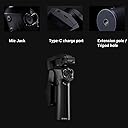
desertcart.com : Snoppa Atom 3 Axis Foldable Gimbal for Smartphone & GoPro Hero 4 5 6, Wireless Charging, Built-in Mic Jack, One-Key Switch V/H Orientation, 310g Payload, W Mini Tripod, Black : Electronics Review: Moto Mod friendly gimbal - In looking for a smartphone gimbal I was seeking one that would allow me to use the 360 camera Moto Mod on my Moto Z2 Force. That would require a gimbal that could support the weight and awkward shape of the phone with the mod attached. I also needed a gimbal that would allow easy portrait mode. After hearing about the Snoppa Atom and it's features I decided to buy it and was pleasantly surprised that it worked as advertised. It is very small in size when folded so it is very portable. I keep it in the glove compartment so whenever I need it, I can just pull it out and use it. It supports the weight of the phone and the 360 camera mod. It allows for one button rotation between portrait and landscape mode and was easy to use without needing to have the app installed. When the 360 camera is attached, the native camera app allows for a selection of 3 different cameras: the 360 camera, the rear camera and the selfie camera. The 360 camera needs to have the phone vertical while the rear camera video the camera can be horizontal. I can use all 3 cameras with the Snoppa ATOM and not have to remove the phone from the gimbal to switch orientation. The ATOM also includes wireless charging so the Wireless Charging Mod or a regular battery mod can be used as well to give added life to your camera while shooting video. The only downside is a that the width of the phone is limited by the phone mount. I wish they allowed for thicker phones with otterboxes. The weight wouldn't be a problem, only need to change the thickness of the rubber phone holder. (Perhaps a dremel could fix it.) I had previously purchased the DJI OSMO 2 Mobile. It has many great features but it is much larger and easy to use spontaneously. It could barely support the combined weight of the phone and the mod and going from landscape mode to portrait mode required removing the phone. If you have a Moto Z and want easy switching between portrait and landscape, this is the gimbal to get. Review: Could be great but misses the mark - The ATOM could be great but comes up short. Here's what I don't like: 1. Controls are in awkward locations and difficult to use. You can't operate it one-handed. 2. The power slide switch is so hard to operate I have to hold the ATOM still with one hand and use my other thumb nail to slide it upward. I almost thought it was defective, but realized it has to be held upward for about a second to turn it off. I guess that makes sense. But that brings me to reason 3. 3. The instruction manual is terrible. Itโs very vague and unclear. As a brand new user to an iPhone gimble, Iโd hope for a tutorial for using it and clear instructions on operation. The manual was apparently a poor translation from another language. 4. The ATOM is hard to hold. The grip is nice, and I like the rubber strip, but itโs on the wrong side! To hold it and have a firm enough grip, you never even touch that rubber strip. Maybe the whole grip should be rubber? Anyway, the ergonomics were not well designed. 5. The zoom/focus slide switch is nearly impossible to operate. Again, I need to use my other hand to operate it. Here's what I like: 1. It folds up. The compact size when folded is really nice. 2. The joy stick works well. 3. The photo/video button works well. 4. The trigger works well. 5. If itโs true, I like the long battery life. 6. The app paired easily with my iPhone and seems to function OK. 7. It appears to be of good quality. It doesnโt feel cheap. 8. The price seems fair. Itโs a good value. Unfortunately, because itโs so hard to operate with one hand, Iโll be returning it and looking elsewhere. Maybe version 2 will be improved. Of course, there's also the possibility the ATOM could follow what other Gimbal manufacturers do and make version 2 of lesser quality, with fewer features.
| ASIN | B07M8QQ7CN |
| Brand | Snoppa |
| Compatible Camcorder Models | GoPro HERO4 Black, GoPro HERO5 Black, GoPro HERO6 Black |
| Compatible Devices | Cellphone |
| Customer Reviews | 3.9 out of 5 stars 20 Reviews |
| Item Weight | 440 g |
| Manufacturer | SNOPPA |
| Manufacturer Part Number | Atom + Pergear Carrying Bag |
| Maximum Weight Recommendation | 310 g |
| UPC | 606015388913 606015389064 |
K**U
Moto Mod friendly gimbal
In looking for a smartphone gimbal I was seeking one that would allow me to use the 360 camera Moto Mod on my Moto Z2 Force. That would require a gimbal that could support the weight and awkward shape of the phone with the mod attached. I also needed a gimbal that would allow easy portrait mode. After hearing about the Snoppa Atom and it's features I decided to buy it and was pleasantly surprised that it worked as advertised. It is very small in size when folded so it is very portable. I keep it in the glove compartment so whenever I need it, I can just pull it out and use it. It supports the weight of the phone and the 360 camera mod. It allows for one button rotation between portrait and landscape mode and was easy to use without needing to have the app installed. When the 360 camera is attached, the native camera app allows for a selection of 3 different cameras: the 360 camera, the rear camera and the selfie camera. The 360 camera needs to have the phone vertical while the rear camera video the camera can be horizontal. I can use all 3 cameras with the Snoppa ATOM and not have to remove the phone from the gimbal to switch orientation. The ATOM also includes wireless charging so the Wireless Charging Mod or a regular battery mod can be used as well to give added life to your camera while shooting video. The only downside is a that the width of the phone is limited by the phone mount. I wish they allowed for thicker phones with otterboxes. The weight wouldn't be a problem, only need to change the thickness of the rubber phone holder. (Perhaps a dremel could fix it.) I had previously purchased the DJI OSMO 2 Mobile. It has many great features but it is much larger and easy to use spontaneously. It could barely support the combined weight of the phone and the mod and going from landscape mode to portrait mode required removing the phone. If you have a Moto Z and want easy switching between portrait and landscape, this is the gimbal to get.
R**K
Could be great but misses the mark
The ATOM could be great but comes up short. Here's what I don't like: 1. Controls are in awkward locations and difficult to use. You can't operate it one-handed. 2. The power slide switch is so hard to operate I have to hold the ATOM still with one hand and use my other thumb nail to slide it upward. I almost thought it was defective, but realized it has to be held upward for about a second to turn it off. I guess that makes sense. But that brings me to reason 3. 3. The instruction manual is terrible. Itโs very vague and unclear. As a brand new user to an iPhone gimble, Iโd hope for a tutorial for using it and clear instructions on operation. The manual was apparently a poor translation from another language. 4. The ATOM is hard to hold. The grip is nice, and I like the rubber strip, but itโs on the wrong side! To hold it and have a firm enough grip, you never even touch that rubber strip. Maybe the whole grip should be rubber? Anyway, the ergonomics were not well designed. 5. The zoom/focus slide switch is nearly impossible to operate. Again, I need to use my other hand to operate it. Here's what I like: 1. It folds up. The compact size when folded is really nice. 2. The joy stick works well. 3. The photo/video button works well. 4. The trigger works well. 5. If itโs true, I like the long battery life. 6. The app paired easily with my iPhone and seems to function OK. 7. It appears to be of good quality. It doesnโt feel cheap. 8. The price seems fair. Itโs a good value. Unfortunately, because itโs so hard to operate with one hand, Iโll be returning it and looking elsewhere. Maybe version 2 will be improved. Of course, there's also the possibility the ATOM could follow what other Gimbal manufacturers do and make version 2 of lesser quality, with fewer features.
J**M
Snoppa Atom
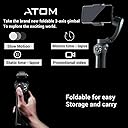
This is my first mobile phone gimbal. I was originally looking at the DJI Osmos 2, but I read that all the functionalities would not work for android. I did have my reservations about the Atom because I heard android also had issues.Customer support is lacking, and the instruction manual is not sufficient for a person who has never used a 3-axis gimbal (manual is in the app). You have to just play with it and watch some Youtube videos. I haven't done much heavy use on it yet, but I did take it snowboarding (as note this is my first gimbal ever). First it probably was my fault but somehow the recording went into a time-lapse mode, even connected to bluetooth the buttons wouldn't work randomly and would have to restart the gimbal. The face track actually work fairly well and I haven't yet figured out how to lock the gimbal vertically (again I'm a newb). When I was snowboarding and did a single run while recording my phone battery just died from about 75% and had to charge my phone. When I went home and did a test with the gimbal it didn't seem too drain my mobile battery, although it does use more when using the snoppa app. Battery life on the gimbal - didn't use it more than 2 hours so can't say much. Durability - dropped it twice while snowboarding still working. Value - do not have enough knowledge between build quality, features, and the first and only gimbal I have every used. Would I recommend it to someone yes, but I would definitely also buy the DJI Osmos 2 Build quality - feels good. Also I do like that Chinese brands are transitioning faster to USB-C. (purchased other products that are not just built in China, but a Chinese company.) Features - Comes with multiple charging cables or wireless charging, a carrying pouch, and a tripod stand. - I had issues with the gimbal leveling horizontally and kept trying to calibrate it, and never worked. I calibrated "drift" and it seemed fix the issue. So if anyone has that kind of issue try "drift calibration". Phone used - Google Pixel and Pixel 3XL 1/27/2019 (update) I finally started getting familiar with the Snoppa Atom and since I have hadn't too many issues with, also since it is my first gimbal it can be user error. I do notice that the Atom diconnects quite often on it's own, sometimes from the trigger button. I feel that the follow mode is very limited on holding its vertical alignment or has a very narrow field, even though it seem like it can go quite far. There have been two additional updates since I purchased it and I do not the exact details of it but they added more instructions in the in-app manual. The second update is the 2.5.3 and now my Google Pixel 3 continues to disconnect it, does not, hold it calibration and shuts down. It went from being a happy purchase to a frustrating one. I will have to wait on an update.
M**A
Perfect
This gimble is just what the doctor ordered! I originally bought this because of the higher weight tolerance, if you have an iPhone 8+ or heavier phone (200 plus grams) most gimbles of this type will not support the weight. Besides doing everything that others of itโs type do, itโs extremely compact and the remote functions on the handle are very intuitive. Panoramic and sudoku functions are amazing and the follow function can either be set for objects or faces. Great purchase.
D**K
Does what it is advertised to do
Wasnโt sure as this was just recently released. However it turned out well for me. Use it with my iPhone. No problems syncing with device and does what it advertises. Main point for me was to use it to record kids and simple things. Iโm no videographer so wanted an easy to use gimble. I hear android users may have problems but so far doing great with my iPhone XS Max.
A**E
Good quality, but there are some bugs...
Good quality, but there are some bugs... Turn to portrait by itself...
J**R
Product flakey at best and support is the worst!
I have had my unit for almost 2 months and that is how long I have been "working" with their technical support. I have sent them multiple videos of the LOUD noise that the device makes, complete failure to calibrate, and twice it has flung my phone violently from the gimbal to the floor. (lucky it was not damaged) Their support has just given me months of runaround and will not send me a replacement unit. I am a HIGHLY technical person (IT professional for over 25 years), so I know how to follow directions. This thing just doesn't work and support is of no help, so if you purchase this product know that you are totally on your own. Purchase, roll the dice, pray for an actual functional unit and that nothing ever goes wrong. Waste of money, just don't do it!
M**.
Works as far
The product came well packaged even though the tripod stand was on the outside of the main box but was in the Amazon packaging. This is my first gimbal so I have some testing to do with it until I get used to it. I was amazed that pergear even sent a complimentary case for the gimbal. It has a good weight to it. I had trouble connecting at first as the app would just close out as I open it but now it's connected to the phone it works ok. It seems the app needs updating or maybe the firmware as when recording with the app there's a noise which sounds like you're under water. As I said I need to work with it so I can get used to it.
Trustpilot
2 weeks ago
1 week ago