
DOWNLOAD THE APP


Customer Services
Copyright © 2025 Desertcart Holdings Limited
DOWNLOAD THE APP
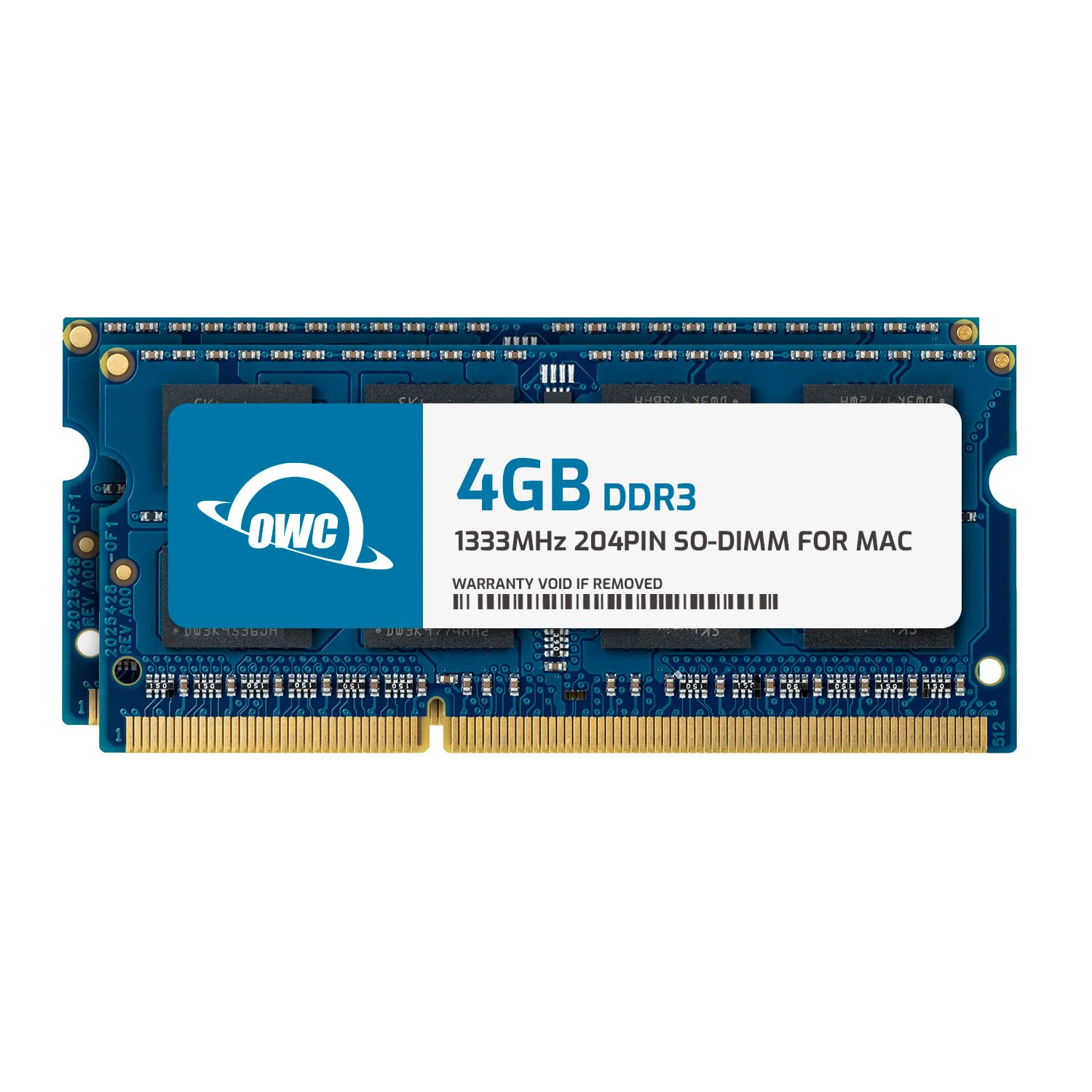
🚀 Elevate your legacy Mac—because slow is so last decade!
The OWC 8.0GB (2x4GB) DDR3 1333MHz SO-DIMM RAM kit is a precision-engineered memory upgrade compatible with select 2010-2011 iMacs, Mac minis, MacBook Pros, and PCs. Featuring 204-pin modules with CL9 latency and a low 1.5V power profile, it delivers a significant performance boost for multitasking and creative workflows. Backed by a limited lifetime warranty and free tech support, this lightweight upgrade revives older machines with modern speed and reliability.




| ASIN | B00IEL16YQ |
| Additional Features | Lightweight |
| Best Sellers Rank | #1,339 in Computer Memory |
| Brand | OWC |
| Column Address Strobe Latency | 9 |
| Compatible Devices | Desktop |
| Computer Memory Size | 8 GB |
| Customer Reviews | 4.7 out of 5 stars 1,629 Reviews |
| Data Transfer Rate | 1333 MHz |
| Form Factor | 204-Pin |
| Global Trade Identification Number | 00794504764024 |
| Item Height | 4.7 inches |
| Item Weight | 9 Grams |
| Manufacturer | Other World Computing |
| Memory Speed | 666 MHz |
| Number of Pins | 204 |
| RAM Memory Technology | DDR3 |
| RAM Size | 8 GB |
| Special Feature | Lightweight |
| UPC | 794504764024 |
| Unit Count | 2.0 Count |
| Voltage | 1.5 Volts |
| Warranty Description | Limited Warranty |
J**A
Easy, straightforward, and it works.
This was a great upgrade for my late 2011 iMac. The installation was incredibly easy and quick. The owner manual for the iMac had very clear instructions to make this change. I also watched a couple YouTube videos on people doing it as well just to have a fluid visual reference of what would be required. It was rather simple and straight forward. I think anyone with even nominal skill would have the ability to complete this performance upgrade. Speaking of... The performance boost has been significant. I run several of the creative types favorite programs on a regular basis. These include the entire photoshop suite, photo mechanic, Final Cut Pro etc. My performance while multitasking between two or more of those programs, and inidividually within one has been markedly noticeable. I wish I would have done this a lot sooner... Although the price was much better since I waited. All in all this was a great value and easy install. I would highly recommend the product.
P**O
Turned out a super slow old iMac into a usable computer again.
These worked perfect for our older 2007 iMac. My wife uses it as a comfort side computer with a big screen to supplement her modern laptop. 32 GB did wonders for the speed at which the applications load and run turning the old computer into a usable machine for basic functions (she even uses it for Sketchbook Pro drawing and works great!). For the money, a good investment to revive an older machine.
L**E
Quick and Easy and Very Good
I have a mid 2011 iMac. It came with 2 modules of memory 2GB each. I had room for a total of 16 GB -- 4 modules of 4 GB each. I got the modules from Amazon the very next day. I watched YouTube installation videos. Super easy. I took the bottom screen off. The memory module compartment was loaded with dust so I blew it out with a sprayer. I then popped the old ones out just like they showed how to do it, making sure to carefully lay them down so I knew how the new ones would go in. I put the two top ones in first and pressed them home, click! Then the bottom ones in, click!. I plugged the iMac back in, connected everything, and turned it on. Voila! Very much faster! Haven't had the bouncing beach ball of slow death since nor the message from CleanMyMac that I was using up all my memory. Turned an 8 year old timer into a perfectly good new iMac. I also recommend watching a video on how to open your iMac and blow the dust out. The fact my memory module compartment was so clogged was a glaring shout that I had to do some basic housekeeping.
A**R
Works great!
I have an old (2011) iMac that only has 4 GB of memory. You can imagine it moved quite slow and would constantly show the spinning wheel. The extra memory cards work like a charm. Now I’m able to have multiple applications and tabs open at once. The YouTube tutorial to insert them was very easy to follow as well. You definitely need to push harder than you expect to insert them.
M**Z
OWC is a reliable brand for RAM memory sticks
I received four (4) 8 GB sticks of RAM for my 2011 iMac running High Sierra. The improvement is remarkable; now I can run some 32-bit applications like InDesign, Illustrator and Photoshop (Creative Suite CS 5.5 for Mac), plus Suitcase Fusion 5 for font management. The installation is easy: this iMac has four slots. I had to unmount the two 2 GB RAM memory sticks with pliers, gently pulling them out of the slots. Other than that, easy peasy. Plugged the iMac and restarted it without issue.
J**N
Reliable to upgrade old memory computers from OWC!
I recommend purchasing OWC Memory upgrade it was really excellent out come, I almost disposed my laptop because it runs too slow 4 GB Ram and I am scared for the upgrade price, but with OWC I was able to replaced w 16 GB Ram ( 4 times the capacity of my old Memory) it was very good price and easy to install. Wow! now my old computer is faster than my new other computer. Thank you OWC!
B**L
Rejected by iMac, Late 2011, as incompatible.
Update after replacement from vendor: Vendor accepted my return and sent me a repo event that worked as advertised. 2 years later and the memory is working as expected, no issues. Will buy again. Original review: Mac rejects the memory modules. most times it doesn't even boot, it just fails POST giving the Memory Fault Code (3 beeps). On the rare occasion that it does get past POST and boots up, It locks up and gives the Memory Fault Code within 5 minutes. Checked and doubled checked the seating of the modules to ensure they were seated correctly. I have purchased many OWC parts and accessories for all of my MACs before, never had an issue. Gonna have to return.
B**0
Helps to add life into an old 2011 macbook pro.
My sons 2011 macbook pro stopped working due to a failed hard drive cable. I was able to find one on here and decided to upgrade the memory at the same time. Easy install and went from 4 gigs to 16 gigs. It didn't improve the boot time much but did make tabs open faster without the buffering beach ball. And yes 2011 macbook pro will recognize and use 16 gigs of memory. New life for an old Apple.
Trustpilot
2 months ago
3 days ago