
DOWNLOAD THE APP


Customer Services
Copyright © 2025 Desertcart Holdings Limited
DOWNLOAD THE APP


🖥️ Elevate your dual-monitor game — because your workspace deserves the upgrade!
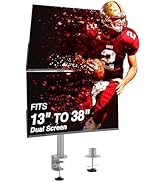
The AVLT Dual Monitor Arm Desk Mount supports 13" to 43" flat or curved screens up to 44 lbs each, featuring a gas spring for smooth height adjustment from 10" to 23". It includes USB 3.0 and AUX pass-through ports, versatile mounting options (C-clamp and grommet), and robust cable management with screw-secured covers, designed to enhance ergonomic comfort and workspace organization for professionals.



| ASIN | B0819PSPVS |
| Best Sellers Rank | #629 in Computer Monitor Arms |
| Brand Name | AVLT |
| Color Name | White-Mount |
| Customer Reviews | 4.4 4.4 out of 5 stars (343) |
| Date First Available | November 11, 2019 |
| Is Discontinued By Manufacturer | No |
| Item Weight | 22.6 pounds |
| Item model number | AVLT-DM43-1-AU |
| Product Dimensions | 25.39 x 13.98 x 4.72 inches |
T**R
Great Dual Monitor Mount
I bought this dual monitor arm desk mount for my wife’s computer to mount two 32” monitors. Unpacking and installation were fairly straight forward. The only two issues I had were: 1). Instructions state that this mount can be installed using a grommet hole in a desk to secure it to the desk. However, most grommet holes in desks (at least in the United States) are 2” holes. The grommet mounting option uses two all-thread bolts screwed into the base, but the outside spacing of the bolts is about 2-1/4” which, of course, is too big for 2” grommet holes. I ended up drilling two smaller holes in the desk, one for each all-thread bolt. On the plus side, this option secures the mount to the desk very securely. 2). There is no guidance in the installation instructions for optimal placement of the arm mount on the desk. I ended up temporarily installing the lower set of arms on the mount base and then experimented moving the base around the desk while swinging the arms to make sure they would clear all computer and other equipment on the desk as well as the walls. This method worked well and final placement clears everything while still giving full articulation of both arms. The unit is very heavy-duty and quality is excellent. Other than the two items mentioned above I am very impressed with this product. After installing this unit on my wife’s desk, and playing with it for a few days, I ordered one for my desk. Because of the two issues above I would give this 4-1/2 stars if I could. But these smaller issues are not enough for me to lower my rating to 4 stars, so 5 stars it is.
M**.
Great Looking and Sturdy Monitor Arms
I'm so impressed with these arms. They're super strong and sturdy holding up my 27" monitor and 34" ultrawide monitor. Setting up for the most part is pretty simple and easy. One of the best things I like about these arms is the cable management. I had several arms before for my setup at home and work, and the cable covers are usually pretty flimsy and just slide and lock in. I have a lot DP and HDMI cables due to my dual workstation, so these cable covers often end up popping out since its so full. These cable covers are different since they are screwed down tight with a bolt. All my cables fit pretty snug, but there is no bulging and I don't have to worry about the covers popping off ever again. I'd recommend keeping it at a maximum of 4 thicker cables though. However, fair warning that attaching the covers can be a pain so if you have to detach cables often, the screwed in covers can be a problem. If you have a set up like mine that won't really change often, it works well. If you can, I would suggest having 2 people set up the cable management. One to hold down the cover in place and the other to screw it in. I did it myself just fine though. The range of motion is great for my needs, but please note that I tried stacking my monitors and it didn't quite work. I would say it's 1 to 2 inches shy of properly stacking them. Overall, a great looking set of dual monitor arms. The extra ports on the base are a cool feature that do work, but I haven't had much use of it yet. Love that they had a white option to match my set up too. These are a little pricey, but they're really worth it!
N**Y
Great product
Amazing product. It’s perfect. Tried a few other dual monitor arms and they sucked and didn’t hold up the monitors. This one is amazing and aesthetically pleasing. Well worth the money. All parts included. Large range of motion, you just have to loosen the screws to make it easier to move or tighten to keep everything still. Perfect size and provides all my amount of desk space back.
A**D
You get what you pay for
Nearly perfect. Easy to install, strong, mostly easy to use, along with some added conveniences. I have a 24+ lb monitor from 2006. This was the first arm I've tried that was able to handle it, and it handles it as well as the newer 12 lb monitor next to it. I used a grommet install style and found the whole process painless. 2 bad points: 1) Tilt strength is controlled by a single bolt and sandwiched rigid and soft washers. It holds the monitor in place well. However, if you want to adjust the tilt, this bolt has to be loosened and retightened to complete the process. There is no sweet spot (for my lighter monitor, anyway) where it holds the monitor steady but allows for simple adjustments when needed. This makes rotating to portrait mode (which I do once or twice a day) a longer process than I like 2) Cable management, when finally set up, is fine. However, the design is a bit thoughtless. The top section, which has plenty of clearance from the desk and the base piece, has a single screw holding it in place. Easy to remove, insert the wires and replace. The bottom section, which is much closer to the desk and the base piece, has two screws, one of which is right up against the desk and base piece. Why this one has two screws when it needs the single screw design of the top section much more is a mystery. That's it. The rest is great. Installation. Stability. Adjustments (other than tilt). Look. The extra USB and audio ports. Well worth the extra expense over the sub $100 options. The cable management and tilt issues are why the $300 options exist, I'm sure.
J**F
Cord installation is difficult but works overall
I have 2 monitors (27” and 24”) that I attached to my Pottery Barn corner desk with the c-clamp. The installation wasn’t that difficult - at first. Then I had to store the cords and wires and the plastic backing on the arms ALMOST burst at the seams trying to hold all of them. My husband and Dad had to step in and help me get the plastic backing on the arms WHILE holding the cords in place. Once the installation was complete it worked perfectly fine. I’ve had it for 2 weeks and no issues to date. Additionally the manufacturer assumed that everyone has a CPU when MOST people use laptops because the plugs for the USB ports are attached to the backend of the device. Now I have to find a way to hide the cords. It’s a great product that is strong and seems like it will last.
C**S
Un poco mas caro que productos similares pero si estas dispuesto a gastarte unos cuantos pesos extras vas a obtener un excelente producto y que esteticamente se ve mucho mejor que otras opciones. Yo lo uso con dos monitores LG de 24 pulgadas
A**E
Easy to assemble and good quality Missing one of the small plugs to hold the arm and provide some resistance to it. (partially refunded)
P**N
Heavy duty was perfect
G**G
Not the cheapest but excellent quality
K**I
I set up this dual monitor arm to hold my 34-inch and 24-inch screens. The larger monitor is in landscape mode and the smaller one is in portrait. I used the standard 10x10 cm VESA bracket, and the arm is clamped to the edge of my sit-stand desk. Both monitors are held securely, and the build quality feels solid and reliable. Mounting the monitors was simple to do on my own. I adjusted the tension so the arm would stay at its highest position, then pivoted it flat. I then set the desk height to its highest point. This allowed me to attach the monitor while it was parallel to the floor, which made it easy to screw in the VESA plate. The arm gives a good range of motion, which makes it easy to get the monitors in just the right position. Since my desk is quite close to the wall, I added a bit of foam padding to the top arm to stop it from hitting and damaging the wall when I move the monitor. That small addition made a big difference, though I still need to be careful not to push too hard when adjusting the position. It was also simple to adjust the 34-inch screen so that my kids could see it at a comfortable angle, which was great. Overall, this is an excellent dual monitor arm that I’d definitely recommend.
Trustpilot
2 days ago
2 weeks ago