We remain fully operational. Our teams are working around the clock to ensure your deliveries continue safely.

DOWNLOAD THE APP


Customer Services
Copyright © 2025 Desertcart Holdings Limited
DOWNLOAD THE APP

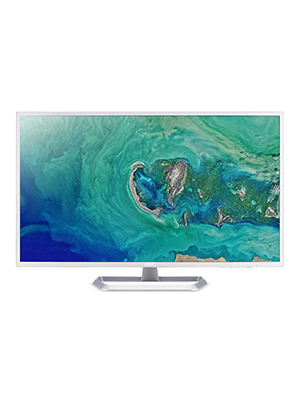
🖥️ Elevate your workspace with big-screen brilliance and seamless style!
The Acer EZ321Q wi is a 31.5-inch Full HD (1920x1080) IPS monitor featuring a rapid 4ms response time and a high 100,000,000:1 contrast ratio for vivid, sharp images. Equipped with HDMI and VGA ports, it offers versatile connectivity options. Designed with Acer VisionCare technology, it reduces eye strain for extended use. Its sleek white finish and Kensington lock slot combine style with security, making it an ideal choice for professionals seeking immersive visuals and reliable performance.






| ASIN | B07YGY3RLN |
| Best Sellers Rank | #5,551 in Electronics ( See Top 100 in Electronics ) #207 in Computer Monitors |
| Brand | acer |
| Color | White/Silver |
| Customer Reviews | 4.6 4.6 out of 5 stars (2,903) |
| Date First Available | November 10, 2019 |
| Item Dimensions LxWxH | 28.7 x 7.09 x 19.1 inches |
| Item Weight | 18.36 pounds |
| Item model number | EZ321Q wi |
| Manufacturer | Acer |
| Max Screen Resolution | 1920 x 1080 |
| Product Dimensions | 28.7 x 7.09 x 19.1 inches |
| Screen Resolution | 1920x1080 |
| Series | EZ321Q wi |
| Standing screen display size | 31.5 Inches |
| Voltage | 240 Volts |
G**Z
Great Monitor
This is the only monitor I could find with a glossy screen-glossy screen monitors are getting hard to find-has no speakers-has a nice clear crisp picture-okay price-a little on the large size-fast shipping-comes in factory sealed box no damage to item-so far so good have not had it that long
E**I
A Stunning Display That Redefines Visual Excellence!
The Acer EB321HQU Cbidpx 31.5" LCD is an absolute game-changer that has elevated my viewing experience to a whole new level. This display is a masterpiece that flawlessly blends style, functionality, and remarkable resolution, making it a must-have for anyone seeking top-tier visual quality. The 2560 x 1440 resolution is an absolute treat for the eyes. It transforms High-Definition entertainment into an immersive spectacle, bringing every detail to life with astonishing clarity and precision. Whether I'm watching movies, gaming, or working on intricate design projects, the sheer brilliance of the display never ceases to amaze me. The contrast ratio of 100,000,000:1 is nothing short of phenomenal. The depth and richness of colors make images pop with vibrancy, giving a cinematic quality to my viewing sessions. Even fast-paced action sequences remain sharp and crisp, thanks to the rapid 4ms response time that effectively eliminates motion blur. One of the standout features of the EB321HQU Cbidpx LCD is its versatility. With a range of connectivity options including DisplayPort, HDMI, and DVI ports, I never have to worry about compatibility issues. Whether I'm connecting my laptop, gaming console, or other devices, the monitor seamlessly adapts to my needs. The display's 300 cd/m² brightness ensures that visuals remain vivid even in well-lit environments. It's a true testament to Acer's commitment to delivering uncompromised quality across various scenarios. Moreover, the power efficiency of 50 W (Power On) showcases the monitor's eco-friendly design without compromising on performance. In summary, the Acer EB321HQU Cbidpx 31.5" LCD (UM.JE1AA.C01) is a masterpiece that combines aesthetics, innovation, and performance in one package. Its breathtaking resolution, exceptional contrast ratio, and versatile connectivity options make it a standout choice for both entertainment and professional use. This monitor has redefined my expectations of visual excellence, and I couldn't be more thrilled with my investment
D**S
Great Development or Office/Business Monitor
I was considering two 27" HDMI monitors, but decided on one 32" for my needs. I really wanted a monitor that had a good brightness level, which can be lower on more gaming focused monitors depending on the screen technology.. My fundamental need was to display multiple windows which it does fine, and is a great boost to productivity versus flipping between screens. The Picture in picture is one of the features I really wanted. I can display up to two concurrent windows, with a choice of 5 locations. The display is crisp, and fine for my eyes. The color rendition is good, I've seen better, especially on some 4k screens, but it is not disappointing, and the colors seem reasonably saturated, and are fine for Photography. But there are some that are much better, check out some of the Viewsonic, and Philips displays. As I noted the brightness is however good for a large display. The feature that really swung the Acer display was the PIP function, I could not find this feature on any monitor at this time for less than $300/ up. This allows me to run a development system and operate side by side of PIP modes to use both systems. This is really awesome. The Acer has three inputs to select from - one Display Port, an HDMI, and one DVI. I run the Windows 10 Laptop into the DVI, and a Raspberry Pi into the HDMI and the Mac into the display port input. I run the Mac at QHD which it performs flawlessly. The Linux (Pi) runs on HDMI at similar resolution, and the lap top in a Window at same res as the local display. I have an external keyboard switch to share the keyboard and mouse between the Mac and the Pi. This all works very well. The only clunky bit is the hidden controls and on screen display on the Acer, thats meh. I have also used the screen with my old Apple TV, which is nice when you are working sometimes. I wish there were a few more PIP options, but the basics are well covered. I also have headphones connected to the display and can listen to music etc at night without waking up the family. There are no on-board speakers however. That would be my one add in a perfect world. This screen does have a VESA MOUNT! I have this hung off a nice wall mount which frees up more desk space and is easy to adjust to suitable viewing. This is something that a lot of models do not support in the value end of the market. In my experience with a super large screen this is a must have. I would not buy a monitor without this feature. The enclosed stand is very nice finished, but I have not used it, so no further comment on that. Obviously all the inputs work, and features. Also the monitor plays nice with the Mac (a 2011 Mac Mini Server) and Windows 10. It also works fine with the Pi, which makes for a really nice little Linux system BYTW. So top marks for compatibility. Oh, and yes it works with the Apple TV Gen 3. The picture is a little low res though, so not the coolest, I would use a more current model for serious viewing. I did not use the supplied cables, I purchased these nice nylon covered cables from Amazon - Ivanky. They work well, and feed through the mount nicely. On size, I think you could go up to about 40" on the desktop, but it may become tiresome to use. I find 32" works fine for my needs. Two 27" would have the usual line down the middle, so I don't think the extra space would be as useable, or at least as flexible. I have definitely seen a productivity improvement with the large screen, and work is more relaxed by not having to keep switching screens all the time. The Mac multiple desktop is really great here for organizing your work flow. Acer get some whacks here for reliability. No observation to share at this time. Will report back if that situation changes. There were no stuck or missing pixels at all. Thumbs up to Acer on that. Build quality, mine is nicely put together, and I really like as noted the traditional power chord and VESA mount. Not having another power pack hanging out on the desk or the floor is nice. Screen uniformity of color etc, very, very good. The camera picture is poorer than the actual experience. The panel is rated for wide angle use and that is 100% the case in use. This is good when we are discussing something on the computer, so you can display and share. That might however, be an issue in some office environments - FYI. In summary... 1. Some great features that are not competitively available in this price range 2. Good quality QHD display with a good brightness 3. Screen controls - meh 4. VESA mount 5. No wall wart, plugs into the standard 110v wall socket! 6. Nice range of digital video inputs, would have loved an additional HDMI (ie 4 inputs) 7. Headphone socket 8. Good price, and good value to price The cons: 1. Its not the best choice for hard core gaming - but then you already know that, so why are you looking! 2. No speakers 3. On screen controls are not the greatest Ux. Overall great business/engineering display. Not the best for photography, and lower performance end of the spectrum for gaming. Recommended for the Office type user. Supports local presentation capability due to size.
J**R
Best monitor ever
Very happy with this monitor. Great size, great quality and great value for the money.
A**R
Good For The Money
This monitor presents a good value proposition, the picture quality isn't up there with more expensive models but for the price paid it's more than acceptable, fonts are a little fuzzy in some sizes but certainly readable, and colors are bright and vivid. The monitor itself is visually attractive and looks good on my desk. The base attached without tools and was easy to slide into place and solid. I had a little trouble working the buttons to set the input to VGA, the layout isn't particularly intuitive, and I don't know if I didn't do it right but every time I boot my computer the monitor looks for an HDMI signal then finally settles on VGA which is a minor annoyance. All in all, I feel I got more than my money's worth, it's a nice, big screen in an attractive package and renders things accurately and well. I'm not a gamer so I can't speak to it for gaming, but it seems fine for streaming video.
A**R
Excellent picture and easy to install.
I have two of these monitors and they are both great! Very easy to install and great picture. I own two and they work great with my Dell docking station. One thing, they only have a couple of ports so make sure you have all the right cords.
B**R
Great monitor
These are great monitors for your typical office environment,
P**.
Works great, no issues at all
J**E
Me encantó muy. Buena definición edito con el y veo perfectamente el detalle. Lleco 6 mese usandolo y lo recomiendo.
R**E
Nice purchase. I tried a lower resolution screen in parallel. I kept that one because of resolution and colour rendering. I use it for CAD. I cannot comment on gamming.
L**A
Huge screen, great resolution, easy set up. My son is a tech guy and works on audio and visual projects and he was blown away with this acer. I like the white frame and just looks solid, good quality. I ordered a white HDMI cable however and glad I did as I did not like the black cables that came with it that had ugly blue plastic connectors. I have a white desk and they look cleaner. Just a tip if you like a white desk, white desk pad, white mouse etc. :)
T**Y
I replaced a 17 year old CRT 15" monitor for my parents in there 70's. This is perfect for them as it is huge, they will not be gaming and it's crazy cheap. The monitor comes so easy to install with only 4 phillips screws. It come with a power cord and an old school blue VGA cable. There is NO HDMI cable in the box, but you can use HDMI. It does not have a DVI (older white cable plug) in it, so buy a HDMI cable. They advertise it as 32", but they round up, it's 31.5". The picture is great for a $225 CDN monitor. The monitor tips a little to adjust for lighting. I sit in front of a computer all day so I wouldn't buy this for myself, but my parents check their email once in awhile and that's it. Even then it is a great monitor, basically you are buying what was top of the line 5 or so years ago. It has no speaker, but most built in speakers are garbage. It will split screen, you hit the windows button on the keyboard and arrow ➡️And it splits screen for you and you choose which ones you want to split. This would also make a daily users second screen. I have 2 32" screens on my desk and basically use the main one in front of me and leave the other with the security cameras on and stuff I have open, but not working on. The monitor looks great and is modern. I would buy it again realizing what I would be using it for.
Trustpilot
2 weeks ago
1 week ago