Some deliveries may take a little longer than usual due to regional shipping conditions.

DOWNLOAD THE APP


Customer Services
Copyright © 2025 Desertcart Holdings Limited
DOWNLOAD THE APP
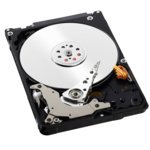


💼 Upgrade your vintage tech with dependable WD Blue power!
The WD Blue 320GB Mobile Hard Drive (WD3200BPVT) is a 2.5-inch SATA II internal drive featuring 320GB of storage, an 8MB cache, and a 5400 RPM spindle speed. Designed for reliable performance in older laptops and compatible devices, it offers a quiet, energy-efficient solution with certified frustration-free packaging for easy installation.


| ASIN | B0037NYQ7K |
| Additional Features | Portable |
| Best Sellers Rank | #2,059 in Internal Hard Drives #29,728 in Computer Internal Components |
| Brand | Western Digital |
| Cache Memory Installed Size | 8 |
| Color | Blue |
| Compatible Devices | Laptop |
| Connectivity Technology | SATA |
| Customer Package Type | Amazon Frustration-Free |
| Customer Reviews | 4.6 out of 5 stars 1,183 Reviews |
| Data Transfer Rate | 3 Gigabits Per Second |
| Digital Storage Capacity | 320 GB |
| Form Factor | 2.5-inch |
| Global Trade Identification Number | 00718037765631, 00777780545228 |
| Hard Disk Form Factor | 2.5 Inches |
| Hard Disk Rotational Speed | 5400 RPM |
| Hard-Drive Size | 320 GB |
| Hardware Connectivity | SATA 3.0 Gb/s |
| Installation Type | Internal Hard Drive |
| Item Height | 3.94 inches |
| Item Weight | 0.22 Pounds |
| Manufacturer | Western Digital |
| Media Speed | 375 MB/s |
| Model Name | WD3200BPVT |
| Model Number | WD3200BPVT |
| Number of Items | 1 |
| Specific Uses For Product | Personal |
| UPC | 777780545228 718037765631 |
| Warranty Description | 2 |
U**A
I have this install in an older Dell laptop I ...
I have this install in an older Dell laptop I use for digital painting. This drive has done very well so far. Not much to say here - just what appears to be a basic - very sound drive. Follow up: This drive has been - as expected - reliable if a tad sluggish. If you want to add some grunt to an older laptop - this drive will not do it. But if you are not in need of a speed increase - this is reliable. Below is some comparisons for people upgrading older systems. I have a D620atg has the Kingston SSDnow, and a D620 has a HGST Travelstar 7200rpm sata3, and finally - a D820 has a Kingrich SSD sata2 (I use an after market media bay drive and put a 5400rpm sata2 drive in it - so the Kingrich has the OSs - one Windows, one Linux and all files are saved to the WD Blue 320. I also have an alt Linux distro and Windows set up on this drive and can boot to it as opposed to the OSs on the Kingrich - via bootgrub). The Kingston is the fastest upgrade. Next up is the Kingrich 32gig SSD sata2 (which is dirt cheap) was a notch below (no surprise). The HGST HDD is a mild surprise. It replaced a 7200 sata1 drive and the difference was pretty amazing. It also seems not too far behind the Kingrich. Plus the 500gigs of space at a good price - makes it an excellent upgrade option for older systems. Note: The extra speed of the HGST comes at a cost. I manually set the cooling fan to high, and keep the laptop on a cooling pad as much as possible. The Dell D620 id fairly small and doesn't discipate heat all that well. So if you go with a 7200rpm drive - use an after market software - like I8kfanGUI, to manually crank up the internal fan and expect the laptop to get a bit warm compared to using a more modest 5400rpm drive.
N**E
Does the job for my Xbox 360
A while back my 360 broke down, and as I was replacing it, I had to make the tricky decision between the 4gb or the 320gb model at a dramatically higher price. Now, the idea of paying the same amount it'd cost to buy a 2tb drive for a 320gb drive seemed absurd, so I elected to go the DIY route instead. There are two DIY option for 320gb drives. You can actually buy an unbranded drive for ~65 bucks. http://www.amazon.com/gp/product/B006NRMBF6/ref=as_li_ss_tl?ie=UTF8&tag=thfefi02-20&linkCode=as2&camp=1789&creative=390957&creativeASIN=B006NRMBF6 Or you can buy this drive for ~48 bucks (at the time of this writing) and save a bit more, if you aren't afraid to get your hands a little dirty inside the guts of a PC making it 360 compatible. The steps for making it compatible may be found here: http://digiex.net/guides-reviews/console-guides/xbox-360-guides/3152-how-hack-250gb-320gb-sata-drive-work-xbox-360-xbox-360-slim.html or you can just do a google search for something like "hack 320gb drive to work with xbox 360." If you follow the instructions on that site to the letter (and your motherboard supports legacy SATA), and you are pretty comfortable with the simple parts of building your own PC, the whole process is incredibly simple and takes maybe 15 minutes. If the idea of flashing a USB thumb drive scares you or you don't feel comfortable hooking up a SATA drive, I'd probably just buy the unbranded drive. If you are a big ol' nerd like me though, this is clearly the way to go. Note: a word about ban fears This process DOES NOT allow you to somehow play pirated games or otherwise require an Xbox 360 modification. This is approximately the same thing as installing a huge usb drive. After an exhaustive review, it appears no one has ever been banned for doing this, and anyone who claims otherwise also did other things like running a hacked Xbox 360. I personally feel pretty comfortable about not getting banned, but if you are more concerned, I'd probably stick with the official Microsoft 320gb drive. http://www.amazon.com/gp/product/B005PSTV2K/ref=as_li_ss_tl?ie=UTF8&tag=thfefi02-20&linkCode=as2&camp=1789&creative=390957&creativeASIN=B005PSTV2K
V**6
Great replacement and upgrade
When the Samsung drive in my laptop started making the occasional death throes of the motor going out, I put this little guy on order. You can go bigger these days, but in my case this was a replacement issue... the upgrade was just from shopping for the best bang for the buck at the time (which with hard drives changes, so don't quote me on this tomorrow). In general Western Digital has been an excellent and reliable manufacturer of hard drives and after years of being a nerd both at home and professionally, it's the brand I trust. They have great diagnostic tools available for download to verify your drive's integrity upfront and clone your current drive if it's an upgrade or total backup situation. Every manufacturer of hard drives has their duds, that's life when dealing with high tech. As with any upgrade, back up your data first and regularly. If there are any problems WD has easy to use diagnostic tools that can sometimes fix minor issues and spit out RMA codes you can send to WD for replacement for major ones. The nice part is, with WD, the odds are low you'll ever have to worry about it. Drives have motors and sensitive material in them... they vary in wear and tear just like any other high tech devices of the same caliber. But for longevity I've had the best luck with WD. And their prices ain't bad either. I might sound biased, but after over a decade in the business, and drives of my own of various manufacturers dating back to the 80s... some which still work, I think I've earned my stripes to say so.
M**E
Caution: Extra thin for laptops. Not normal thickness.
I have two of these in a RAID1 on a file server to store the OS (Ubuntu 12.04). A separate 12-disk hardware RAID6 of WD Red disks stores the 18TB of data. Pro: Works out of the box. No difficulties setting up the partition and inserting it into the software raid (mdadm) and synchronizing it with the existing RAID. Cons: 1. This replaced a WD Blue disk that had gone bad after only 1 year of light use. (The Red disks store the data and get moderate use, the Blue disks only store the OS and get very light use) 2. This is the new ultra-slim thickness for thin laptops, which meant that it didn't fit into my HD mount correctly and required some finagling. The only reason that annoys me is that I checked WD's website before buying and it explicitly listed it as normal thickness, which is not true.
D**N
Works Great!! on older Dell 1545
Best $51.13 investment for an older investment. This Harddrive is the predecessor to the WD3200BEVT I had in my Dell Inspiron 1545. It burned out in Feb. 2012, the very next week I bought a cheaper $400 HP 2000-427CL and threw my Dell in the closet. It took me 8 months to muscle up the gambling courage to buy another hard drive(actually my cousin reminded me by asking where's the Dell while using my HP). Did some research, I wanted to buy the same company + model, didn't want to take a chance upgrading to a 500GB. Though I should've took a chance on the 500GB, I already have 4 external hard drives(2 WDs - 500GB, 1.5TB; 2 Seagates - 1GB, 2GB). Videos, movies & music, I'm 31 go figure. The best about dusting off the Dell is that it has Intel Core 2 Duo(2x 2GHz) as oppose to the AMD Radeon HD Dual Core(2x 1.64GHz) my HP has which means my: 1. HD PVR 2 records smooth with no pixel flashes nor screen jumps 2. Sony Movie Platinum 12's preview screen plays HD 1080p & 720p 14mb mp4s smooth in "Preview Quality"(no proxy files needed!!) It took a couple hours to re-install Windows Vista + all the necessary drivers. 1 Hour to upgrade free to Service Pack 2(it came with SP1, SP2 is needed for Sony Movie 12).Then another 3-4 hours to install the approx. 90 updates via Windows Update. My newer HP, the cheap one, was so cheap from Sam's Club, it didn't come with any backup Re-installation Discs. I was too happy after purchase I didn't even care. Finally, those with Windows 7 know that Windows Media Player 12 plays MP4s. Well Windows Vista WMP 11 DOESN'T and some of my folders are bunched up with both wmv & mp4. BUT I FOUND THE PERFECT FREEWARE PLAYER THAT DOES, it's DAPlayer([...]), plays all media including blu-ray & wmv. I say this because others like VLC, RealPlayer, Gom, etc. don't play 720p+ HD videos smooth on laptops.
I**T
Good backup disk
Ever since my SSD crashed, I've been paranoid about backing up my hard drive. I bought this hard drive purely to clone my existing work laptop's drive and be available as a backup in the event of a crash. It is sloooooow. I tested it against another 7200 disk and the other disk read at 94000 KB/s while this one read at 77,000 KB/s. sloooooow. The SSD, which crashed on me and is being RMA'd, is SOOOOOO much faster. But I give this WD disk 5 stars for being cheap and hopefully reliable, bc that's what I need it for... as a reliable backup.
W**O
Works well, arrived quickly. HP users please take note
This hard drive was bought to replace an original (failed) HD in an HP Pavilion dm4-1160us machine. I have all the restore discs on DVD as created when the machien was new, but HP, in its infinite wisdom appears to have "cloned' the full size of the original hard drive (500 gig) which then is spanned across the DVD restore discs. Thus, when attempting to do a system recovery, the HP said, "not enough room" on the new Hard drive to restore from the discs. if you have an HP with restore discs, you'll need a drive as large or larger as the original for restoring, or...another edition of Windows that can be activated on a smaller drive. Just a "heads up"... Drive itself is FINE...and is functioning easily during restore.
Z**K
Best Value
This is the sixth WD3200BPVT I have bought, and each one has been excellent. I have put this drive into both external cases and laptops. My oldest WD laptop drive is currently 5 years old, although it is not the same model as this one. I have owned laptop hard drives by Toshiba, Samsung, and Seagate as well, and none can compare to Western Digital in terms of price. As far as performance goes, it is commonly believed that Western Digital is always a touch slower than its competitors. However, I have never seen this performance gap with everyday computing, gaming, video editing, video playing/steaming, or file storage. In case you are wondering, this drive is thin enough to fit into any laptop, because it only has one platter. I will continue to recommend and buy Western Digital for both my laptops and desktops. For my money, I prefer to go with the cheapest, especially when the cheapest is darn good! Buy this drive and you will not regret it.
Trustpilot
3 weeks ago
4 days ago