We remain fully operational. Our teams are working around the clock to ensure your deliveries continue safely.

DOWNLOAD THE APP


Customer Services
Copyright © 2025 Desertcart Holdings Limited
DOWNLOAD THE APP
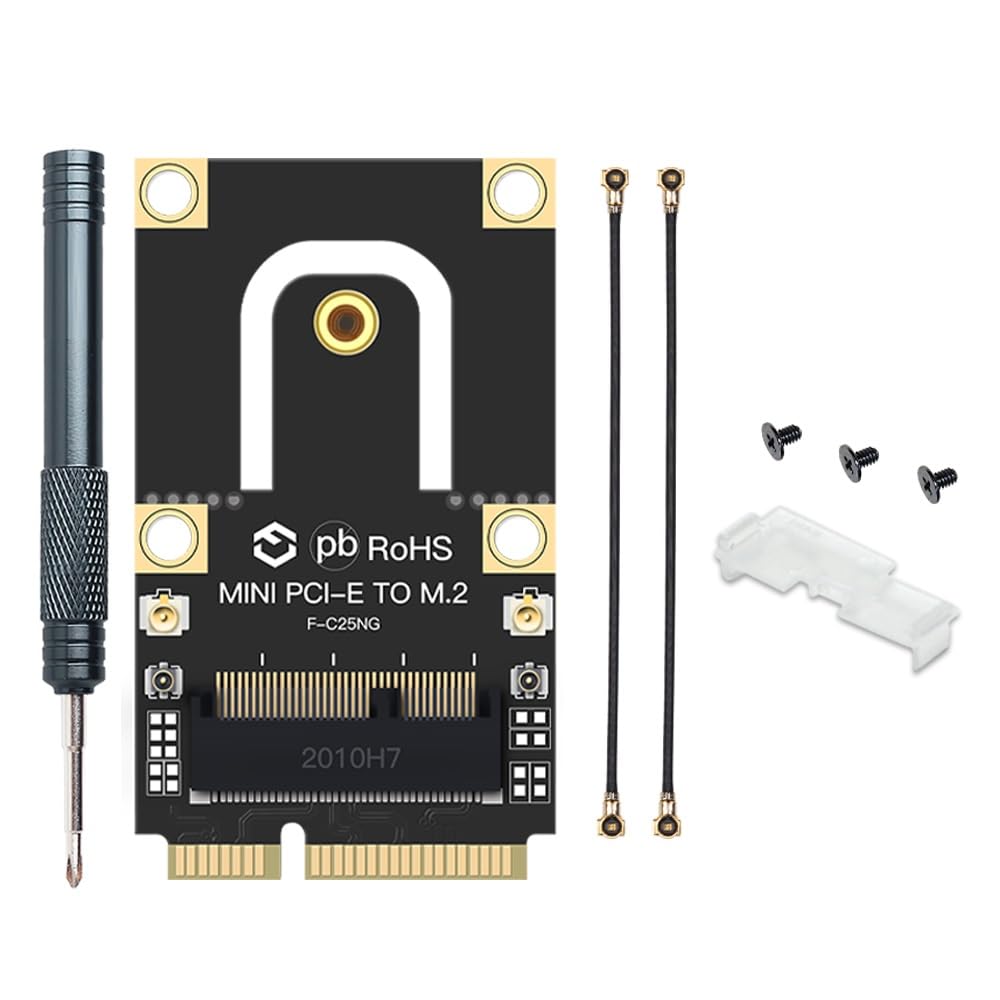
🚀 Upgrade your vintage laptop to WiFi 6 speed—because your device deserves a glow-up!
This M.2 to PCIe converter adapter enables laptops from 2010-2016 with Mini PCI-E slots to use modern M.2 Key A+E WiFi and Bluetooth cards. Supporting WiFi 6 (802.11ax) and backward standards, it offers a compact, plug-and-play solution to upgrade wireless connectivity without replacing your laptop. Compatible with popular Intel and Broadcom cards, it’s the perfect cost-effective way to future-proof legacy laptops with next-gen wireless performance.
| ASIN | B083YW3RM3 |
| Best Sellers Rank | #143 in Internal Computer Networking Cards |
| Brand | YOUBO |
| Color | M.2 wifi to PCIe Converter |
| Compatible Devices | Laptop |
| Customer Reviews | 4.6 out of 5 stars 280 Reviews |
| Data Link Protocol | Bluetooth |
| Hardware Interface | PCI |
| Item Weight | 0.02 Kilograms |
| Manufacturer | YOUBO |
| UPC | 645195973076 |
F**T
Allowed me to teach an old dog new tricks!
Worked great in my ancient Dell ES530 with an Intel AX200NGW. My notebook has 3 PCIE slots but I managed to wedge it and into the original Intel Centrini Advanced-N 6205 slot made for wifi. I could have used the full size slot but I had nothing to screw it into. So I wedged it in and it causes a tiny back case bulge but it's almost unnoticeable unless you knew what you were looking for. It took about 5 minutes to get ready, taking the antenna wires and connecting the smaller MHF4 adapters. Then placing the new Intel card into the converter and then connecting extension antenna wires to the larger IPEX UFL to bridge the devices. Then placing the card in it's slot and connecting my notebooks original IPEX UFL antenna wires to the Intel card. Was simple to install and the seller is legit, this m2 wireless to half PCIE card works great and comes with everything you need. I went from getting 20-60Mbps down to getting 600-1000Mbps down (I have an Asus AX88 and Xfinity Gigabit internet). Well worth the $27 (just about $20 for the Intel card and another $7 for this m2 to pcie converter). Shipping was fast and the item was packaged nice and safe. Once booted up Windows 10 64bit alerted me that I now had WiFi 6 and the benefits etc. I got great speeds and even better signal than with my ancient Intel 6205 (N device). I would recommend any day! 5 stars!
S**S
Great for updating the WiFi in an older laptop, if it has the room to spare
This is a nicely-designed adapter, as many other M.2-to-mPCIe adapters don't include the antenna conversion between the old U.FL and newer MHF4 connectors. Whether or not you can use it, however, greatly depends your PC having the space for a replacement WiFi card that's potentially longer (if the original was half-length) and definitely thicker (at least double, since your new card sits above this adapter). Installation is straightforward, although the tiny MHF4 antenna connectors can be challenging to work with. I'd suggest using a magnifying glass and verifying that the connection is aligned before applying pressure, to reduce potential frustration and/or damage. If needed, for installation in a half-length mini-PCIe slot, the upper part of the adapter snaps off easily (but can't be replaced if you change your mind). Post-installation, my PC had no trouble recognizing the new WiFi card, and I'm enjoying its faster connection speeds. Some laptops might accept only specific white-listed WiFi cards, but such issues are out of the control of this adapter. Overall, I'm happy with the design and functionality of this converter, and it's worth buying as long as you make sure that your laptop/PC has enough spare room to fit it. Recommended.
C**R
Works for Dell XPS 8700's Mini PCI slot
Worked well. I wanted to upgrade my nearly 12 year old computer's Bluetooth from 4.0 to 5.2 and the wifi from 2.4 single band to dual band wifi 6 so I swapped the 1703 the computer came with, with an Intel AX210. Getting all the little antennae plugged in was a challenge due to my hand and finger size but after attaching them using blunt hand tools I was able to fit it all into my Dell XPS 8700's mini PCI slot with this adapter. Interestingly, the same Intel AX210 chip did not work well in the regular PCI slot, causing a range of Bluetooth errors. As such, If you're having issues with the PCI slot cards with antennae attachments in the back, simply take out the Intel chip they come with and use this adapter in your mini PCI slot (if applicable). Note: If you computer has an M2 slot, you don't need this adapter, just use that M2 slot. Overall, I highly recommend this adapter. It can help rejuvenate your old relic of a computer and fix Bluetooth or Wifi problems you may be having. This likely works for most laptops too as long as you have the required 43cm of room.
B**O
Unable to connect the wires
I was not able to install the given 2 black wires to the wifi 6 card nor this adapter. It's just too small to fit it. When i tried without the 2 wires, th computer recognized the wifi 6 card and installed the drivers. But, because of no antenna connection, i am not able to connect to my wifi6 . Back to using a USB AC for now. Update**. Bought a different antenna and connecting the wifi 6 card to the antenna seems to be working now. Bluetooth 5.1 is also working.
P**S
Great upgrade for old laptops.
Works well.
K**N
Best part is the all metal screwdriver.
Simple little device that does the job. The little machined screw driver is the best part. I keep in my toolbag as its now my goto for small little M2 type screws. The head fits them perfectly.
R**L
I got WiFi 6 on 12 year old laptop!
I got this to install a new Intel WiFi 6E AX200WiFi Card on my 12 year old Dell laptop, it originally came with a legacy 802.11n WiFi card (aka WiFi 4) in PCIe form factor, I wanted to upgrade to the new 802.11ax standard (aka WiFi 6). Turns out the new cards come in M.2 form factor so I got this converter to plug the new card. PROS Fully compatible for Dell E6520. Comes with everything you need. CONS It's really difficult to connect the tiny MHF4 antenna connectors, you have to be very careful not to bend or ruin them. Other than that, Windows 10 installed the drivers automatically, so was up and surfing right away after booting windows.
A**X
Easy upgrade path
Like others have mentioned, the small antenna connectors are a pain but that's not unique to this adapter. Be patient, make sure you have good lighting, and be careful if you decide to use tools. Hook up the small conversion antenna cables before you install your M.2 card. Make sure to download the drivers for the new card first to make the process smoother. In my case, Windows Device Manager recognized the new card/adapter as a generic network/BT device. I pointed Windows to the new drivers I had already download and the card initialized right away. Old card: Intel Dual Band Wireless-AC 7260 (Wi-Fi 5). New card: AMD RZ616 (MediaTek MT7922A22M) Wi-Fi 6E. Motherboard: Gigabyte GA-H97N-WIFI (rev. 1.1).
Trustpilot
1 week ago
1 month ago