
DOWNLOAD THE APP


Customer Services
Copyright © 2025 Desertcart Holdings Limited
DOWNLOAD THE APP


🌡️ Stay cozy, save smart — the future of home comfort is in your hands!
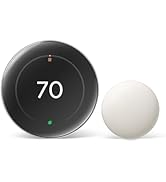
The Google Nest Thermostat is an ENERGY STAR certified, programmable smart thermostat designed for easy DIY installation and seamless integration with Google Home and Alexa. It offers remote temperature control, voice commands, HVAC system monitoring, and supports Nest Renew for prioritizing clean energy usage. Compatible with most heating and cooling systems, it helps reduce energy waste by automatically adjusting settings when you're away, making it a top choice for modern, eco-conscious homes.



| ASIN | B08HRWWCTR |
| Additional Features | Programmable |
| Backlight | Yes |
| Best Sellers Rank | #317 in Tools & Home Improvement ( See Top 100 in Tools & Home Improvement ) #1 in Home Programmable Thermostats |
| Brand | |
| Brand Name | |
| Color | Fog |
| Connectivity Protocol | Wi-Fi |
| Connectivity Technology | Wi-Fi |
| Control Method | Voice |
| Control Type | Button Control |
| Controller Type | Android, Google Assistant, Vera, iOS, nest |
| Customer Reviews | 4.1 out of 5 stars 28,416 Reviews |
| Display Type | LED or LCD |
| Finish Types | Matte |
| Included Components | Documentation bundle, Mounting screws, Nest Thermostat, Steel plate |
| Item Dimensions D x W x H | 1.07"D x 3.31"W x 3.31"H |
| Item Height | 1.07 inches |
| Item Type Name | Thermostat |
| Item Weight | 4.9 Ounces |
| Manufacturer | |
| Manufacturer Warranty Description | 1 year. |
| Model Name | Google Nest Thermostat |
| Model Number | GA02083-US |
| Mounting Type | Wall Mount |
| Number of Batteries | 2 AAA batteries required. (included) |
| Power Source | Corded Electric |
| Product Dimensions | 1.07"D x 3.31"W x 3.31"H |
| Product Style | Programmable Wifi Thermostat |
| Shape | Round |
| Special Feature | Programmable |
| Specific Uses For Product | Heat Pump |
| Specification Met | Energy Star |
| Temperature Control Type | Heating, Cooling |
| UPC | 193575007717 |
| Voltage | 24 Volts |
T**H
Do research before you decide to buy
I was looking for a basic, smart thermostat for our cabin so I could monitor the temperature over the winter in the event of heating issues or someone kicking the door in and it freezing inside; and also, because we turn the heat way down while not there, I could turn it back up on the way there and have it already warm when we arrive. As I read reviews on this thermostat, which I kept going back to when I reviewed others, it seemed like most complaints were about needing a "c" wire to the thermostat and Google not disclosing that. I can't speak to that as I'm not sure it's absolutely necessary, I knew nothing of wiring a thermostat to a furnace. I went into it though assuming I needed a "c" wire and researched different ways to do it. There were other complaints like displayed temperature inaccuracies, but at the end of the day I went with the basic Google Nest in sand color (looks pink to me). I'm glad I spent the time researching ahead of time and, so far, glad I didn't listen to the "don't buy this product" reviews. Does exactly what I want it to do, easy to use, displays perfectly accurate temperature, and was easy to install (again, glad I researched quite a bit and was prepared). Now for my install experience: Just for the record, my cabin furnace is heat only, so I only really needed 2 low voltage wires from the thermostat to the furnace. The existing cable had 3 wires however, one of which (the green one) was not hooked up at either end. FYI, take the advice of the "how to" videos and take a picture of the wire locations on the old thermostat before removing them, and make sure the furnace breaker is off too. The green wire, as I researched, is usually for operating the furnace fan separate from when it's on for heating or cooling, something I, and probably most people, don't use. The white and red wires were hooked to their corresponding letter coded (R&W) spaces on the thermostat and furnace. I had purchased a plug-in 24v transformer with a long set of wires, based on my previous research, to use as the "c" wire, which I learned supplies power to the thermostat. I intended on plugging it into a nearby outlet, running the wire alongside some doorframe trim, which would hide the wire, and into the wall behind the new thermostat. This, I think, would have worked just fine. I also learned though, from watching another "how-to" video just before I started the project, that all furnaces have a 24v connection space along with where all the other thermostat wires would go. So I just hooked the unused green wire to the "c", or 24v, spot on the furnace and to the "c" connector on the Nest thermostat. *The Nest comes with wire identifying stickers and I did label this wire on both ends to indicate it's now the power wire. Once the wiring was done, turned the breaker back on and followed the install directions from the Google Home app. The only minor issues I had was that the display was in Celsius, not Fahrenheit, and it took me awhile to figure out that this needed to be changed via the phone app, not the thermostat. There may be a way, but I couldn't figure that out. Also, was a little nervous because of the previous reviews I read when the initial temperature displayed about 4-5 degrees above the actual temperature, but by the time I cleaned everything up, it was right on. In Google's defense, it did indicate it takes a little bit to adjust itself. Very happy with it and glad I picked this one-so far anyhow.
M**T
It works and was a great price with utility rebate
I bought this when it went on sale and also discovered that PG&E offers a $50 rebate. This made it a no brainer to replace the lousy Honeywell thermostat I've been wanting to replace for a while. It's works good, was easy to install, and does a better job than the Honeywell it replaced. No issues with WiFi connection or app servers being flaky or down. I like that it also has trends showing how long it runs during each day, a nice addition would be temperature and humidity trends too. Some things to be aware of: 1. Google owns Nest, so this "Nest" thermostat will only work with the Google Home app and not the Nest app. I have another Nest device that only works on the Nest app. It is annoying as I would prefer they work in either one app or the other or have the option to move both into one app, but it's not world ending. I found the Home app to be just fine, but a couple of things like where to access and edit the schedules could be more intuitive. 2. You can remove your existing thermostat, note the way it is wired, and check to make sure this is compatible with what you have on their website before you buy it. 3. This will only support 2-stage heat OR 2-stage cooling, not both. If your system has both this isn't going to provide you with ideal results and I suggest buying something else. 4. The installation manual is using the Home app to scan the QR code on the thermostat. It does a decent job stepping through the installation process and will even connect the thermostat to your WiFi for you. However I did run into an issue with the wiring diagram it provided with my 2-stage gas heating, I answered "yes" to "does your thermostat have two sets of labels" or something along those words, and it mismatched the labeling on the 2-stage heat wire. I went back to the question and said "no" and the wire label was then correct. This was more of an annoyance to me, but I could see this potentially causing unnecessary headaches for someone unfamiliar with thermostat wiring. 5. Make sure you have the C-wire, or if you don't have it get the C-wire adapter kit they offer. From some of the reviews if you don't you're going to have a bad time. Mine has the C-wire as most newer HVAC units do so wasn't a concern for me. 6. It was actually very easy to add other household members in to allow them access to the thermostat in the Home app and have it track if they are home or not for it to automatically go into Eco Mode if it detects everyone is gone. I haven't yet enabled this feature so I can't say how well it works yet.
H**O
It went from bad to worse
I've purchased two of these. I wanted something like my old Nest thermostats, but I needed to mount some without C-wires and these can run on batteries. Programmable thermostats are a must in my opinion, and being able to control them from your phone is a nice convenience. That's where the pros end. I put up with the far from intuitive controls on the unit itself, since I expected to set it and forget it. That worked ok for quite a while, long enough to decide to buy the second one. Then something changed. It stopped following the schedules we programmed. I'm not sure if there was a firmware update, but both units (not even in the same zipcode) started going into auto-eco mode no matter what I programmed them to do. I've read some people's argument that it's a "smart" thermostat and I should expect that. Well, it's not very smart if it turns it's self up to 80 degrees (Fahrenheit) five minutes after I set it to 72 and go into a different room. The problem is that it tries to know when you're home, but if the thermostat is not in an area where people are, then it assumes no one is home and goes into auto-eco mode. Search online for help, and all you can find is other people with the same frustration. So I give up, and decide to at least set the eco mode to the lowest temperature it will allow, which is 76. That way when it decides we shouldn't have AC, at least it won't get too hot. Not perfect, but better than 80. Then when I really am away, and I set it to 80, it goes into auto-eco mode, which was then 76. That's right, it tried to save energy by running my AC more. Very smart. I contact google. At least an hour on the chat. I ask to communicate through email because it's taking so long. Dozens of emails later, and they just stopped responding. Their solutions ranged from sending me in endless loops looking for settings that don't exist, to buying more thermostats and returning mine for a credit. So I would be buying, and going through the installation process, of exact replacements. When I asked what they would do if the issue still persisted (in trying to avoid going through everything for nothing) they would not tell me. Take the extra step of installing a c-wire, and get the old Nest thermostats. I still have two of them, and I love them. The controls are as intuitive as you can get. I didn't even mention the controls on the google devices. No touch feedback of any sort, and it's in a spot on the device that isn't usually visible when it's mounted to a wall. From teenagers to the elderly, everyone finds the controls are unnecessarily frustrating. 1 star because I can control it from my phone.
A**S
Works great, but follow the setup instructions
We recently purchased this thermostat and like how convenient it is to use with our Google Home app. I had some difficulty getting it to work initially but it was my own fault for not following the setup instructions more carefully. I failed to correctly select the HVAC system I use and the thermostat gave me an error message that didn't exactly correspond to the problem. Once I got it figured out with the help of Google Home support representative, Kep, it works very well. So, the bottom line is make sure you carefully follow the setup instructions.
D**A
Sleek Thermostat
I’ve been using it for a couple of weeks and so far I think it’s okay! I got it when it was on sale, its very sleek and nice. Not sure if there is any energy savings to it. I did it myself without my husband as he is gone and it was extremely easy. I previously had a honeywell old thermostat and it only had W,Y,R and C was optional with batteries. So I got this version which was exactly what I was needing. Installation was easy and not hard at all with inserting the wires and getting it set up. I also got another accessory to cover the other holds that happened with the old thermostat. Overall I do like the sleeker look. I like that I can adjust and change the temperature on my phone and anywhere I’m at! I have to use the google home app which is not an issue with me at all. I feel like other reviews are very upset but it’s easy and self explanatory. I like to use the heat/cool mode and it’s nice. I do agree I feel like it doesn’t hold a temperature but I will continue to see how it goes!
F**2
Great thermostat and relatively easy to install and use.
When our old Nest thermostats stopped being supported by Google, we had to upgrade because we typically adjust these from our phone while we're away. These are slick looking and easy-to-install replacements. You use the Google Home app for installation (not the Nest app) and if you follow the instructions... line for line... you'll do fine. Make SUPER sure you seat the wires well. In my first installation, I didn't seat the "heat" wire deep enough and I spent the next hour trying to figure out why and ended up having to so a factory reset on the thermostat and start from scratch. Once I figured out what was wrong, it installed easily. The 2nd one was a piece of cake after the first one.
A**R
Why did I wait so long?! Happy customer!
Good price Easy to operate Control ability is awesome/easy Install was a little much, but my husband is handy Brightness is normal/good Temp control good/easy Quality is very nice Humidity— N/A
J**N
No unpaid features, No Support, No touch Screen Capability, No Learning.
Give me my original Nest back! I ordered this one, to replace an old fashioned thermostat in my office. The old one has more functionality... At least you can turn it up and down without allowing location and going through ten steps in the Google Home app on your smartphone. First, there are no instructions, no place to show old wire colors and labels to new wire colors and labels. It only does that when you set up in the app... Which leads to Problem number 2. If you have an old nest account, it has to be migrated. Which I still haven't figured out what that means, however it does mean that if you have ever upgraded your google drive or gmail account to a g suite account it won't work. It won't go through the setup process, it won't connect, it won't control your HVAC System. You will have to create another google account. (This would be my third google account one I created 20 years ago in college, one for work, and now this one.) Like I need another username and password to remember. Now that leads to problem number 3, your phone is probably connected through the other google accounts, so when you install the google home app it will always want to default to your primary google account that is on everything else. I switched accounts yet every time I open the google home app it goes right back to the other one and you have to go through the steps to switch back to the other account. They cannot be linked they cannot be shared, and they cannot be logged in at the same time. So I figured I would just link it to alexa and she can change the temperature and surely the nest would be like mine I bought before google got involved and it would learn and life would be simple and power bills would go down. Not so much, that leads us to problems 4 and 5, first when trying to add the nest device you get a circular reference, alexa says you need to enable the skill, that sends you to google where you have to enter the new email and log in then it sends you to nest because in my case I already have a nest account associated with my alexa which is under my google account that can't migrate the nest account because it is a g suite account then google sends you back to alexa to enable the skill that cannot be enabled until the account is allowed through google who wants to migrate but cannot because it is under a premium google account. I even tried to say screw it I'll just use the thermostat itself to adjust the temperature, thermostat's have been able to do that since they were invented. No Dice, there are no moving parts and the touch screen only shows you the temperature when you touch it so you cannot change it without the app. Then I tried to work on the learning part of it so I could just set it to be at a comfortable temperature and on the weekends when no one is there set it a little more ecofriendly and I would never have to deal with it again. Only problem, that feature which is the backbone of why you buy a nest in the first place is now a paid subscription feature. Problem 6 is it constantly disconnects from wifi. And I mean Constantly. I don't think after setup it has actually connected without me having to go into the app and reconnnect it. Support was wonderful though, Amazon support that is, I repackaged it and put it back in the box and when I went to return it they gave me a message to ask if Amazon Support might be able to help with the problem and give me a quick phone call. I typed the number and the phone rang immediately with an amazon support person who helped tremendously to get it connected and try to get it set up. By the way Google support had me on hold for over 40 minutes and when I did get through they had no clue what they were doing the kept telling me to go to the app and it would do everything for me. There were several other frustrating things I dealt with on this, however I am very patient and a pretty technical guy with an IT degree and have put in 3 of these before google got involved with wonderful results. If you dare to tangle with this after reading this I wish you luck. I like the mozaic puzzles with 2000 pieces all the same shape printed on both sides and no edges and this is one challenge that I want no part of. I am paying the shipping to send it back to amazon and I will find a solution that works, is User friendly, and easy to set up. I do not want to spend hours thinking about how I can be more efficient with power usage. Life is too short. Hope this Helps! J
Trustpilot
1 day ago
3 weeks ago