
DOWNLOAD THE APP


Customer Services
Copyright © 2025 Desertcart Holdings Limited
DOWNLOAD THE APP



Print with Power! ⚡
The Epson C31CA85656 TM-T88V Thermal Receipt Printer is a high-performance printing solution designed for modern businesses. Featuring both Ethernet and USB interfaces, this sleek dark gray printer ensures seamless connectivity and efficient transactions, all while being Energy Star rated for eco-conscious operations.
C**S
follow these step if your printer is not connecting i have win 10 home / pro and this works great.. take your time follow the steps there ...
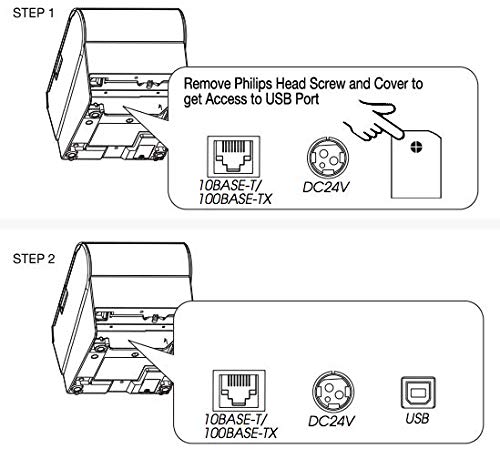
Almost returned it .. follow these step if your printer is not connecting i have win 10 home / pro and this works great.. take your time follow the steps there is no time limit ... so do it slowly.. First, the USB port is located under a plate on the back of your printer, to the right of the power connection, held on with a single screw. Remove the screw and plate to access the USB port.Video: How to activate the USB port.Power off printerPower printer on while holding the feed button until the printer starts printing a self-testAfter the self-test prints, hold the feed button for a couple of seconds and a menu of options will printFrom this first menu, select option 3 by pressing the feed button 3 times, then holding it down for a couple of secondsFrom this next menu, press the feed button 10 times, then hold it for a couple of secondsOn this last menu, select option 2 by pressing the feed button 2 times and then holding itPress the feed button (and hold briefly) to exit.The USB port is now enabled. Turn the printer off & back on again to use.
B**E
Five Stars
Works on network so fast they are worth every penny. They are Used. They work. I am satisfied with purchase.
T**Y
Good printer
Good printer for the price. We have it as backup printer for our POS system.
L**9
Great Source for this product
Great Source for this product
H**A
ONE OF THE BEST PRINTERS AROUND
One of the best printers around for POS applications
M**K
good
good
Trustpilot
1 month ago
2 months ago