Desert Online General Trading LLC
Dubai, United Arab Emirates
Desert Online General Trading LLC
Dubai, United Arab Emirates


⚡ Upgrade your workflow, not your wait time!
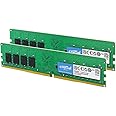
The Crucial 16GB DDR4 RAM Kit (2x8GB) delivers 2400 MHz speed with low 1.2V power consumption, designed for easy installation and reliable performance. Ideal for professionals seeking faster multitasking and enhanced system responsiveness on compatible desktops.


| RAM | 16 GB DDR4 |
| Memory Speed | 2400 MHz |
| Brand | Crucial |
| Series | Crucial DDR4 2400 MT/s DIMMS |
| Item model number | CT2K8G4DFS824A |
| Hardware Platform | PlayStation 5 |
| Item Weight | 1.12 ounces |
| Product Dimensions | 5.27 x 0.03 x 1.23 inches |
| Item Dimensions LxWxH | 5.27 x 0.03 x 1.23 inches |
| Color | Green/Black |
| Computer Memory Type | DDR3 SDRAM |
| Voltage | 1.2 Volts |
| Batteries | 1 A batteries required. |
| Manufacturer | Crucial Technology |
| Language | English |
| ASIN | B01BIWLED0 |
| Is Discontinued By Manufacturer | No |
| Date First Available | January 28, 2020 |
D**.
Great for older/budget builds
Works great, got 2 kits for 32gb total and runs well in my Optiplex 5050 SFF for standard use and light gaming. If you have an older/budget build, this ram will do well for you if you grab 2 kits as they are single rank. It is at end of life by Crucial, so upgrading to better ram may be worth it to you. If you’re limited to lower by your CPU and don’t feel like upgrading it tho, this is quality ram
A**R
Desktop memory
Good price and easily inserted it into my Dell 3050 sff mini tower computer. So far, seems to work well, giving me 16GB of ram.
D**.
A good product that does a good job!
Good, solid, and they just work.
R**N
Trusted brand, reliable RAM, reasonably priced
This is the brand recommended by Dell. This memory 2-pack is working perfectly and was a welcome upgrade for an older PC. The price was just right and delivery time was reasonable.
D**N
It's fine, I guess?
Simple enough to install but I'm not sure how well it works. The problem was on my end, I'd forgotten my pc only has 2 slots for RAM. I had 12GB installed already (1 4GB and 1 8GB). Thinking I could squeeze more life out of my rapidly aging pc, I learned it could expand up to 32GB. I bought this set of 2 thinking I'd be up to 28GB. Yeah, no. I could only replace the 4GB stick with one of these from the 2 pack. So, I spent 30 bucks on a 4GB upgrade. I took a star off because this is the second time having Crucial recommend the "wrong" sticks.
L**Y
Crucial RAM, brand new, works great, no issues!!
New, unopened and works exactly as it should. Accomplished the goal of the upgrade I sought to do. I've had no issues with this RAM, it's literally brand new. Seller did, in fact, send me the correct capacity and speed of RAM I ordered. No issues whatsoever and it even got here on time.
A**R
A Weird but Minor Quirk
I bought these for an application that never happened. Then, when I started building a new system a few years later, I got a second pair using Amazon's reorder feature. Booting the machine, they showed up as one pair of Crucial branded, and one pair of Micron branded sticks. As far as I can tell, it doesn't affect performance, it's just A Weird but Minor Quirk. Such fun, right?Other than that, these are good sticks. I've never had problems with Crucial, and my current system and the one that's built, but just has to have all my stuff transferred. (I have over a TB of pictures alone!)Several years ago, Maximum PC magazine did a tongue-in-cheek article about the different types of fanboys. They missed a few, including the "I Owe 'Em One" type. Crucial did me a solid a few years back, and so they're my go-to brand.
C**Y
Company Give You a Good Idea in their FYI on How to Upgrade Your Bios
I am pretty much an amateur when it comes to tinkering with my computer. Calvin n' Hobbs' FYI was very much appreciated. The advice as not just upgrade the bios, but also included how you might go about doing it. It probably saved both of myself and the company from having to do extra, unnecessary work. Following their hint, I was able to easily go to the manufacturer's site and have them determine the necessary updates. I did have to manually install the bios update, but that was easy. I already knew how to open the case to the computer (my model's interior is cramped if you don't know how to open it--thanks YouTube for the assist there), and the memory installed correctly and snapped in place just like it was supposed to in the twinkling of an eye. I closed up the computer, plugged everything in again, and hit the power. The desktop started right up and let me know the memory had changed (yay!), I continued, and in no time at all I have a noticeably speedier little computer. The Crucial part sent was flawless, and the advice priceless. Thanks Calvin 'n Hobbs/Blazing Trade, Inc.!
Trustpilot
1 month ago
3 weeks ago