We remain fully operational. Our teams are working around the clock to ensure your deliveries continue safely.

DOWNLOAD THE APP


Customer Services
Copyright © 2025 Desertcart Holdings Limited
DOWNLOAD THE APP


🚀 Upgrade your rig, outrun the rest!
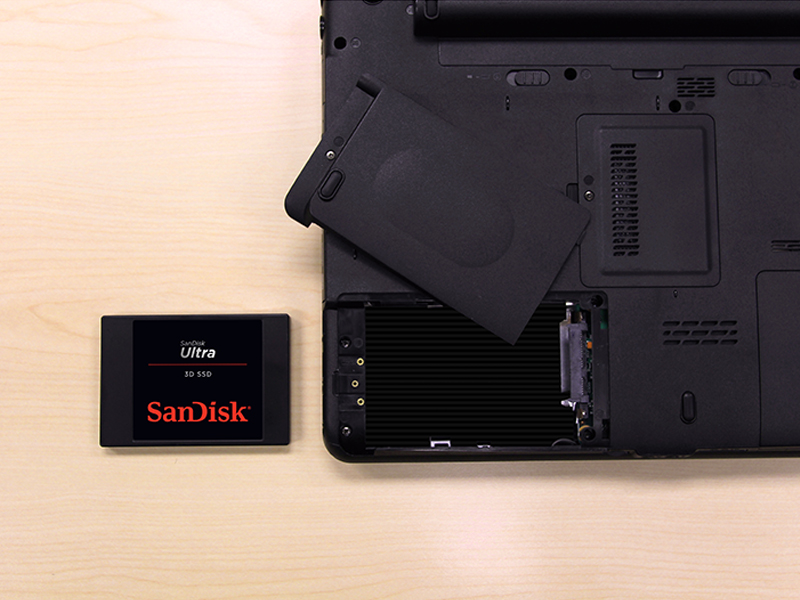
The SanDisk Ultra 3D NAND 500GB Internal SSD leverages advanced 3D NAND and nCache 2.0 technology to deliver up to 560MB/s read and 530MB/s write speeds. Designed for SATA III 6 Gb/s interfaces in a compact 2.5-inch form factor, it offers enhanced endurance, power efficiency, and shock resistance—perfect for professionals and gamers seeking a reliable, high-performance storage upgrade that breathes new life into older systems.




| ASIN | B072R78B6Q |
| Additional Features | High Speed SSD Drive |
| Best Sellers Rank | #901 in Internal Solid State Drives |
| Brand | Sandisk |
| Built-In Media | SSD |
| Cache Memory Installed Size | 500 |
| Color | Black |
| Compatible Devices | Gaming Console, Laptop, PC |
| Connectivity Technology | SATA |
| Customer Package Type | Standard Packaging |
| Customer Reviews | 4.8 4.8 out of 5 stars (35,134) |
| Data Transfer Rate | 50 Megabits Per Second |
| Digital Storage Capacity | 500 GB |
| Enclosure Material | 3D Nand |
| Form Factor | 2.5-inch |
| Global Trade Identification Number | 00619659155513 |
| Hard Disk Description | Solid State Drive |
| Hard Disk Form Factor | 2.5 Inches |
| Hard Disk Interface | Serial ATA-600 |
| Hard-Drive Size | 500 GB |
| Hardware Connectivity | SATA 6.0 Gb/s |
| Installation Type | Internal Hard Drive |
| Item Dimensions L x W x Thickness | 3.96"L x 2.75"W x 0.28"Th |
| Item Type Name | SanDisk Ultra 500GB 3D NAND SATA III SSD - 2.5-inch Solid State Drive - SDSSDH3-500G-G25 |
| Item Weight | 1.92 ounces |
| Manufacturer | Western Digital Technologies Inc. |
| Media Speed | 530.0 |
| Model Name | SanDisk Ultra 3D NAND Internal SSD |
| Model Number | SDSSDH3-500G-G25 |
| Number of Items | 1 |
| Read Speed | 560 Megabytes Per Second |
| Specific Uses For Product | personal, gaming, business |
| UPC | 619659155513 |
| Unit Count | 1.0 Count |
| Warranty Description | 3-year limited |
E**S
Still One of the Best SATA SSDs for Speed and Reliability
Still One of the Best SATA SSDs for Speed and Reliability The SanDisk Ultra 3D NAND 500GB SSD is a fantastic upgrade for anyone looking to give an older computer a major performance boost. Installation is straightforward—just plug it into any SATA port, and it’s immediately recognized by most systems. Once installed, the difference is dramatic: Windows boots in seconds, applications launch instantly, and overall responsiveness feels like using a new machine. Performance is rock solid. With sequential read/write speeds around 560/530 MB/s, it hits the limits of what SATA III can deliver. SanDisk’s nCache 2.0 technology helps maintain consistent performance during large transfers, and 3D NAND gives it excellent endurance. I’ve used SanDisk Ultra SSDs in multiple builds—both desktops and laptops—and they’ve all been extremely stable with no data loss or slowdowns even after years of daily use. It also runs cool and silent, drawing much less power than a traditional hard drive. Whether you’re using it for an operating system drive, a game library, or even in an external enclosure for backups, it performs flawlessly. Compared to budget SSDs, the Ultra 3D feels a bit more refined—faster sustained speeds and longer lifespan justify the slightly higher price. Bottom line: A proven, high-quality SSD that’s still one of the best choices for SATA upgrades. It offers the perfect mix of speed, reliability, and longevity—especially for breathing new life into older PCs or laptops.
B**.
Great price for performance / volume
Firstly, I want to go ahead and state the following: While everyone moves to M.2 and PCI-E based NVME storage, I still recommend SATA based SSDs as the best bang for your buck. If you look at synthetic or simulated test scores from software like crystal disk mark, you may be easily swayed to pay the premium for NVME, however, real world usages still shows that SATA SSDs are still very close in terms of game / application loading speeds. Yes, the NVME is faster, there is no denying it, but at this juncture if you are looking to keep costs low, you can feel confident in still buying a standard SSD. With that out of the way, I particularly want to state that I have had really good luck with Sandisk drives, with zero failures to date. This 2TB drive is still fresh so I can't comment on its longevity, but it booted fine and is not showing signs of early failure. To be perfectly honest, you can likely even go for the lower tier variant and not notice any real world difference in performance, but I chose the extreme because the price difference is small and when I build for someone else I tend toward slightly more premium options.
M**L
Works fast and tons of capacity!
We upgraded a 3-4 year old Dell Inspiron laptop from a 1TB HDD to this 2TB SSD. The process was very easy with a simple interface adapter cable (not included, available here on Amazon). I used Macrium Reflect to clone the disk and it booted right up. I had to download a free partition tool (mini-tool partition) to change the partitions around as the Windows 10 native app won't allow you to allocate space unless the donor and recipient "drives" are physically listed side by side in the app (IE: won't work if there is a reserved space in between them). The drive boots fast, sped the whole computer up when opening big files and has enough room that I doubt it will ever run out of space. I considered getting the more expensive single level drives that last much longer, but the reviews showed that these seem to last quite a long time. Considering that most new mid/high range PCs have M.2 NAND drives, I didn't see the value in buying a drive that will likely outlast any PC that will be able to work with it. Suggestion:-Be sure to turn off any defragmentation apps or processes when upgrading to SSD or it will shorten the life of your drive. SSD drives do not need to be defragmented like physical HDD, so just turn it off in your control panel, and make sure none of your PCs OEM maintenance apps do any defragging to be sure. Check it periodically as mine somehow got turned back on for a short time. I am not sure if an update reset the default to on, or if I goofed up. It's not a huge worry, it won't ruin anything fast, but the life span is based on how many times you erase and re-write each address, and defragging greatly increases that.
R**I
A good drive that's fast and easy.
I ordered a mounting kit for this that came with cables. It turns out all I needed was a cable as my computer had a bay that it slid right into and required no extra mounting hardware. But you do need a SATA cable and power cable. You can buy a kit like I did that has the mounting hardware and cables pretty cheaply. Installation as an additional drive was simple. I just screwed it into the mounting bay and slid it back into my computer, plugged a small power cable into the drive and an available power port, and plugged the SATA cable into a socket on my motherboard and the the drive. Using the drive manager in Windows, I saw the drive, partitioned and formatted it, and now have an additional drive. I bought this one because one specific game I play takes a very long time to load and is a game that I load and reload frequently to switch characters. This speeds it up a lot. If you want to use it to replace your system drive, then you'll want to get a utility that allows you to make a copy of your master drive onto this one. There are utilities from Acronis and other manufacturers. What you would do is plug in the drive into your computer, boot up the utility from a flash drive or CD-ROM you burn, use the utility to mirror your system drive onto this SSD, then turn off your computer, unplug the drives, and plug this SSD back into the port your had your system drive on. Then when you boot up, you'd be booting up from this SSD and you'll see a HUGE gain in performance if you're coming from a physical hard drive.
J**É
Funciona correctamente. El portátil ha ganado una velocidad vertiginosa.
C**H
All is good, although the speed is slightly below the advised.
A**D
arrive in specific time speed read 550m speed write 350m not like site 550m
J**S
Muy buen SSD, reemplace un Kingstone que tenía instalado anteriormente y se nota que mejoro la velocidad de mi PC, y en cuanto a la capacidad de 1Tb bastante bien que a mí me da de sobra ya que todo lo importante lo almaceno en un NAS y la nube, este SSD lo agarre en una oferta por $1,700Mx así que fue muy buena compra.
C**N
Excelente produto! Meu PS4 pro ficou muito melhor!
Trustpilot
5 days ago
2 days ago