

Desert Online General Trading LLC
Dubai, United Arab Emirates
Desert Online General Trading LLC
Dubai, United Arab Emirates


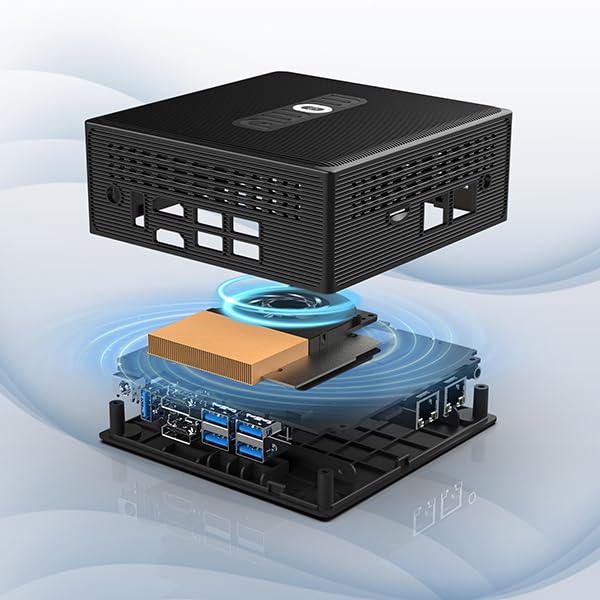

🚀 Power Meets Portability: Elevate Your Digital Experience!
The AWOW Mini PC is a compact yet powerful desktop solution featuring an Intel Celeron Quad-Core J4105 processor, 8GB of RAM, and 128GB SSD storage. With dual Gigabit Ethernet, multiple USB 3.0 ports, and dual HDMI outputs, it’s designed for seamless multitasking and connectivity. Ideal for home, office, or media center use, this mini PC supports both Windows 10 Pro and Linux, making it versatile for various applications. Plus, with easy storage expansion options and a full year warranty, it’s a risk-free investment for your tech needs.


| Standing screen display size | 75 |
| Processor | 1.5 GHz celeron |
| RAM | 8 GB |
| Hard Drive | 128 GB |
| Chipset Brand | Intel |
| Number of USB 2.0 Ports | 4 |
| Brand | AWOW |
| Item model number | ss |
| Operating System | OS |
| Item Weight | 1.63 pounds |
| Package Dimensions | 10.16 x 5.63 x 2.2 inches |
| Processor Brand | Intel |
| Number of Processors | 4 |
| Flash Memory Size | 8 GB |
| Hard Drive Interface | Serial ATA |
B**E
You Will Just Simply Like It
AWOW has been in the market for years. And this AK34 pro has done some latest update of BIOS already when factory out. Bearing US based logo in 2023, its BIOS latest flash added Intel VM technology and therefore once being booted up, the whole sound system is Intel Smart Sound Technology (SST). Intel SST is renowned in its capability of offering extra and superb clarity for podcast sound reproduction and the embodiment of even the slightest nuances of high fidelity sound of audio play if you hook up the system via its 3.5mm jack to an external home cinema or audiophile stereo system.On top of this provision, I particularly like AWOW in the aspect that its Intel SST OED and controller hardware are both already installed and no extra software and drivers are needed to be installed or downloaded (which other machines claiming SST capable but often lack OED or relevant controller on the motherboard. And AK34PRO excels and has edges over the other same price level products in the capability of allowing users to download Realtek Audio software and drivers simultaneously, completely free from BSOD situations, which can turn your system running on both Intel SST and Realtek Audio in the form of Realtek High Definition Audio (SST). This sound interface simplifies the complexity of sound control panel that some users who dislike and who do not like to tune any equalizers but yet still having HD sound right out of the box.This is the one of the many commendable parts of AK34PRO in which areas some other NUCs constantly have issues with, particularly in searching for the correct driver for hardware Intel SST OED to run and start its service.And therefore it also explains why AWOW flashed new the BIOS as most up to date with Intel VM technology and manages to resolve the long term issue that Intel official corporation often receives inquiries from end users via its Intel Computing Experience Campaign.Thanks to AWOW US, which has rectified the issue by close cooperation with Intel even though Intel renounced support to NUCs anymore starting from September 1 this year onwards.But users don't have to worry since Intel is still offering latest Realtek Audio SST drivers download for different generations of NUCs.I managed to switch the OS of AWOW from both Windows 11 back to Windows 10 or vice versa freely with complete fulfillment of hardware requirements by Microsoft (MS).As a matter of fact, MS will invite users of AWOW AK34PRO running Intel Celeron J4105 to get immediately updated to Windows 11, and the whole system will work much smoother than staying with Windows 10 especially for those who face problems with no audio issues after updating to Windows version 22H2 no matter what OS you're running (Win 10/11).But I noticed just days ago that Windows 11 22H2 will run much better even though version 23H2 is rolling out via update. The latest version of Windows updates have most previous operational issues resolved if users allow MS to implement optional diagnostic measures onto your machine, and leave all hassles to MS to help out with the correct and appropriate configuration of Windows for you. For this point users need to trust MS by using your original MS account, where I can't feel any hurt or any offence in this scenario case. If users want to insist a local account but at the same time also needing tech help with AK34PRO, they may try installing MS Quick Assist as optional feature and allowing MS Quick Assist app to run through Firewall settings.Overall speaking after having toggled with this new little box with Windows 10 pro pre-installed of this new updated BIOS AWOW for months, you will be glad to see after upgrading to Win 11 by invite, your device is completely meeting secure hardware requirements laid upon by MS in the interface of Device Security and health status of device.With its sturdy and beautiful build of this new AK34PRO under US complete control and intelligent revision, you must like this machine especially at its on-sale price.With this purchase experience, I am also made confident to purchase the other legacy metal shell line of AWOW mini PCs. Do give it a shot. You'll never regret.p.s. 1. the constant bonuses of some legacy and generic models of AWOW include twin NICs, where you can hook up one for fibre broadband LAN and another for various but not limited use like connecting remote desktop within local Ethernet area, running two different ISP services, separate firewall, media server, and or other customized servers etc.2. there exists a micro SD card slot which can read up to 256GB data with complete ease and recognition by Windows.3. within side the box, you may add 2.5 inch SATA internal SSD or replace the OEM M.2 SATA 2280 SSD.4. the Gemini Lake family system CPU of AWOW most often meet upgrade to Windows 11 invite very soon if yours was Win 10 pre-installed cuz the new BIOS is secure boot enabled with standard platform keys installed.All the above are miracles of this little box sold around 100 bucks, less than a legit version of Windows 11 pro buying from MS Store.
D**W
Very Impressed So Far, but
Out of the box, it's a very nice little machine that seems to spec out well. I bought this to drive some holiday video projectors and then to serve as a router/pi-hole device, so I didn't need much. But for what I paid, this exceeds expectations and passes the Windows 11 hardware compatibility test to boot (it has a TPM module!)As with most machines, the first thing I do is wipe the drive and perform a Linux Ubuntu install and run some tests there, which I was happy with, and then tried to reinstall Windows. That went smoothly except that the Multimedia Audio Controller driver is missing from the drivers package on the manufacturer's website. I've reached out and there hasn't been much time for a response yet. Not worried based on what others have said here about support. I'll update to confirm.
A**R
Crap
I buy 10 plus pcs a year for our business. This pc didn't last more than 6 months. Windows would not load. Called company with no help. They gave me stuff to do to fix it. Spent hours on it still doesn't work. Started to use other pcs no problem. Never again. Please do not buy. You are on your own with problems
D**N
DAK board setup
The media could not be loaded. I bought this mini computer because I was looking for a low cost computer running Windows 10 that I could tuck behind a frame and run a wire to a touch screen monitor to run DAKboard software. Out of the box all I had to do was run Windows updates and for my particular use I didn't need to install anything at all. I used Microsoft Edge and window tens touch screen compatibility to make it work. The specs were as advertised this is a quad core seller on processor with 8 gigabytes of RAM. The only con I encountered is that there is a fan that will cycle on under heavy usage or hot temperatures in the room. It is as quiet as a laptop fan, I just thought it was worth mentioning. You can see in the video I attached it's pretty snappy.
B**U
Great PC in such a tiny package
The media could not be loaded. This mini PC took me by surprise. I needed something for school and was tired of setting up my gaming PC for my assignments so I got this and I'm glad I did. Setup was easy, it comes with windows pre-installed and all I had to do was sign in. It's so quiet, sometimes I forget it's running and the small size helps with saving space on my desk. I even tried running my elgato on it and, for the most part, it works and once I find my Rovio capture disk, I'll try that too. You will need a mouse and keyboard, I suggest wireless because it's less of a hassle and you can tuck the PC in the corner. It also supports microsd cards, which makes it even more convenient.
J**L
A tiny, inexpensive monster
Standing ovation. Sits there and mines happily for days on end.Probably plays fortnite too, not sure though.
B**N
Pass on this trash
Needed a new Windows key off the start because of Windows watermark. It is very loud all the time (every 5 minutes loud af fan off\on) even though the air coming out of it isn't even warm. Constant random "windows encountered a problem, device resetting" every single day... This thing is garbage! It then locked me out of my account so I had to find a work around by making a new account and lost everything on the other one. Now it is stuck in some "automatic repair" loop and I need to reinstall Windows. Absolutely the worst pc product I have ever owned! Complete garbage!
M**I
What a Deal
This little computer is fantastic! It boots up quickly, is simple to use, and is fast!
Trustpilot
2 weeks ago
3 weeks ago