We remain fully operational. Our teams are working around the clock to ensure your deliveries continue safely.

DOWNLOAD THE APP


Customer Services
Copyright © 2025 Desertcart Holdings Limited
DOWNLOAD THE APP


⌨️ Elevate your workflow with the keyboard that works as hard as you do.
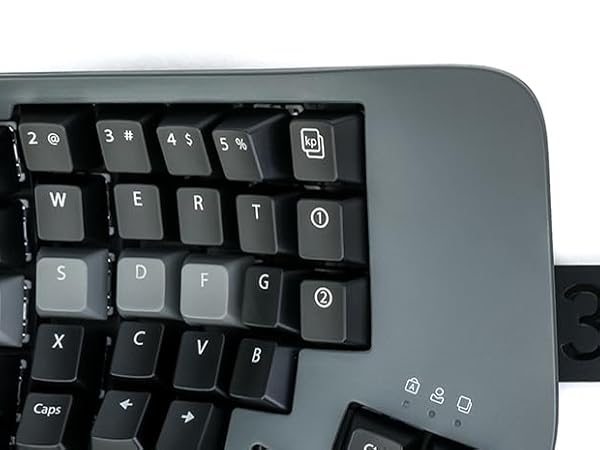
The Kinesis Advantage360 is a premium split ergonomic keyboard featuring 76 keys with a contoured design and adjustable tenting to maximize comfort and reduce strain. Equipped with quiet Kailh Box Pink linear mechanical switches rated for 50 million presses, it offers a smooth, durable typing experience. Fully programmable via the SmartSet engine with 9 customizable profiles and onboard 8MB storage, it supports Windows, macOS, Linux, and Chrome OS through USB-C connectivity. Its PBT keycaps resist shine, ensuring a professional look and feel, backed by a 3-year warranty and US tech support.







| ASIN | B0CGJRK71M |
| Additional Features | Ergonomic, Split Keyset Design, Wrist Rest |
| Antenna Location | Business, Personal |
| Best Sellers Rank | #264 in Computer Keyboards |
| Brand | KINESIS |
| Built-In Media | Bridge Connector, Extra Keycaps, Keycap Puller, USB Cable |
| Button Quantity | 104 |
| Color | Dark Gray |
| Compatible Devices | Laptop, PC, Smartphone, Tablet |
| Connectivity Technology | USB-A |
| Customer Reviews | 4.2 out of 5 stars 349 Reviews |
| EU Spare Part Availability Duration | 3 Years |
| Enclosure Material | Aluminum, Plastic, Polybutylene Terephthalate |
| Generation | 1 |
| Hand Orientation | Ambidextrous |
| Item Dimensions L x W x H | 15"L x 8"W x 3"H |
| Keyboard Description | Mechanical |
| Keyboard Layout | QWERTY |
| Manufacturer | Kinesis |
| Mechanical Keyboard Switch Model | kailh_box_silent_pink |
| Model Name | Advantage360 Linear Quiet |
| Model Number | KB360-KLQ |
| Number of Batteries Required | 1 |
| Number of Keys | 76 |
| Power Source | Corded Electric |
| Recommended Uses For Product | Business, Personal |
| Special Feature | Ergonomic, Split Keyset Design, Wrist Rest |
| Style Name | SmartSet (USB) | Quiet Switch |
| Switch Type | Linear |
| Theme | Ergonomic Keyboard |
| UPC | 607998360200 |
| Warranty Description | 3 Year Manufacturer |
| Water Resistance Level | Not Water Resistant |
Z**R
Good, bad, and the awesome
It's been about twenty years since I first used a Kinesis and haven't used one since. For the past 14 months I've been using a Moonlander split keyboard. It's a decent keyboard, but the options for tenting are very poor unless you invest in more hardware purchased from their site. They do offer excellent support, though. I'd had the keyboard for about six months when the right side thumb cluster hinge broke. They sent me a replacement for free. Back to the Kinesis. I write A LOT. I'm a full-time author so I bang out hundreds of thousands of words per year. I'm in my mid-fifties, and fingers and wrist hurt all the time because of poor ergonomics and cheap keyboards. The Kinesis Advantage 360 is kind of amazing. It has true tenting, and the concave nature of the pieces means you can comfortably rest your palms on the outside and only move your fingers. Since I have used a split ortho board for over a year, this was not a huge learning curve. The keys are laid out well, but I had to change a few. I like the CTRL and ALT on the left side on the bottom row. I moved those keys using the ZMK software which is not really friendly. You have to have a Github account, fork builds, and then use the key mapper to generate new firmware. Each piece of the keyboard them must be connected via USB. Copy the corresponding builds to each piece and then swap key caps. I'm happy with the four or five keys I moved and have this looking almost exactly like my Moonlander layout. Bluetooth has worked perfectly on my PC. I've had zero issues so far. I hit a key in the morning and my PC wakes up. I leave the backlighting off. After two weeks of heavy use, the batteries are still going strong without a recharge. I purchased the palm pad separately. Why aren't these included with this very expensive keyboard? Come to find out, they might not be needed depending on your hands. I find them okay, but I will probably switch back to using the palm rests without the pads. They are comfortable and all, but I'm making more typos with them installed. This is a very expensive keyboard, and it will not be for everyone. There is a learning curve. When I initially switched to a Moonlander, my WPM dropped to about five words per minute. I'm a slow and not very accurate typist, but after this short amount of time I'm up to about 70 WPM with a 98% accuracy rate. This is fantastic for my old hands. Overall, this is a technical board that requires an understanding that the interface software is far from user friendly. Remapping keys will be challenging. I find that the key caps get oily from my fingers rather quickly, which is a weird thing to write, but it's true. So far this has not affected my typing, but I feel like I need to wipe them with a cloth a few times a week. Lightly textured key caps would have been perfect on this thing. Even with these negatives, I feel this keyboard beats the Moonlander by a mile. This is a true ergo keyboard and so far I love typing on it. The Gateron brown switches feel really nice. Negatives aside, this is the best keyboard I've ever owned. I look forward to many years with this thing.
A**O
Excellent product, no Bluetooth issues, incredible typing exp.
This is an excellent product, the build quality aligns with its price and surpasses it. The typing experience is incredible once you get used to it. You can achieve a "flow state" typing that is so pleasant is incredible. Not to mention my wrists pain got away from two weeks of using it. The Bluetooth problems are a thing of the past and the programability is super easy with clique and the latest update which already came with the shipped product from the factory. The pink switches are amazing, I was afraid that they would be too easy to press but they are not.
G**D
Adv360Pro. Very very good with minor caveat.
I purchased the Kinesis Advantage 360 keyboard a few weeks ago, and I am confident that it will be my go-to keyboard for a long time. The keyboard is incredibly comfortable to use, and I was able to easily customize the keys with the Kinesis graphical keymapping tool. Although the build quality is decent, I felt that the default ABS plastic keycaps that came with the purchase were of low quality. Fortunately, replacing them with Kinesis PBT keys made a significant difference. Initially, I had a Bluetooth connection issue, but after troubleshooting, I haven't experienced any problems since. Although the keyboard comes with a higher price tag, I believe that it's worth the investment. If you work on a computer a lot, just like with investing in a high-quality chair, it's essential to prioritize ergonomics and comfort. I recently started feeling a tingling sensation, soreness, and sometimes minor pain in my wrists while typing on a regular keyboard, which led me to research ergonomic keyboards. I'm thrilled that I found the Kinesis Advantage 360 because it has significantly reduced my discomfort and improved my typing experience. But even if you don't have any problems with your wrists/hands, I still think this is a great keyboard to consider. It took me about a week to get used to the keyboard layout, but with daily practice, typing at least thirty minutes to an hour each day, I was able to return to my average typing speed of 90wpm. Three weeks in, I feel like I am in total control of this keyboard, including all the special symbols, without even looking at the keys. I have never felt this level of control with a regular keyboard. While I changed the mapping for the hotkeys, I left the key mapping alone for the majority of the keys. Some of the special symbols, such as equal/plus, back tick/tilde, and curly brackets, were challenging to get used to, but with plenty of practice, I have significantly improved. It's worth noting that it's normal to experience some frustration when using a keyboard like this, but I believe that anyone can come to appreciate it with practice. There is a good chance that you might run into Bluetooth connection issues with this keyboard at some point, but be aware that this is a normal thing for any type of bluetooth electronics. For me, after troubleshooting, the Bluetooth issue has not returned yet, but it is very infrequent and minor enough that the benefits of this keyboard outweigh the potential downsides.
A**Z
22 year old programmer experiencing wrist pain
So obviously this keyboard is an insane purchase, and is hard to justify. So what made me buy it? **The Build up** I am a 22 year old software engineer. In college (about 2 years ago) I started to notice my wrists were hurting a lot after long periods of coding. I was only 20 at the time and I was thinking 'I am WAY too young to be getting pains like this". Thus started the rabbit hole. I first bought a zsa moonlander. The software is great, I love that you can mod it (more on that later), but something about the amount that you have to reach to hit the top and bottom of each column, it was pretty uncomfortable. Then I went for a corne variant, which has much less keys. This did reduce finger travel, but the reliance on layers didnt feel right to me. In comes the kinesis. **Kinesis vs Glove 80** I had to debate for about a month (again, large purchase, it just how I am) between the glove 80 and the kinesis. Two things seemed to lean in the kinesis' favor for me. 1. MX keys. I personally dont like low profile keys at all 2. Better chasis. From all accounts I have read, the glove 80 feels light. This can be nice for travel but my kinesis stays at my desk all the time and I much rather would prefer to have it not move on my desk rather than it be lighter. **The results** I absolutely love this keyboard. The first day I got it I actually thought about returning it because I couldn't get ZMK to work. Then I realized there are web editors for this stuff! The keywell makes more of a difference than i could have imagined. I have almost the same amount of keys I did on the moonlander but I barely have to move my fingers to hit all the keys. I havent had wrist pain once using this keyboard (and I currently have wrist pain typing this on my laptop). This is an amazing product that I PROMISE you will not regret if you are experiencing wrist pain from typing.
H**N
Great concept, but needs UX improvements
First of all, you will need to read user manual on how to pair this keyboard through bluetooth. Manufacturer could either rename keys in more obvious way or provide sticker with cheat sheet so users can just plug and play it.l in USB mode. There is a switch where usb cable plugs in but it does not have any marking whether it is general on off switch or USB vs Bluetooth switch. This is confusing because sometimes my keyboard disconnects via BT and it does not work if I simply plug in usb. I really would have prefferred a keyboard with typical layout out of the box. There is no benefit of having ESC key swapped with Tab key. There is no battery level indicator. My keyboard every now gets disconnected from computer. Either because of kids who accidentally press some buttons while I am away or because of battery level getting low or because something happened with my computer. Because of the issues mentioned above the troubleshooting process is painful to restore.connectivity because it is not clear what is going on.
M**K
Easier on the hands, Mac setup experience could be improved
Overall it’s a great keyboard. It takes time getting used to, but I can type much longer on it without issues than a normal ergonomic keyboard. Which matters a ton and was what I was hoping for. It is an adjustment. I hope you already know how to touch type correctly. I did, except I typed 6 and C with the wrong fingers. I was forced to learn the right way. No big deal. As a developer, I use punctuation more than most, and some punctuation isn’t placed great. But I’m getting used to that, plus I’ve customized the keyboard some. I love it’s got programmability. That’s quickly becoming a favorite feature. I do NOT like it’s done through Chrome. They had a real program, but gave up on it. Oh well. As a Mac user I was not happy with the process to figure out where the modifier keys should go. My keyboard works out of the box but since it has Windows keys on it the key caps need changing to make things nicer. You really want to use the Mac keycaps (included!). Unfortunately there isn’t a single bit of documentation anywhere explaining where they should go. I contacted support. You have to use their reprogramming tool and apply the default Mac layout. THAT will show you. I know the modifier keys work on the Mac without reprogramming. But it would be nice if there was a single insert anywhere in the box showing you which key corresponds to which so you can swap the key caps easily. I don’t use Windows keyboards enough to have what the windows key or the application key should be. Just document it. I got the quiet version of the switches. They’re not exactly silent but they’re certainly not much quieter than a normal mechanical keyboard. I’m quite happy with them.
T**R
Pricey, but worth it.
Great product, learning curve is 1-2 weeks before getting back to your pre-kinesis typing speed, build quality is very high, Bluetooth connectivity is great w Apple products (using MacBook Pro M1-M4), curiously kinda sucks with windows though with random intermittent disconnects (easily fixed by plugging in USB cables) I purchased these in a last ditch attempt to help my carpel tunnel and was pleasantly surprised with almost immediate relief. Even w the weight and size of these I find myself making excuses to bring this with me on business trips due to how much they help/correct my wrist and finger pain and numbness. The only downside is as a coder you will feel the unavoidable draw to NeoVim..
J**I
Kinesis Keyboards are great but...
Background - I have been using Macs since 1986. I-do-not-code! I just run my business with it. I Love my Advantage keyboards - I have been using them for 20 years and currently have 3. They quickly solved my carpel tunnel issues and enabled me to touch type without looking at the keyboard. I can even finish typing a sentence while listening to my office manager's question as she walks in the door. 6 or 7 years ago, I bought an extra one as a spare just in case the company did not survive. All of them were very easy to convert to the Mac Keyboard. BUT - I have had the Adv360 since early December and still have not figured out how to convert it to the Mac configuration. They have great introduction videos and even mention the ability to convert to Mac layout … but they never explain it. Good news - they have an excellent support team. Bad news - they are swamped with all the new orders - and questions. So one has to submit a tech request and wait in line to get a response. While I am delighted that they are finally getting the recognition they deserve, I am running out of time to be able to test the new layout. Tyler has been trying to help. "All you need to do is remap the keys to the positions you are used to. You can do this with onboard programming tools pretty quickly. Rules of remapping: 1. Remaps always pull from the default layout. 2. You cannot remap a remap 3. You cannot lose access to a key 4. Remaps only go in one direction, if you want to swap two keys, that is two remaps. 5. You can move in/out of any layer during remapping. Layer keys are immune to onboard programming. Think of remapping as Copying/Pasting an action. To “Remap” any key on the Advantage360 to a new location: 1) Press and hold the SmartSet Key, then tap the Remap Key. 2) First select the source key (i.e., the action you want to “copy”). 3) Then select the physical destination key (i.e., where you want to “paste”)." Did I mention that I do not code? I am sure that the above will tell an experienced Windows and Macintosh coder how to convert the keys - but to me, it is greek. Example - the above #2)"First select the source key (i.e., the action you want to “copy”).” - WHERE IS THE SOURCE to copy a "Mac Command” or “Mac Option” on the all-Windows keyboard? ONCE I HAVE THE SOURCES FOR THE MAC Left COMMAND, OPTION, CONTROL, Right COMMAND, then I suppose I can follow #3) “paste” that in the exact locations as the “Windows Ctrl” or the “Windows Alt” keys. So unless I can get the keyboard to type Macintosh, I will have to return it and stay with my tried and true, very old Advantage keyboards. Sign me as very disappointed...so far.
Trustpilot
2 months ago
2 weeks ago