
DOWNLOAD THE APP


Customer Services
Copyright © 2025 Desertcart Holdings Limited
DOWNLOAD THE APP

🚴♂️ Ride longer, explore smarter, and never miss a turn with COROS DURA Solar!
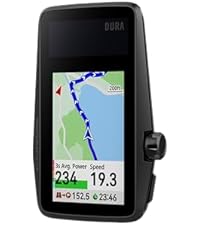
The COROS DURA Solar GPS Bike Computer delivers an industry-leading 120-hour battery life enhanced by solar charging, a vibrant 2.7" MIP touchscreen optimized for all lighting conditions, and advanced dual-frequency GPS for precise, bike-friendly navigation. Seamlessly sync your ride data via WiFi and Bluetooth, and enjoy smart turn-by-turn guidance with routes from Strava, Komoot, and Ride with GPS—perfect for serious cyclists who demand endurance, clarity, and intelligent routing on every adventure.




| ASIN | B0D6TQWRCN |
| Battery Cell Composition | Lithium Ion |
| Battery Life | 120 Hours |
| Best Sellers Rank | #14,854 in Electronics ( See Top 100 in Electronics ) #5 in Cycling GPS Units |
| Brand | COROS |
| Brand Name | COROS |
| Color | Black |
| Connectivity Technology | Bluetooth |
| Customer Reviews | 4.6 4.6 out of 5 stars (291) |
| Date First Available | June 19, 2024 |
| Display Type | Always-On Memory LCD |
| Display resolution | 480x240 |
| Global Trade Identification Number | 00810005783200 |
| Human Interface Input | Touchscreen |
| Included Components | COROS DURA GPS Cycling Units |
| International Protection Rating | IP67 |
| Item Dimensions LxWxH | 0.2 x 0.05 x 0.33 inches |
| Item Package Dimensions L x W x H | 6.73 x 4.06 x 3.11 inches |
| Item Weight | 102 Grams |
| Manufacturer | COROS |
| Material | Plastic |
| Model Name | COROS DURA Solar GPS Bike Computer |
| Model Year | 2024 |
| Mounting Type | Handlebar Mount |
| Number of Items | 1 |
| Package Weight | 0.47 Kilograms |
| Part Number | COROS DURA Solar GPS Bike Computer |
| Product Dimensions | 0.2"L x 0.05"W x 0.33"H |
| Screen Size | 2.7 Inches |
| Sensor Type | GPS Sensor |
| Size | 99.5 x 60.8 x 15.7mm |
| UPC | 810005783200 |
| Warranty Description | 2 year |
D**K
Coros Dura
So far this Dura bike GPS has been great. I also own the Garmin Explore 2 (Garmin E2) to compare it to. I just bought the Coros Dura in August 2025. And it installed the latest update upon turning it on. It has Firmware v 3.1011.0 dated Jul 28, 2025. I understand the earlier versions had issues that were resolved in later releases. I have no experience with the old Dura software, only this July 28, 2025 version. So my comments may differ from others that bought the device in 2024. The battery on the Dura so far appears great, no complaints. So far i have 37.5 hours of use on the first charge. I have not charged it after the first charge yet. Given it has 70.8% battery left, I will not charge until it gets below 50%. I think if I put it in the sun when not riding it would never need to be charged with AC. Solar charging while riding is dependent on sun and angle of the sun. I find when I ride I'm rarely riding into the sun for any length of time. When the sun is behind me the solar panel is shaded. The most sun it gets is when I stop for a break. Then I angle it into the sun and get good solar charging. The maps lack street names on the Dura device but i find I don't really need or use them. It does show the street to turn on about 500 ft early. That's all I find I need. Also, while the Garmin has street names, it only displays some street names and sometimes no street names. I never really noticed it on the Garmin while on the trail until I watched for it. Typically bike paths and most streets are not labeled on the Garmin while in route. The routes on the Dura are much better than the routes on the Garmin. I know everyone says they use the same maps and routes but that has not been my experience. The Garmin will route me on streets with a 45mph speed limit and no shoulder. That's crazy when there are local streets that will take you to the same location. I feel the Garmin routing is based closely on their car routes. The Dura has routed me on local 25mph streets and bike paths. And surprisingly it has routed me on some short cut bike cutaways between streets, thru parking lots, etc. I'm amazed at the routes it finds. I have been on some crazy great short cuts. Not sure how it knows about them, I didn't know them. On the other hand garmin will route around underground tunnels built for bikes. Not sure why it misses those great shortcuts that are much safer to cross a road. And fun to go thru. I had gone off route a few times already with the Dura. The Dura rerouted me quickly and on a decent route, not a fast busy road. I think it uses the phone to reroute but no issue and fast. I'm not sure what all the reroute complaints are really about. I always have my cell phone with me and of course the app is running. It does not drain the battery anymore than any of my other 100 apps. I say the reroute is no issue in this version of the firmware. Obviously if you bike in a no cell phone signal area you would lose the reroute ability for those moments but you might lose GPS signal too. Once you get back into range you can reroute. I'm never really in any zone with no cell coverage and certainly not for any great length of time. The Garmin E2 had been a major headache to use. It is a very difficult to use device, particularly when all you want or need is a GPS for navigation. I already have an odometer, speedometer, and time on my bike. I have miles, calories, heart rate, temp on my watch. Only need Navigation. The Garmin has this incredibly complicated user interface. Full of features I would never use. I don't care about calories or what it thinks I burned or energy I used. I'm all about riding no matter how many calories. The first few times using the garmin i had to abort using the gps. My later adventures with the Garmin were better but still frustrating. For example, at one point i took a long break at a restaurant. I could not get the Garmin to turn off to save battery. For some reason it thought i was still riding. But I did stop the navigation so it was confusing. And the timer on the Garmin requires too much hand holding. Great for cheating on route time but why cannot the GPS figure out the timer why do I need to be involved. The Dura does all the timer stop/start activity on its own, like a computer should. The Garmin has major issues in routing friendly paths and roads. I don't like the routes from the Garmin. And the rerouting keeps wanting to take you back to the original route. It does not like to find a new route forward unless you stop the current route and plan another from your current location. And usually it directs you on a busy high speed street. Very flustrating. While the screen size on the Dura is 2.75" the map space is larger than the garmin explorer 2 with its 3" screen. The Garmin E2 has a block on the top of the map and a block at the bottom. Dura uses all the screen for the map and only uses the top of map to show the road to turn on when you are 500 ft away. Both GPS units have the same screen resolution of 240 x 400 pixels. Both look clear and have good graphics images. Garmin Explore 2 Steps to get to the Map: Open app, there is a home page with 5 links on the bottom. Home Challenges Calendar News Feed More Oddly to get to the Map you need to choose More. Why more on a GPS ?? Seems like Calendar or News Feed would be a More… After choosing More, then there are around 15 items to choose from. Need to choose Training & Planning down into the menu. Then another menu is displayed with 6 items to choose from. Choose Courses and that takes you to a listing of courses you have created. Need to click on Create Course, then choose a Course type among 7. I chose Gravel/Unpaved Cycling. That takes you to another menu of 2 choices. Choosing Custom will finally bring up a Map. My question, why so menus to get to a map on a navigation GPS? That is crazy. At that point you need to choose a starting point. Dura just assumes the current location and you can change it if you want. Not on the Garmin, you need to pick it. Then there is no address entry so you need to zoom out and move around to find your final location. On the Coros app, it has 4 menus on the bottom of the main page. Progress, Activities, Explore, and Profile. Explore is the map, I would have just called it Map but ok Explore works. Click on the Explore option and yes, it takes you right into the map. Looks like Google Maps It is that easy to get there. Put in an address or choose Create Route and then move around the map and drop an end point. What a relief to see it just make the mapping easy enough. Taking a 12 mile route on both Dura and Garmin yield different results. The Dura has lots of side streets, many turns on various roads. Looks ok to me at a glance. The Garmin takes the least number of roads but looking at it, it chose a great route for a car. On streets that are 50 MPH and other main streets. No idea why it chose that route but no way, not on a bike. I would not take that route. You can create a route street by street. But it takes time and if you venture off course Garmin will be happy to route you back on a main high speed street. And with all this Garmin nonsense, it was 4 miles longer. Just confusing for a navigation GPS made for a bike. If you live in a rural area and the number of roads are limited then the Garmin would likely choose the only possible path and all is great. But with lots of side streets around it does not make use of them. Garmin just seems to use the routing it has on their car GPS’s. One other area of different between Garmin E2 and Dura is the data transfer. The Garmin Explore 2 only has bluetooth and it is very slow to download and install a firmware update. The last update I installed this year took me 3 days. In the first day it ran for an hour and I had to run so I stopped the download. I started it back up later and let it run for 2 hours and had to stop it for a call. It was on the final and third day I let it sit until it was done but it took a very long time. I feel the process is too slow, but it does work. The Coros Dura has both bluetooth and wifi. The wifi is much faster. The firmware update I did only took a few minutes. That is how this should work. Bluetooth is just too slow for transferring data. If I had to pick one thing to like about the Dura it would be the routing. The routes are crazy good for bikes. No high speed roads, lots of bike only routes. It chooses a better path than I could. The battery use and charging are great too. But it is the routing that amazes me the most. The screen on the Dura is very good during the day. I have not been on a night ride with it yet. The Garmin screen is as good. No issues with either unit. Have no idea why Garmin cannot use the same routes. I have sat and picked the same routes on Dura and Garmin side by side and Garmin always chooses some high speed road for 10 miles or so. I hate that. The Dura just picks a great biking route. Bike paths whenever it can and low speed roads when needed. I am very happy with the routing on the Dura. I have compared to other apps like Komoot and Strava. Although those both nag you about a monthly feed. Getting thru that, they still choose bad routes down busy high speed streets. I like whatever Coros Dura is doing with their routing. After using the Dura for a few weeks I have some further comments. Surprisingly I have not charged the Dura since the initial charge. Thats is really good. There is no need to worry about the charge on this guy, just go biking. The zoom level by default is one level out too far. When you come up to a turn and there are several streets that could be turned on, the map is hard to tell which one at the default zoom level. If you zoom in one level then no problem. It would be nice if that was defaulted. Trying to change the zoom level while riding is a challenge. The road is bumpy and riding one handed sometimes feels like riding a bull. And in general, I find changing screens a challenge while riding too. And the zoom level cannot be changed after the upcoming street is displayed. Also, the zoom level is reset after a turn. If on a smooth street then all is good but those smooth streets are rare in my area. Creating routes, one day I tried to create a new route on the road and in the rain. But the device kept saying I had too many routes and need to delete a route to make room. I was not sure where this action was needed, on the app or device. And removing one route on each it still did not work. After removing a few routes I was able to get a new route on Dura. Flustrating in the rain. Would have been nice to just replace the oldest route and not show any error message. Interestingly, last week a new software update came thru and it said it fixed the limited routing. I'm not sure if that is the same routing issue or not but good to hear.
A**R
Excellent battery life, everything I need
The initial setup process on the Dura was a bit glitchy due to Bluetooth weirdness. Bluetooth syncing just didn't seem very reliable for me. And installing firmware updates using WiFi was terrible since it couldn't find many networks. (Might be a 2.4GHz vs 5GHz issue.) But afterwards when I actually use it, the Dura was amazing. I charged to 100% ahead of a long bike ride, and after 112 miles of biking it had 88% battery left! This is simply amazing. I really liked the customizable data fields for display and I selected the speed chart, heart rate chart, and cadence chart as my main display. After the ride, I was able to view a plethora of statistics previously not known to me. I liked the training load and training effect statistics; they seem helpful. The navigation is also good; following the breadcrumb navigation is easy thanks to the great screen with good brightness. The turn-by-turn navigation certainly isn't as good as Google Maps but I was used to way worse experience on a bicycle so this is still an improvement. I am now way more confident to try out new roads on my bike with the Dura than before.
P**R
Great Value!
I already have a COROS watch and heart rate monitor and I like the simplicity, value, battery life, and flexibility of the COROS system. I decided to stay with COROS in spite of the negative early reviews when the product was first released, knowing that COROS continuously improves and updates software (like they did on my Pace watch). As I hoped, all of the areas of concern I saw in reviews were not issues for me, and presumably have been fixed. Pairing with my existing Ant+ cadence, COROS HR, and COROS watch were easy. Loading maps and routes was easy. While riding, the screen was very readable and the device quickly re-routed me when part of my route was closed. I also appreciated that they had fixed the climbing display, to show the entire climb on one screen, unlike early reviews. Because I'm used to the watch crown, I found using it on the Dura to be simple (and I preferred it to buttons). My only complaint was that the default data screens were more than I need, so I'll be customizing these for my next ride. Also of note: the battery didn't charge much on an early morning ride (used 2.5% and generated .4% for 90 minutes due to shadows), so consider time of day when thinking about the effectiveness of solar charging.
T**H
Great for Navigation and Dexcom Alerts (via phone)
So far, so good. This is the first and only cycling computer I have owned, and I am happy with my purchase. It was down to this one and a similarly priced Garmin unit. In the end, the battery life and usability features on this one won out. I only use it for navigation, as I don't have a power meter or HR sensor. The nav instructions are clear and the route is easy to follow. The split screen and display options are nice. It is a little quirky synching routes from RideWithGPS, but the post ride sync to Strava is smooth. I also get my Dexcom (T1D) alerts via the Bluetooth connection with my phone and this has changed the game for my glucose range while pedaling.
N**I
Qualità prezzo vincente. Preciso, chiaro, semplice nei menu. Autonomia pazzesca. Compatibilità perfetta con ogni accessorio (cardio, potenziometro, sensori cadenza, radar posteriore). Consigliato come ottima alternativa a Garmin 540/840
J**J
Wow! My first bike computer for my first touring bike (I'm ready for both at the age of 73). After much net research chose the Coros Dura because of the 60 hour+ battery life. I hike and bike in the Scottish Highlands so the only power is from my solar panel (mostly a joke in Scotland), my power bank, and the bike's dynamo. No chance of charging a hungry Garmin with all my other devices in the wilderness so I ignored that brand and chose Coros. The Dura comes in a smart box with cables, instructions, and a mount. I purchased a screen protector separately. Syncing with Corus app was a breeze. I had already saved half a dozen imminent routes to the app on my smartphone and whizzed them over to the Dura. Pleased about that as trying to avoid hefty subscriptions to Komoot or any other navigation platform for a route transfer facility. The Corus maps may be a little limited but they seem to be fine for the Dura. The controls on the Dura's wheel are intuitive once you discover the back button. I'm going to fit the (supplied) Dura holder to the bike handlebars next and it looks excellent. The Dura's bike alarm feature looks potentially useful for parking up outside shops etc without having to drag in the bike's valuables. So far..brilliant.
S**A
Works perfectly and unbelievable battery life. I used it for a 7 day tour from Mumbai to Goa and had to charge only once (that too as a precaution as it was nowhere close to being discharged). The solar function seems to be of limited use though. I am a normal user who records the days activity with a heart rate and cadence sensor. Worked perfectly!!
A**.
Battery life is unbelievable, navigation, strava live segments, very good reports after.
A**T
Nachdem der Akku meines Garmin Edge 820 im Fahrradurlaub die Grätsche gemacht hat, musste ein neues Navi her. Bisher bin ich mit Garmin (Edge-, Etrex- und gpsmap Geräte) immer gut gefahren (bzw. gelaufen, gewandert) , was im wesentlichen an der hervorragenden (technischen) Qualität der Geräte und des "Ökosystems" gelegen hat. Was mich immer gestört hat waren der hohe Preis und die z.T. etwas unübersichtliche Bedienung. Jetzt habe ich dem Coros Dura eine Chance gegeben und es bisher - nach rund 30 Stunden Betrieb bei Radtouren - nicht bereut. Die Genauigkeit der Positionsbestimmung, der Routenführung und der Sensordaten (Geschwindigkeit, Strecke etc.) ist hervorragend. Lediglich bei der Ermittlung der Höhendaten (Anstieg-/Abstieg) waren sich der DURA und dem zum Vergleich mitgeführten GPSMAP 66s nicht immer einig (DURA lag hier immer ein paar wenige % über dem Garmin Gerät). Da der DURA i.d.R. nicht ausgeschaltet wird (er wird in eine Art Tiefschlaf versetzt) steht er binnen einer Sekunde nach Aktivierung mit exakten Positionsdaten zur Verfügung. Ein deutlicher Vorteil gegenüber Geräten anderer Hersteller. Anschalten und Losfahren - perfekt! Die Kopplung mit externen Sensoren (Speed, HR, Trittfrequenz) klappte problemlos. Die Verarbeitung des Geräts ist qualitativ hochwertig. Der Bildschirm "brilliert" zwar nicht, ist aber jederzeit sehr gut ablesbar (die Helligkeit passt sich der Umgebung an). Störende Spiegelungen konnte ich nicht feststellen. Die Bedienung erfolgt über ein Drehrad und lediglich eine Taste bzw. über den Touchscreen. Das Drehrad ist gewöhnungsbedürftig, funktioniert aber auch während der Fahrt erstaunlich gut, zumindest dann, wenn die Strecke nicht allzu 'holprig' ist. Auch der Touchscreen erfüllt seine Aufgabe gut (getestet bisher aber nur bei trockenem Wetter). Die Menu Führung ist intuitiv und durchdacht. Hier haben mich Garmin Geräte schon zur Verzweiflung getrieben! Die Kartendarstellung ist einfach gehalten. Man bekommt nur wenige Geländeinformationen (z.B. keine Straßennahmen). Das mag für viele ein Negativpunkt sein - ich bewerte das mittlerweile als positiv. Reduktion auf das zur Orientierung Notwendige. Das ist aber vielleicht auch Geschmacksfrage. Die Konfiguration des Geräts ebenso wie die Routenplanung erfolgt via Smartphone. Da ich meine Strecken im Vorfeld plane ist das aber kein Problem. Nur für spontane Änderungen kommt das Handy ins Spiel Das Kartenmaterial (OSM) selbst ist im DURA hinterlegt und umfasst auch kleinste Wege. Für das Re-Routing bedarf es aber des Smartphones (genutzt wird hier die Verbindung zu Google Maps). Das funktioniert - soweit ich das sehe - aber auch ohne aktivem Mobilfunkempfang, wenn man die Karten von Google Maps auf seinem Handy speichert. Ich plane meine Strecken in der Regel mit Komoot. Die Übertragung von Komoot auf den DURA erfolgt absolut problemlos! Spielt man gps-Dateien auf den DURA (auch das funktioniert via Smartphone perfekt) gibt es z.T. allerdings bei den Abbiegehinweisen Aussetzer. Damit kann ich aber leben. Die absolut herausragende Eigenschaft des DURA liegt in der Akkulaufzeit. Coros gibt hier 120 Stunden an (geringe Bildschirmhelligkeit, keine externen Sensoren, ohne Aufladung durch das eingebaute Solarpanel). In der Praxis (volle Bildschirmhelligkeit, 1 - 2 externe Sensoren) verbrauch der DURA zwischen 1,2 - 2 % Akkuleistung pro Stunde, was 50 - 80 Stunden entspricht. Allerdings lädt sich er Akku aber auch während der Fahrt über sein kleines Solarpanel auf. Bei bewölktem Wetter waren das zwischen 0,2 - 0,3 % pro Stunden, bei Sonnenschein 0,8 - 1 %. Damit ist der DURA prädestiniert für (Mehrtages-) Touren >> 1000 Kilometern. TOP! Bei der Software (sowohl auf dem Gerät, als auch in der APP und auf der Coros Webseite) fehlen mir noch einige Kleinigkeiten. Hier ist Garmin weiter. Ich gehe aber davon aus, dass sich Coros - die sich ja als Hersteller von Sportuhren bereits einen Namen gemacht haben - das Produkt weiter entwickelt. Fazit: funktionale, zuverlässige Top-Technik mit leichten Schwächen zu einem guten Preis. Bestens geeignet für Vielfahrer und alle, die ständig vergessen, den Akku aufzuladen ;).
Trustpilot
2 weeks ago
1 month ago