🎨 Elevate your digital canvas with precision and style — don’t just create, dominate!
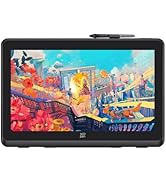
The XPPen Deco 02 is a sleek, portable digital drawing tablet featuring 8192 levels of pen pressure sensitivity, a silent dual-sided roller dial for precise control, and 6 customizable shortcut keys. It includes a battery-free, ergonomic P06 stylus with a built-in eraser, supports both right- and left-handed users, and is compatible with Windows and Mac OS as well as popular creative software. Designed for professionals and enthusiasts alike, it offers a premium drawing experience without the premium price tag.













| ASIN | B07DCS9D9Q |
| Batteries | 1 Lithium Ion batteries required. |
| Best Sellers Rank | #567 in Computer Graphics Tablets |
| Customer Reviews | 4.5 4.5 out of 5 stars (805) |
| Date First Available | May 29, 2018 |
| Is Discontinued By Manufacturer | No |
| Item Weight | 2.78 pounds |
| Item model number | Deco 02 |
| Manufacturer | XP-PEN |
| Product Dimensions | 14.25 x 8.27 x 0.35 inches |
G**S
Deco 02 by Xp-pen a great wacom alternative.
Where can I start? first off, I like this one, which is going to be my new tablet for my day job. The box looks nice and have that look that you wouldn't' expect to find on a graphic tablet made in China. The box is sturdy, firm and feels like it can withstand almost everything and very well designed by the way. what's on the box is what really matters. A Deco 02 tablet that comes with a ring or roller wheel to set with the last shortcut key and has a lot of built-in functions. This roller wheel will save a lot of time for you because when we artist tend to calibrate sizes of the brush or doing the zoom in and out, this roller wheel comes very handy ( way better than shortcut keys). Also it comes with a sort of lid or cover for the ring made out of rubber, which is nice to the tact and easy to handle. The pen is a passive pen that won't need any charge and very ergonomic and light ; even this time xp pen put an eraser on the pen...that is cool. I remember that the old wacoms had it, not anymore though on the more advanced models. This eraser will save you time since you don't have to use the switch buttoms on the pen to change from brush to eraser. The pen comes with a practical pen holder, very hard and durable, it will old the pen on your desk, also carries the pen nibs and the pen. I wish my artist 15.6 should have had one of those. When it comes to performance, this tablet is way better than my old wacom. It can register 8,192 levels of pressure sensitivity that helps a lot when you are doing digital sketching, painting and inking on many programs, I have tested it with Photoshop, Krita 4.0 and Sketchbook Pro. It works like a charm with all the pressure needed in all of them. The only cons is with Krita, that sometimes start behaving erratic but that is not only with xp-pen, also has been reported with the latest wacom's. I think this tablet is great for everyone who is on graphics with a budget and also for professionals digital artists like me that are looking for something smooth and precise that will perform great and would not put you on a serious debt. As an additional, the pressure sensitivity and the tablet drivers are so easy to calibrate that it works right out of the box on my 12gb old Imac 2011 with OSX High Sierra... Yep this tablet will do its duty very well.
C**A
Long time Wacom user, happy to switch to XP
I'm amazed at the quality of this tablet, it is closely comparable to the Intuos Pro. I found the driver installation to be way more easy and straightforward than Wacom drivers. The dial is smooth and comfortable, you can configure it not only for zooming or scrolling up/down but also add specific keys to it, which as an animator I love for scrolling through my timeline. It comes with a detachable rubber pad which you can use if you prefer holding the dial to turn it, you socket it into the hole in the dial, but I don't use it as I feel like it gets in the way. The pen is great too. It might be a little thin for heavy drawing but the material it is made with gives it a good grip. If you have small or medium hands this won't be a big deal. I ordered this model because it seemed like the only one with an eraser attached to the pen, I'm aware that since Wacom patented the eraser, other companies weren't able to put one in their pens. But I'm really impressed at the functionality of this eraser, sure it's not as soft as the Wacom ones, but it has a little bit of pressure which is more than I thought it would be like. My only complaint about the pen is that the side button is hard to press, it is dipped into the pen instead of coming out a little like other brands, so it's hard to feel it to find it and then press it. I'd 100% recommend this tablet to artists of all levels, whether you're a student and are looking for your first drawing tablet to learn, or a professional looking for cheaper yet working options.
F**A
Super value and great quality
This must be one of the best tablets out there. Plenty big to work with two monitors but not so big as to take up the whole desktop space. The scrolling wheel is perfectly silent and smooth, and works great both with and without the green plug. The pen is light and feels like a pencil or ball point pen in the hand, the hexagonal profile perfect for grip and to keep it from rolling down an inclined desk. Some people may not like the recess button, but it's exactly what I wanted to see in a pen, because I rarely use it (It's just as easy to select the function on the buttons or software interface) and being recessed makes it so I never hit it accidentally. Sensitivity is great, accuracy is as good as any far more expensive tablet. It looks great and even the packaging is stellar. Installation was simple and now it works just better than the much more expensive Wacom it replaced. There's only one small advantage the Wacom had. If you click outside the designed app, the tablet automatically mapped to both monitors. Now it maps to both monitors after time has passed and it won't map back to the designate app unless specifically selected on the pen control panel. Also sometimes the control panel turns off and you have to quit it in apps then start it again (just click on it). Although this last thing may be the fault of the Operating System and not the tablet itself. But once used to it it's not an issue at all. Overall it's a great product, much better than the price would suggest. Absolutely recommend it.
V**Z
Me ayuda mucho a mi trabajo, excelente producto
J**N
I am a teacher and needed something to write with to teach maths more effectively during remote learning. The device is big enough and sensitive enough to allow good handwritten notes on screen and during live presentations. The pen is comfortable although the stylus button can be annoying and inadvertently pressed. The software works well. Due to the nature of use I haven’t used the scroll or quick buttons much at all. Build quality is good so far and daughter has been using I’m easily too.
A**A
Produto excelente! Tamanho grande ótimo para apoiar recomendo. Entrega rápido
M**N
I think this drawing tab is excellent for a beginner as well as a professional. The interface is smooth and I loved the zoom feature. You cannot go wrong with this product. It is light weight, sturdy and comes with a pouch and a glove. It has been a few days since I am using it and I must say that it has been a good experience.
H**L
仕事で細かいトリミングをしたい時に使っています。 デザイナーではないし絵を描くわけでもないですが、これがあることで仕事の効率も品質もかなり上がりました。 手が届きやすい値段で十分使いやすいので、重宝しています。
Trustpilot
1 month ago
3 weeks ago