We remain fully operational. Our teams are working around the clock to ensure your deliveries continue safely.

DOWNLOAD THE APP


Customer Services
Copyright © 2025 Desertcart Holdings Limited
DOWNLOAD THE APP

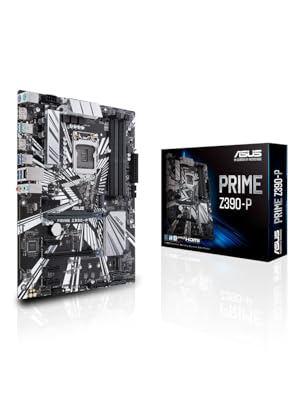
💎 Unlock elite mining & gaming power with ASUS Prime Z390-P — where speed meets stability!
The ASUS Prime Z390-P motherboard is engineered for Intel 8th and 9th Gen processors, featuring 6 PCIe slots ideal for cryptocurrency mining setups. It boasts USB 3.1 Gen2 for ultra-fast data transfer, advanced cooling controls with FanXpert 4, and robust hardware protections including Safe Slot Core and 5X Protection III. Designed to deliver stable overclocking and multi-GPU support, it’s a reliable foundation for high-performance desktops and mining rigs alike.







| ASIN | B07HCT5GBD |
| Best Sellers Rank | #118 in Computer Motherboards |
| Brand | ASUS |
| Built-In Media | IO Shield, M.2 Screw Package(2), PRIME Z390-P, SATA 6Gb/s cables(2), Support DVD, User's Manual |
| CPU Model | Core i9 |
| CPU Socket | LGA 1151 |
| Chipset Type | Intel Z390 |
| Compatible Devices | Personal Computer, Desktop |
| Compatible Processors | Intel Socket 1151 9th / 8th Gen Intel Core, Pentium Gold and Celeron Processors |
| Customer Reviews | 4.4 out of 5 stars 1,808 Reviews |
| Global Trade Identification Number | 00192876128497 |
| Graphics Card Interface | PCI Express |
| Item Dimensions L x W x H | 10.34"L x 2.09"W x 12.91"H |
| Item Type Name | ASUS Prime Z390-P LGA1151 (Intel 8th and 9th Gen) ATX Motherboard for Cryptocurrency Mining(BTC) with Above 4G Decoding, 6xPCIe Slot and USB 3.1 Gen2 |
| Item Weight | 600 Grams |
| Main Power Connector Type | 24-Pin |
| Manufacturer | ASUS Computer International Direct |
| Memory Clock Speed | 2400 MHz |
| Memory Slots Available | 4.0 |
| Memory Storage Capacity | 64 GB |
| Model Name | Prime Z390-P |
| Model Number | Prime Z390-P |
| Number of Ethernet Ports | 1 |
| Number of Ports | 25 |
| Platform | Windows 10 |
| Processor Socket | LGA 1151 |
| RAM Memory Technology | DDR4 |
| S/PDIF Connector Type | Optical |
| System Bus Standard Supported | SATA 3 |
| Total Number of HDMI Ports | 1 |
| Total PCIe Ports | 6 |
| Total SATA Ports | 4 |
| Total Usb Ports | 13 |
| UPC | 192876128497 |
| Warranty Description | 3 years |
A**N
Great 6 GPU Mobo with caveat
It does indeed utilize 6 GPUs as some others have stated. You do need to disable things like HD audio, and enable 4g encoding. (I did not need to update my bios to do this.) It also does appear to be that the GPUs DO need to be the exact same make/model/etc. In fact, yesterday I bios modded my cards, and now it only sees 4 and will not even post with more than 4 installed. Each card works great solo. I will be testing today once home from work if I flash them all with the exact same bios if the mobo will then boot with all 6. Up until this point though, the motherboard has worked great out of the box, looks good, and has been exceptionally adequate for my needs. Especially for the price at which I purchased it. UPDATE: I actually added in 2 other cards via a PCI-e 4 way splitter so now I am running 8 gpus on this board. In addition to this, 2 of them are different models from the other 6. I am running 6 rx 580 4 gb, 1 rx 480 4 gb, and 1 rx 570 4gb. They do NOT have to all be the same card.
D**D
Excellent
👍
V**O
Good motherboard but be very clear on its limitations.
Used to replace the A version in a more simplified application. It’s pretty nice but not that easy to install. Some of the pin locations are too different from the A motherboard which makes no sense, since it’s supposed to be the same board with a few less features. Regardless it works just as well as the A board it replaced.
A**5
Attention Miners - How to enable 6gpu support
Good Motherboard for 6 gpu mining rig. It will accept 6 but you have to do certain things to pull it off. 1) before you connect any riser or peripheral (just ram/cpu/disk connected), hook it up to monitor (hdmi) and update the bios. 2) after you update the bios to latest, enable "Above 4g decoding" in the advanced section (it's under "system agent (SA) configuration" of the bios (please note if you do this first, then update your bios, it will fall back to 4g encoding = disabled after the bios update). Once you get those options set, go ahead and load up your OS (Windows10) and set it all up. Then you can connect your riser cards to the motherboard, with one important detail, all 6 cards have to be identical (same manufacturer, model, etc). It will not work with mixed manufacturer cards or different models (using the 3/16/21 v2080 bios). As an example 2 gigabyte nvidia 2080's and 4 asus nvidia 3070's will not work, locks up and no video. However if you use 6 MSI AMD 5700 xt's, it will load like a champ (or 6 of any identical card). Another thing to point out, if you have trouble with AMD cards loading the amd adrenaline driver (blue screen's or fails to load it), you have to add a windows 10 registry key to lengthen the wait time for windows to find the card on the riser (google how to add TdrDelay to registry) that will solve the blue screen's. Good luck! and yes I spent about 2 days of trial and error to figure all this out. :) I have 4 (6gpu) mining rigs using this mainboard so it is possible.
A**R
Works great. Easy setup.
Works great. Easy setup.
M**B
Miner Motherboard
Wanted to provide a recent review for those who are considering this Motherboard for mining. I can confirm that mix manufactured cards (Nvidia and AMD) in the same rig will not work. Otherwise Same card models will. I have 6 x AMD 6700XT running Pretty close to 47/MHs. Still messing with settings. I am running my mining setup on Windows w/Team Red miner. Like previous review, Update BIOS to latest version (3004). In bios, just reset everything to default after update (F5). Use F9 for search, type 4G -> Enable both. Change all PCIE speeds to GEN2, Disable Audio, Serial and SATA ports not in use (I am using #1). Lastly, make sure CPU is being used as default graphics display, not auto and disable fastboot. You May need to do a TdrDelay Mod of 8 to 10 in windows with 5 Video Cards Plugged in. My Tdr setting is 8. PCIx1_1 should be the last slot for your last video card. 5 Video Cards works with no prob, once you add TdrDelay w/bios settings, Windows Boot might take 30sec-45 with that 6th card, so just wait for the display to turn on. The video driver didn't fail. 46.6-47.5 MHs is norm for 6700xt on this build. Hope this helps any future folks. Can't comment on HiveOS, I just avoid it, so can't speak to 6 cards with Linux, only windows.
E**N
Motherboard is terrible, and so is ASUS Customer Support
I purchased this motherboard some time back, and it was working at first in my computer, but then it stopped working randomly, and I went to a computer diagnostic center, and they told me the problem was with my motherboard. I used my 3 year warranty to request an replacement/repair Online from ASUS. They allowed me to send it back, and they would send it back. Only to wait 1 month, and they send my motherboard back with a note that says it was cancelled, and when they returned it back, there was a huge Dent/Bend on the right corner of the motherboard, with red tape on it. I never sent the motherboard with a crack/dent on it. I requested a refund, but they held me on the line and kept transferring for a whole hour and a half, leading to nowhere.
S**A
Excelente tarjeta
Excelente gráfica, no la encontraba en mi país y me esta funcionado de maravillas con mis otros componentes.
Trustpilot
2 weeks ago
2 weeks ago