
DOWNLOAD THE APP


Customer Services
Copyright © 2025 Desertcart Holdings Limited
DOWNLOAD THE APP

🚀 Own your speed, skip the lease, surf the future!
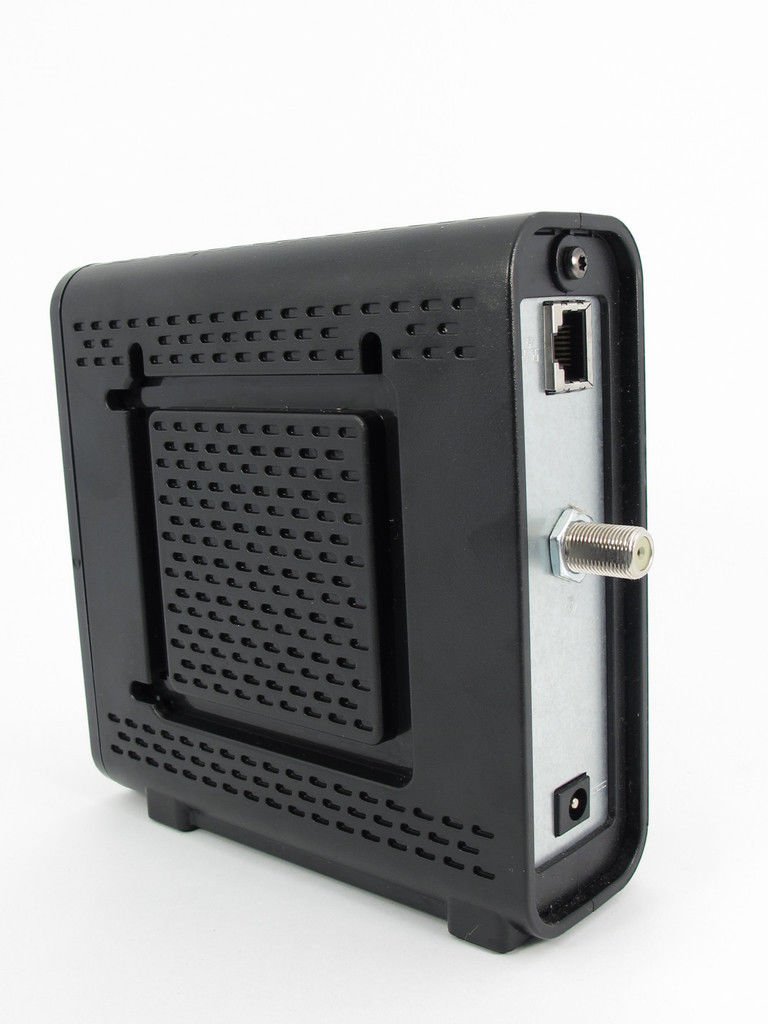
The Motorola SURFboard SB6121 is a DOCSIS 3.0 cable modem delivering up to 172 Mbps download and 132 Mbps upload speeds via 4 downstream and 4 upstream bonded channels. Compatible with major cable providers (excluding Verizon FiOS and AT&T U-verse), it features a gigabit Ethernet port for wired connections and supports IPv6 for future-proof internet. Ideal for professionals seeking reliable, high-speed internet without monthly rental fees, it offers easy setup and a 1-year warranty.


| ASIN | B004XC6GJ0 |
| Best Sellers Rank | #187,362 in Electronics ( See Top 100 in Electronics ) #165 in Computer Networking Modems |
| Brand | ARRIS |
| Color | Black |
| Compatible Devices | Personal Computer, Router, Laptop |
| Connectivity Technology | Wired |
| Customer Reviews | 4.3 out of 5 stars 11,657 Reviews |
| Data Transfer Rate | 160 Megabits Per Second |
| Global Trade Identification Number | 00612572186237 |
| Internet Service Provider | cox, optimum, spectrum, xfinity |
| Internet service provider | cox, optimum, spectrum, xfinity |
| Item Dimensions L x W x H | 6.4"L x 2"W x 8.7"H |
| Item Height | 8.7 inches |
| Item Type Name | Cable Modem |
| Item Weight | 1 Pounds |
| Manufacturer | Motorola |
| Maximum Downstream Data Transfer Rate | 172 Megabits Per Second |
| Maximum Upstream Data Transfer Rate | 132 Megabits Per Second |
| Modem Type | Cable |
| Number of Ethernet Ports | 4 |
| Number of Ports | 4 |
| Product Dimensions | 6.4"L x 2"W x 8.7"H |
| UPC | 021111531467 999997143176 163120457496 031112833194 808113025534 612572180136 707568510001 031112584188 793426726851 081258012236 804067410327 048159209707 168141495601 132017756516 172302715873 043396313620 999996719143 755263230472 151903603536 011822578936 490560200185 088020688156 885784846835 612572186237 763615975131 |
| Warranty Description | 1 year |
R**S
Smaller, Faster, and Better, too !!
I was one of the first to get a Motorola SB6120 -- and was very much satisfied with the ease of set-up, the awesome speeds, the functionality, and the workmanship. But, like all electronic gizmos, they tend to crap out after a few years. When my SB6120 started dropping upstream channels, I looked to Motorola once again -- right here at Amazon -- and found the new Motorola SB6121. After checking the specs, I found that the new SB6121 Model has the latest IPV6 technology (higher bandwidth capabilities)that were not available on the SB6120. The newer IPv6 technology allows connection speeds up to 160 Mbps., against the 150 Mbps of the SB6120. IPV6 is not in common usage yet, but it will be pretty soon -- And the SB6121 will be ready with the fastest speeds available!! The new SB6121 is a super-easy set-up, and the connection speeds are fast and steady. Comparing the DOCSIS 3 SB6120 to the newer SB6121 : 1.- The Sb6121 is smaller (height and depth are smaller, width is greater). 2.- The SB6121 runs slightly (average about 5 degrees F) warmer than the SB6120. 3.- Connection speeds, latency, and jitter are better with the SB6121 than the SB6120 -- and WAY faster than ANY DOCSIS 2 modems, regardless of manufacturer. Some tips I learned from using the Motorola DOCSIS 3 Modems with 2 different (D-Link DIR-655 and Netgear WNR3500L) "N"-speed Wireless Routers: The SB6120 runs coolest when mounted to a wall or other vertical surface, and spaced approximately 1/2-inch away from the surface. This allows an adequate air flow that's necessary to keep the Modem cool. Mounted with the wires pointing straight down, the SB6120 runs at about 95 degrees F in a 78 degree room when mounted away from a wall. Temperatures measured with Mastercool Infra-Red Laser Thermocouple Gun (available at Amazon). The new SB6121 is smaller than the SB 6120, and it runs a little bit warmer (98-100 F), even when mounted the same way as the SB6120. I suggest that you mount the new SB6121 1/2" away from the wall as well, but with the wires pointing straight back. Whatever you do, DON'T STACK ANYTHING on ANY Modem or Router !! Both of these devices give off heat and electrical interference, and will perform their best when spaced about 4 feet apart, which keeps the interferences from overlapping and killing the Wireless Router's range. When you get your internet connection going, go to the Motorola Modem's Home Page: Sample snapshot of my SB6121 = Cable Modem Status Signal Addresses Configuration Logs Open Source Help This page provides information about the current upstream and downstream signal status of your Cable Modem. -------------------------------------------------------------------------------- Downstream Bonding Channel Value Channel ID 49 50 57 58 Frequency 837000000 Hz 843000000 Hz 861000000 Hz 867000000 Hz Signal to Noise Ratio 37 dB 37 dB 38 dB 38 dB Downstream Modulation QAM256 QAM256 QAM256 QAM256 Power LevelThe Downstream Power Level reading is a snapshot taken at the time this page was requested. Please Reload/Refresh this Page for a new reading -1 dBmV -1 dBmV -1 dBmV -1 dBmV Upstream Bonding Channel Value Channel ID 3 1 2 Frequency 36100000 Hz 23300000 Hz 29600000 Hz Ranging Service ID 7425 7425 7425 Symbol Rate 5.120 Msym/sec 2.560 Msym/sec 5.120 Msym/sec Power Level 45 dBmV 45 dBmV 45 dBmV Upstream Modulation [3] QPSK [3] 64QAM [3] QPSK [2] 16QAM [3] 64QAM [3] QPSK [3] 64QAM Ranging Status Success Success Success Signal Stats (Codewords) Bonding Channel Value Channel ID 49 50 57 58 Total Unerrored Codewords 1457238562 1457238645 1457237949 1457238150 Total Correctable Codewords 17 26 23 27 Total Uncorrectable Codewords 1031 937 1682 1468 -------------------------------------------------------------------------------- Status | Signal | Addresses | Configuration | Logs | Open Source | Help © Copyright 1997-2008 It should give a snapshot of the specs for YOUR modem. You will be looking for 4 Downstream channels that read SNR @ 37-38 db and the power levels at around 0 dbmV. Upstream power levels on all 3 bonding channels should read around 45-50 dbmV. A deviation of 5 from any of these figures indicates a problem. If the Modem's signal is solid and constant, but the power level readings are 5 points off in either direction, check your OUTDOOR SPLITTERS or TAPS first, because they tend to crap out when they're exposed to heat for long periods. The operating temperatures for splitters and taps is only 140 degrees F. maximum, and that temperature is easily reached in direct sunlight, even when enclosed. Those of you who live in hot climates may notice that the Modem's downstream power levels drop off 1 or 2 points when the outside temps get up to 110 F or higher. Don't panic !! In case of rapture, dial 1-800-Oh Jesus. ;>) I found the RCA DH24SP High-Bandwidth (5-2400MHz)2-Way Signal Splitter (available at Amazon) to be an excellent handler of the high-speed signals of Cable, Satellite, and HDTV signals. It's a "2-Way" splitter, so the power flows equally in either direction, enabling MUCH higher upload speeds. If you need a TAP for unequal cable lengths, a CommScope SV-DC-6G Digital Tap worked well for me. For strong and clear Wireless range and reception, use only Category 7 (shielded) Ethernet cable (available at Amazon) between your Modem and Router, and between your Router and Main computer. Good Luck !!
M**3
Lease no more
Full disclosure, I am writing this with the product just a few hours out of the box. Like most other buyers of this modem, I was annoyed having to pay Comcast the monthly modem lease fee. I finally got ticked off enough to do something about it when my leased modem became a hotspot and Comcast raised the lease rate to $10/month to boot. I compared the SB6121 modem to some others in the Arris product family. For my usage needs & level of service, this one fits the bill nicely (and at ~$65 the price is right). Having had the benefit of reading other reviews prior to installation I was aware of some potential pitfalls. The process I used was to first connect it to the cable line, power up the modem, and let it be for ~2hours (assumedly to let the firmware update and/or for Comcast to identify the new modem on the network). After the 2hr dwell, I connected the Ethernet cable from the modem to my laptop, opened IE and the Comcast setup for the new modem initiated. I had to be patient through the set up steps (took about 20 minutes to get through all of the login & initialization screens) but in the end my internet connected. After I had internet working through the laptop, I connected the modem to my wifi router. I had to power down & power up the modem and the wifi router to make the connection (first repowered the modem, and 30 seconds later powered up the wifi router) but I now had internet working through the router (wow, so far no problems). Then came the dreaded call to Comcast to get the lease fee waved... I couldn't believe the experience (it was that GOOD). I was connected to customer service in ~ 2 minutes, only spoke to one operator who took care of everything- verified the modem's ID number, waived the lease fee, and was advised where to return the Comcast leased modem. In total I only spent ~5 minutes on the phone with Comcast. I couldn't believe how painless it was. Maybe I am one of the lucky few. But the modem works as advertised... no issues with connectivity (thus far), no compromise on speed, and the set up was pretty painless.
D**Y
Takes Some Perseverance, Signal Probs on Start Up
this is my latest review: I have had this now for quite some time. Turns out the docsys 3 is very sensitive and shuts itself down when overloaded. TW sent their best guy out finally. Turns out especially in heavy traffic ares it needs a "splicer" which throttles down the incoming. Since they have attached the splicer I've had no problems at all! this was my second review: I had a lot of trouble to begin with. Kept on dropping signal. Time Warner had to come out and replace all my connectors. Doc sys 3 is more demanding than doc sys 2 in terms of all the connectors being in sync it seems. Once that was done all has worked quite well. I have updated my stars on this to 3. Its a good product. But there is caveats with the DocSys 3s overall. Especially if you are in a highly trafficked area and share outgoing cable line such as in an apartment building. Doc sys 3's have more bands, thus require more band width. TWC has done some fixing around here which has appeared to strengthen by connection. I bought the Zoom 5431 and couldnt get it to handshake across all bands. Ended up sending it back and keeping the SB 6121. The Zoom has 12 bands: 8 + 4. The Motorola 8 bands. On digging deeper I found that all of the doc sys 3's have this problem. I talked to Motorola. She says firmware is pushed through the Provider. And in many cases Doc Sys 3 is still a relatively new system for them. Provider controls almost everything in the box. If some update hasnt made it through properly you can experience problems. I am in an apartment building and share through up on the roof. Since reconnecting the sb6121 I am having much less problems with it. But, unlike the single band doc sys 2's I have become resigned to the fact that buying into more bandwidth also makes my modem a more complicated and demanding piece of machinery vis a vis the connection and that I will, probably at least once a day, time out until the provider perfects the firmware. I will say that when the sb6121 reboots it reconnects across all bands very nicely. And when I reset to factory default, and waited the necessary half an hour before rebooting (resetting gets all its firmware configs from the provider, you might even have to call and ask them to push it through again, according to motorola) my box has been working much better. I'd say buying into docsys 3's be prepared for a little more work on getting it set up. ORIGINAL REVIEW: If you are a time warner customer think twice. I am a turbo customer in a heavy traffic urban setting. The modem is constantly timing out. If you look up SB6121 online re bonding values you will find that there are many many customers who share this same issue. More than any other modem. It appears to be extremely sensitive to noise. I have researched the issue for hours, there does not appear to be a fix. This issue, of constantly timing out, is I believe a docsis 3 problem. The docsis 3's have multiple bands, which "bond," creating a cross tunnel that supposedy keeps a more stable connection than docsis 2s which have only one band and do not bond. If one band is bonding on a docsis 3 system the theory is it should work without any interruption problems. But, with this modem, when one of the bands stops connecting, it essentially freezes as it tries to recalibrate its footing. This can happen as much as up to every 10 minutes. So I am returning for the Zoom 5341. It is also a docsis 3 system, but seems according to the lack of complaints online (1 versus 100) to be able to churn its way through the timeouts without dropping the connection. I will let you know if it can handle a heavy trafficked neighborhood.
K**5
This is a great replacement if you don't have cable phone
I discontinued my Comcast phone service so even though my rental modem was less than six months old, I wanted to buy my own modem so I could stop payig $7.50 rent for the rest of my life to Comcast for their modem. And before I went with Comcast phone I had a Motorola cable modem and it did a great job. In fact my son just started using it again. I read a lot of the negative reviews about getting this on line with Comcast. And I also had issues with the automated system, did everything and it went right until the end of the install and then locked up. Save yourself a lot of time. Get your modem ready to go and use a magnifying glass to be sure you have the correct MAC code and the SN. On the bottom of the modem or on the box. Then call Comcast at 1-800-Xfinity. Work through their phone system and end up with a tech and say you need to activae a new modem. They ask a lot of questions and the process takes about 30 minutes. Be sure you have the MAC code right and be sure Comcast reads it back to you correctly. I had an issue of seeing an 8 which was really a B. (I was a previous Comcast customer so I can't say what your experience will be if you buy this modem and then try to sign up with Comcast or another provider like Cox.) The Motorola SB6121 Surfboard is about half the size of the Comcast modem so you clear a little desk space. I'd also run a speed test on the old modem and compare once your new modem is activated. My system is fast, more than 35 on downloads and 7 on uploads. I get the same numbers on my PC and MAC that are direct wired to the router and on the other computers and Ipads using the wireless network. The best deal (if you believe deals from Comcast) was while talking with the tech, he said he could offer me a promotion for six months that would save me $20 a month. That more than pays for this Motorola modem plus a lilttle extra for the time I spent on the phone. At the price I can't imagine a better deal and it is forward looking in case Comcast increases speeds for normal home accounts which they have done in the past. Feel good about buying this modem. I seldom write a review but I thought this might make people feel better. I live for Amazon PRIME what a fantastic service! I worked for Comcast and AT&T for years and I certainly understand the bundling concept but it is not always the best option. My home phone is now via a new Verizon 4G product which does not use your old home wiring system. My television is DirectTV which has a huge DVR that every room can use and they rewired my home for free because they said the wiring Comcast did 12 years ago could not truly handle High Def. Of course the negative is the bigger Sat dish. When all is said and done, my system costs about the same as when I bundled the TV, Broadband and Phone with Comcast. Just better quality. Long review. The modem works great. Little heat which is an issue in my office.
J**Y
The little modem that couldn't (cable modem reboot due to T4 timeout)
Summary: this modem is fine if your service is good, but it fails really ungracefully if your service is marginal. While the underlying cause of the issue *is* poor service (which is of course no fault of the modem), fluctuations in signal quality are unavoidable, and how the device *handles* sub-optimal service must be considered in the review process. The fact that the modem reboots with even minimal signal degradation - in situations where other devices do not - is why I have arrived at a rating of 3 stars. The problem? When your signal levels drift out of spec even slightly, the SB6121 shoots itself in the head and reboots. The error recorded in the logs is "rebooting due to T4 timeout." When it reboots your service is interrupted for 30 seconds to a minute, while you wait for the device to boot and re-register with the CMTS. In my particular case, this behavior happened a few times a day. By way of comparison, my DOCSIS 2.0 modem never had this issue, and after preliminary testing my Zoom 5341J DOCSIS 3.0 modem does not either (although the jury is still out on that modem's long term performance. How much this bothers you depends both on how frequently it occurs and on how you're using your service. For normal web browsing, you may never even notice it. But this kind of intermittent loss of connectivity will wreak havoc on things which require a steady connection: online gaming, video streaming, telephony, work VPN, etc etc. If you'd like to know if this is happening to you, the logs are available at the modem's web management UI - look for "reboot" there and check your uptime on the main status page. I am (sadly) a Time Warner Cable customer. If you do happen to see this behavior with TWC, be warned: they will not do anything to help you, since such problems are generally very difficult for them to track down, and as a rule they are deemed too expensive for them to actually correct. They will either try to up sell you to ultimate/extreme/turbo/etc and claim that this will resolve the issue, or they will tell you to the modem is defective and suggest that you exchange the modem for a replacement. Do not believe the lies of these charlatans. Being provisioned for a higher cap will do nothing to avoid a time out like this (if anything, pushing more data might exacerbate it), and all SB6121s will handle these scenarios in the same way. A new one will not help. If you are aware of these issues and opt to try your luck with the SB6121, I recommend that you retain your "rented" modem for a period of time to verify that your level of service is adequate to keep the SB6121 happy. Wait at least a week, and check the logs: if you do not see T3 / T4 timeouts, you are probably fine. However, if you do see time outs and reboots, you should switch back to your "rented" modem and promptly return the SB6121 within Amazon's return period. Then, you should evaluate your options: if you are paying for and actually need a level of service which requires DOCSIS 3.0 speeds, try a different DOCSIS 3.0 modem such as the Zoom 5341J and cross your fingers. If you do not actually require DOCSIS 3.0 and do not intend to upgrade, though, DOCSIS 2.0 may very well prove more reliable for you and the modems tend to be cheaper. You cannot go wrong with something like the Motorola SB5101U , which should be much more tolerant of failed providers (and also, it should be in extensive deployment, so chances are if *you* see a problem, so will your neighbors - making your provider much more likely to actually start caring enough to fix it). One final note: I've read that some Comcast customers have received firmware updates which resolve this problem for them. However, be advised: only your cable provider can update the firmware of cable modems, and nobody I ever talked to at TWC seemed capable or interested in discussing firmware updates for my device. If you can get a firmware update that improves the stability of this modem, that's great, but at least with TWC you cannot count on them to do this for you. Below are some typical signal strength observations at my installation for both this device and the Zoom 5341J (which I replaced it with). Typical readings on the SB6121 (when operating normally): SNR: 36-37 dB (four channels bonded) Downstream power level: 3-4 dBmV (four channels bonded) Upstream power level: 46 dBmV (single channel) (Note: these readings are all within spec. When the device reboots the SNR is substantially lower (it's difficult to get precise data since the device retains no long term signal strength data)) Typical readings for the 5341J: SNR: 40-42 dB (four channels bonded)* Downstream power level: 2-3 dBmV (four channels bonded) Upstream power level: 46 dBmV (single channel) The important thing to note here is the improved SNR of the 5341J. I should reiterate that all of these values are within spec, and you would see absolutely no difference in performance from the 5341J's slightly better readings. However, the fact that the 5341J fares better in normal operation implies to me that the device is of a superior design, and it may tolerate conditions the SB6121 will not.
A**.
excellent modem
This is an excellent modem. Does everything the manufacturer says it does. I just got Amazon Prime, so delivery was very fast. I've only had the modem for one day, so more details when I add to this review in about six months. It was very easy to set up. Three connections and it was all powered up and set to be activated by my service provider - Comcast. The actual time it took for Comcast to activate the modem was less than five minutes, but it was between the time I first dialed Comcast until the modem activation that was the aggravating part. I called Comcast on my cell phone because my home phone was voip. After the initial recorded "Thank you for calling Comcast", I was asked to enter the telephone number of my service. Then I was given a menu. Press "1" if you want this, "2" if you want that, "3" if you want that "4" for everything else. Since modem activation wasn't on the menu list, I pressed "4". I then got another menu. Press "1" for this, "2" for that "3" for that, and "4" for everything else. Since modem activation wasn't on the list, I pressed "4". Then another recording "I'll connect you to a customer service representative. There was the sound of a phone ringing "I'm going to finally activate my modem and see how it works", I thought. I got another recording. "All our customer service representatives are busy. Approximate wait time is ten minutes". I really wanted to activate my modem, so I waited. Finally someone answered the phone in a very cheerful manner. "Hi. My name is... Who am I speaking with?... how are you today?" I told him what I wanted to do. He said "I'll connect you to our internet service dept". I got another recording telling me that "All our service representatives are busy. Approximate wait time is three minutes". At this point, I was shaking and I accidentally pressed the disconnect button on my phone. Ordinarily I would be happy about that, but I REALLY wanted to activate my modem, so I called Comcast back. I had to endure all the number pressing I was required to do. Then I finally got someone. I told her that I had accidentally disconnected the phone and apparently she had all the information already. "Oh, you wanted to be transferred to our technical dept". "Yes". She transferred me. After waiting a few minutes I finally, finally got to a person that could actually activate my modem. I gave her the model number, serial number, and mac address. I was all set and back on the internet in five minutes. One thing that was particularly aggravating was the fact that every single person I talked to at Comcast tried to sell me something like upgrading my cable tv service or getting their telephone service. I had to listen to their spiel and explain to them I was very happy with what I had and I had no desire to upgrade. All I wanted to do is activate my modem. I think Comcast should cut back all the ads they put on tv, all the junk mail they send out, and the sales calls they make to their customers. I've had several calls from them trying to get me to upgrade, so much so that I've blocked their calls. Even though the calls are blocked, my phone lists who called and when. Last week, they called twelve times in one afternoon, even after I told them not to! The bottom line is: Amazon - FIVE stars for a quick delivery Motorola - FIVE stars for a great product Comcast--ONE star for crummy customer service, but friendly people and who finally activated my modem. I suggest that if you have to call Comcast, be retired or set aside some time to deal with them. I have a little postscript to this great adventure. A half hour after I got my modem activated, a car hit a utility pole and knocked out cable service to my area. I didn't know it was an accident at the time - I thought I had a faulty modem. I called back Comcast. I had to endure the same menu items, then had a ten minute wait for a customer service rep. When someone got on the line, I told him the problem I had with my modem. He said "Just a minute...Oh, I'm showing an outage in your area. Turn on your tv. Are you getting a picture?" No I wasn't. "As long as I know it wasn't my modem..." "Can I interest you in upgrading to 60 channels or maybe getting a dvr. For at least the fifth time, I said "No. I'm very happy with what I've got". Six hours later I got my cable service back.
P**K
Transferring from One Network to Another
I started this telephony project with the expectation of saving a good deal of money per annum, getting improved performance and owning my own communications equipment.After a great deal of trial and error coupled with blood, sweat, and tears, I have a fully functioning, High-speed Internet node. The crux of my travails was the conversion from one vendor to another (U-verse -> Xffinity) and equipment (ATT -> Arris/Asus/MajicJack). Setup of Network Gear ------------------------------- After performing a thorough Inernet search, I determined that the Arris Surfmodem/Asus N600 Router were capable of good performance while meeting the interface requirements of Comcast (Docsis 3.0). I used the 'onion layered schema' for testing proceeding from: cable modem -> router -> Majicjack. Arris Surfmodem ----- --------- After several polite, but ultimately unproductive calls to ATT, I was able to determine that the modem couldn't 'sync' the line signal. I was, however, able to initiate the 'port shutdown' transaction that ATT requires. I then called Xffinity to get my MAC address into their database. The representative with whom I spoke was barely conversant in English; he felt he could activate the modem. I told him that he couldn't talk to it. So, I threw in the towel,and scheduled the heavy gun, Xffinity installer. ATT Customer Support: Ernest, but unknowledgeable; tried to foist ATT field service on me @ $99 ASUS N600 Router -------------------------- Upon arrival, Eric, the Xffinity service tech, complimented me on my choice of network hardware, tore out all the ATT coax back to the pole, and tested my modem. All the lights were lit as specified and the modem tested fine. He activated the mode and discovered that the MAC address was almost a random number. Eric also assisted in going through the router configuration screens. Voila, the hardware works beautifully, and the network speeds are up to spec. Next, the MajicJack issues. Xffinity Customer Service: Communication problems MajicJack ---------- I got the MajicJack out of box, connected the ethernet and telephony wires as proscribed and began the configuration process. I then reversed my thinking and connected directly to my computer. Unfortunately, on a Macbook the MajicJack takes up two USB ports, and the MajicJack configuration program tends to freeze the touchpad. So, I did another turnabout and used the server program. Contrary to expressed opinion, I didn't find it easy to use; it would accept only ten digit phone numbers. After two iterations, I was satisfied with the results. Results: I could call out but call into U-verse v icemail. I called ATT to disconnect my voicemail, which resulted in a system 'number not available' message. At this point, I felt that ATT was still holding on to the number, so I perused MajicJack Customer service and found a chat page. I talked with Carlos, the tech, about my concerns and received a formalized that "ATT would not permit incoming calls until the phone number was dropped." After the ATT due dae date, I receIved an email that the number was dropped. The phone now worked beautifully. MajicJack Customer Service: concise and to point; excellent. A little difficult to navigate. Life Alert/Magic Pendant --------------------------------- These must be configured for MajicJack. Magic Pendant Customer Service: Award winning. They will handhold you through the process. Conclusions: ----------------- 1) ATT possibly embedded problems. Their customer service is problematic. All the hardware, that I used, is excellent. 2) There are hidden rules when transitioning from < Network A, type 1 > >---> < Network B, type 2 >. Most are not well known and some of may unintentionally cause the online service reps to lead you astray. 3) The hardware worked well and the documentation was, for the most part, accurate. Restrictions weren't enumerated. 4) It's possible to reduce costs by 50% and obtain better service.
D**E
STEPS TO DEALING WITH COMCAST
FOR COMCAST USERS- TIPS ON HOW TO GET IT SET UP. I usually do not post reviews, but I felt like I needed to for this particular product. If you are a Comcast user be ready for a bit of a battle, but the product is worth it and saves you a lot of money from renting one from Comcast. Luckily, I had read previous reviews stating that Comcast makes it difficult when you use your own modem. After 1hr and 40min on the phone, seven transfers, and a curse word or 2, I am finally set up. Hopefully my experience will help you avoid this situation. I set up an Internet only service for my apartment. I refused Comcast's modem, and their installation fee. When I received the XFINITY kit, I bought this modem here and set it up myself. (VERY EASY, took a minute at most to set it up) Then it was time to deal with Comcast, not so easy. They will give you the runaround and try to get you to either get a new modem, or have somebody come out and look at it. My guess is when he would come out to look at it, he would tell me I needed a new modem. Here are the steps of all 7 people that I spoke with. I should have mentioned Amazon reviews earlier. 1st person- Gave my information. She said my service was canceled somehow and she had to transfer me to billing to have it set back up 2nd person- Gave my information. She said the original person that sent me the kit had "screwed up big time"- Not sure what they did. She got all of my information again, I told her everything they sent me. She said I was all set, and quickly said the monthly total, which was not accurate. Even though I told her what was sent to me, she still tried to add on the rental fee for their modem. I corrected her. She took it off and transferred me back to activation. I sat on hold for 10 min before an automated recording said I could not be helped at this time and my call was ended. 3rd person- I called back. Gave my information, and the modem info (on the bottom of the modem). She said I needed to try a different "cable outlet" or the modem wasn't correctly working. She said they needed to send out a tech to my house to verify if it was the connection or the modem. I refused. She transferred me to a "higher tech". 4th person- Gave my information, and the modem info. She said the same things as the previous lady. Again told me I needed to have somebody come out. Again I refused. She said I needed to speak to a higher tech as well. Since I was already told she was the higher tech, I said this time just transfer to me to the highest one. 5th person- Gave my information, and the modem information. He said the same things. I might have lost my patience at this point, and he told me not to yell at him. Whoops. He told me my only options were to pay and have somebody come out there, or cancel service. I asked him if there was a way to get xfinity wifi working because I needed Internet for work right away. He transferred me to billing. 6th person- Gave my information. She told me she couldn't help me. She didn't know why he transferred me to her. I needed to talk to somebody to activate it. She transferred me back to activation (aka the original step) 7th person- Gave my information (for the 7th time). I skipped right to Amazon reviews. Made it very clear that I knew this modem worked. I knew nothing was wrong with my connection. At that point she asked for the modem information (for the 4th time). Magically she said the Mac ID number got mixed up and they put a 8 instead of a 3. Mind you this was the FOURTH TIME I gave that information. They all misunderstood the number? Finally got set up. MORAL: Ask them to repeat back every number you give to them. Mention Amazon reviews right away. Do not let them tell you they need to send somebody out. Do not let them tell you that you need a different modem. This one works great and saves you a lot of money.
Trustpilot
2 weeks ago
1 month ago