Desert Online General Trading LLC
Dubai, United Arab Emirates
Desert Online General Trading LLC
Dubai, United Arab Emirates


🖨️ Small footprint, big impact—print smarter, live freer.
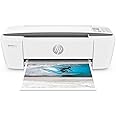
The HP DeskJet 3755 is a compact all-in-one wireless printer engineered for the busy professional’s home or office. Featuring high-resolution color printing at 4800 x 1200 dpi, seamless mobile and AirPrint connectivity, and Instant Ink readiness, it combines convenience with quality. Its ultra-low power consumption and space-saving design make it the perfect fit for modern workspaces craving efficiency without clutter.
| Controller Type | Amazon Alexa, Vera, iOS |
| Maximum Media Size | 11 x 17 inch |
| Power Consumption | 2.2 Watts |
| Included Components | Power Cord |
| Print media | Envelopes |
| Scanner Type | Document |
| Max Input Sheet Capacity | 60 |
| Max Copy Speed (Black & White) | 40 ppm |
| Compatible Devices | Smartphones |
| Maximum Color Print Resolution | 4800 x 1200 dpi |
| Sheet Size | 23.1 |
| Maximum Black and White Print Resolution | 4800 x 1200 dpi |
| Warranty Type | 90 days limited warranty |
| Dual-sided printing | No |
| Wattage | 2.2 watts |
| Max copy resolution color | 4800 x 1200 dpi |
| Max copy resolution black-white | 4800 x 1200 dpi |
| Duplex | Simplex |
| Hardware Interface | USB 2.0 |
| Ink Color | Cyan, Magenta, Yellow, Black |
| Additional Printer functions | All In One |
| Control Method | Voice |
| Number of Trays | 1 |
| Number of USB 2 Ports | 1 |
| Total USB Ports | 1 |
| Model Series | DeskJet |
| Specific Uses For Product | Home |
| UPC | 603784289151 |
| Printer Ink Type | Color Ink |
| Global Trade Identification Number | 00603784289151 |
| Memory Storage Capacity | 64 MB |
| Manufacturer | hp |
| Item Weight | 6.74 pounds |
| Product Dimensions | 10 x 17 x 7 inches |
| Item model number | R-HP10128 |
| Is Discontinued By Manufacturer | No |
| Material Type | Plastic |
| Number of Items | 1 |
| Size | stone |
| Manufacturer Part Number | J9V91A#B1H |
W**S
Great service
All was great
K**E
Price good
Working well
C**O
Driver not included
The printer itself is great. But, what you are not told when you purchase a new printer, of any brand, is that printers made after January 2024, do not come with a driver!Our old HP printer, made in 2007, suddenly stopped working this year. I waited until I desperately needed a printer to buy this refurbished HP Deskjet 3700. But, I could not get it connected, no matter how many ways I tried. We even took it to a computer repair store, along with our HP Elite Book, they told us there was nothing they could do to help us. That we had to call the help desk of the maker to get it working. So I spent almost three hours on the phone with HP technicians yesterday afternoon. I was then told that starting in 2024, all printers now need a driver installed after purchase. You buy a plan, I chose the 3 year plan for $199.99,( I was also offered a 5 year plan for $399.99) . You receive automatic updates for the length of the plan. I was also told that is the reason my old printer no longer worked. Now this new printer is amazing, I can print anything from my phone, I can fax and scan. I just wish I had been given this information before I made my purchase, it would have saved me an entire week of trying to get the printer to work, and given me a heads up on the extra money required.
P**N
Mindboggling HP Incompetence
What happens when you take the worst of HP and combine it with the worst of Microsoft? The Hewlett-Packard DeskJet 3755. Constantly disconnects, takes hours to get it to sync back up to wi-fi (usually involving a factory reset and then having to input all of the Instant Ink info again only to be told the printer is already on the network). Sure hope you have NASA-grade supercomputers too if you want to do anything involving the app; alignment is impossible and even just sitting here doing absolutely nothing, the HP "Smart" (LOL!) app consumes nearly 30% of a CAD workstation CPU. But don't bother with the alignment because the print quality is among the worst I've ever seen going back to the dot matrix days. This printer, like HP consumer electronics and Microsoft, does nothing right and is an absolute nightmare to deal with. I wouldn't give this printer away to my worst enemy.I have a Brother unit at home and I have NEVER had any problems with it at all. Avoid HP like the plague unless you enjoy banging your head against the wall and pulling your hair out.To be fair, my Mac finds it no problem and doesn't use 30% of the CPU to do so. I understand that Microsoft is a complete incompetent joke so I'm not sure how much blame to place on HP vs. Microsoft but they both produce products that never should have made it off the drawing board -- and they do it over, and over, and over until here we are in 2023 and people are just used to this crap.
S**Y
Fantastic small printer for home
Fabulous printer. It was a refurbished printer which didn't bother me at all, because I knew it meant HP did a deep dive into every aspect of it and made sure it was in tip top condition. And it is! It works perfectly and better than my previous HP inkjet printer which I had for more than 10 years. The printouts in color were crystal clear and the colors were vivid.
M**Y
I liked the look and color of the product.
I like this model of printer, I had one before several years ago. I don’t do much printing that’s why a small printer like this model would have been good for me. I’ve moved to a different area where the the WIFI signal is difficult to link to my Apple tablet and IPhone.
K**C
Affordable and reliable.
Perfect for home office. Cheap, but well made. Have been using it for over a year without any issues. Wireless connection works well.
C**E
Nice compact size and works well so far
I love the size compared to my previous printer. Looks brand new. Set up was easy and worked well with my Chromebook. Download the HPsmart app to your phone first, set up or log into your hp account, register and set up the device (make sure you are already connected to the same wifi as what the printer will use and have your phone’s Bluetooth on), once the printer is set up you can run a test print from your phone. Next went to my Chromebook and went to Network Settings, Advanced, printers, and my Chromebook was already seeing the hp device so I had to save it. Hit CTRL P selected the hp printer from the drop down and that was it. Much easier than I thought it would be. So far so good, happy I bought this.
Trustpilot
3 weeks ago
3 weeks ago